Changelog Entries - 2021
This help topic encompasses new features, enhancements, and defect corrections covering all aspects of your hosted environment, including Expere Document Services and the Expere Engine.
Supplemental December release
| Expere Engine: Log4j updated |
|---|
|
| Summary: We previously informed you that the Expere Engine was using a vulnerable version of Log4j that was determined to have a security risk. As a result, we upgraded the Expere Engine to Log4j version 2.15.0. On December 14th, Apache confirmed another medium vulnerability that required an update to Log4j version 2.16.0. They have since confirmed an additional critical vulnerability on December 20th that requires an update to version 2.17.0. As a result, we have upgraded the Expere Engine to use Log4j version 2.17.0. No user action is required. |
| Implementation Notes: This enhancement is available in the supplemental December release of Hosted Expere / Expere Document Services. |
| EZ Transform: Log4j updated |
|---|
|
| Summary: It was identified that EZ Transform was using a second vulnerable version of Log4j that was determined to have a critical security risk. We have corrected the security finding by upgrading EZ Transform to use Log4j 2.17.0. No user action is required. |
| Implementation Notes: This enhancement is available in the supplemental December release of Hosted Expere / Expere Document Services. |
Supplemental December release
| Expere Engine: Log4j updated |
|---|
|
| Summary: It was identified that the Expere Engine was using a vulnerable version of Log4j that was determined to have a security risk (2.14.0 then 2.15.0). We have corrected the security finding and created an Expere release containing an updated Expere Engine which includes the security remediation. No user action is required. |
| Implementation Notes: This enhancement is available in the supplemental December release of Hosted Expere / Expere Document Services. |
| EZ Transform: Log4j updated |
|---|
|
| Summary: It was identified that EZ Transform was using a vulnerable version of Log4j that was determined to have a security risk. We have corrected the security finding by deploying a fix through emergency maintenance. No user action is required |
| Implementation Notes: This enhancement is available in the supplemental December release of Hosted Expere / Expere Document Services. |
December
| Expere Engine enhanced to use FOP 2.6 |
|---|
|
Summary: As a part of our continued effort to create WCAG 2.0
compatible documents we have updated the Expere Engine to now use FOP 2.6
when generating TaggedPDF documents. We will continue making enhancements to
FOP 2.6 for TaggedPDF support, so check back for items being identified and
corrected. Please note, WCAG support requires special content authoring and
is not currently supported ‘out of the box’. As part of our feature to
update the Expere Engine to use FOP 2.6, we made the following WCAG
2.0-related changes in the December release:
|
| Implementation Notes: This feature / enhancement work is available in the December release of Hosted Expere / Expere Document Services. |
| TaggedPDF behavior enhanced |
|---|
|
| Issue: A user reported during preliminary testing that multiple loans failed when attempting to output them using the TaggedPDF document format. |
| Solution: This issue has been resolved; users may now resume testing using a TaggedPDF document format. |
| Implementation Notes: This defect correction is available in the December release of Hosted Expere / Expere Document Services. |
| PdfMerge and linked option (radio) button field behavior enhanced |
|---|
|
Issue: A user reported that when testing Wolters Kluwer E-Sign (WKES)
linked fillable field functionality, they discovered that the enumerated
values for field names in a mergedPDF did not match that of the
corresponding JSON file. For example:
This resulted in receiving errors in WKES when trying to complete the eSign process. |
| Solution: This issue has been resolved; WKES fillable field enumerated values in a merged PDF now match that of the corresponding JSON file and the package of documents can now be eSigned through WKES. |
| Implementation Notes: This defect correction is available in the December release of Hosted Expere / Expere Document Services. |
| Document Generation Services (DGS) TransactionID behavior enhanced |
|---|
|
Issue: Users reported that the Document Generation Services (DGS)
TransactionID sent to eOriginal did not match the ID in
the request sent to our internal Document Management application. The
expected behavior is that Document Management uses the DGS
TransactionID in the request to create the transaction
in eOriginal. |
Solution: This behavior has been resolved; Document Management now
uses the DGS TransactionID in the incoming request to
create a transaction for use with eOriginal. |
| Implementation Notes: This defect correction is available in the December release of Hosted Expere / Expere Document Services. |
| Engine: multiple accounts now allowed in a single transaction with the same product |
|---|
|
| Summary: A user reported that an error occurred when opening multiple accounts in a single transaction when where the same EZ Config (or OPPSA) Product name was used for more than one account in the request. Internal analysis determined that this error occurred because Expere previously only allowed multiple accounts in a single transaction when the product name was different for each account. As a result, this behavior has been enhanced: Expere now supports multiple accounts in a single transaction with the same product name. |
| Implementation Notes: This enhancement is available in the December release of Hosted Expere / Expere Document Services. |
| RTF output: signature line behavior enhanced |
|---|
|
Summary: Users reported signature line inconsistencies that
necessitated addressing; instead of being a starndard, uniform width, the
length of the signature line directly corresponded to the number of the
characters in the value of the SignerName element. As a
result, the signature line would span across the entire width of the page.
This behavior has been enhanced so that the signature line for both RTF and
PDF outputs are 3.5" wide. |
| Implementation Notes: This enhancement is available in the December release of Hosted Expere / Expere Document Services. |
| Ability to perform a Select / Generate |
|---|
|
| Summary: In addition to a Select and Generate API call, Document Management can now facilitate a Select / Generate API call when using sending a transaction to eOriginal. With this API call, users first select a specific set of documents to be generated (using a Select API call) then generate that document set (using a Generate API call). |
| Implementation Notes: This enhancement is available in the December release of Hosted Expere / Expere Document Services. |
| eOriginal: Upload Validation |
|---|
|
|
Summary: eOriginal upload validation logic has been updated so that
only eNotes are validated. Previously, all documents were validated, causing
a transaction to fail. In the transaction, if |
| Implementation Notes: This enhancement is available in the December release of Hosted Expere / Expere Document Services. |
November
| ESignatureAndFieldSupport XY Coordinates Only behavior enhanced |
|---|
|
Issue: Users reported that when passing in an
ESignatureAndFieldSupport ancillary option with
Coordinates only set to "true," transaction data was not printed on the
document for those fields which would normally contain data. |
| Solution: This behavior has been enhanced after internal analysis; transaction data now appears and prints as expected expected when ESignatureAndFieldSupport with Coordinates Only = ‘true’ is set. |
| Implementation Notes: This defect correction is available in the November release of Hosted Expere / Expere Document Services. |
DGS Core DocViewer API: v2 added for
BeginSession and
updateTransaction |
|---|
|
| Summary: DGSCoreDocViewer has been updated with V2 REST methods for the BeginSession and UpdateTransaction API calls. These were updated in an effort to be more consistent with preliminary REST API calls in this service that were previously created. The updated "v2" methods, noted in the URL's, now utilize JSON data rather than form data. |
| Implementation Notes: This enhancement is available in the November release of Hosted Expere / Expere Document Services. |
| Expere Engine enhanced to use FOP 2.6 |
|---|
|
Summary: As a part of our continued effort to create WCAG 2.0
compatible documents we have updated the Expere Engine to now use FOP 2.6
when generating TaggedPDF documents. We will continue making enhancements to
FOP 2.6 for TaggedPDF support, so check back for items being identified and
corrected. Please note, WCAG support requires special content authoring and
is not currently supported ‘out of the box’. As part of our feature to
update the Expere Engine to use FOP 2.6, we made the following WCAG
2.0-related changes in the November release:
|
| Implementation Notes: This enhancement is available in the November release of Hosted Expere / Expere Document Services. |
| DocViewer Embedded PDF |
|---|
|
| Summary: As part of our overall effort to convert static to dynamic documents, DocViewer has been enhanced to allow viewing the new an embedded .PDF document type. DocViewer can now view and extract an embedded .PDF file. Typical DocViewer functionality is also supported through the documents, such as data entry and field interaction. |
| Implementation Notes: This feature is available in the November release of Hosted Expere / Expere Document Services. |
| New AnchorText ancillary output type added |
|---|
|
| Summary: We have implemented a new feature where users can now author documents that contain text anchors for signature and date fields. Through this new feature, we have added a new ancillary output type called "AnchorText" that, when selected, allows third party eSiging applications to add initial, signature, and date fields to a document. |
| Implementation Notes: This feature is available in the enhanced November release of Hosted Expere / Expere Document Services. |
October release
Early October release
| eOriginal: ability to support testing between Preview on Demand / Test on Demand environments |
|---|
|
Summary: Users may now indicate to which eOriginal environment they
want to their transaction: Test On Demand (TOD) or Preview on Demand (POD)
through the EOriginalPreviewOnDemandEnvironmentInd data
point. This indicator accepts the following values:
|
| Implementation Notes: This feature is available in the October release of Hosted Expere / Expere Document Services. |
| Sequencing behavior enhanced for Option (radio) buttons |
|---|
|
| Issue: It was discovered that when testing the Wolters Kluwer E-Sign (WKES) additional field support feature, the sequence number assigned to the fillable field on the document differed from that of the JSON relationships file. As a result, WKES could not display the .PDF document because the fields referenced in the JSON did not match that of the document. |
| Solution: This behavior has been enhanced; the fields in both the .PDF and .JSON files are identical, and the .PDF document now displays properly in WKES. |
| Implementation Notes: This defect correction is available in the October release of Hosted Expere / Expere Document Services. |
| RTF Alignment behavior corrected |
|---|
|
| Issue: A user reported an issue with the alignment of text on documents issues after the Expere release to the Customer Test (CT) environment on September 21. The issue impacted documents generated with an RTF output. All text on the documents was left-justified, when some should have been centered-justified, right-justified, or even slightly indented. |
| Solution: This behavior has been corrected; documents generated with the RTF output are now created with the expected text alignment. |
| Implementation Notes: This defect correction is available in the early October release of Hosted Expere / Expere Document Services. |
| NotaryBlock behavior when used with Wolters Kluwer E-Sign ancillary option enhanced |
|---|
|
Summary: Users reported that when using the
WKES_ESignatureAndFieldSupport ancillary output with an
authored NotaryBlock element, the generated notary section
was not present for a notary to hand write any information. Research
determined that this behavior occurred when FillableField
elements were authored inside the NotaryBlock element.
This behavior has been enhanced so that when
|
| Implementation Notes: This enhancement is available in the early October release of Hosted Expere / Expere Document Services. |
Supplemental September release
| OPPSA Conversion: enhancements and behavior/functionality modifications |
|---|
|
Summary:
|
| Implementation Notes: These enhancements and defects are available in the enhanced September release of Hosted Expere / Expere Document Services. |
September
| Support for embedded PDF's |
|---|
|
| Summary: We have introduced a new authoring format that inserts an embedded .PDF file into the content file (.REQ file). This new .REQ type will allow users to enter data into fillable fields and electronically sign a document within this embedded PDF. |
| Implementation Notes: This feature is available in the September release of Hosted Expere / Expere Document Services. |
| Tool Suite: UCD Functionality removed |
|---|
|
| Summary: Due to deprecated functionality, we have removed the UCD section and Request UCD checkbox within the Expere Document Services Tool Suite. We have renamed this section to TRID Merge and have preserved the checkbox of the same name. |
| Implementation Notes: This enhancement is available in the September release of Hosted Expere / Expere Document Services. |
| Barcodes: barcodeInter25 format enhanced |
|---|
|
|
Summary: It was discovered that barcodeInter25 requires an even
number of characters in the barcode pattern in order to function properly;
as a result, when an odd number of characters is provided for a
barcodeInter25 barcode type, we are prepending a 0 to the barcode. Note: as a reminder, BarcodeInter25 is a numeric-only
barcode type. |
| Implementation Notes: This enhancement is available in the September release of Hosted Expere / Expere Document Services. |
| WSDL and Tool Suite: TaggedPDFEmbeddedFont document format no longer supported |
|---|
|
| Summary: TaggedPDFEmbeddedFonts is no longer supported as a document format. The TaggedPDFEmbeddedFonts has been removed as a DocumentFormatTypeEnum from the WSDL. Additionally, Tagged PDF Embedded Fonts is no longer available as a Document Format option within the Expere Document Services Tool Suite. |
| Implementation Notes: This enhancement is available in the September release of Hosted Expere / Expere Document Services. |
Supplemental August release
| Document Format enhanced with EZ Config Packages and Packets |
|---|
|
| Summary: Previously, the Expere Document Services (EDS) Tool Suite required users to select the Document Format. By requiring the Document Format to be selected it would override the value set within EZ Config Packages and Packets when Merge EZ Config data was used. . As a result, this behavior has been enhanced: we are no longer requiring that users select the Document Format in the EDS tool suite. If no value is provided in either EDS or EZ Config Packages and Packets, the default format will be PDF. |
| Implementation Notes: This enhancement is available in the Enhanced August release of Hosted Expere / Expere Document Services. |
| Expere Engine: SignatureField formatting/spacing behavior resolved |
|---|
|
Summary: Users reported that a SignatureField
element authored outside of a Table element was being
placed over the signature line and any text directly below It (see below): 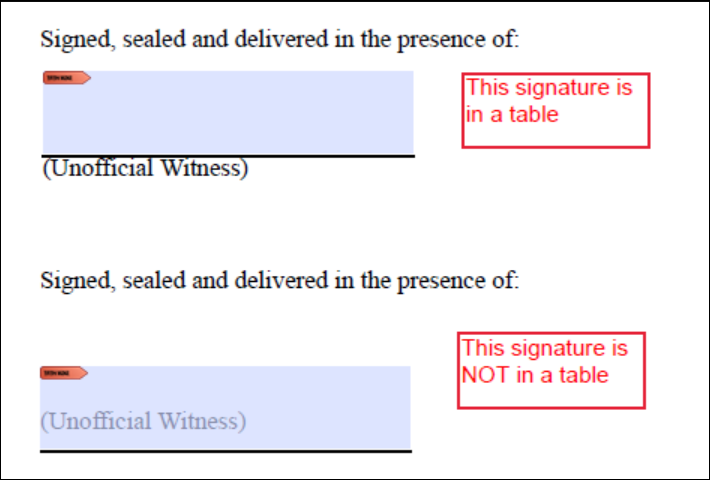 We have enhanced this behavior so that the
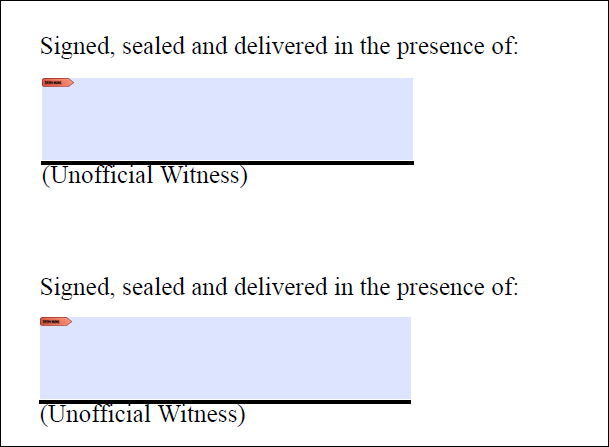 |
| Implementation Notes: This enhancement is available n the Enhanced August release of Hosted Expere / Expere Document Services . |
| DocViewer: Phase dropdown functionality unavailable when using EZ Config Packages and Packets |
|---|
|
| Summary: We had an enhancement request to remove the Phase dropdown from the Document Options or Document View page in DocViewer when using EZ Config Packages and Packets. Users may now view documents from the Forms to View First dropdown, essentially bypassing the Phase dropdown. |
| Implementation Notes: This enhancement is available in the Enhanced August release of Hosted Expere / Expere Document Services. |
Early August Release
| DocumentService REST API: BRE to be specified on Generate and Deliver Requests |
|---|
|
Summary: Users may now specify BRE (Business Return Envelope)
information in Generate,
Generate-Synchronous and Deliver
requests. The BRE can specified at either the request level, resulting in
the same BRE being used for all delivery groups created from the request, or
within the Recipient container to override what was
specified on the request. BRE can also be specified at there Recipient level
only, allowing only some recipients to receive BREs.
Note: BRE is an optional parameter on the request,
and must be configured on your account within Print Fulfillment. Please
work with your Professional Services contact for setup/configuration
questions. |
| Technical Notes: Consult the Hosted Expere > Wolters Kluwer E-Sign Feature Guide: Deliver > Special Considerations on detailed information when using the BRE parameter |
| Implementation Notes: This enhancement is available in the early August release of Hosted Expere / Expere Document Services. |
| Instance Display Name and Embedded PDF behavior enhanced |
|---|
|
Issue: Users noted that in the response file, the Instance Display
Name (InstanceDisplayName) appeared incorrectly. The
InstanceDisplayName element should have displayed the
static text consisting of the document display name and the DTA value, for
example: <r:InstanceDisplayName>Tax Escrow Account Receiving Tax
Bills NY - C1StAddr, C1City, NY C1PC</r:InstanceDisplayName>
Instead. only the DTA value appeared:
<r:InstanceDisplayName>C1StAddr, C1City, NY
                            C1PC</r:InstanceDisplayName>
. |
Solution:
InstanceDisplayName now display the static text consisting
of the document display name and the DTA value. |
| Implementation Notes: This defect correction is available in the early August release of Hosted Expere / Expere Document Services. |
| Entity signatures missing space issue corrected |
|---|
|
| Issue: A user reported an issue where the signature line under the phrase "A(n) Limited Liability Company did not allow enough space for the party to sign. |
| Solution: This issue has been resolved; the Expere Engine has been updated to provide enough space under the phrase "A(n) Limited Liability Company for a party to sign a signature. |
| Implementation Notes: This defect correction is available in the early August release of Hosted Expere / Expere Document Services. |
| Tool Suite: EZ Config support options updated |
|---|
|
| Issue: Previously, we had updated the Expere Document Services Tool Suite with a new EZ Config Merge Options section (see PBI 675396). Further analysis determined that we needed to implement additional enhancements to this section. |
Solution: The EZ Config Merge Options section has been updated
to the following:
|
| Implementation Notes: This defect correction is available in the early August release of Hosted Expere / Expere Document Services. |
| DocumentService REST API: Delivery response updated to return the Delivery request ID first |
|---|
|
| Summary: The DocumentService REST API Delivery method has been enhanced to immediately return the request ID and delivery groups before calling Wolters Kluwer E-Sign to return ID's for each document package. This enhancement is intended to alleviate timeouts that may occur within the calling application while waiting for a response from DocumentServce. |
| Implementation Notes: This enhancement is available in the early August release of Hosted Expere / Expere Document Services. |
| DocumentService REST API: new ListDocuments-synchronous method created |
|---|
|
Summary:
ListDocuments-synchronous has been added as a Document
Service REST API method and is used to list documents for a given document
package. |
| Implementation Notes: This feature is available in the early August release of Hosted Expere / Expere Document Services. |
Supplemental July release
| Bug found in enhanced July release |
|---|
|
| Issue: After our supplemental July release we found that a bug existed in DocumentService/EDS. As a result, we have rolled back the changes in those components and removed the Change Logs. We will be releasing those changes at a future date; new date is yet to be determined. All other changes still outlined in the Change Log are available on the respective release dates (outlined above) for each environment. |
| Implementation Notes: This defect correction has resulted in a rollback of previously-released changes as part of the Hosted Expere / Expere Document Services. |
| Fee Merging behavior enhanced |
|---|
|
| Issue: A user reported that Default Data for Late Fee and Prepayment Penalty information resulted in duplicate Late Fee information when merging Default Data with the request transaction. Subsequently, this duplicate information resulted in an error in DocViewer. |
| Solution: This issue has been addressed: policies containing Late Charges and Prepayment Penalties exist now merge correctly into the request transaction. |
| Implementation Notes: This defect correction is available in the supplemental July release of Hosted Expere / Expere Document Services. |
| New Environment and Connectivity Details section added to Web Services Guide |
|---|
|
| Summary: We have added new Environment and Connectivity Details pages to our Web Services Guide; each topic is specific to our CT or production environments and lists SOAP / REST important endpoints, application URL's, IP addresses, and Swagger pages . |
| Implementation Notes: This enhancement is available in the supplemental July release of Hosted Expere / Expere Document Services. |
| System Requirements enhanced for Tool Suite user guide |
|---|
|
| Summary: As we enhance consistency for all our end user documentation deliverables, we are ensuring that system requirements information is present in the appropriate artifacts, specifically the Expere Document Services Tool Suite User Guide: System Requirements |
| Implementation Notes: This enhancement is available in the supplemental July release of Hosted Expere / Expere Document Services. |
| WCAG 2.0: Empty figure tags / blank paragraph behavior enhanced |
|---|
|
|
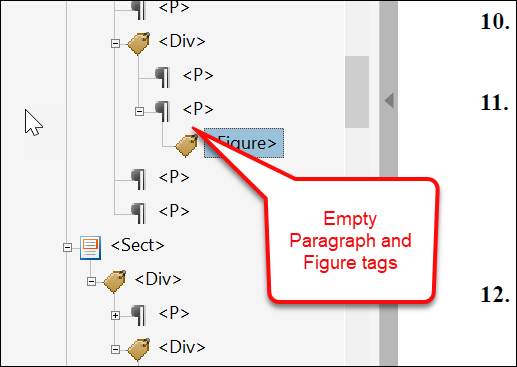
Summary: Users reported an issue with empty Paragraph and
Figure tags when running a full accessibility check in Adobe
Acrobat. It was determined that the stylesheet used when generating the
document inserted duplicate blocks that did not contain any
content.
This behavior has been enhanced: empty Paragraph and Figure tags are no longer created in the tag tree and will not cause a full accessibility check to fail. |
| Implementation Notes: This enhancement is available in the supplemental July release of Hosted Expere / Expere Document Services. |
July
| Integrators / Hosted Expere Integration to Wolters Kluwer E-Sign: Invitation to register for electronic package delivery |
|---|
|
Summary: As part of the Hosted Expere to Wolters Kluwer E-Sign (WKES)
feature, the WKES Register method was created to support registering users
for electronic delivery of document packages. When the WKES
SmartContentStatus returned to Hosted Expere for a given address is either
"NoContentStatus" or if the user does not exist, users will now receive an
invitation from WKES to register for electronic package delivery.
Additionally, we have introduced the following statuses:
Finally, we have updated the Expere Document Services Tool Suite > SETUP page to include a new System Admin (Invite User) Username, updated Username to Compliance Officer Username, and added a User Container field. |
| Implementation Notes: This feature is available in the July release of Hosted Expere / Expere Document Services . |
| WCAG 2.0: Waiver of Grantors Rights-GA tagging and screen reading enhanced |
|---|
|
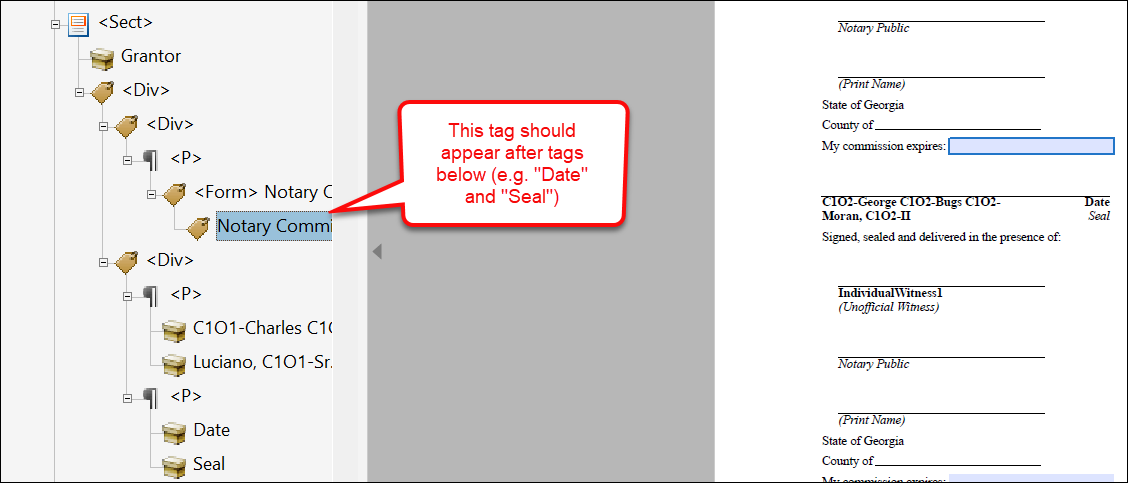
Summary: The following WCAG 2.0-related items have been addressed
regarding the Waiver of Grantors Rights-GA document:
This issues have been resolved; tagging and screen reading behaviors have been enhanced to act as expected. |
| Implementation Notes: This enhancement is available in the July release of Hosted Expere / Expere Document Services. |
| GenerateUpdate callback behavior enhanced - REST Deliver method |
|---|
|
Issue: Users reported receiving a GenerateUpdate
callback when calling the DocumentService REST API
Deliver method. This is incorrect behavior; a
GenerateUpdate callback should not be sent when making
a Deliver call. |
Solution: This behavior has been enhanced; users will not receive a
GenerateUpdate callback when making a
Deliver REST call. |
| Implementation Notes: This defect correction is available in the July release of Hosted Expere / Expere Document Services. |
| ConfigureRoles behavior enhancement |
|---|
|
Summary: Based on user feedback, we updated
ConfigureRole so the roles are not sequenced when we
send them to eOriginal. By not sequencing the roles the email invitations
will not be automatically sent out by eOriginal. |
| Implementation Notes: This enhancement is available in the July release of Hosted Expere / Expere Document Services. |
June
| Field linking now supported for use with Wolters Kluwer E-Sign |
|---|
|
| Summary: Expere now supports linking fillable fields with option (radio) buttons and checkboxes for use with Wolters Kluwer E-Sign (WKES). This enhancement allows better representation of fillable field relationships on the document within WKES, ensuring end users completing the documents are only completing the fields necessary. If you are interested in using this feature, please contact your Professional Services representatitve for more information. |
| Implementation Notes: This feature is available in the June release of Hosted Expere / Expere Document Services. |
| Tool Suite: OPPSA Conversion to EZ Config - Support for EZ Config Product and Organization for Select Generate Deliver / Select and Generate / Generate functions |
|---|
|
|
Summary: As part of the OPPSA conversion project to EZ Config, the
Tool Suite has been updated to allow users to pass in an EZ Config Product
and/or Organization into either a Select Generate Deliver, Select and
Generate, and Select / Generate method. This allows users to merge logo and
product information into an Expere transaction without utilizing EZ Config's
UpdateTransaction API. The Tool Suite functionality for each of the aforementioned pages has been updated to include a new EZ Merge Options dropdown; this replaces the Default Data > Apply Logo from Default Data checkbox. For more information, consult the Tool Suite User Guide: Select Generate Deliver, Select and Generate, Select / Generate pages. |
| Implementation Notes: This feature is available in the June release of Hosted Expere / Expere Document Services. |
| ListDocuments - PackageID added to result |
|---|
|
Summary: Previously in PBI
671445, a new PackageID parameter was added to
the Documents data type in the Expere Document Services
DocServices WSDL. As part of this PBI, the package ID
for each document will now be returned in the
ListDocumentsResponse. |
Technical Notes: Sample response
snippet: |
| Implementation Notes: This feature is available in the June release of Hosted Expere / Expere Document Services. |
| Support for Embedded PDF |
|---|
|
| Summary: Wolters Kluwer has introduced a new authoring format as part of WCAG 2.0 compliance initiative. When authored as a "PDF." (PDF prefix), the Expere Engine now generates documents with an embedded .PDF file of an image. For more information, see the following Expere Authoring and Tools changelog. |
| Implementation Notes: This feature is available in the June release of Hosted Expere / Expere Document Services. |
| DocumentService: OPPSA Conversion to EZ Config - Support for EZ Config Product and Organization for Generate / Generate-Synchronous methods |
|---|
|
|
Summary: As part of the OPPSA conversion project to EZ Config,
Document Services has been updated to allow users to pass in an EZ Config
Product and/or Organization into either a Generate or Generate-Synchronous
API method. This allows users to merge logo and product information into an
Expere transaction without utilizing EZ Config's UpdateTransaction API.
Document Services has been updated to pass in a new
|
Technical Notes: Sample
request: |
| Implementation Notes: This feature is available in the June release of Hosted Expere / Expere Document Services. |
| eOriginal: Instance Display Name added when creating Doc Profile |
|---|
|
| Summary: Document Generation Services has been updated to display the document name when a user is logged into Command Center and Closing Center. Instead of all documents showing as 'Closing Document' you will now see the actual instance display name. This functionality was enhanced for the closing documents but the eNote will still appear as such since it is already unique in the naming convention. |
| Implementation Notes: This enhancement is available in the June release of Hosted Expere / Expere Document Services. |
| eOriginal: Addition of Execution Type To Uploaded Documents |
|---|
|
| Summary: Document Generation Services has been updated to allow the eOriginal Closing Center the ability to determine the execution type for each closing document that is uploaded. |
| Implementation Notes: This enhancement is available in the June release of Hosted Expere / Expere Document Services. |
| User documentation navigation enhancements: new Getting Started guide / Expere Document Services Web Services Guide API restructure |
|---|
|
Summary: We made the following user documentation changes:
|
| Implementation Notes: This enhancement is available in the June release of Hosted Expere / Expere Document Services . |
| Hosted Expere to WKES Integration Feature Guide: callback routing expanded |
|---|
|
Summary: We have enhanced the Feature Guide > Using Callbacks section
to include additional information about the following callback routes:
|
| Implementation Notes: This enhancement is available in the June release of Hosted Expere / Expere Document Services. |
| eOriginal Reverse Registration |
|---|
|
Summary: The feature allows a user to reverse a MERS registration for
the eNote that is generated in the transaction. When the
/Txn/EOriginalMERSReverseRegistrationInd is passed as
true in the transaction .XML file, we call for the reverse registration of
the eNote. |
| Implementation Notes: This feature is available in the June release of Hosted Expere / Expere Document Services. |
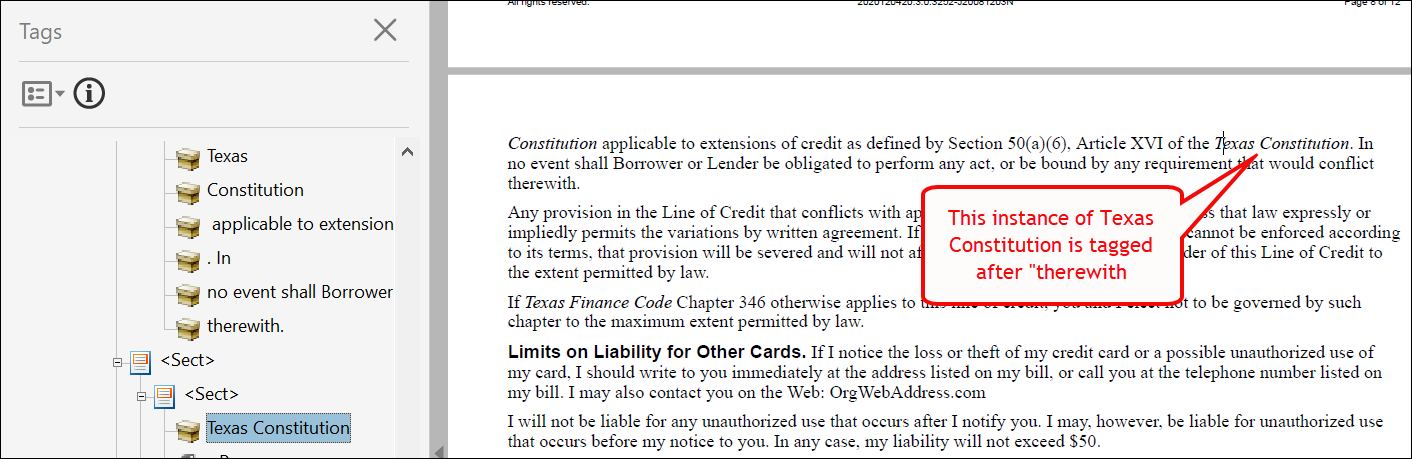
| WCAG 2.0: DocumentReference / hyperlink tagging and screen reader behavior enhanced |
|---|
|
Summary: The following WCAG 2.0-related items have been addressed
(applicable document appears in bold next to the bulleted issue):
|
| Implementation Notes: This enhancement is available in the June release of Hosted Expere / Expere Document Services. |

| Integrators: OPPSA Conversion to EZ Config - Support for EZ Config Product and Organization for SelectGenerateDeliver / SelectAndGenerate / Generate methods |
|---|
|
|
Summary: As part of the OPPSA conversion project to EZ Config, Expere
Document Services has been updated to allow users to pass in an EZ Config
Product and/or Organization into either a SelectGenerateDeliver,
SelectAndGenerate, and Generate API method. This allows users to merge logo
and product information into an Expere transaction without utilizing EZ
Config's UpdateTransaction API. Expere Document Services has been updated
to pass in a new |
Technical Notes: Sample
request: |
| Implementation Notes: This feature is available in the June release of Hosted Expere / Expere Document Services. |
May
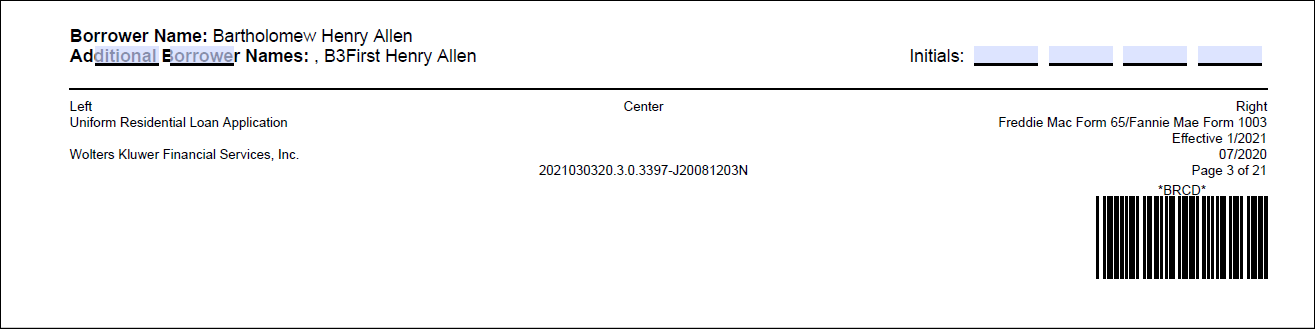
| Engine: URLA address field behavior enhanced (Salesforce case # 00774441) |
|---|
|
|
UPDATE: Recently we made a development change to
address Salesforce case # 00774441 where two initial fields that should
have been present adjacent to Your Initials in the middle of the
page were superimposed over Additional Borrowers at the bottom of
the page. This change has been backed out of an enhanced CT deployment
scheduled to occur on 4/16. This change will be re-released in a near
future release. Issue: Similarly to PBI 669576, a related initial issue was reported when generating the URLA for transaction using the DC version of the form: two initial fields that should have been present next to Your Initials on the middle of the page were superimposed over the words Additional Borrower Names on the footer of the page (see example below).
|
| Solution: Initial fields, previously hovering over footer text, are now appropriately placed under the Your Initials field in the middle of the page |
| Implementation Notes: This defect correction is available in the May release of Hosted Expere / Expere Document Services. |
| eOriginal: Borrower/Cosigner/Power-of-Attorney behavior enhanced |
|---|
|
| Summary: We have added an error message for when a user tries to send an eNote transaction to eOriginal with unsupported party types. If the borrower or cosigner in a transaction is not an individual or a sole proprietorship, or if there is not an individual power of attorney passed for the borrower or cosigner the transaction will fail. eOriginal does not support any other party types for the eNote signers. |
| Implementation Notes: This enhancement is available in the May release of Hosted Expere / Expere Document Services. |
| eOriginal > Upload feature: support uploading documents to Non-MERS eVault |
|---|
|
Summary: Previous work was completed to allow the collection of
non-MERS eVault credentials. This PBI is using those credentials to send the
appropriate transaction data to the correct eVault, based on the type of
upload the user has specified.
(/Txn/EOriginalUploadTransactionType) |
| Implementation Notes: This feature is available in the May release of Hosted Expere / Expere Document Services. |
| Transaction merging behavior enhanced (Salesforce case # 00793373) |
|---|
|
Issue: Users reported that when attempting to merge an EZ Config
Default Data organization into the transaction .XML, the resulting .XML file
displayed only a single "undefined" line. This behavior occurred when
attempting to merge organization data without any product information.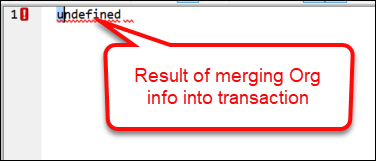 |
| Solution: This issue has been resolved; users may now merge Default Data organzation information with the request transaction. |
| Implementation Notes: This defect correction is available in the May release of Hosted Expere / Expere Document Services. |
| DocumentService: default enum values verified for parameters |
|---|
|
Issue:
DocumentService users reported transaction failures when passing in a
request with a barcode ancillary output without a value in the
horizontalAlignment parameter. |
Solution: This issue has been resolved: if no value is specified for
horizontalAlignment, the value defaults to
"Right" |
| Implementation Notes: This defect correction is available in the May release of Hosted Expere / Expere Document Services. |
| eOriginal > Upload feature: supported expanded for non-eNote transactions |
|---|
|
| Summary: Updates have been made to collect the credentials for eOriginal that are tied to the non MERS eVault. This eVault is used when uploading transactions that do not generate a eNote. This functionality does require proper setup with eOriginal to provision a non MERS eVault for an organization. |
| Implementation Notes: This feature is available in the May release of Hosted Expere / Expere Document Services. |
| WCAG 2.0: Reading order behavior enhanced |
|---|
|
| Summary: As part of our continued effort to ensure WCAG 2.0 compliance, we have updated read order functionality. Users originally reported that the Adobe Acrobat screen reader was reading sections of pages in the wrong order within the FHA Mortgage document. |
| Implementation Notes: This enhancement is available in the May release of Hosted Expere / Expere Document Services. |
Supplemental April release
| Callback to Salesforce feature |
|---|
|
Summary: As part of the Callback to Salesforce feature, a new
optional string parameter for
<AuthorizationHeaderOverride/> has been added to the
<callback/> element of the request. The value is
passed in the AuthorizationHeaderOverride will be used as the key for the
authorization header for the token returned in the response. This allows
headers to be ‘customizable’ and support callbacks to systems which can only
receive tokens under certain header types. |
Technical Notes: Sample request snippet
below: |
| Implementation Notes: This feature is available in the supplemental April release of Hosted Expere / Expere Document Services. |
Integrators: DocServices WSDL
updated to include PackageID in ListDocumentsResponse |
|---|
|
Summary: A new PackageID parameter has been added to
the Documents data type in the Expere Document Services
DocServices WSDL. The package ID for each document will
be returned in the ListDocumentsResponse in a future
release. |
| Implementation Notes: This enhancement is available in the supplemental April release of Hosted Expere / Expere Document Services . |
| WK Hosted > WKES Integration: ElectronicOnly and ElectronicWithESign behavior updated |
|---|
|
Summary: We have modified the functionality for the
ElectronicOnly and ElectronicWithEsign
delivery options to use mailing information from the
Recipient element when parties have not consented to
electronic delivery. The Recipient information will be used as the ‘backup’
information for paper delivery when either electronic method cannot be used.
If Recipient information is not provided, DiscreteParties for Paper Delivery
will be used. parties have not consented to electronic delivery. The parties
represented within the Recipient element would receive a
physical, paper mailing. |
| Implementation Notes: This enhancement is available in the supplemental April release of Hosted Expere / Expere Document Services. |
| eOriginal: Namespace functionality enhanced |
|---|
|
| Issue: An issue was reported when sending an eNote to eOriginal. It was determined that the transation failed due the addition of a namespace. |
| Solution: Document Generation Services was updated to support the namespace in the transaction and will successfully pass the required data to eOriginal. |
| Implementation Notes: This defect is available in the supplemental April release of Hosted Expere / Expere Document Services. |
April
| eOriginal > Upload feature: eNote option usage behavior enhanced |
|---|
|
| Summary: Current support of the upload feature is limited to transactions where the eNote is generated. The user must pass the /Txn/EOriginalUploadTransactionType to indicate that their transaction generates an eNote. The user does still need to pass the /Txn/EOriginalUploadInd along with the new type in order to get the documents to upload successfully. |
| Implementation Notes: This feature is available in the April release of Hosted Expere / Expere Document Services. |
| eOriginal > Upload feature: document viewing limit added |
|---|
|
| Summary: We have limited the number of documents each signer sees when they are logged into eOriginal. The signers will only have visibility into the list of documents that they are eSigning and the documents that do not support eSignatures or do not have signatures. |
| Implementation Notes: This feature is available in the April release of Hosted Expere / Expere Document Services. |
| eOriginal > Upload feature: AutoDate field added to signatures |
|---|
|
| Summary: With this release, the signature lines have been updated to automatically populate the date when the eSignature is completed. This applies to the closing documents only and not the eNote. The EsignatureDateSupport attribute needs to be passed as true in the request for the date to be added to the documents correctly. |
| Implementation Notes: This feature is available in the April release of Hosted Expere / Expere Document Services. |
| eOriginal > Upload feature: FillableFieldSet enhanced to support mutually exclusive checkboxes |
|---|
|
| Summary: Support has been added to account for documents that contain mutually exclusive checkboxes. The field will be available for the first party listed in the Expere response that is signing the document if there is only one set of checkboxes. |
| Implementation Notes: This feature is available in the April release of Hosted Expere / Expere Document Services. |
| WCAG 2.0: Split tables producing error in Initial Disclosure Package transaction (Salesforce case # 00748724) |
|---|
|
Issue: A user reported that their transactions for the Initial
Disclosure Package repeatedly failed when attempting to generate documents
using the output type of TaggedPDF's. The result consisted of a
NullPointerException in the error message and log file. Additionally with
this PBI, development reviewed the following issues:
|
Solution: We have enhanced this behavior; as a result:
|
| Implementation Notes: This defect correction is available in the April release of Hosted Expere / Expere Document Services. |
| eOriginal OrgAdditionalAddress Mapping updated to use 'type' |
|---|
|
| Summary: We made a change so the Payment Center address prints in the Payments section of the eNote instead of the first address the organization passes. |
| Implementation Notes: This defect correction is available in the April release of Hosted Expere / Expere Document Services. |
| Barcode 128 behavior enhanced (Salesforce case # 00625326) |
|---|
|
| Issue: Users reported barcodes did not appear on RTF documents when using a Barcode128 type with documents containing EZ Config Packages and Packets setup information. Internal analysis determined that the presence of %Page% and / or %TotalPages% when using Barcode128 and generating RTF outputs resulted in the barcode not appearing. |
| Solution: When either %Page% or %TotalPage% is included in the barcode pattern for RTF output and barcode type of 128, the page or totalpage is removed from the barcode; all other barcode data will be used for generating the barcode. |
| Implementation Notes: This defect correction is available in the April release of Hosted Expere / Expere Document Services. |
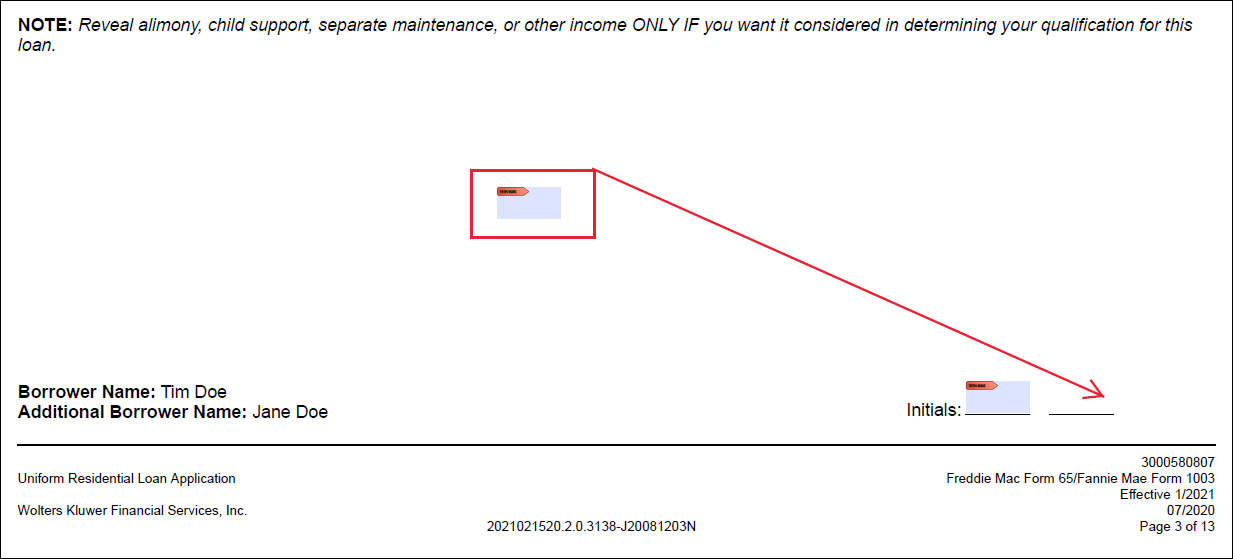
| Engine: URLA initial field behavior enhanced (Salesforce case # 00761731) |
|---|
|
|
Issue: A user reported that the eSignable portion of the second
initial field on page three (3) of the URLA was floating above the lower
right footer area where the initial field should have been placed. Internal
analysis determined that an issue existed with how middle pages of generated
documents handled intials with DC loans for married couples (see example
below).
|
| Solution: This issue has been resolved; the fillable field for the second initial field now apperas as expected in the bottom right footer of the document. |
| Implementation Notes: This defect correction is available in the April release of Hosted Expere / Expere Document Services. |
| Integrators / Hosted Expere Integration to Wolters Kluwer E-Sign: GetRecipientDeliveryActionItems REST API method created |
|---|
|
Summary: As an enhancement to the Hosted Expere Integration to
Wolters Kluwer E-Sign feature, we have added a new
GetRecipientDeliveryActionItem REST API method that
when called, provides a response with information on open or actionable
package statuses in Wolters Kluwer E-Sign for a given recipient; see
below:
The
|
Technical Notes: Sample response
below: |
| Implementation Notes: This enhancement is available in the April release of Hosted Expere / Expere Document Services. |
| eOriginal > Upload feature: Wildcard initial support added when initializing |
|---|
|
|
Summary: Support has been added for documents that contain initial
fields where the content does not specify the party that should complete the
initials. The fields will be available for the first party that is signing
the document. Note: This PBI is part of the Upload feature that is currently
work-in-progress and will be available in a near-future
sprint. |
| Implementation Notes: This enhancement is available in the April release of Hosted Expere / Expere Document Services. |
| eOriginal > Upload feature: FillableFieldSet enhanced to support multi-line text fields |
|---|
|
| Summary: Support has been added to account for documents that contain multiline text fields. The field will be available for the first party listed in the Expere response that is signing the document if there is only one set of text fields. |
| Implementation Notes: This feature is available in the April release of Hosted Expere / Expere Document Services. |
| eOriginal > Upload feature: FillableFieldSet enhanced to support single line text fields |
|---|
|
| Summary: Support has been added to account for documents that contain single line text fields. The field will be available for the first party listed in the expere response that is signing the document if there is only one set of text fields. |
| Implementation Notes: This feature is available in the April release of Hosted Expere / Expere Document Services. |
| eOriginal: role name changed for parties not signing eNote |
|---|
|
| Summary: All parties who are signing documents that do not include the eNote will have a role of 'Signer' to be more generic and to allow for more than 8 total parties signing documents in a single transaction within eOriginal. The parties who sign the eNote will still have the 'Borrower' role and is still limited to 8 parties with the 'Borrower' role. |
| Implementation Notes: This feature is available in the April release of Hosted Expere / Expere Document Services. |
| eOriginal: support for Power of Attorney enhanced |
|---|
|
| Summary: With this release, we have added support for a power of attorney to sign the eNote for the borrowers and cosigners. |
| Implementation Notes: This enhancement is available in the April release of Hosted Expere / Expere Document Services. |
| Hosted Expere to WKES Integration Feature Guide now available |
|---|
|
|
Summary: Hosted Expere users working through the Hosted Expere to
WKES Integration can now consult the Feature Guide created specifically for
this feature workflow. The new Expere Document Services Feature Guide area is intended to provide a more comprehensive look at each feature available and various integration strategies, which may help with user implementation. Each feature guide will consist of its own set of help topics, with links to request/response samples (where applicable), the methods which can be used (REST or SOAP), and other critical information. |
| Implementation Notes: This enhancement is available in the April release of Hosted Expere / Expere Document Services. |
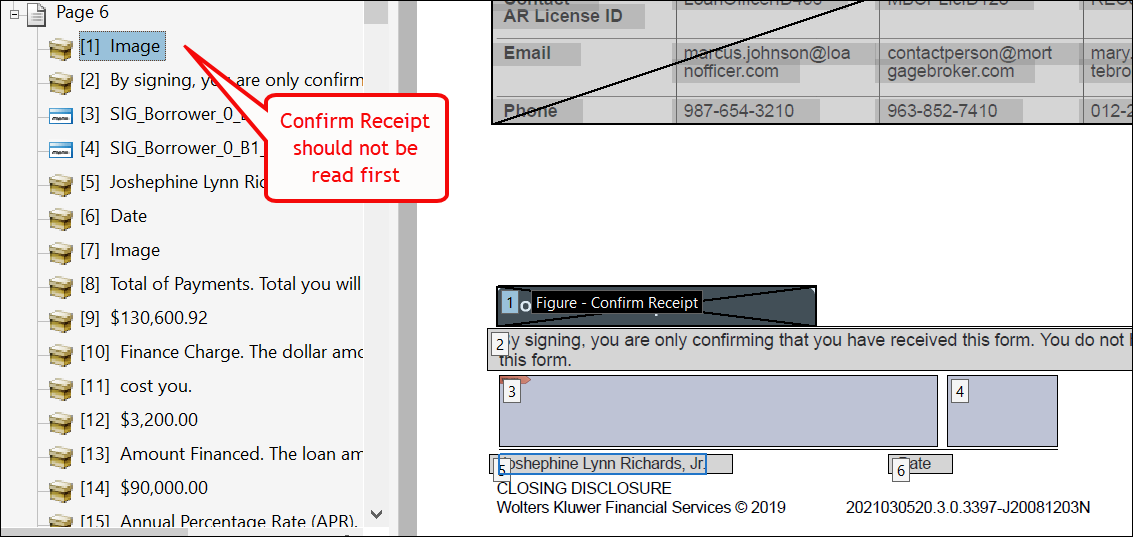
| Read order and signature bookmark behavior enhanced |
|---|
|
Summary: Users reported the following issues:
This behavior has been enhanced: for non-merged, single documents, the screen reader reads the items in the correct order while bookmarks appear in the correct order. |
| Implementation Notes: This enhancement is available in the April release of Hosted Expere / Expere Document Services. |

| Integrators: response now returns SignatureUniqueIdentifier for fillable checkbox |
|---|
|
Summary: Previously, in PBI 656099, we updated the EDS (DocumentService) WSDL to
include a SignatureUniqueIdentifier element for each
fillable checkbox in a Notary Block; the
SignatureUniqueIdentifier element connects the fields
within the Notary Block to the notary signature so the electronic delivery
platform knows which fields are associated with each specific notary block.
For this PBI, Expere now returns the
SignatureUniqueIdentifier for fillable checkboxes in
the response file. |
| Implementation Notes: This enhancement is available in the April release of Hosted Expere / Expere Document Services. |
March
| Expere Engine: DefaultData fees behavior enhanced |
|---|
|
|
Summary: Users reported that Default Data policy fees did not merge
with request transaction fees; instead, they appeared after the existing
fees. This behavior has been enhanced so that Default Data fees are merged
with existing fees under the same fee name. Response sample before enhancement: 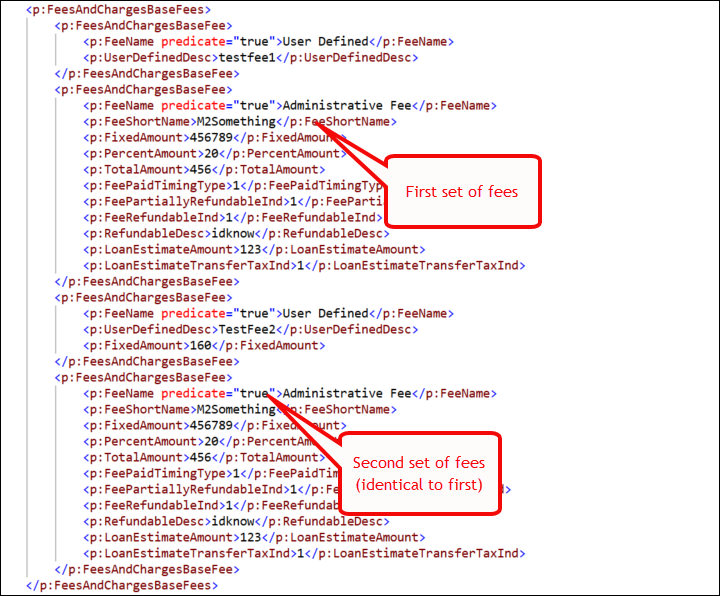 Response sample after enhancement: 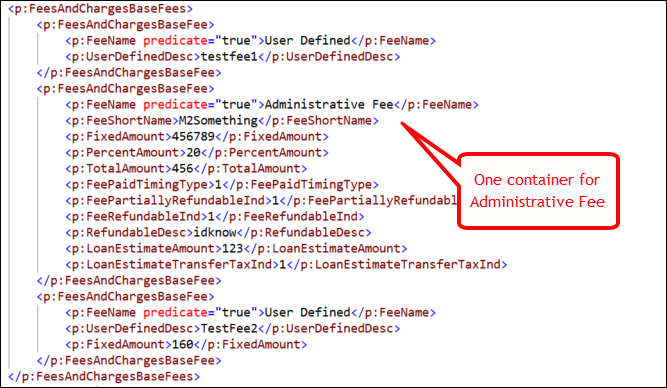 Note: if no
fees exist on the transaction, all fees from default data are appended
to the transaction; additionally, deposit fees with the same name that
have fee details present will have any matching detail nodes
merged. |
| Implementation Notes: This enhancement is available in the March release of Hosted Expere / Expere Document Services. |
| Integrators / Hosted Expere Integration to Wolters Kluwer E-Sign: SmartConsentStatus descriptions enhanced |
|---|
|
| Summary: As part of our Hosted Expere Integration to Wolters Kluwer E-Sign feature, we have updated the SmartConsentStatus responses to contain more descriptive information. For more information, see the Register topic within the Feature Guide for more information. |
| Implementation Notes: This feature is available in the March release of Hosted Expere / Expere Document Services. |
| PostProcess call updated to include DiscreteParty information |
|---|
|
| Issue: A user reported an issue where DiscretePartyID values were not included in the response file when selecting the eNote option with MergedCopyPDF as an ancillary option. Additionally, it was discovered that the InstanceProperties, DiscreteParties, and InstancePageSize containers were also not being returned. |
| Solution: This behavior has been enhanced so that the Expere response now includes the DiscretePartyID value(s) as well as InstanceProperties, DiscreteParties, and InstancePageSize containers when generating an eNote with MergedCopyPDF as an ancilary option. |
| Implementation Notes: This defect correction is available in the March release of Hosted Expere / Expere Document Services. |
| eOriginal > Upload feature: FillableFieldSet enhanced to support checkboxes |
|---|
|
| Summary: Support has been added to account for documents that contain checkbox fields. The field will be available for the first party listed in the expere response that is signing the document if there is only one set of checkboxes. |
| Implementation Notes: This feature is available in the March release of Hosted Expere / Expere Document Services. |
| eOriginal > Upload feature: FillableFieldSet enhanced to support initial fields |
|---|
|
| Summary: Support has been added to account for documents that contain initial fields. The fields will be available for the parties that are signing the document. |
| Implementation Notes: This feature is available in the March release of Hosted Expere / Expere Document Services. |
eOriginal:
transactionBusinessProcessName supported |
|---|
|
Summary: In order to accommodate the filtering of transactions within
the eOriginal vault we have added the ability to pass the
transactionBusinessProcessName to eOriginal. Users should pass this business
process name in their transaction xml as
/Txn/EOriginalTransactionBusinessProcessName. There are steps
that need to be completed in eOriginal for the enhancement to full
function. |
| Implementation Notes: This enhancement is available in the March release of Hosted Expere / Expere Document Services. |
| Integrators / Hosted Expere Integration to Wolters Kluwer E-Sign: Tool Suite > SETUP Page updated to selected callback information |
|---|
|
Summary: As part of our Hosted Expere Integration to Wolters Kluwer
E-Sign feature, we have updated the REST Credentials section on the
Tool Suite SETUP page to include three new checkboxes:
Selecting a particular checkbox(es) sends callbackes to the user for the particular REST API method. |
| Implementation Notes: This feature is available in the March release of Hosted Expere / Expere Document Services. |
| eNotary / Integrators: SignatureUniqueIdentifier added to FillableCheckbox and FillableText in EDS WSDL |
|---|
|
Summary: To support eNotary functionality within Hosted Expere, we
updated the DocumentServices WSDL to now include a
SignatureUniqueIdentifier element for
FillableCheckbox and FillableText data
types. We will be updating functionality in a near-future sprint to return
this element and value in the response file. Note: This is an
optional parameter. |
|
Technical Notes: Sample WSDL code
snippets: FillableCheckbox FillableText |
| Implementation Notes: This enhancement is available in the March release of Hosted Expere / Expere Document Services. |
Supplemental February release
| eOriginal: transaction destruction behavior enhanced |
|---|
|
| Summary: A user can now destroy a transaction in eOriginal (destruction workflow) if the required data is missing. Previously the user would get an error before the destruction was done. |
| Implementation Notes: This enhancement is available in the February Out of Band release of Hosted Expere / Expere Document Services. |
| eOriginal: Mappings updated |
|---|
|
| Summary: With this release, additional mappings were added for further support of fixed and ARM loans for eOriginal. |
| Implementation Notes: This enhancement is available in the February Out of Band release of Hosted Expere / Expere Document Services. |
| Integrators / Hosted Expere Integration to Wolters Kluwer E-Sign: Delivery Groupings logic updated for SuppressPaperDelivery |
|---|
|
Summary: As part of our Hosted Expere Integration to Wolters Kluwer
E-Sign feature, Delivery Groupings have been updated for use with
SuppressPaperDelivery: Expere returns a
SuppressPaperDelivery element and value in the
DiscreteParty section of the response. If this value is
set to "true," a paper delivery group is not created for the particular
discrete party containing the "true" value. : |
| Implementation Notes: This feature is available in the February Out of Band release for Hosted Expere / Expere Document Services. |
| Integrators / Hosted Expere Integration to Wolters Kluwer E-Sign: Delivery Groupings logic updated for SmartConsentStatus |
|---|
|
Summary: As part of our Hosted Expere Integration to Wolters Kluwer
E-Sign feature, Delivery Groupings have been updated for use with
SmartConsentStatus: Delivery Groupings logic has been added to include a
"SmartConsentStatus" when Delivery Mode = "ElectronicOnly"
or "ElectronicWithESign". When Delivery Mode =
"ElectronicOnly" or "ElectronicWithESign"
delivery groupings are created for each unique recipient. Emails returned
for each discrete party are analyzed to verify a smart consent status is
present within Wolters Kluwer E-Sign to ensure they are registered (or
"consented") to receive electronic packages. If any of the recipient emails
are not consented, a DirectToPaper delivery mode it utilized, and delivery
groupings are created based on that delivery mode. |
| Implementation Notes: This feature is available in the February Out of Band release for Hosted Expere / Expere Document Services. |
| Integrators / Hosted Expere Integration to Wolters Kluwer E-Sign: Deliver method enhanced for ElectronicOnly and ElectronicWithEsign option |
|---|
|
Summary: As part of our Hosted Expere Integration to Wolters Kluwer
E-Sign feature, we have updated our Delivery method to now
support ElectronicOnly and
ElectronicWithEsign delivery modes. This means that
document packages created through the Generate method can be delivered to
WKES using either the ElectronicOnly or
ElectronicWithEsign delivery method. |
| Implementation Notes: This feature is available in the February Out of Band release for Hosted Expere / Expere Document Services. |
| Integrators / Hosted Expere Integration to Wolters Kluwer E-Sign: GetDeliveredImages method updated to support ElectronicWithESign and ElectronicOnly |
|---|
|
Summary: As part of our Hosted Expere Integration to Wolters Kluwer
E-Sign feature, we have updated the GetDeliveredImages
method to now support ElectronicWithEsign and
ElectronicOnly delivery modes. When either of these
options are selected, using the GetDeliveredImages method
retrieves and returns a merged PDF of the images that were provided to the
recipients. Note: For ElectronicWithESign, the image returned will be the
signed document package. |
| Implementation Notes: This feature is available in the February Out of Band release for Hosted Expere / Expere Document Services. |
| Integrators / Hosted Expere Integration to Wolters Kluwer E-Sign: Callbacks returned |
|---|
|
Summary: As part of our Hosted Expere Integration to Wolters Kluwer
E-Sign feature, we now return status updates from WKES via the
DocumentService callback service. The status are returned in a .JSON format
with the following information:
|
Technical Notes: To add callbacks to a request, the following
elements must be
passed: |
| Implementation Notes: This feature is available in the February Out of Band release for Hosted Expere / Expere Document Services. |
February
| eOriginal: Password Override |
|---|
|
| Summary: In order for end users to log into eOriginal users will need to provide a password in the transaction xml. For parties that sign the eNote the last 4 digits of the SSN will be used, unless a unique passcode is passed in the transaction xml. For all other parties the unique passcode is required. This passcode is used for the end users log in with and must be provided to the end user. |
| Implementation Notes: This enhancement is available in the February release of Hosted Expere / Expere Document Services. |
| Integrators / Hosted Expere Integration to Wolters Kluwer E-Sign REST API methods added |
|---|
|
Summary: We have created the following REST methods for the Hosted
Expere integration to Wolters Kluwer E-Sign feature:
|
| Implementation Notes: This feature is available in the February release of Hosted Expere / Expere Document Services. |
| eOriginal: signers now passed as part of Upload feature |
|---|
|
|
Summary: Previously, only eNote signers were passed to eOriginal. As
part of our feature work related to uploading documents from a transaction
to eOriginal, all signers included in the Expere response are now passed to
eOriginal. Note: in the Txn/EOriginalUploadType XPath
value, users may specify either "0" (never upload documents to
eOriginal) or "1" (only upload documents to eOriginal if an an eNote is
autoselected. Wolters Kluwer does not currently support always uploading
documents to eOriginal (specified through a "2" value).Note: This
PBI is part of the Upload feature that is currently work-in-progress and
will be available in a near-future sprint. |
| Implementation Notes: This feature is available in the February release of Hosted Expere / Expere Document Services. |
| Integrators / Hosted Expere Integration to Wolters Kluwer E-Sign: Delivery Groupings created for Electronic with E-Sign delivery |
|---|
|
Summary: As part of our Hosted Expere Integration to Wolters Kluwer
E-Sign feature, we have updated our delivery grouping logic to now support
creating delivery groups when the DeliveryMode is set to
ElectronicWithESign. Now, upon submitting a
Generate request where DeliveryMode =
ElectronicWithESign, delivery groups will be created
and the DeliveryGroup callback will consist of the following:
|
| Implementation Notes: This feature is available in the February release of Hosted Expere / Expere Document Services. |
| Integrators / Hosted Expere Integration to Wolters Kluwer E-Sign: GetGenerateResults updated with delivery group ID |
|---|
|
Summary: As part of our Hosted Expere Integration to Wolters Kluwer
E-Sign feature, we have enhanced the GetGenerateResults
method to allow a Group ID to be submitted in the request. This will allow
users to review a document package for a specific delivery group ID for a
given request. For more information, see the Feature Guide. |
| Implementation Notes: This enhancement is available in the February release of Hosted Expere / Expere Document Services. |
| Integrators / Hosted Expere Integration to Wolters Kluwer E-Sign: email address returned as part of Discrete Party in response file |
|---|
|
Summary: Previously in PBI 625511, we added the EmailAddress parameter
to the DiscreteParty data type in the Expere Document
Services DocServices WSDL. We are now returning an
EmailAddress value in the response file when an email
address has been provided in the request transaction for a
DiscreteParty. |
| Implementation Notes: This enhancement is available in the February release of Hosted Expere / Expere Document Services. |
| Hosted Expere Integration Wolters Kluwer E-Sign: Delivery Groupings created for ElectronicOnly delivery |
|---|
|
| Summary: As part of our Hosted Expere Integration to Wolters Kluwer E-Sign feature work, we have updated the Delivery Groupings logic to now create delivery groups. The new Expere Document Services Feature Guide contains detailed information regarding Delivery Groupings and how they impact the integration to Wolters Kluwer E-Sign feature. |
| Implementation Notes: This feature is available in the February release of Hosted Expere / Expere Document Services. |
Supplemental January Release
| PostProcess functionality enhanced with eNote and MergedCopyPdf |
|---|
|
Issue: It was reported that when submitting a request where
EClosingType=1 and MergedCopyPdf=true,
the subsequent Expere response exhibited the following behavior:
|
Solution: This issue has been resolved; submitting a request where
EClosingType=1 and MergedCopyPdf=true,
the response file now includes the Id in the
FillableFieldSet > FillableText
container and "initial" value in the
FieldType parameter. Additionally, we determined
that |
| Implementation Notes: This defect correction is available in the January release of Hosted Expere / Expere Document Services. |
January
| Expere Engine: Support for Font, FontSize, and Underline added for Signatures |
|---|
|
Summary: It was determined that Expere needed to support specifying a
specific font and its size, and the ability to add an underline to a
Signature and Signature Date field. As a result Font,
Font Size, and Underline parameters
are now supported for the SignatureField and
SignatureDateField elements. |
| Implementation Notes: This enhancement is available in the January release of Hosted Expere / Expere Document Services. |
Integrators: Response file updated to use
DocumentProfileId in
DocInstances |
|---|
|
Summary: Previously in PBI 638364, we updated the Expere Document Services
DocService WSDL to add a
DocumentProfileId to the DocInstances
parameter. We have now updated Expere Document Services to return the
DocumentProfileId element in the
DocInstances container in the Expere response
file. |
Technical Notes: Sample response below
(DocumentProfileId is bolded at the bottom of
the DocInstances
container): |
| Implementation Notes: This enhancement is available in the January release of Hosted Expere / Expere Document Services. |
| GetDeliveredImages REST API created for use with paper-only delivery - Hosted Expere > Wolters Kluwer ESign feature |
|---|
|
Summary: As part of our Hosted Expere to Wolters Kluwer E-Sign
feature, we have implemented a new GetDeliveredImagesOnly
REST API method that allows users to retrieve images of their physical
mailings to the recipient. |
| Implementation Notes: This feature is available in the January release of Hosted Expere / Expere Document Services. |
| Middle page initial fields not fillable |
|---|
|
Issue: A user reported an issue with middle pages of a generated PDF
not being fillable. After generating the
UniformResidentialLoanAgreement specifying
ESignatureAndFieldSupport, the initial fields on each page were
only fillable on the first, second, and last page of the PDF. The initial
fields on pages three through ten were not fillable. 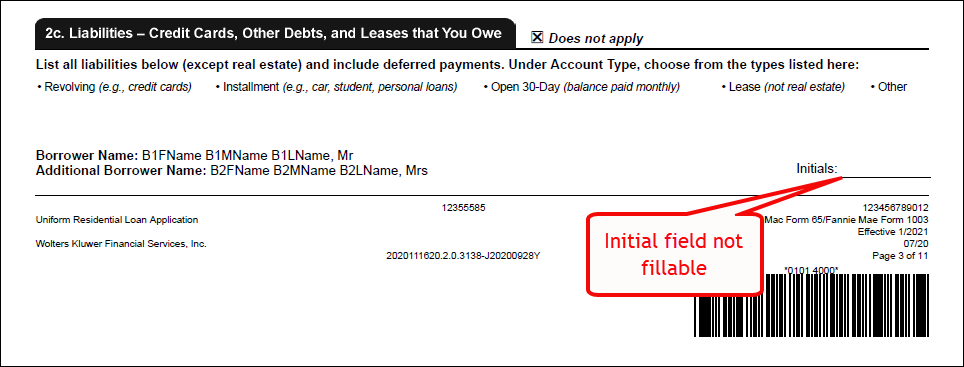 |
| Solution: This issue has been resolved; initial fields on middle pages are now fillable. |
| Implementation Notes: This defect correction is available in the January release of Hosted Expere / Expere Document Services. |
| Delivery Grouping Callback logic implemented - Hosted Expere > Wolters Kluwer ESign feature |
|---|
|
|
Summary: As part of our Hosted Expere > Wolters Kluwer ESign feature,
we have added callback logic for our Delivery Groupings. The callback logic
has been enhanced to indicate whether or not delivery groupings have been
created successfully. When delivery groupings are successfully created,
the callback returns the following:
When delivery groupings are not successfully created, the
callback returns the following:
Note: The routing URL is:
/api/v1/deliverysetup-callback.For a successful callback creates the delivery groupings, the message
sent back to users in the response file will resemble the following (in
JSON
format): For
a callback that does not create the delivery groupings, the message sent
back to users in the response file will resemble the following (in JSON
format):
|
| Implementation Notes: This new feature is available in the January release of Hosted Expere / Expere Document Services. |