This help topic encompasses new features, enhancements, and defect corrections covering
all aspects of your hosted environment, including Expere Document Services and the
Expere Engine.
December
| Expere Engine: Unique identifier
created for each notary block (eNotary feature enhancement) |
|---|
- Type: Enhancement
- Reference: PBI 647196
- Compliance Impacts: This item is not a compliance or regulatory issue.
- Documentation Impacts: No documentation impact
|
Summary: As an enhancement to our eNotary feature, we have modified the
Expere Engine to automatically add a SignatureUniqueIdentifier
element for each field in a Notary Block; the
SignatureUniqueIdentifier element now connects the fields
within the Notary Block to the notary signature so the electronic delivery
platform knows which fields are associated with each specific notary signature.
Note: The SignatureUniqueIdentifier element can be present
as a child in the <SignaturePoint/> and in the
<FillableField/> (<Fillablefield/> and
<FillableCheckbox/>) set areas of the
transaction request. |
Technical Notes: See the following <SignaturePoint/>
> <SignatureUniqueIdentifier/> code sample
below:<r:Signer>
<r:Id>NotaryID</r:Id>
<r:Description>Notary/r:Description>
<r:SignaturePoints>
<r:SignaturePoint>
<r:IncludeDate>true</r:IncludeDate>
<r:PageNumber>10</r:PageNumber>
<r:PageOrder>0</r:PageOrder>
<r:Height>36.0</r:Height>
<r:Width>162.0</r:Width>
<r:SignatureText>NotaryID</r:SignatureText>
<r:XCoordinate>37.0</r:XCoordinate>
<r:YCoordinate>307.22</r:YCoordinate>
<r:Type>Signature</r:Type>
<r:FieldName>SIG_Notary_1_NotaryID_true_0</r:FieldName>
<r:SignatureRequired>true</r:SignatureRequired>
<r:SignatureUniqueIdentifier>NotaryBlockSection1</r:SignatureUniqueIdentifier>
</r:SignaturePoint>
|
|
Implementation Notes: This enhancement is available in the December release of Expere Document Services /
Hosted Expere2021
Release One of the Expere Engine. |
| Generate request validation enhanced |
- Type: Feature
- Reference: PBI 647260
- Compliance Impacts: This item is not a compliance or
regulatory issue.
- Documentation Impacts: No documentation impact
|
|
Summary: As part of the Wolters Kluwer Hosted Expere to Wolters
Kluwer ESign initiative, we have added enhanced validation to notify users
that only supported Recipient-related combinations are allowed on a Generate
request. When using a Recipient node, only
DeliveryMode=DirectToPaper is allowed; using one of
the other DeliveryMode values
(ElectronicOnly,
ElectronicWithESign, orImageOnly)
would result in a 400 Bad Request error; for example:
"Recipients property is only supported for the following delivery modes: DirectToPaper."
|
|
Implementation Notes: This feature is available in the December
release of Expere Document Services / Hosted Expere. |
| Generate-Callback service created |
- Type: Feature
- Reference: PBI 647186
- Compliance Impacts: This item is not a compliance or
regulatory issue.
- Documentation Impacts: No documentation impact
|
Summary: We have implemented a new Generate-Callback
service. Note the following:
- The
Generate-Callback method URL to POST is:
/api/v1/generate-callback
- The callback message sent back to users will resemble the following
(in JSON
format):
{
    "TransactionIdentifier":386556,
    "PassthroughIdentifier":null,
    "UpdateType":"GenerateUpdate",
    "Description":null,
    "TimeStamp":"2020-11-25T09:53:04.4535654-06:00"
}
|
|
Implementation Notes: This feature is available in the December
release of Expere Document Services / Hosted Expere. |
| Tool Suite SETUP page updated to allow callback
setup |
- Type: Feature
- Reference: PBI 647185
- Compliance Impacts: This item is not a compliance or
regulatory issue.
- Documentation Impacts: Expere Document Services Tool Suite
User Guide: SETUP page > REST Setup
Credentials
|
|
Summary: As part of our Wolters Kluwer Hosted > Wolters Kluwer ESign
feature, we have added to ability to set account-level callbacks for use
with DocumentService REST API's. Users can select either a
username/password or token authentication type and associate to a specific
callback URL. |
|
Implementation Notes: This feature is available in the December
release of Expere Document Services / Hosted Expere. |
| DocumentFormat parameter behavior enhanced |
|---|
|
Summary: It was reported by a customer that the
DocumentFormat parameter, at the packet level, was being
returned as “null” in their response from Expere. Through internal investigation
we found that the DocFormat was not being returned when
selecting PdfMerge or MergedCopyPDF. The
DocumentFormat parameter has been updated was modified to
now return a value of "Pdf" value if nothing was provided in the a
PdfMerge or MergedCopyPDF request. |
| Implementation Notes: This enhancement is available in the December release of Expere Document Services / Hosted Expere2020 Release Three of the Expere Engine. |
| Font/FontSize parameters now optional with NotaryStamp field
type |
|---|
|
Summary: Previously, Font and FontSize
parameters were required when setting the FieldType parameter
set to NotaryStamp. It was determined that text would never
need to be entered when using the NotaryStamp option as it is
reserved for placing the NotaryStamp image. As part of the eNotary feature, we
are making these parameters optional when using a NotaryStamp
fillable field. |
| Implementation Notes: This enhancement is available in the December release of Expere Document Services / Hosted Expere2020 Release Three of the Expere Engine. |
| Barcodes now supported on specific pages within
static documents |
- Type: Enhancement
- Reference: PBI 642955
- Compliance Impacts: This item is not a compliance or
regulatory issue.
- Documentation Impacts: No documentation impact
|
|
Summary: A static document was customized to have a barcode on only
the last page. This resulted in blurry text at the bottom of the other
pages. This issue has been resolved. |
|
Implementation Notes: This enhancement is available in the December
release of Expere Document Services / Hosted Expere. |
| LOB/Alias now included in Generate Content URI dialog box |
|---|
|
|
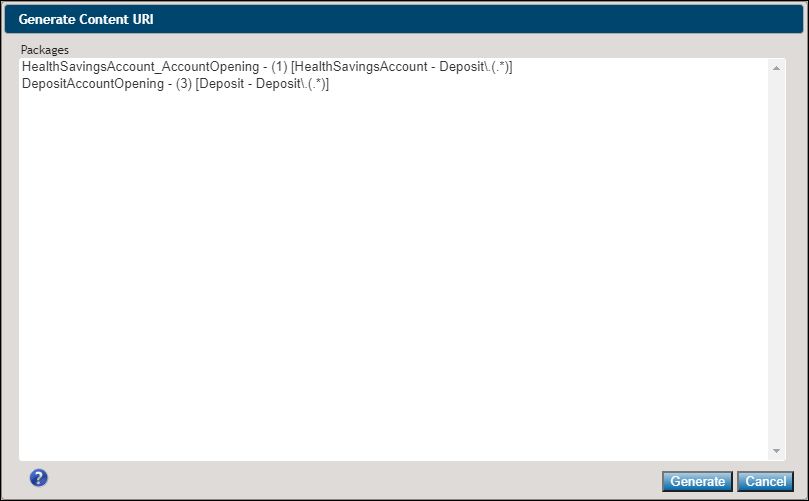
Summary: EZ Config Packages and Packets users reported that it was
difficult to differentiate between packages with the same name. It was requested
that when selecting a Package through the Expere Document Services Tool Suite,
that the Line of Business (LOB) and Alias appear adjacent to each package. As a
result, the Generate Content URI dialog has been updated to display the
package name and corresponding LOB and Alias.
|
|
Implementation Notes:
This enhancement is available in the December
release of Expere Document Services / Hosted ExpereThis enhancement is available in the November
deployment of Document Generation Services. |
| Generate/Generate Synchronous REST API's updated
to include WKES Delivery options |
|
|
Summary: As part of the Wolters Kluwer Hosted REST to Wolters Kluwer
ESign (WKES) Delivery feature, the Generate and Generate-Synchronous REST
API's have been updated to include the following WKES Delivery parameters
within the request:
- FI Pre-Consent: true or false values
- Delivery Hold: true or false values
- Delivery Mode: includes DirectToPaper, ElectronicOnly,
ElectronicWithEsign, ImageOnly
- DirectToPaper
- ElectronicOnly
- ElectronicWithEign
- ImageOnly
- Recipient Info: includes name, address (1 and 2), city,
state, zip, country code, mailing type (USPS, UPS, FedEx)
- Name
- Address Line 1
- Address Line 2
- City
- State
- Zip
- Country Code
- Mailing Type
- USPS shipping options
- First Class
- First Class International
- First Class Electronic Certified
- First Class International Electronic
Certified
- UPS (Customer contract required)
- Next Day Air
- Ground
- Worldwide Saver
- Expedited SM
- FedEx (Customer contract required
- Priority Overnight
- Standard Overnight
- Two Day Shipping
- International Priority
- Economy
|
|
Implementation Notes: This feature is available in the December
release of Expere Document Services / Hosted Expere. |
| Callback URL character limit enhanced |
- Type: Enhancement
- Reference: PBI 643825
- Compliance Impacts: This item is not a compliance or
regulatory issue.
- Documentation Impacts: No documentation impact
|
|
Summary: A user reported that their callback URL length had exceeded
the maximum character limit. As a result, the user was unable to use their
specified callback URL. We have increased the callback URL length from
255 to 2048 characters.
|
|
Implementation Notes: This enhancement is available in the December
release of Expere Document Services / Hosted Expere. |
November
| Generate Synchronous added as a Tool Suite search
option on the SUPPORT page |
|
|
|
Summary: Generate-Synchronous is now an option within the API Call
section on the SUPPORT page. |
|
Implementation Notes: This enhancement is available in the November
release of Expere Document Services / Hosted Expere. |
| New REST methods added to
DocumentService |
- Type: Feature
- Reference: PBI 640664, 641461, 641460, 637657, 644343
- Compliance Impacts: This item is not a compliance or
regulatory issue.
- Documentation Impacts: No documentation impact.
|
Summary: As part of our feature to support transaction data transform
services we have created a new Expere Hosted REST API with various methods.
These methods are used to retrieve transaction transform stylesheets stored
with a given account, allow users to transform their transaction data using
a specified stylesheet, or delete stylesheets no longer used. These methods
consist of the following:
Generate-Synchronous: this is independent of our
standard asynchronous API's. The generate-synchronous call offers a
singular approach in generating documents by including both the ID
and generated documents in the response. Previously, users would
submit a request to return the EDS transaction ID, then a second
request to return the document packages. This feature enhancement
streamlines the overall process of returning an ID and document
package by including them both in one singular response.Generate-Asynchronous: used to request document
processing based on transaction data included in the request. This
operation is an asynchronous call back that takes transaction data,
a Content URI (for callback servicing), and an account ID
(AccountID) for the calling application and returns a Transaction ID
with a status. This is typically followed by a call to the
GetRequestResult operation, using the transaction ID
returned in the Generate response, to retrieve generated package
documents as requested by the calling application in the
Generate request.Select-Synchronous: used to run document
autoselection for a given request, and return list of document for
potential generation. GetGenerateResults: used to request status
information about a previously submitted request and to retrieve
generated documents (using a RequestID) for
Generate, SelectAndGenerate, or
SelectGenerateDeliver API calls.
The Swagger page can be accessed here. |
|
Implementation Notes: This feature is available in the November
release of Expere Document Services / Hosted Expere. |
| DocumentService REST API's now documented via
Swagger |
- Type: Feature
- Reference: PBI 643322
- Compliance Impacts: This item is not a compliance or
regulatory issue.
- Documentation Impacts:
Document Service REST
API
|
Summary: With REST APi's, Wolters Kluwer utilizes Swagger. Users can
access the API documentation available here. The Swagger UI provides
annotations around the methods and parameters utilized within
DocumentService. |
|
Implementation Notes: This feature is available in the November
release of Expere Document Services / Hosted Expere. |
| Tool Suite: SETUP page updated for Wolters Kluwer
ESign credentials |
|
|
|
Summary: As part of our effort to integrate Hosted Expere and Wolters
Kluwer ESign (WKES) in order to utilze the latter's delivery options, we
have updated the SETUP page to accept WKES user credentials. This
allows a bridge between Hosted Expere and WKES so a document package can be
generated in Hosted Expere and delivered to a user(s) via WKES for an
immediate electronic signature. |
|
Implementation Notes: This feature is available in the November
release of Expere Document Services / Hosted Expere. |
| Select-Synchronous REST API implemented |
- Type: Enhancement
- Reference: PBI 641461
- Compliance Impacts: This item is not a compliance or
regulatory issue.
- Documentation Impacts: No documentation impact.
|
|
Summary: We have implemented a new select-synchronous REST API call,
which is used to select documents for immediate processing and retrieve the
results of the Select request. |
|
Implementation Notes: This feature is available in the November
release of Expere Document Services / Hosted Expere. |
| Asynchronous Generate REST API
implemented |
- Type: Enhancement
- Reference: PBI 641460
- Compliance Impacts: This item is not a compliance or
regulatory issue.
- Documentation Impacts: No documentation impact.
|
|
Summary: We have implemented a new generate-asynchronous REST API
call, which is used to request document processing based on transaction data
included in the request. This operation is an asynchronous call back that
takes transaction data, a Content URI (for callback servicing), and an
account ID (AccountID) for the calling application and returns status
information. This is typically followed by a call to the
GetRequestResult operation to return the generated package
documents as requested by the calling application in the Generate
request. |
|
Implementation Notes: This feature is available in the November
release of Expere Document Services / Hosted Expere. |
| Integrators: eOriginal DocumentProfileId location
updated |
|
|
Summary: Previously, the DocumentProfileId parameter
resided within the eOriginal data type. We have determined
that we need to place the parameter within a more meaningful location; as a
result, the DocumentProfileId is now in the
DocumentInstance parameter. The new location, combined
with other parameters within the DocumentInstance parameter
will provide more context as to which Document Profile ID's correspond to a
particular document. Note: This is an optional parameter and will only
appear in the response when the eOriginal Document Profile ID is present
for the given document. |
|
Implementation Notes: This enhancement is available in the November
release of Expere Document Services / Hosted Expere. |
October expanded release
Note: The changes outlined below will be included with the CT release on November 5 and
Production release on November 12.
| SignatureText field lengthened |
- Type: Enhancement
- Reference: PBI 644056
- Compliance Impacts: This item is not a compliance or
regulatory issue.
- Documentation Impacts: No documentation impact
|
Summary: Internal resources discovered that a customer's transaction
was failing repeatedly due to the number of characters in the
SignatureText field exceeded the character limit. As a
result, we increased the character limit from 255 to 500. |
|
Implementation Notes: This enhancement is available in the November
release of Expere Document Services / Hosted Expere. |
| XY coordinates now returned on Generate call when
merging PDF's with an EClosing |
- Type: Defect
- Reference: PBI 644741
- Compliance Impacts: This item is not a compliance or
regulatory issue.
- Documentation Impacts: No documentation impact
|
|
Issue: A user reported that XY coordinates were not returned in the
Expere response when making a Generate call. Internal analysis revealed that
the absence of XY coordinates in the Expere response was caused when
selecting the MergedPdf ancillary output option and an EClosingType=1.
|
|
Solution: This behavior has been enhanced; XY coordinates are now
returned in the Expere response file when selecting the MergedPdf ancillary
output option with an EClosingType=1. |
|
Implementation Notes: This defect correction is available in the
November release of Expere Document Services / Hosted Expere. |
| Empty phone number data point removed when
calling eOriginal |
- Type: Enhancement
- Reference: PBI 635580
- Compliance Impacts: This item is not a compliance or
regulatory issue.
- Documentation Impacts: No documentation impact
|
|
Summary: Previously when submitting a transaction to eOriginal where
the PhoneNumber element was included in the transaction, but a value was not
provided, the transaction failed. We have enhanced this behavior so that
users may keep the PhoneNumber element in their
transaction XML and will no longer need to remove it when a value is not
present. |
|
Implementation Notes: This enhancement is available in the November
release of Expere Document Services / Hosted Expere. |
Note: The change outlined below was included with the
CT release on October 12; however, it will be part of a separate Production event to
be released at a later date.
| WKES Field Naming convention updated to include NavigationOrder |
|---|
|
|
Summary: In PBI 626223, we enhanced the sequencing of Wolters Kluwer E-Sign (WKES)
signatures/signature dates. These changes resulted in an undesired user
experience when signature/signature date fields were captured throughout the
document with other fillable fields captured after. We have further enhanced the
sequencing of all fillable fields by adding a navigation order variable to the
field naming convention. This allows WKES to use the FieldOrder value for
applying the signature fields and the NavigationOrder for walking users through
the fillable fields in a more conventional order within the signing software.
WKES Field naming convention has been updated to:
WKES_FieldType_UserEmail_FieldOrder-NavigationOrder_M/O
|
| Implementation Notes: This enhancement is available in the 2020 Release Three (3) of the Expere EngineOctober release of Expere Document Services / Hosted Expere. |
October
Note: Enhancements and defect corrections previously deployed on September 8 will be
reverted on September 14 during a regular maintence window. These changes originally
scheduled for the September release will now be part of the October release.
| eOUpload funtionality implemented |
- Type: Feature
- Reference: PBI 572118
- Compliance Impacts: This item is not a compliance or
regulatory issue.
- Documentation Impacts: No documentation impact
|
Summary: Users may upload Expere documents to an eOriginal
transaction using a new EOriginalUploadInd XPath. A value
of "1" signifies that all Expere documents will be uploaded to the eOriginal
Command Center for viewing. The Technical Notes section contains the
possible values that can be used for this indicator in the incoming Expere
request. |
Technical Notes:
Txn/EOriginalUploadInd
- 0 (F) (or not present) = Do not Upload to eOriginal
- 1 (T)= Upload ALL Docs to eOriginal
|
|
Implementation Notes: This enhancement is available in the October
release of Expere Document Services / Hosted Expere. |
| Generate-Synchronous API call
implemented |
- Type: Feature
- Reference: PBI 637657
- Compliance Impacts: This item is not a compliance or
regulatory issue.
- Documentation Impacts: No documentation impact.
|
|
Summary: We have implemented a new generate-synchronous REST API
call, independent of our standard asynchronous API's. The
generate-synchronous call offers a singular approach in generating documents
by including both the ID and generated documents in the response.
Previously, users would submit a request to return the EDS transaction ID,
then a second request to return the document packages. This feature
enhancement streamlines the overall process of returning an ID and document
package by including them both in one singular response. The Swagger page
can be accessed here. |
|
Implementation Notes: This feature is available in the October
release of Expere Document Services / Hosted Expere. |
| Expere Engine:
InstanceSigningInstructions behavior enhanced with a
PostProcessRequest |
|---|
- Type: Defect
- Reference: PBI 636220
- Compliance Impacts: This item is not a compliance or regulatory issue.
- Documentation Impacts: No documentation impact
|
Issue: Previously, a PostProcessRequest always returned
the InstanceSigningInstructions as "NoSignatures." Instead the
InstanceSigningInstructions value that was designated in
the request should be retained in the PostProcessRequest with
values of "NoSignatures," "InkSign," or "ESign." |
Solution: The PostProcessRequest now returns the correct
InstanceSigningInstructions value. |
|
Implementation Notes: This defect correction is available in the 2020 Release Three of
the Expere EngineSeptember release of
Hosted Expere / Expere Document Services. |
| Ability to merge documents added with eOriginal
functionality |
- Type: Enhancement
- Reference: PBI 635818
- Compliance Impacts: This item is not a compliance or
regulatory issue.
- Documentation Impacts: No documentation impact
|
Summary: A user reported an issue where merging PDF documents into a
single document package did not function when passing in an
EClosingType=1 indicator in the transaction request.
Expere now supports the ability to merge PDF documents when using eOriginal
through either the MergePdf or
MergeCopyPdf ancillary output options. |
|
Implementation Notes: This enhancement is available in the September
release of Hosted Expere / Expere Document Services. |
| Duplexing information added to Implementation
Strategies > Ancillary Output user documentation |
|
|
|
Summary: We recently had a request to provide detailed information
around the use of the Duplex ancillary output option. The specific
use case requested information on inserting blank pages in a merged PDF
document package where certain individual documents contain an odd number of
pages. The use of the Duplex ancillary output option would insert
these necessary blank pages. As a result, we have added information about
using the Duplex option in our Implementation Strategies
online help documentation. |
|
Implementation Notes: This enhancement is available in the September release of Hosted Expere / Expere
Document Services2020 Release Three (3) of the
Expere Engine. |
| Delivery behavior enhanced - queuing and
status |
- Type: Enhancement
- Reference: PBI 618568
- Compliance Impacts: This item is not a compliance or
regulatory issue.
- Documentation Impacts: No documentation impact
|
Summary: A user reported that they were unable to retrieve documents
after receiving a callback indicating their documents were ‘ready.' Based on
internal analysis, it was determined that there are two saves that occur on
a single request; one for Render_Pending and a second for
Render_Success. On a typical request, the saves occur
in the order of ‘Pending’ and then ‘Success’. However, there has been an
instance where the Render_Success was saved first, and the
Render_Pending status occurred second, overwriting the
‘Success’ status. This caused a problem when requesting the generated
documents, as the status was ‘Pending’ indicating to the requesting system
that the documents were not ready. We have updated our process to no
longer overwrite the Render_Success status once it has
occurred.
|
|
Implementation Notes: This enhancement is available in the September
release of Hosted Expere / Expere Document Services. |
| RAW_XML document format enhanced to use images |
|---|
- Type: Enhancement
- Reference: PBI 627696
- Compliance Impacts: This item is not a compliance or regulatory issue.
- Documentation Impacts: No documentation impact
|
|
Summary: Users reported that when using RAW_XML as a document
format, any images present in the document appeared only as a name rather than
with Base64 encoding. We have enhanced the behavior when opting for
RAW_XML document format so that any images that exist now appear in
Base64 encoding in the resultant Expere response file. |
| Implementation Notes: This enhancement is available in the 2020 Release Three (3) of the Expere EngineSeptember release of Hosted Expere / Expere Document Services. |
| Signature "X" on form enhanced |
|---|
- Type: Defect
- Reference: PBI 631067
- Compliance Impacts: This item is not a compliance or regulatory issue.
- Documentation Impacts: No documentation impact
|
|
Issue: Users reported that the "X" that appears in signature fields was
positioned incorrectly and obscured by the red tab that appears below the Signer
title (for example Borrower's Signature0. This behavior appeared on page
three (3) through the second to last page of the URLA Continuation
Page. |
Solution: This behavior has been enhanced:
- The signature "X" is now positioned closer to the signature line instead
of directly below the Signer title
- The signature "X" is no longer obscured by red tab below the Signer
title
|
|
Implementation Notes: This defect correction is available in the 2020 Release Three (3) of the Expere EngineSeptember release of Hosted Expere / Expere
Document Services. |
| Integrators: EmailAddress added as a parameter in
WSDL |
|
|
Summary: The EmailAddress parameter has been added
to the DiscreteParty data type in the Expere Document
Services DocServices WSDL. The email address associated to
each Discrete Party will be returned in the response in a future release.
Adding the email address to Discrete Party opens up the opportunity to
better integrate with electronic delivery products, like Wolters Kluwer
E-Sign (WKES). |
|
Implementation Notes: This feature is available in the September
release of Hosted Expere / Expere Document Services. |
| EZ Config Transaction functionality updated to accept multiple products |
|---|
|
| Summary: We have enhanced our EZ Config Transaction service to now support multiple product selection when selecting Deposit products. After selecting your Organization, select any number of products in the Available Products pane to move to the Selected Products pane. Additionally, the Organization dropdown has been updated to include the ID after the ORG name to distinguish between multiple organizations that have the same name. |
|
Implementation Notes: This enhancement is available in the 2020 Release Two of Document Generation
ServicesSeptember release of Hosted
Expere / Expere Document Services. |
August
| Implementation Strategies documentation updated
with Logo information |
|
|
|
Summary: The Expere Document Services Implementation
Strategies online help documentation now contains additional
guidance on when logos can/cannot be applied through an ancillary output.
For more information on rules for using or not using logos, see Implementation Strategies: Logos > Situations where logos are not
applied. |
|
Implementation Notes: This enhancement is available in the August
release of Hosted Expere / Expere Document Services. |
Expanded July Release
Note: The expanded June release will occur in the CT environment on 7/22;
production deployment is 8/9.
| eNote creation process enhanced -
Signers |
- Type: Enhancement
- Reference: PBI 616860
- Compliance Impacts: This item is not a compliance or
regulatory issue.
- Documentation Impacts:
eOriginal Quick Guide available by request
|
Summary: We have enhanced our process for creating Signers on the
eNote within eOriginal. The following Signer types are supported:
- /Txn/CoSigners/CoSigner
- /Txn/Borrowers/Borrower
- /Txn/CoSigners/CoSigner/Signers/Signer
- /Txn/Borrowers/Borrower/Signers/Signer
- /Txn/Borrowers/Borrower/RepresentativeEntities/RepresentativeEntity/Signers/Signer
- /Txn/Borrowers/Borrower/RepresentativeEntities/RepresentativeEntity/RepresentativeEntities/RepresentativeEntity/Signers/Signer
- /Txn/Borrowers/Borrower/RepresentativeEntities/RepresentativeEntity/RepresentativeEntities/RepresentativeEntity/RepresentativeEntities/RepresentativeEntity/Signers/Signer
- /Txn/CollateralItems/Collateral/Owners/Owner/Trustees/Trustee
/Txn/CollateralItems/Collateral/Owners/Owner/Trustees/Trustee/Signers/Signer
Note: The following elements are required for each Party on the
eNote:
- FirstName
- LastName
- SSN
- EmailAddress
- RembrandtID or SignerID
|
|
Implementation Notes: This enhancement is available in the expanded
July release. |
| eNote Destruction process enhanced |
- Type: Feature
- Reference: PBI 626572
- Compliance Impacts: This item is not a compliance or
regulatory issue.
- Documentation Impacts: eOriginal Quick Guide: eNote
Destruction Workflow Outline (eOriginal Quick Guide available by
request)
|
Summary: Previously in PBI
560985, we expanded eOriginal support for the Destruction
workflow. In this PBI, we have modified the Destruction workflow to run when
the Txn/EOriginalDestructionType is passed in with a value
of 1, 2, of 3. The possible enumerated values for
Txn/EOriginalDestructionType are defined as
follows:
- 0 = Do NOT execute
- Destruction logic within eOriginalwill NOT be run.
- 1 = Destruct managed doc profiles only
- Documents previously uploaded to eOriginal by Expere,
including the eNote, will be destructed.
- 2=Destruct ALL doc Profiles
- Documents previously uploaded by Expere,including the
eNote,as well as any manually uploaded documents through
eOriginal Command Centerwill be destructed.
- 3 = Destruct Transaction
- Removes the entire transaction from eOriginal.Note: If
Txn/EOriginalDestructionType is NOT included in the request
it is treated the same as a '0'.
|
|
Implementation Notes: This feature is available in the July expanded
release of Hosted Expere / Expere Document Services. |
| MergedPDF enhancements with Adobe Acrobat
Accessibility Checker |
- Type: Enhancement
- Reference: PBI 628336
- Compliance Impacts: This item is not a compliance or
regulatory issue.
- Documentation Impacts: No documentation impact
|
|
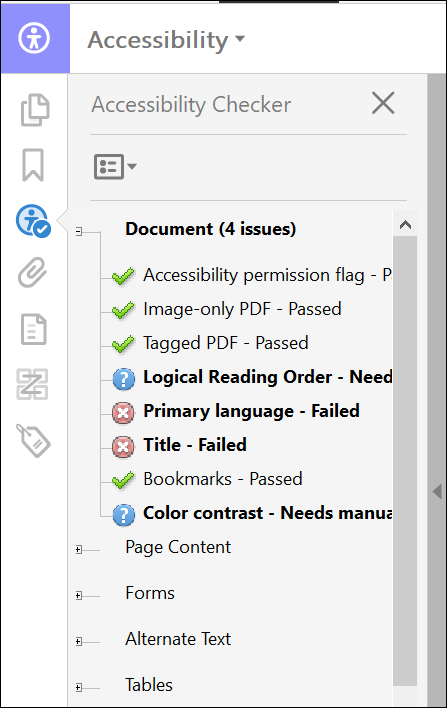
Summary: Users reported that generating a MergedPdf with either a
format of Tagged PDF or Tagged PDF Embedded Fonts resulted in the Adobe
Acrobat Accessibility Checker flagging the Title and Primary
Language as non-WCAG 2.0 compliant (displaying as Failed in
the Accessibility Checker). We have enhanced this behavior to reflect the following changes:
- The Title name now defaults to the packet, which typically
display as Default
- The language is set to English
|
|
Implementation Notes: This enhancement is available in the July
expanded release of Hosted Expere / Expere Document Services. |
| Sequencing behavior enhanced |
- Type: Enhancement
- Reference: PBI 626223
- Compliance Impacts: This item is not a compliance or
regulatory issue.
- Documentation Impacts: No documentation impact
|
|
Summary: Users reported that sequencing for initials was ordered
incorrectly: some initial lines were sequenced after the signature line for
the same email address (or recipient), which caused issues when signing
within our WKES signing application. The WKES signing application requires
that the signature be sequenced last. This behavior has been enhanced: signature line and date fields are
sequenced last for the same email address. |
|
Implementation Notes: This enhancement is available in the July
expanded release of Hosted Expere / Expere Document Services. |
| Missing initial lines behavior enhanced |
- Type: Defect
- Reference: PBI 625632
- Compliance Impacts: This item is not a compliance or
regulatory issue.
- Documentation Impacts: No documentation impact
|
|
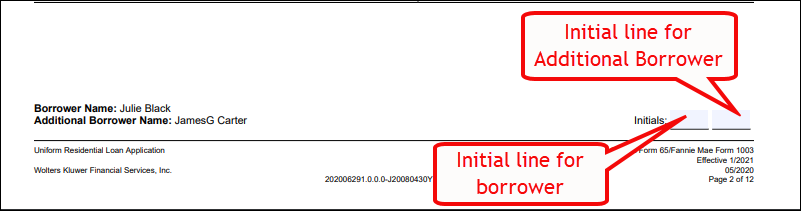
Issue: It was reported that the borrower and additional borrower
initial lines did not appear on the Uniform Residential Loan
Application document in the lower right corner for certain pages.
Instead, only the additional borrower initial line appeared. The initial
lines are linked to the specific email addresses of the borrowers. |
|
Solution: This issue has been resolved; both borrower and additional
borrower initial lines appear in the document. |
|
Implementation Notes: This defect correction is available in the July
expanded release of Hosted Expere / Expere Document Services. |
July
WKFS_StyleGuide.xml now excludes
SignerEmail for older versions of content |
- Type: Defect
- Reference: PBI 624666
- Compliance Impacts: This item is not a compliance or
regulatory issue.
- Documentation Impacts: No documentation impact
|
Issue: It was determined that using older content versions that did
not support the SignerEmail resulted in a null pointer
error and failure of certain documents to generate, such as the Fannie
Mae 1003 Freddie Mac 6 URLA Continuation Page. The Expere engine has
been updated to not require a signer email when content has not been updated
to use one. |
|
Implementation Notes: This defect correction is available in the July
release of Hosted Expere / Expere Document Services. |
| eOriginal Loan Identifier updated for
CreateTransaction |
- Type: Enhancement
- Reference: PBI 625098
- Compliance Impacts: This item is not a compliance or
regulatory issue.
- Documentation Impacts: No documentation impact
|
Summary: It was determined that eOriginal transactions were using
XPaths containing the LoanIdentifier data point for the
Loan Origination and Loan ID that were not intended for those respective
values. As a result, we have updated
Txn/Note/Note[1]/LoanIdentifier to be used with the
Loan Origination ID and Loan Number when creating eOriginal
transactions. |
|
Implementation Notes: This enhancement is available in the July
release of Hosted Expere / Expere Document Services. |
| Organization / policy merge transaction behavior
enhanced |
- Type: Enhancement
- Reference: PBI 623479
- Compliance Impacts: This item is not a compliance or
regulatory issue.
- Documentation Impacts: No documentation impact
|
Summary: It seemed that there isolated incidents when copying
organizations and policies from one set of content to another. Users were
unable to merge the transaction using the copied organization or policy. It
seemed that some data items in the .REQ files had a predicate in the PTR
(for example: PRINT
/Txn/OrgAddresses/OrgAddress[1]). As a result, the
convertToDefaultSchema removed the predicate when
creating the XPath values. In the Organization .REQ files, the predicates
were removed causing errors to occur stating that conflicting values existed
for the same XPath.It was determined that
convertToDefaultSchema removed the predicates when
white space was present in the transaction .XML file. As a result, we
have enhanced convertToDefaultSchema to now return
predicates when whitespace is present in the transaction .XML file.
Note: It should be stressed that most users may never enounter this
issue. Consult this changelog in the unlikely event that it does
occur. |
|
Implementation Notes: This enhancement is available in the July
release of Hosted Expere / Expere Document Services. |
| New NotaryStamp options added |
|---|
|
Summary: The Expere schema has been updated with new FieldTypeEnum value of NotaryStamp. This new enum value is being added in anticipation of Expere content updates to support eNotary. Adding this value will allow integrators to use the Expere response to determine what field(s) on the document are intended for notary use. Electronic signing partners will then be able to appropriately assign signer roles based on the FillableFieldType. Additionally, we have added a new SignatureUniqueIdentifier element that is used to asssociate the FillableField to the applicable SignatureField. |
|
Implementation Notes: This feature is available in the 2020 Release Two of the Expere Engine2020 Release Two of Document Generation
ServicesJuly release of Hosted Expere /
Expere Document Services. |
<InstancePageCount> and
<InstancePageSize> elements now return
values |
- Type: Enhancement
- Reference: PBI 616574
- Compliance Impacts: This item is not a compliance or
regulatory issue.
- Documentation Impacts: No documentation impact
|
Summary: When conducting extensive internal testing, we noticed
discrepancies in the values that the <InstancePageCount>
and <InstancePageSize> elements were returning for the
eNote from eOirginal.
<InstancePageCount> did not return a value; it
should return any page number value other than "0"<InstancePageSize> returned a value; expected
values were either "letter" or "legal" <InstancePageCount> and
<InstancePageSize> elements now return expected
values for the eNote.
|
|
Implementation Notes: This feature is available in the June release
of Hosted Expere / Expere Document Services. |
Expanded June Release
Note: The expanded June release will occur in the CT environment on 6/18 and in
production on 6/24.
| eOriginal Quick Guide updated |
- Type: Enhancement
- Reference: PBI 619087
- Compliance Impacts: This item is not a compliance or
regulatory issue.
- Documentation Impacts:
eOriginal Quick Guide available by request
|
|
Summary: We have updated the eOriginal Quick Guide to include
new Destruction/Redraw and Upload workflows. This guide is
available by request; reach out to your Professional Services contact.
Note: The Upload functionaility is not currently supported; as a result,
the Txn/EOriginalUploadType transaction indicator
should not be submitted at this time in your request.
Including this transaction indicator in your request will result in a
transaction failure. However, it will be supported in a near-future
release. |
|
Implementation Notes: This feature is available in the June release
of Hosted Expere / Expere Document Services. |
| eNote destruction process added |
- Type: Feature
- Reference: PBI 560985
- Compliance Impacts: This item is not a compliance or
regulatory issue.
- Documentation Impacts:
eOriginal Quick Guide available by request
|
|
Summary: We continue to expand our eOriginal integration to support
additional use cases and workflows. We have recently expanded our workflow
to support eNote redraws and destruction. What is eNote redraw and
destruction? After an eNote has been generated, it is determined
that a revised version of the eNote is required, or an eNote is no
longer applicable. Redraw or Destruction will be executed based on
transaction parameters provided in the request. Based on the transaction
parameters the eNote will be redrawn, replacing the original eNote
previously generated, or the eNote will be removed (destructed), and
replaced with a paper note. |
|
Implementation Notes: This feature is available in the June release
of Hosted Expere / Expere Document Services. |
June| Fillable fields in FooterNotice not applied to subsequent middle pages |
|---|
- Type: Defect
- Reference: PBI 613852
- Compliance Impacts: This item is not a compliance or regulatory issue.
- Documentation Impacts: No documentation impact
|
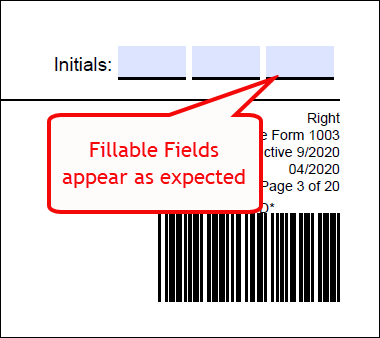
Issue: It was reported that Initials fields did not appear as fillable fields in pages between the first and last pages of a PDF document. When authored as fillable fields with a MiddlePages attribute in a FooterNotice element, the fillable fields appeared only on the second page of the document; all subsequent pages with the exception of the last page do not display fillable fields in the FooterNotice. |
| Solution: Fillable fields in FooterNotice are applied to additional middle pages, specifically the Initials fields. |
|
Implementation Notes: This defect correction is available in the 2020 Release Two (2) of the Expere EngineJune release of Hosted Expere / Expere Document
Services. |
| WSDL updated for new NotaryStamp attribute
value |
|
|
Summary: The Expere Document Services WSDL has been updated with
new FillableFieldTypeEnum value of
NotaryStamp. This new enum value is being added in
anticipation of Expere content updates to support eNotary. Adding this
value will allow integrators to use the Expere response to determine
what field(s) on the document are intended for notary use. Electronic
signing partners will then be able to appropriately assign signer roles
based on the FillableFieldType. |
|
Technical Notes: The corresponding response file will be
available in the July release of Hosted Expere / Expere Document
Services. |
|
Implementation Notes: This feature is available in the June
release of Hosted Expere / Expere Document Services. |
Expanded May Release
Note: The expanded May release will occur in the CT environment on 5/21 and in
production on 5/28.
| lifetimeFloorPercent datapoint added |
- Type: Enhancement
- Reference: PBI 617785
- Compliance Impacts: This item is not a compliance or
regulatory issue.
- Documentation Impacts:
eOriginal Quick Guide available by request
|
Summary: Our eOriginal integration has been updated to include the
floor interest rate datapoint for ARM loans. This is in follow up to
eOriginal adding a new lifetimeFloorPercent datapoint to
their schema. As a result the floor interest rate for a loan will now be
populated on ARM eNotes, generated through eOriginal. Please reference the
eO Quick Guide for details on this mapping. |
|
Implementation Notes: This enhancement is available in the May
release of Hosted Expere / Expere Document Services. |
| MaximumLateAmount mapping updated |
- Type: Enhancement
- Reference: PBI 617784
- Compliance Impacts: This item is not a compliance or
regulatory issue.
- Documentation Impacts:
eOriginal Quick Guide available by request
|
Summary: During our initial development and subsequent release, we
included the MaximumLateAmount for all loan types, even if
a value did not exist in the transaction XML. It was determined that
including either a "null" or "0" value for
MaximumLateAmount was causing transactions to fail in
eOriginal. As a result, we have modified functionality so that if
MaximumLateAmount contains either a value of "null" or
"0" it is not included in the request to eOriginal. |
|
Implementation Notes: This enhancement is available in the May
release of Hosted Expere / Expere Document Services. |
Expanded May Release
Note: The expanded May release will occur in the CT environment on 5/5 and in
production on 5/14.
| New data items added to eoCreateTransaction
call |
- Type: Feature
- Reference: PBI 615219
- Compliance Impacts: This item is not a compliance or
regulatory issue.
- Documentation Impacts:
eOriginal Quick Guide available by request
|
|
Summary: Our eOriginal integration has been enhanced with the
following two transaction mappings. The
<Txn/EOriginalTransactionTypeName> has been
added to the Expere Txn Schema as a new data point for collecting the
eOriginal Transaction Type. The transactionTypeName is a
parameter used when creating the transaction in eOriginal. It is a
‘string’ value which is preconfigured within eOriginal. Please work with
your eOriginal Implementation Consultant if you are unsure what this
value is. In addition to adding the new data point above, we have
updated our mapping for <LoanOriginationId>. This
data point was already being mapped to the eNote within eOriginal. This
has been further enhanced to now set the
<LoanOriginationId> as the Loan ID for the eO
Transaction within the eOriginal Command Center. |
|
Implementation Notes: This feature is available in the May release of
Hosted Expere / Expere Document Services. |
| maxBytesPerRead updated in web.config
files |
- Type: Enhancement
- Reference: PBI 616466
- Compliance Impacts: This item is not a compliance or
regulatory issue.
- Documentation Impacts: No documentation impact
|
Summary: A user reported receiving SOAP errors on select transactions
when attempting to generate a package and were receiving a maximum
bytes per Read operation message. As a result, we have
increased the maxBytesPerRead value to 10000000 in the
corresponding EDS and DGS web.config files. |
|
Implementation Notes: This enhancement is available in the May
release of Hosted Expere / Expere Document Services. |
<PackageDocs> element now
appears |
- Type: Enhancement
- Reference: PBI 616051
- Compliance Impacts: This item is not a compliance or
regulatory issue.
- Documentation Impacts: No documentation impact
|
Summary: We received an enhancement request to include the
<PackageDocs> element when selecting a subset of
documents for a package. Previously, the <PackageDocs>
only appeared when using a SELECT and GENERATE call. Users of the
GENERATE call will notice that the
<PackageDocs> element will now notice the
<PackageDocs> element, and its child elements, are
included in the Expere response file. |
Technical Notes: Sample <PackageDocs> element and
child elements in the response
file:"PackageDocs": [
{
"DocDescriptor": {
"DocID": "PKGD.AddendumToLoanApplication-HE",
"DocType": {
"Enum": "Dynamic"
},
"DocDisplayName": "Addendum to Loan Application",
"DocRootEntityName": "INS.AddendumToLoanApplication-HE",
"DocRequiresSignature": false,
"DocCustomDataItems": [],
"DocumentClass": null,
"DocumentTypeDescription": null,
"NegotiableInstrumentFlag": false,
"RecordableFlag": false,
"FormNumber": null
},
"DocWorkOrder": null
},
|
|
Implementation Notes: This enhancement is availabie in the May
release of Hosted Expere / Expere Document Services. |
May
Note: The May release will occur in the CT environment on 4/30 and in production
on 5/14.
| eoConfigureRoles and eoConfigureSortOrder APi's
implemented |
- Type: Feature
- Reference: PBI 612832
- Compliance Impacts: This item is not a compliance or
regulatory issue.
- Documentation Impacts: No documentation impact
|
|
Summary: We have updated our integration to eOriginal to now call
eoConfigureSortOrder and eoConfigureRoles in support of electronically
signing the eNote through eOriginal. The eOConfigureSortOrder API is used to
sort the document order; if successful, the eOConfigureRoles API is used to
determine the document signing party. After both API's are called, users can
electronically sign the eNote document through the eOriginal Closing Center.
eoConfigureSortOder and eoConfigureRoles is called for eOriginal
transactions when Txn/EOriginalEsignInd = True Note: There is no WSDL
change associated with this new feature. |
|
Implementation Notes: This feature is available in the May release of
Hosted Expere / Expere Document Services. |
| MergedCopyPDF signature behavior
enhanced |
- Type: Defect
- Reference: PBI 607955
- Compliance Impacts: This item is not a compliance or
regulatory issue.
- Documentation Impacts: No documentation impact
|
Issue: An issue was reported where requests made with
MergedCopyPDF and either
eSignaturesAndFillableFieldSupport = True
OR
WKES eSignature = True, resulted in the PDFs containing
regular fillable fields for the signature(s) instead of the expected
electronic signature fields. |
|
Solution: This issue has been resolved; when electronic signature
fields are requested with MergedCopyPDF as the ancillary output, the
resulting PDFs contain the expected electronic signature fields. |
|
Implementation Notes: This defect correction is available in the May
release of Hosted Expere / Expere Document Services. |
| Expere updated to honor of copies in package document
(PKGD) |
|---|
- Type: Enhancement
- Reference: PBI 606934
- Compliance Impacts: This item is not a compliance or regulatory issue.
- Documentation Impacts: No documentation impact
|
|
Summary: Expere now honors the number of copies for a given document when
authored in an .REQ file. When working with number of copies in EZ Config
Packages and Packets, the number of copies specified within EZ Config Packages
and Packets will be honored in addition to the number of copies specified in the
.REQ file. For example, a document authored with three copies in the .REQ file
and two copies in EZ Config Packages and Packets will result in six copies of
the document. The document file names are incremented with (1), (2), (3), etc.
to identify multiple copies. |
|
Implementation Notes: This enhancement is available in the April release of Expere Document Services /
Hosted ExpereExpere Engine 2020 Release One
(1). |
| Processing enhanced |
- Type: Enhancement
- Reference: PBI 612138
- Compliance Impacts: This item is not a compliance or
regulatory issue.
- Documentation Impacts: No documentation impact
|
|
Summary: We continually strive to to enhance any processes that
impact our customers. For the May release, we have updated our print
fulfillment callback method from a single-threaded process to a
multi-threaded process. Implementing this change will improve our callback
processing time, resulting in customers receiving their print fulfillment
status updates more quickly. |
|
Implementation Notes: This enhancement is available in the May
release of Hosted Expere / Expere Document Services. |
| Duplicate documents with inline package issue
resolved |
- Type: Defect
- Reference: PBI 612168
- Compliance Impacts: This item is not a compliance or
regulatory issue.
- Documentation Impacts: No documentation impact
|
|
Issue: A user reported that unwanted duplicate documents were being
generated when using a customized inline package document. |
|
Solution: This issue has been resolved; duplicate documents only
appear in the package when they have been deliberately specified to generate
more than once. |
|
Implementation Notes: This defect correction is available in the May
release of Hosted Expere / Expere Document Services. |
April
| Duplex even number printing issue
resolved |
- Type: Defect
- Reference: PBI 610128
- Compliance Impacts: This item is not a compliance or
regulatory issue.
- Documentation Impacts: No documentation impact
|
|
Issue: It was reported that when using the Duplex ancillary
output option with a package that contained a even number page count, an
error occurred resulting in no document generation. |
|
Solution: This issue has been resolved; Duplex now functions
as expected regardless of even or odd page numbering. |
|
Implementation Notes: This defect correction is available in the
April release of Expere Document Services / Hosted Expere. |
| Special character values supported |
|---|
- Type: Enhancement
- Reference: PBI 429547
- Compliance Impacts: This item is not a compliance or regulatory issue.
- Documentation Impacts: No documentation impact
|
Summary: As part of a dedicated long term effort to support
previously-unsupported Unicode characters when generating static documents, we
now support the following special characters in this release through the Arial
font character map:
| Code |
Description |
Replacement Value |
| 8239 |
Narrow no break space |
Space character (32) |
| 8226 |
Bullet |
Black circle (183) |
| 8242 |
Prime symbol |
Single quote (39) |
| 8203 |
Zero width space |
Character removed |
| 65292 |
Full width comma |
Comma (44) |
| 8206 |
Left-to-right mark |
Character removed |
| 8208 |
Hyphen |
Minus character (45) |
| 750 |
Modifier Letter Double Apostrophe |
Double quote (34) |
| 730 |
Ring Above |
Degree symbol (176) |
|
|
Implementation Notes: This enhancement is available in the April release of Expere Document Services /
Hosted ExpereExpere Engine 2020 Release One
(1). |
| Barcode printing behavior resolved with URLA
document tagline |
- Type: Defect
- Reference: PBI 607603
- Compliance Impacts: This item is not a compliance or
regulatory issue.
- Documentation Impacts: No documentation impact
|
|
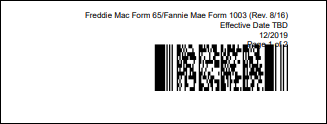
Issue: A user reported an issue where the barcode printed over the
document tagline on the and the Uniform Residential Loan Application and
Uniform Residential Loan Application - Lender Loan Information document (see
example below of barcode partially obscuring the "Page 1 of 2" text). This
issue appeared when using a 2D barcode. |
|
Solution: When generating the URLA with a 2D barcode, the barcode no
longer prints over the footer information, specifically the document
tagline. |
|
Implementation Notes: This defect correction is available in the
April release of Expere Document Services / Hosted Expere. |
| Signature issue resolved in Fannie Mae/Freddie Mac Uniform
Residential Loan Application |
|---|
- Type: Defect
- Reference: PBI 589263
- Compliance Impacts: This item is not a compliance or regulatory issue.
- Documentation Impacts: No documentation impact
|
|
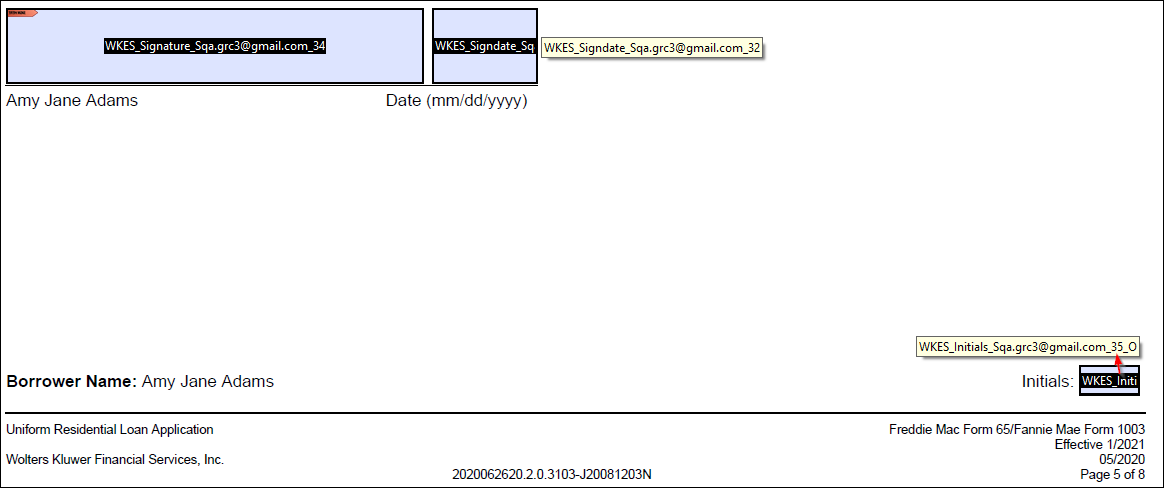
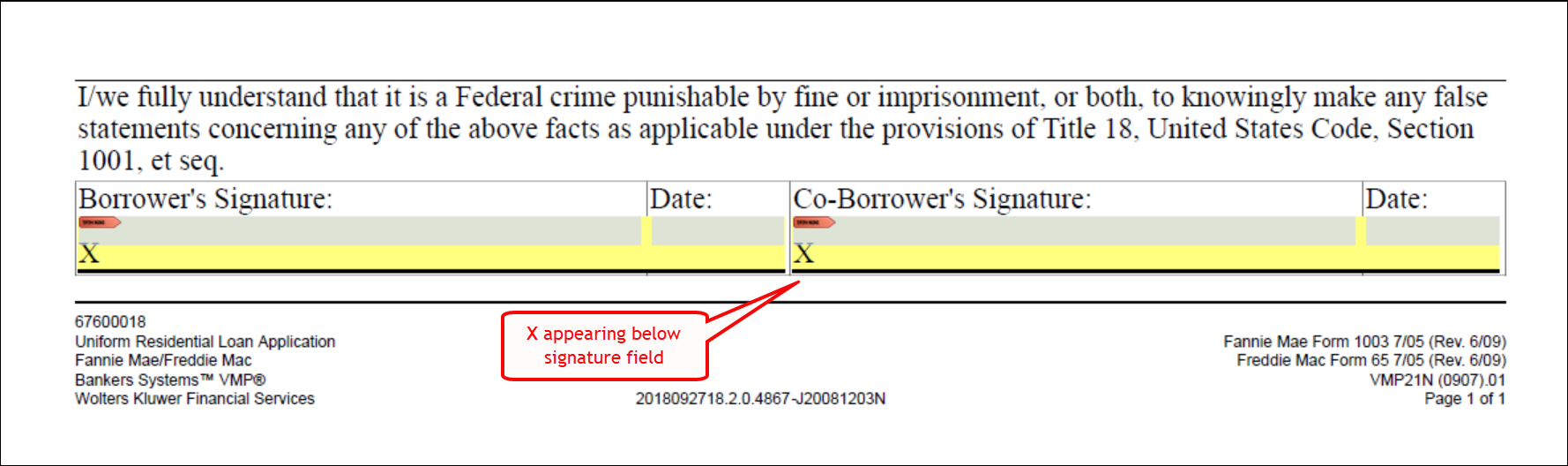
Issue: It was reported that when electronically signing the Fannie
Mae/Freddie Mac Uniform Residential Loan Application, the signature was
appearing above the X on the form (see example below). The correct
behavior should consist of the X appearing to the left of the electronic
signature (Borrower's Signature: and Co-Borrower's Signature) and
Date fields. |
|
Solution: This issue has been resolved; the X now appears to the
left of the electronic signature (Borrower's Signature: and
Co-Borrower's Signature) and Date fields in the Fannie
Mae/Freddie Mac Uniform Residential Loan Application. |
| Implementation Notes: This defect correction is available in the April release of Expere Document Services / Hosted Expere2020 Release One (1) of the Expere Engine. |
| FillableText elements now yield values in
response file |
- Type: Enhancement
- Reference: PBI 604430
- Compliance Impacts: This item is not a compliance or
regulatory issue.
- Documentation Impacts: No documentation impact
|
Summary: Previously in PBI 604497, we updated the Expere Document Services WSDL to include
four new elements in the <FillableText> data type:
<FieldText>,
<HorizontalAlignment>,
<Underline>, and <MultiLine>.
This modification to the WSDL was deployed with our March release. In this
PBI, the response file now returns values for these elements:
<FieldText> (returns a value if text string is
present; if not it will return a "nil" value)<HorizontalAlignment> (values are "left,"
"center," or "right")<Underline> (either "true" or "false"
value)<MultiLine> (either "true" or "false"
value)
|
Technical Notes: The following response file sample displays an
updated <FillableText/> element with new parameters (in
bold):
<r:FillableText>
    <r:FieldName>Lender.FullNameStreetCityStateZip_1</r:FieldName>
    <r:ToolTip>Lender.FullNameStreetCityStateZip_1</r:ToolTip>
    <r:Width>203.22</r:Width>
    <r:Height>40.96997</r:Height>
    <r:XCoordinate>39.98</r:XCoordinate>
    <r:YCoordinate>905.7</r:YCoordinate>
    <r:Sequencing>1</r:Sequencing>
    <r:FontName>Courier</r:FontName>
    <r:FontSize>10.0</r:FontSize>
    <r:NumberOfCharacters>0</r:NumberOfCharacters>
    <r:FieldText>Sample Text</r:FieldText>
    <r:HorizontalAlignment>Left</r:HorizontalAlignment>
    <r:Underline>false</r:Underline>
    <r:PageNumber>1</r:PageNumber>
    <r:MultiLine>true</r:MultiLine>
</r:FillableText>
|
|
Implementation Notes: This enhancement is available in the April
release of Hosted Expere / Expere Document Services. |
March Out of Band
Note: We found an issue when signing through an electronic document. We determined that
resolving the issue prior to the April release was critical in ensuring that our
customers can continue to generate documents without interruption. These changes
will be available after the production deployment on 4/10 from 12:00 am to
4:00 am.
| Wolters Kluwer E-Sign naming convention updated
to sequence numbers |
- Type: Enhancement
- Reference: PBI 612334
- Compliance Impacts: This item is not a compliance or
regulatory issue.
- Documentation Impacts: No documentation impact
|
|
Summary: In a continued effort to support the new Paycheck Protection
Program supported through TSoftPlus offered by the SBA, a new scenario
within Wolters Kluwer E-Sign had been identified. Initial fields offered for
entry prior to eSignature fields caused a sequencing issue where Wolters
Kluwer E-Sign could not apply the initials in the final document. To support
this new scenario, Expere was updated to sequence fillable fields throughout
the document without repeating the same sequence number and incrementing to
ensure proper signing order. |
|
Implementation Notes: This enhancement is available in our February
Out of Band release, scheduled for March 9. |
March
| iText 7 enhancement for use with Duplex ancillary
option |
- Type: Enhancement
- Reference: PBI 592830
- Compliance Impacts: This item is not a compliance or
regulatory issue.
- Documentation Impacts: No documentation impact
|
|
Summary: Previously, Expere utilized iText 5.5; however, we made a
determination that we needed to update our technology to optimize our PDF
rendering. As a result, we have upgraded Expere to utilize iText 7 when
Duplex is applied through the ancillary output options. |
|
Implementation Notes: This enhancement is available in the March
release of Hosted Expere / Expere Document Services. |
| DocDescriptor/DiscreteParty element order
updated |
- Type: Enhancement
- Reference: PBI 604817
- Compliance Impacts: This item is not a compliance or
regulatory issue.
- Documentation Impacts: Expere Document Services Web Services
Guide: DocDescriptor; DiscreteParty
|
Summary: In order to enhance consistency across our Java and .NET
applications, we made the following updates:
- DocDescriptor: the
<LogoSupport/>,
<DocumentList/>, and
<ESignatureDocument/> elements now appear in
this exact order at the bottom of the
<DocDescriptor/> data type.
- DiscreteParty: the
<ForeignAddress/>
element now appears before <BusinessName/> in
the <DiscreteParty/> data type.
|
|
Implementation Notes: This enhancement is available in the April
release of Expere Document Services / Hosted Expere. |
| WSDL updated with new FillableText elements |
|---|
|
Summary: After determining that some inconsistencies existed regarding
fillable text functionality within our Expere products, we have added the
following elements to the <FillableText/> data type in the
Document Generation ServicesExpere Document Services WSDL:
<FieldText><HorizontalAlignment><Underline><MultiLine> Note: The response file will display these elements and populate values in
the April deployment. |
Technical Notes: Sample <FillableText/> element with new parameters (in bold): <r:FillableText>
<r:FieldName>Lender.FullNameStreetCityStateZip_1</r:FieldName>
<r:ToolTip>Lender.FullNameStreetCityStateZip_1</r:ToolTip>
<r:Width>203.22</r:Width>
<r:Height>40.96997</r:Height>
<r:XCoordinate>39.98</r:XCoordinate>
<r:YCoordinate>905.7</r:YCoordinate>
<r:Sequencing>1</r:Sequencing>
<r:FontName>Courier</r:FontName>
<r:FontSize>10.0</r:FontSize>
<r:NumberOfCharacters>0</r:NumberOfCharacters>
<r:FieldText>Sample Text</r:FieldText>
<r:HorizontalAlignment>Left</r:HorizontalAlignment>
<r:Underline>false</r:Underline>
<r:PageNumber>1</r:PageNumber>
<r:MultiLine>true</r:MultiLine>
</r:FillableText>
|
|
Implementation Notes: This enhancement is available in the March release of Expere Document Services /
Hosted Expere2020 Release Two (2) of
Document Generation Services. |
| eSignature field enhancement for URLA
Continuation Sheet |
- Type: Enhancement
- Reference: PBI 598270
- Compliance Impacts: This item is not a compliance or
regulatory issue.
- Documentation Impacts: No documentation impact
|
|
Summary: A user reported that the eSignature fields on the second
page of the continuation sheet did not allow for any actual eSignatures.
Typically in Adobe Acrobat, eSignature fields are highlighted in blue; the
screen shot below displays the second page of the continuation page without
the presence of eSignature fields for Borrower's Signature,
Co-Borrower's Signature as well as the corresponding Date fields. We have enhanced this functionality; eSignatures are properly created
on all signature areas of the URLA continuation sheet. |
|
Implementation Notes: This enhancement is available in the March
release of Expere Document Services / Hosted Expere. |
Response file enhanced to better handle NumberOfCharacters element |
|---|
- Type: Enhancement
- Reference: PBI 588517
- Compliance Impacts: This item is not a compliance or regulatory issue.
- Documentation Impacts: No documentation impact
|
Summary: It was reported that the NumberOfCharacters
element was returning a value of ‘0’ in the Expere Response, when a value was
not authored in content. Returning a value of ‘0’ could result in a signing
software inappropriately restricting data entry in fillable fieldsWe have updated our functionality to return
a ‘nil’ value for the NumberOfCharacters element in the
Expere Response, when one is not authored. We have updated our response to not include NumberOfCharacters in the
response, when a value has not been authored in the content. Sample
reponse before enhancement:
<r:FillableFieldSet>
    <r:FillableText>
        <r:Id>*</r:Id>
        <r:EmailAddress>*</r:EmailAddress>
        <r:FieldName>Field3</r:FieldName>
        <r:ToolTip>Field3</r:ToolTip>
        <r:Width>547.2</r:Width>
        <r:Height>40.0</r:Height>
        <r:XCoordinate>37.0</r:XCoordinate>
        <r:YCoordinate>510.32</r:YCoordinate>
        <r:FontName>ArialMT</r:FontName>
        <r:FontSize>10.0</r:FontSize>
        <r:NumberOfCharacters>0</r:NumberOfCharacters>
        <r:FieldText/>
        <r:HorizontalAlignment>Left</r:HorizontalAlignment>
        <r:Underline>false</r:Underline>
        <r:PageNumber>1</r:PageNumber>
        <r:MultiLine>true</r:MultiLine>
    </r:FillableText>
</r:FillableFieldSet>

</r:FillableFieldSet>
We
have updated our functionality to enhance thie behavior: if no content is
added to either the ToolTip or
NumberOfCharacters elements, neither element appears in
the response file. |
|
Implementation Notes: This enhancement is available in the 2020 Release Two (2) of Document Generation
ServicesMarch release of Expere
Document Services / Hosted Expere. |
| Response now includes all fillable checkboxes
with GroupID's |
|
|
|
Summary: We have enhanced the functionality concerning the use of
GroupID's and fillable checkboxes: the Expere response file now includes all
fillable checkboxes that contain GroupID's with their corresponding XY
coordinates. Previously, the generated PDF document contained the created
radio buttons and the corresponding XY coordinates for the first fillable
checkbox of the group. When fillable checkboxes are authored in the REQ
with a GroupID, and the request is for eSignature and Field Support with
NonSignatureFieldCoordinatesOnly set to ‘True’:
- The Radio button grouping is named using the GroupID
- The response includes ALL radio button options with XY Coordinates
for each radio button option, as well as the GroupID.
|
Technical Notes: Sample Expere response
below:<r:FillableCheckbox>
<r:Id>BorrID</r:Id>
<r:EmailAddress>test@email.com</r:EmailAddress>
<r:FieldName>yes</r:FieldName>
<r:ToolTip>yes</r:ToolTip>
<r:Checked>true</r:Checked>
<r:PageNumber>1</r:PageNumber>
<r:XCoordinate>154.29</r:XCoordinate>
<r:YCoordinate>661.22</r:YCoordinate>
<r:GroupID>Group1</r:GroupID>
<r:Mandatory>No</r:Mandatory>
|
|
Implementation Notes: This feature is available in the 2020 Release One (1) of the Expere EngineFebruary release of Expere Document Services
/ Hosted Expere. |
February - Out of Band
Note: We found that our ongoing iText upgrades were causing some transactions to fail.
We determined that resolving the issue prior to the March release was critical in
ensuring that our customers can continue to generate documents without interruption.
These changes will be available after the production deployment on 2/25 at
10:00 pm.
| Intermittent transaction failures
resolved |
- Type: Enhancement
- Reference: PBI 605233
- Compliance Impacts: This item is not a compliance or
regulatory issue.
- Documentation Impacts: No documentation impact
|
|
Summary: After our update to production on 2/21, internal monitoring
discovered that some transactions were periodically failing. It was
determined that our ongoing efforts to upgrade iText from 5.5 to 7, and
using both versions simultaneously, was the source of these failed
transactions. We have updated Expere to better accommodate utilizing both
versions of iText. As a result, until all Expere components using iText
are upgraded to version 7, the PDF will indicate an APGL license, but
the Wolter Kluwer license still applies. |
|
Implementation Notes: This enhancement is available in our February
Out of Band release, scheduled for February 25. |
February
| OPPSA printing behavior enhanced |
|---|
- Type: Defect
- Reference: PBI 592245
- Compliance Impacts: This item is not a compliance or regulatory issue.
- Documentation Impacts: No documentation impact
|
|
Issue: A customer reported that when sending an Expere request with
multiple accounts, OPPSA data appeared multiple times on the Reg E -
Disclosure and Limits and Fees documents when the data should
have appeared only once. After internal research, it was determined that an
issue existed with the Expere Engine. |
| Solution: The Expere Engine has been updated so that OPPSA data appears only once unless otherwise specified. |
|
Implementation Notes: This defect correction is available in the January release of Expere
Document Services
requires a 2020 Release One Expere Engine update.
. |
| "&" symbol now allowed in certain elements |
|---|
- Type: Enhancement
- Reference: PBI 599080
- Compliance Impacts: This item is not a compliance or regulatory issue.
- Documentation Impacts: No documentation impact
|
Summary: A customer reported failed transactions; after internal
analysis, it was determined that the "&" character in the Mailing Address 2
line (<MailingAddressStreetAddr2>Test & Business name
</MailingAddressStreetAddr2>) was causing this particular
transaction to fail. This behavior has been enhanced. We have updated Expere
to escape the "&" when it is submitted in a request; Expere now
serializes this special character and returns it in the response file
successfully. |
|
Implementation Notes: This enhancement is available in the February release of Expere Document Services /
Hosted Expere2020 Release One (1) of the Expere
Engine. |
| Fillable field/checkbox size modified with dynamic
documents |
|---|
- Type: Enhancement
- Reference: PBI 595023
- Compliance Impacts: This item is not a compliance or regulatory issue.
- Documentation Impacts: No documentation impact
|
|
Summary: A customer reported that the size of our fillable checkboxes
were smaller than its non-fillable counterpart for dynamic documents;
subsequently, issues occurred in their scanning process. After internal
assessment, it was determined that Expere was decreasing the size of checkboxes
when making them fillable. As a result, we have enhanced the size of our
fillable fields and checkboxes to match those of their non-fillable
counterparts. |
| Implementation Notes: This enhancement is available in the 2020 Release One (1) of the Expere EngineFebruary release of Expere Document Services / Hosted Expere2020 Release Two (2) of Document Generation Services. |
| iText 7 enhancement for use with ancillary options |
|---|
- Type: Enhancement
- Reference: PBI 588118 / 592823 / 592830
- Compliance Impacts: This item is not a compliance or regulatory issue.
- Documentation Impacts: No documentation impact
|
Summary: Previously, Expere utilized iText 5.5; however, we made a
determination that we needed to update our technology to optimize our PDF
rendering. As a result, we have upgraded Expere to utilize iText 7 with the
following ancillary options:
- Barcodes
- Watermarks
- Duplex
|
|
Implementation Notes: This enhancement is available in the 2020 Release One (1) of the Expere EngineFebruary release of Expere Document Services /
Hosted Expere. |
| Additional guidance provided for using mutually exclusive checkboxes and GroupID's |
|---|
|
| Summary: We have added supplemental guidance on using mutually exclusive checkboxes and GroupID's, consisting of various scenarios and code sample. Please refer to the link above for more information. |
| Implementation Notes: This enhancement is available in the February deployment of Expere Document Services / Hosted ExpereExpere Engine 2020 Release One (1). |
January
| Default document margin behavior enhanced for use with barcodes |
|---|
- Type: Enhancement
- Reference: PBI 591870
- Compliance Impacts: This item is not a compliance or regulatory issue.
- Documentation Impacts: No documentation impact
|
|
Summary: It was reported that when a document (.REQ file) did not contain
predefined margins and utilized a barcode in the tagline, the barcode appeared
over the tagline information. As a result, Expere now uses .5 inch default
document margins when they have not been authored in the document and when
using either barcodes or logos. Note the following:
- If all margins have been defined, Expere will honor the defined
margins in the document.
- If some, but not all, margins have been defined, Expere will honor
the defined margins and set the remaining margins to .5 inches.
|
|
Implementation Notes: This enhancement is available in the 2020 Release One (1) of the Expere EngineJanuary release of Expere Document Services /
Hosted Expere. |
| Document retry behavior enhanced between Expere
Document Services and Document Generation Services |
- Type: Enhancement
- Reference: PBI 589821
- Compliance Impacts: This item is not a compliance or
regulatory issue.
- Documentation Impacts: No documentation impact
|
|
Summary: A customer initially reported that a hosted Expere
transaction failed. After performing additional research and investigation,
it was determined that a unique timing issue occurred between Expere
Document Services (EDS) and our document library/queuing platform, Document
Generation Services (DGS). Specifically, EDS requested the documents from
DGS but because the documents were not yet saved to the database, no
documents were returned. As a result, EDS failed to return the documents in
the response to the customer and failed the transaction. We have updated
EDS to implement new retry logic; which will now attempt three retries
before failing the EDS response. |
|
Implementation Notes: This enhancement is available in the January
release of Hosted Expere / Expere Document Services. |