Manage Library
The library includes custom and default tasks and decisions.
- Custom tasks and decisions can be added, edited, and removed.
- Default tasks and decisions are added by Wolters Kluwer and cannot be changed or deleted.
- Shared tasks from other lines of businesses will be visible in both Custom and Default tasks that do not include integrated tasks.
Task Library
To access open the task library, select  and Manage Custom Tasks.
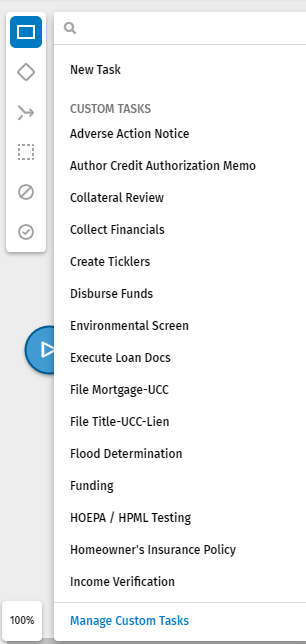
Edit a Custom Task in the Library
- Open the library.
- Hover over the task and select
 .
. 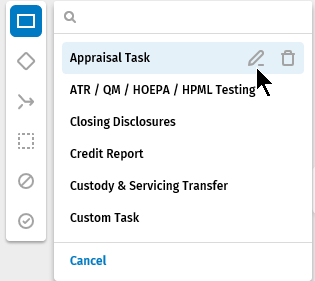
- Make the changes in the Edit library task properties pane
and select Update.Note: After editing the custom task, templates created with the edited task will include the changes made to the task. Previously created templates using the task will include the properties previously used for the task, not the current changes.
Delete a Custom Task in the Library
- Open the library.
- Hover over the task and select
 .
. 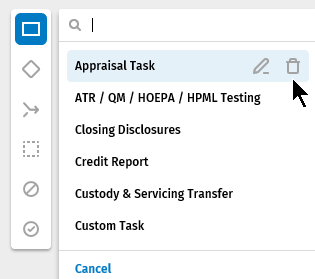
- Select Delete to confirm the removal.
Decision Library
To access open the decision library, select  and Manage Custom Tasks.
Edit a Custom Decision in the Library
- Open the library.
- Hover over the task and select .
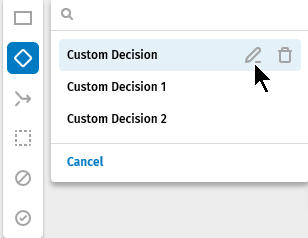
- Make the changes in the properties pane and select
Update.Note: After editing the custom decision, templates created with the edited decision will include the changes made to the decision. Previously created templates using the decision will include the properties previously used for the decision, not the current changes.
Delete a Custom Decision in the Library
- Open the library.
- Hover over the decision and select .
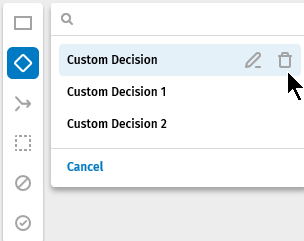
- Select Delete to confirm the removal.