The Account Agreement - Safe Deposit Box Lease Policy conversion is slightly more complex
than other policies.
First of all, if performing multiple conversions/imports for Policies, you must run the
Form Setup Policies conversion prior to the Account Agreement - Safe Deposit Box Lease
(SDBL) Policy. The policies may be converted in the same group or the Form Setup
Policies can be converted first. Doing so ensures the moved data items correctly convert
to the new locations.
Note: If you do not have a Form Setup policy converting from OPPSA,
you must create an Account Document Setup and a Document Setup policy
in EZ Config Default Data prior to converting the Account Agreement - Safe Deposit
Box Lease policy. Failing to do would will prevent some of the data within the
Account Agreement - Safe Deposit Box Lease policy from converting properly. After
converting the Account Agreement - Safe Deposit Box Lease policy, associate the
Account Document Setup and Document Setup policies to the appropriate
products.
Also note that data from this policy may be converted in one of the following manners:
- Moved to the corresponding Organization
- Moved to all Document Setup Policies
- Moved to all Account Document Setup Policies
- Not Converted
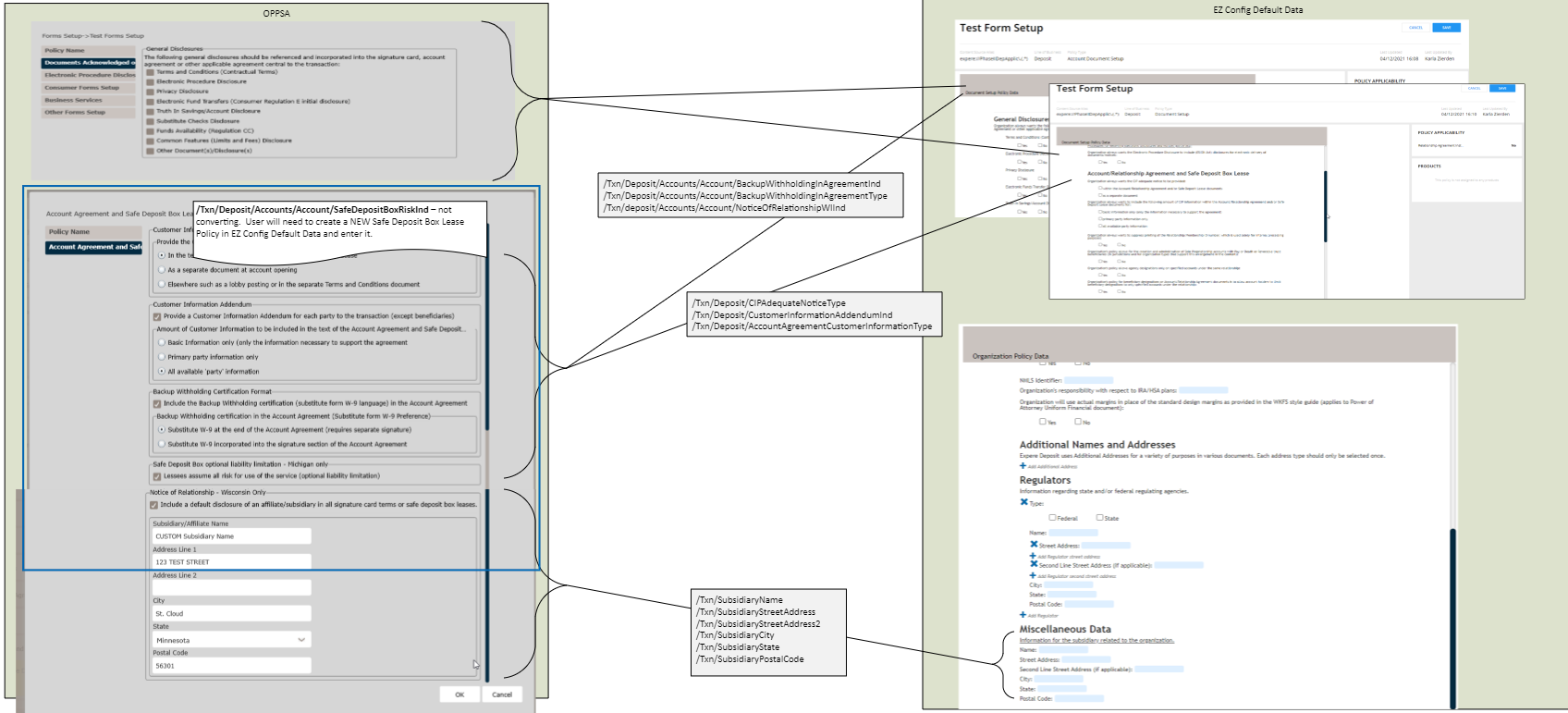
The following data items from the Account Agreement and Safe Deposit Box Lease Policy are
moved to alternate locations when converted into EZ Config Default Data, as defined
below.
Note: After conversion, review all the values to ensure your Policies are set up
as intended. These values are placed into ALL Document Setup and ALL Account
Document Setup policies, so verify those policies to ensure the data points are as
you expect.
Data Moved to Corresponding Organization
The following data items from the Account Agreement and Safe Deposit Box Lease policy in
OPPSA are moved to the Organization (based on the Alias specified in the Conversion
dropdown field and the name in the oppsaOrganizationName response from Expere) in EZ
Config Default Data.
If the Organization and/or Policies are not created within EZ Config Default Data, the
conversion will NOT convert the policy nor move the data. The "Policy Not Created - Data
Not Moved" message is provided.
Note: If the xpath does not exist in the OPPSA export
(Expere removes any blank values for oppsaOrganizationName), the data items are
ignored.
/Txn/SubsidiaryName
/Txn/SubsidiaryStreetAddress
/Txn/SubsidiaryStreetAddress2
/Txn/SubsidiaryCity
/Txn/SubsidiaryState
/Txn/SubsidiaryPostalCode
Data Moved to ALL Document Setup Policies (for the Account/Alias/LOB)
The following data items from the Account Agreement and Safe Deposit Box Lease policy are
moved to ALL Document Setup Policies for the Account/Alias/LOB.
Note: If the xpath does
not exist in the OPPSA export, the data items are ignored.
/Txn/Deposit/CIPAdequateNoticeType
/Txn/Deposit/CustomerInformationAddendumInd
/Txn/Deposit/AccountAgreementCustomerInformationType
Data Moved to All Account Document Setup Policies (for the Account/Alias/LOB)
The following data items from the Account Agreement and Safe Deposit Box Lease policy are
moved to ALL Account Document Setup Policies for the Account/Alias/LOB.
Note: If the
xpath does not exist in the OPPSA export, the data items are ignored.
/Txn/Deposit/Accounts/Account/BackupWithholdingInAgreementInd
/Txn/Deposit/Accounts/Account/BackupWithholdingInAgreementType
Data NOT Converted
/Txn/Deposit/Accounts/Account/SafeDepositBoxRiskInd
/Txn/Deposit/Accounts/Account/NoticeOfRelationshipWIInd
Note: You must create your own Safe Deposit Box Lease Policy if you wish to use these data
items.
Refer to Appendix A: All Data Conversion Exceptions for a list of all data
conversion exceptions.