Data Exceptions
Data Point Migration Notes
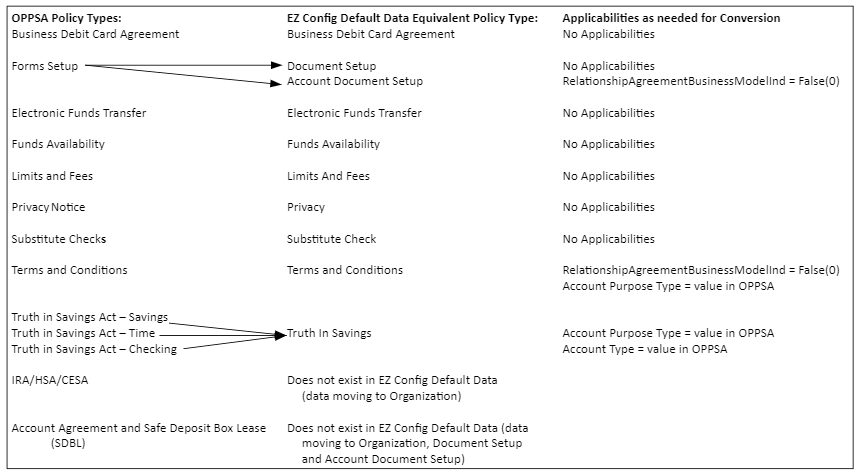
In some instances, the data items from OPPSA and the data items within EZ Config Default Data are not a one-to-one match. As a result, the data from OPPSA may not align precisely with the data within EZ Config Default Data. The following image provides an illustration of how OPPSA Policy data converts into EZ Config Default Data Policy data.
Policy Not
Created - Data Not Moved- Data that does not convert because there is no equivalent data value within EZ Config Default Data Data Not Converted
- Data that does not convert and requires user updates.Data Not Converted
- Data points that moved from a Policy Type to Organizations within EZ Config Default Data.
- Data points from one Policy Type that move to multiple Policy Types within EZ Config Default Data.
Note that Regulator data points are assumed to be the same as they were within OPPSA. Review those values in the Organization after the conversion is completed to ensure their accuracy.
Some data points within the Safe Deposit Box Lease Agreement Policy type move to the Document Setup or the Account Document Setup Policy in EZ Config Default Data. Safe Deposit Box Lease Policy
- /Txn/Deposit/Accounts/Account/EarningsDetailType
Refer to Appendix A: All Data Conversion Exceptions for a list of all data conversion exceptions.
Refer to Appendix B: Data Items Not Converting for a list of all data items that are not included in the conversion process.