Authoring Static REQ Files
A static requirement file, or static document, is written and prepared in advance for particular processes or lending transactions. Static documents are created with specific content in a fixed format with compliance content that does not change with each transaction.
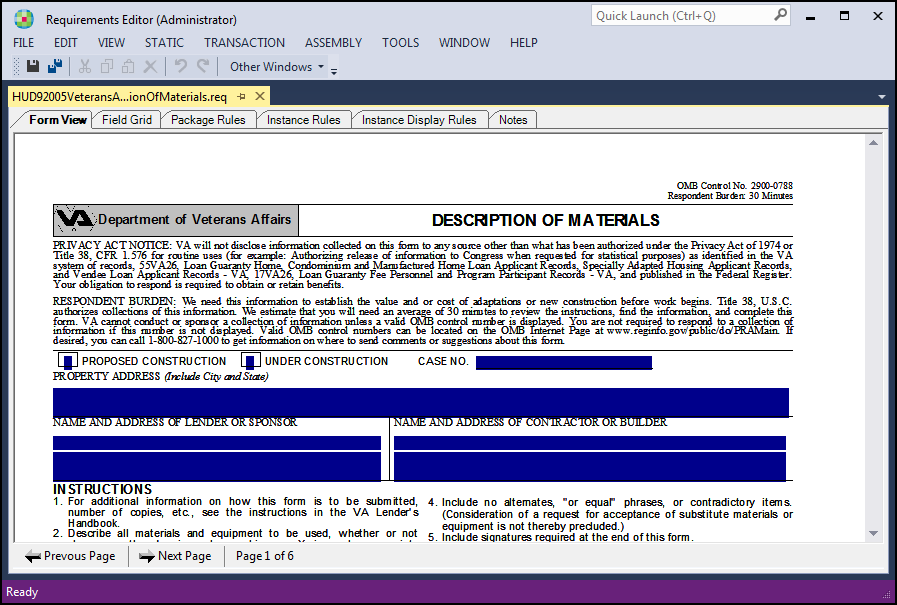
In a pure static model, static content is brought into the Requirements Editor through an XTemplate (layout-driven) image. Data fields are in a fixed position; if the same data is required in more than one place, the data field is positioned in each of those places. Data populates the data fields at runtime and any discrepancy between transaction data received and the properties of the fixed data fields is handled by overflow rules including overflow to a target (an addendum, for example). Other mechanisms to accommodate data overflow include truncated text and reduced font size.
- Defined input fields
- Calculations
- Validations
- Links to instruction sheets
- Intelligent data merge
- Overflow for handling Signatures or specific data fields
In a static document, check boxes and empty text fields that must be completed during each transaction appear on the documents with data that is typically entered by completing prompts during document preparation. If not populated during document preparations, the static documents can be printed with blank values or non-filled check boxes and text fields.