Saving a Static Document as Dynamic
A static requirements document can be saved as a dynamic document. This is particularly helpful when needing to author the content of the document for ADA compliance.
When saving as a dynamic document, the following are retained:
- all PTR rules (including instancing and package rules)
- all text of the document
- all fields
- all bitmap images
Note: Only textual content can be saved during this process. All formatting for
the document must be reconstructed.
To save as a dynamic document:
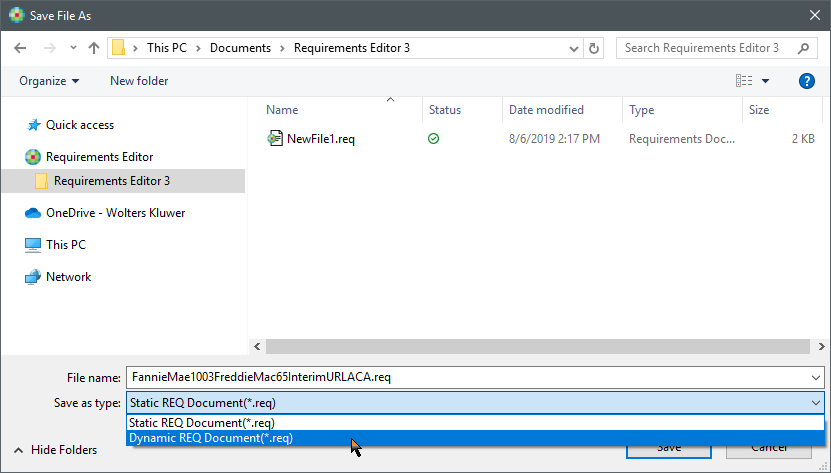
- With the static document open, select . The Save File As window is displayed.
- In File name, enter a new filename for the dynamic document.
-
From the Save as type list, select Dynamic REQ Document.
-
Select Save. The Document Properties window is displayed.
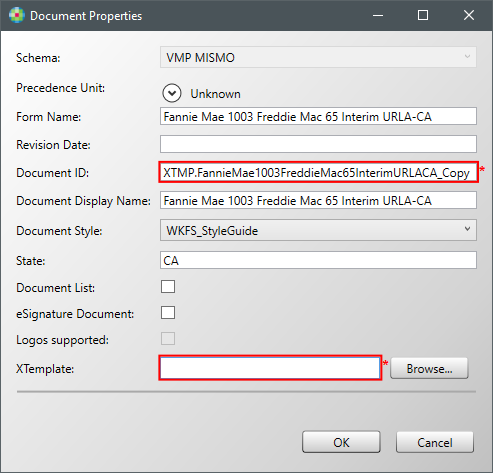
Note:- The Document ID and XTemplate are highlighted with a red border to prompt you to compelte them.
- The Document ID is prepopulated with the ID from the source document, appended with "_Copy" to prevent duplicate IDs.
-
Edit the Document ID and select an XTemplate and select OK
to create the document.
The new dynamic document is created and displayed within Requirements Editor.