Manage Libraries
The Manage Libraries page allows users to deploy new libraries, assign Account ID's to libraries, and view details for a particular library.
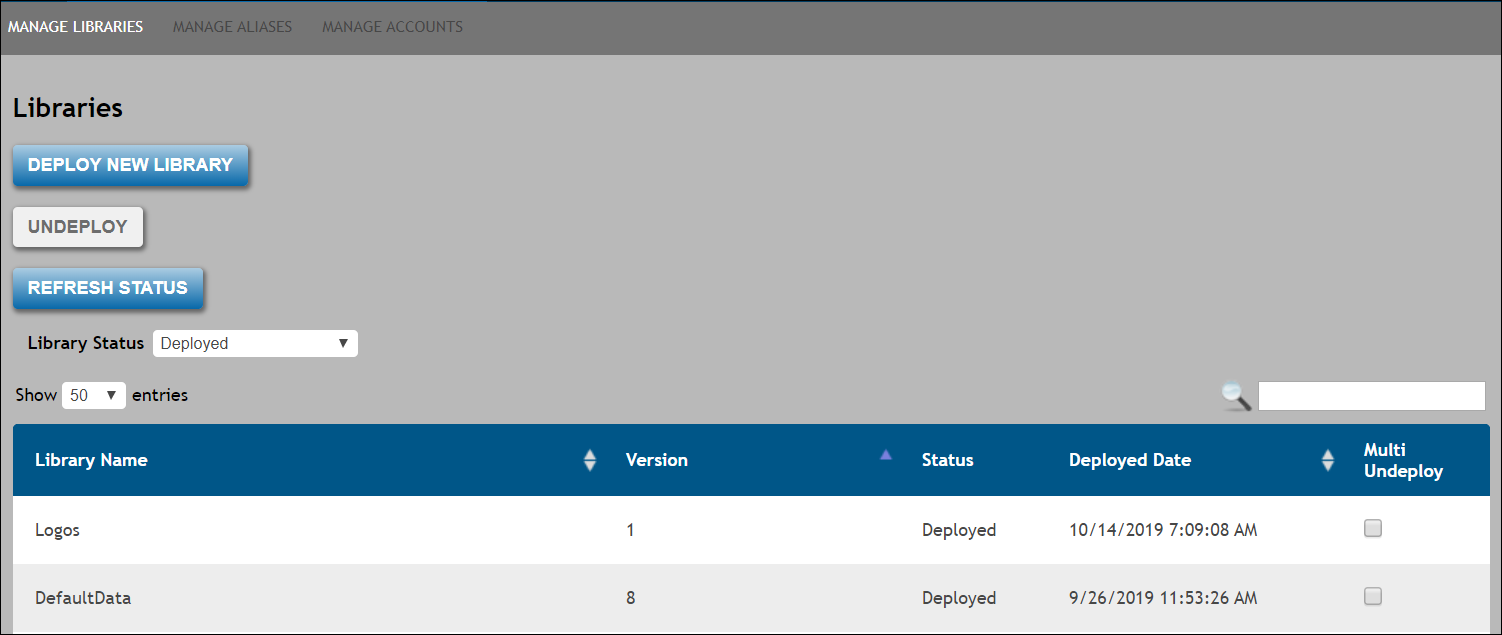
From the main page you can perform any of the following:
To refresh the list of deployed libraries, click the Refresh Status button.
Page Overview
Upon accessing the Manage Libraries screen, a list of recently viewed/accessed libraries appears in table format. The table contains the following columns:
- Library name; the name of the library.
- Version; the version of the library.
- Status; one of the following statuses:
- QueuedforDeployment: The library status has been placed in state where it will be deployed. As libraries will rarely take up to 24 hours to deploy, if a library is still in a QuenedforDeployment state after 24 hours, it likely means that an issue exists with the library. Users can utilize the Cancel option at that time.
- Deploying: the library is currently being deployed. As libraries will rarely take up to 24 hours to deploy, if a library is still in a Deploying state after 24 hours, it likely means that an issue exists with the library. Users can utilize the Cancel option at that time.
- Deployed: the library is deployed and available for use
- QueuedforRemoval: the library has been placed in a state where the system will remove it. Once the backend system starts the removal process, it changes the status of the library to Removing
- Removing: the library is currently being removed; upon completion, the library status will appear as Removed.
- FailedDeployment: this status appears if an error occurs at any point during the library deployment process
- Removed: this is the final status of the library removal process upon completion.
- Deployed Date; the date the library was deployed.
- Multi Undeploy; select a checkbox next to the desired library(ies) to remove.