Recipients
The Recipients pane includes the name and party information for all parties that may be
required to sign the documents. The suggested approach to assigning recipients is to
select all potential recipients; by default all recipients are presented on the
recipients list as selected. Upon the package submission, if a party is not going to
sign the package then SmartSign Plus system automatically removes (drops) the recipients
who are not signers on the selected package.
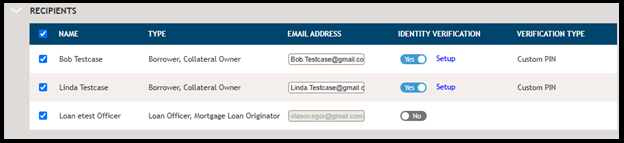
The recipient name and email address are brought into the recipients pane through information entered in other areas of the application. On this page, the email address can be edited; however, any changes to emal address applied on this page do not get updated in other areas of the application. A recipient, and mailing address, must be associated with a signer for the package. If the recipient or mailing address is not releated to a signer, they should be removed.
When the Electronic Fulfillment option is selected, the identity verification and type
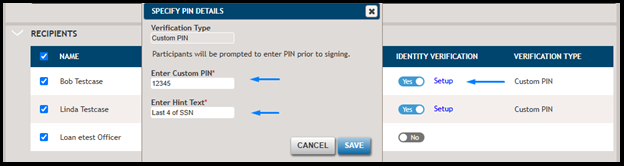
options are available. The verification method is to define a custom PIN that the
recipient must enter to access the document for electronic signature in the SmartSign
Plus signing room. The verification type will show Not Set if the identity
verification option is set to Yes but the verification type has not been defined.
Note:
The PIN can contain
any combination of letters and numbers. It must include between 1-30 characters.