Creating a Policy
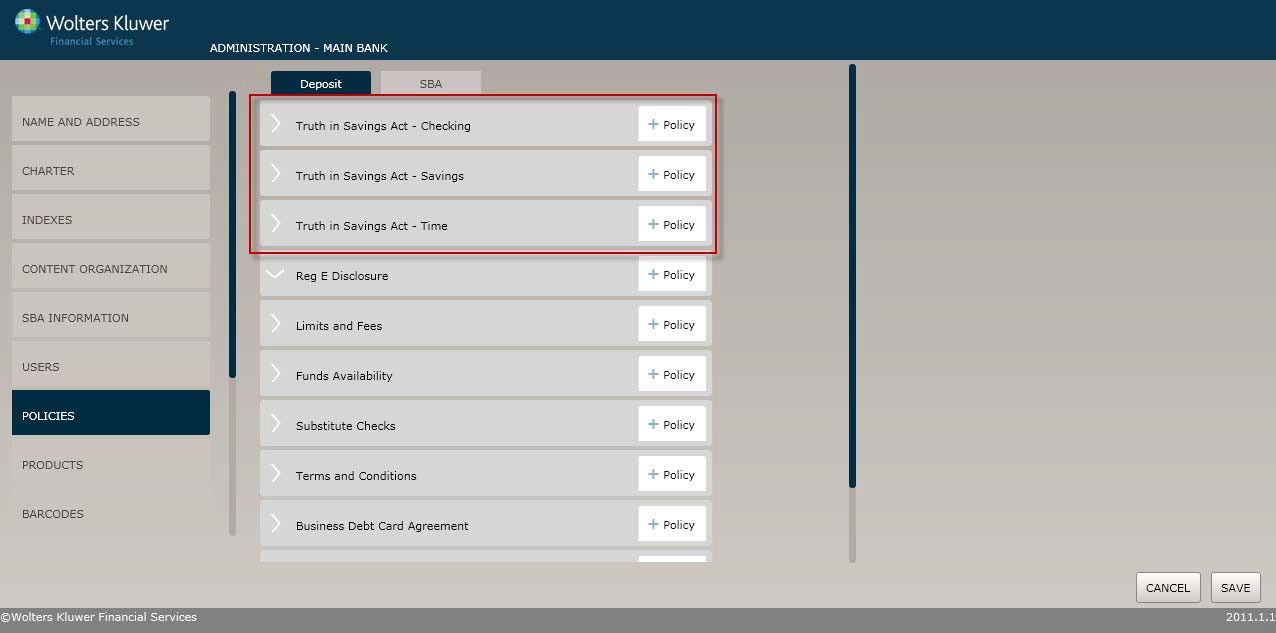
To create a new Truth-in-Savings policy, select the Policies menu option and click the Policy button for one of the following:
- Truth in Savings - Checking
- Truth in Savings – Savings
- Truth in Savings– Time
Before You Begin: Saving Your Changes
Click the OK button at any time to save the policy information and make it available to OPPSA users; however, keep in mind that the policy will close and save the information when you click OK. You will have to go to the menu page and open the policy again to make additional changes.
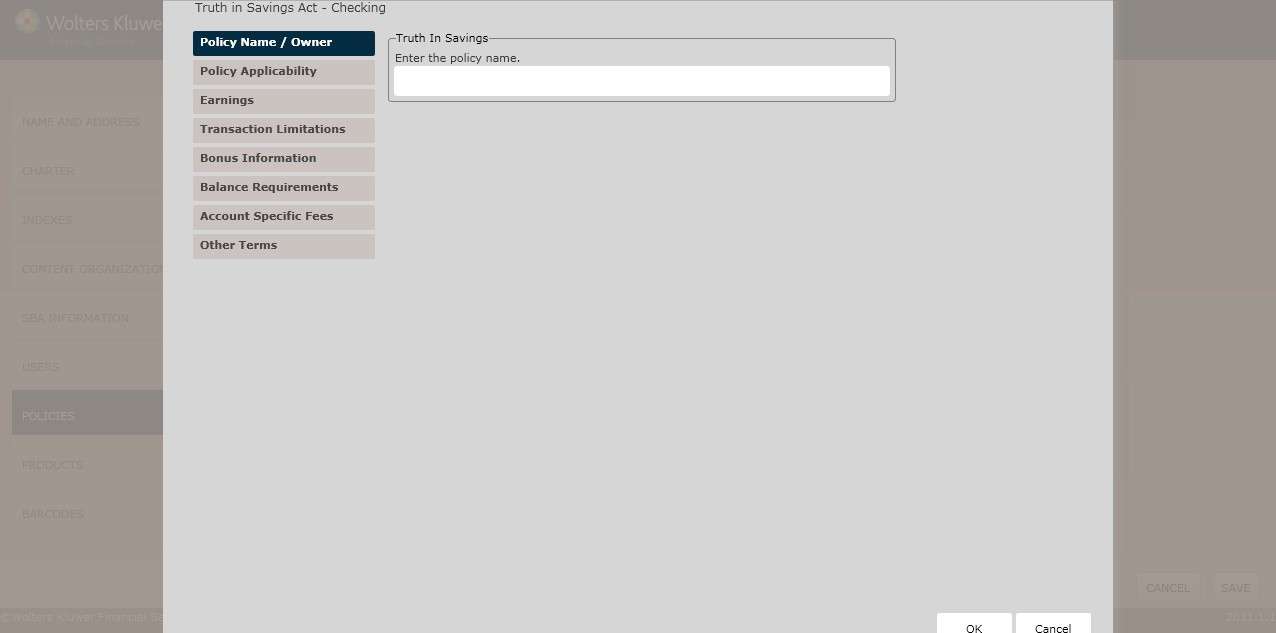
Policy Name / Owner page
Enter the policy name. The Policy Name / Owner page appears by default. Complete this page and then click the option immediately under Policy Name / Owner, in this case Policy Applicability.
Policy Applicability page
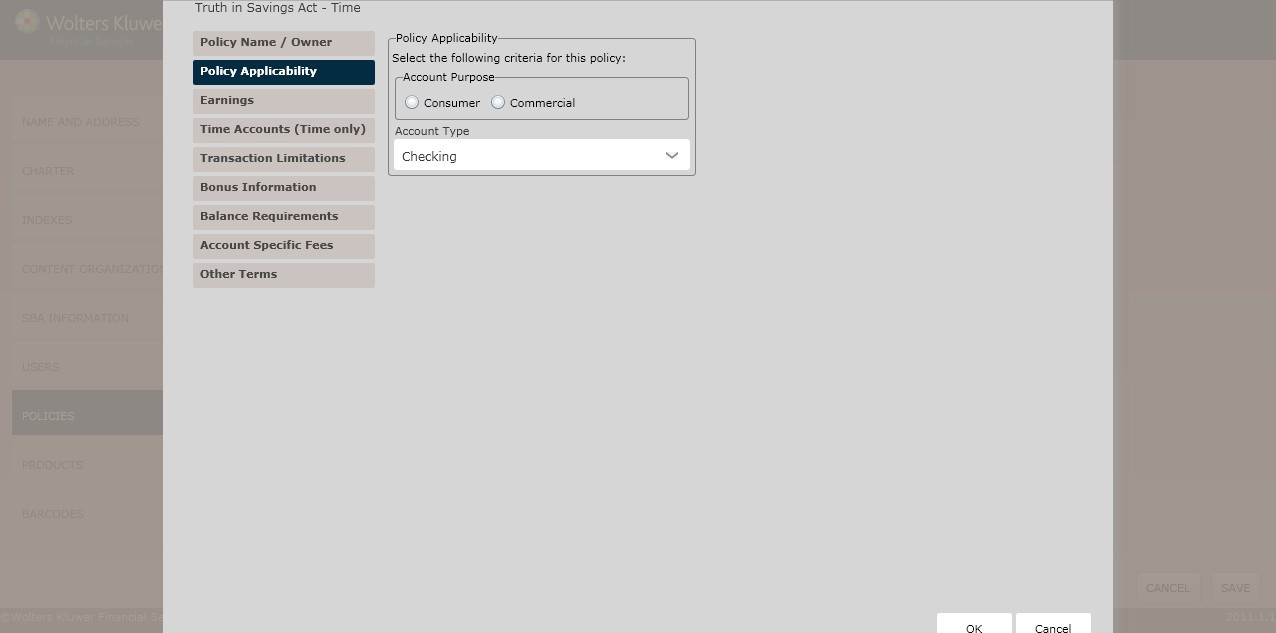
Select the account purpose:
- Consumer; to use this policy for IRA and HSA accounts, click the This policy may also be used for IRAs and HSAs checkbox.
- Commercial; select the account type:
- Checking (*if choosing a checking account policy type and consumer, commercial, or IRA/HSA account purpose)
- Deposit Policy Setup:
- Money Market (*if
choosing savings account policy type and consumer,
commercial, or IRA/HSA account purpose)
- Savings (*if choosing a savings account policy type and consumer, commercial, or IRA/HSA account purpose)
- Time (*if choosing a time account policy type and consumer, commercial, or IRA/HSA account purpose)
- Club (*if choosing a
time or savings account policy type and consumer
account purpose)
- ETA (SM) (*if choosing a checking or savings account policy type and consumer account purpose)
- Basic Banking (NY Only) (*if choosing a checking account policy type and consumer account purpose)
- Money Market (*if
choosing savings account policy type and consumer,
commercial, or IRA/HSA account purpose)
Earnings page
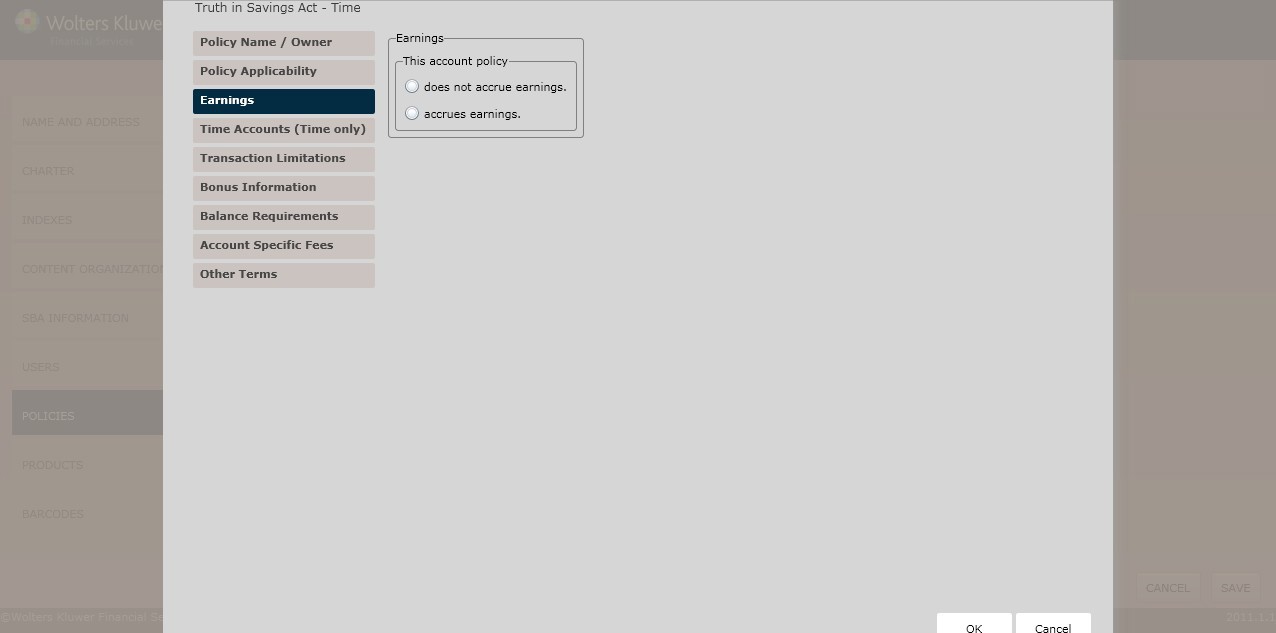
Select one of the following:
- Does not accrue earnings
- Accrues earnings
Rate Type
Determine the Rate Type by selecting one of the following:
- Fixed (*default)
- Determine the Rate Structure by selecting one of the following:
- Single; enter the APY and Rate in the Single Rate section.
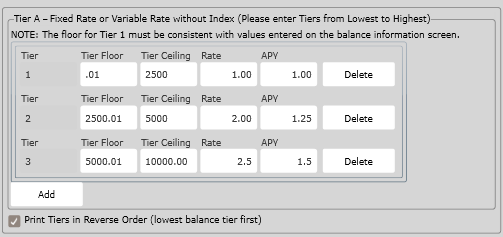
- Tier A; enter tier information in the Tier A – Fixed Rate or Variable Rate without Index section.
- Tier B; enter tier information in the Tier B – Fixed Rate or Variable Rate without Index section
- Stepped; enter the stepped information in the Stepped Rate section.
- Exchange; enter the exchange information in the Exchange Rate section.
- Determine the Rate Structure by selecting one of the following:
- Variable
- To tie the rate to an index, click The rate is tied to an index checkbox.
- Determine the Rate Structure. See Fixed above for more information.
Rate Information
Select one of the following from the Compounding Frequency dropdown box:
- Daily
- Weekly
- Bi-weekly
- Monthly
- Quarterly
- Semi-annually
- Annually
- Continuous
- No compounding/simple
- Semimonthly
Select one of the following from the Crediting Frequency dropdown box:
- Daily
- Weekly
- Bi-weekly
- Monthly
- Semi-monthly
- Quarterly
- Semi-annually
- Annually
- At maturity
Deposit Policy Setup
By default, Tier information will appear on the PDF in highest to lowest order. To display Tier information in lowest to highest order, select ‘Print Tiers in Reverse Order (lowest balance tier first)’ checkbox.
General Policy for Payment of Earnings
To determine a payment of earnings policy, select one of the following from the General Policy for Payment of Earnings section:
- Adding it to the account balance
- If necessary, click the If this account is closed before a crediting date, the account holder will forfeit any accrued, but uncredited earnings checkbox.
- Crediting it to another balance
- If necessary, click the Credited earnings are required to be withdrawn and cannot be added to the account balance checkbox.
- If necessary, click the If this accounts closed before a crediting date, the account holder will forfeit any accrued, but uncredited earnings checkbox.
- Mailed by check
- If necessary, click the Credited earnings are required to be withdrawn and cannot be added to the account balance checkbox.
If necessary, click the If this accounts closed before a crediting date, the account holder will forfeit any accrued, but uncredited earnings checkbox.
If selecting Variable frequency rate and a particular Compounding Frequency, the Variable Rate Information section appears. Select one of the following Rate Change Frequency options:
- Daily
- Weekly
- Every Other Week
- Monthly
- Quarterly
- Semiannually
- Annually
- At any time
To establish a Floor, click the corresponding checkbox. Enter the lowest rate applicable in the corresponding field.
To establish a Ceiling, click the corresponding checkbox. Enter the highest rate applicable in the corresponding field.
To specify that an Initial Rate Applies, click the corresponding checkbox.
- To establish a Fixed Rate Type, click the corresponding checkbox. Enter the rate in the Fixed Initial Rate text box.
- Enter a rate in the Initial Rate field.
- Enter a rate term in the Initial Rate Term field. Select one of the following:
- Day(s)
- Month(s)
- Week(s)
- Year(s)
Determine if a Periodic Rate Change Limit Applies by clicking the corresponding checkbox.
- Enter a Periodic Rate Change Limit in the corresponding text box.
- Enter a Periodic Rate Change Term in the corresponding text box. Select one of the following:
- Day(s)
- Month(s)
- Week(s)
- Year(s)
To determine Single Rate information, provide information in the following fields:
- APY
- Rate
Balance Computation Method
In the Balance Computation Method section, select the method used to determine the balance on which earnings are paid:
- Daily Balance
- Average Daily Balance
To determine the method used to determine the balance on which earnings are paid, click Other; enter the following:
- Balance Computation Method Name
- Enter the method in the corresponding text box.
Noncash Deposits
In the Noncash Deposits section, determine when a noncash item will accrue earnings after being deposited. Select one of the following:
- Day of Deposit
- First Business Day After Deposit
- Business Day Receive Credit
- Other
Early Withdrawal Penalty
(*If selecting a Savings Account)Determine how the Early Withdrawal Penalty by selecting one of the following:
- No penalty applies because principal withdrawals are strictly prohibited within seven days of the deposit and any other permitted withdrawals are without penalty (*default)
- An early withdrawal penalty may/will be imposed
- Determine if The penalty may/will be imposed by selecting one of the following:
- The penalty may be imposed; select the penalty criteria by selecting one of the following:
- Specific Value; enter the value in the corresponding field.
- Amount Withdrawn; in The early withdrawal penalty amount is equal to section,select one of the following:
- One, three,or six months earnings; select one of the following:
- Seven days’ earnings if the withdrawal is made within the first six days after deposit
- The greater of all earnings on the amount withdrawn or seven days' earnings on the amount withdrawn
- Other
- The penalty will be imposed; select the penalty criteria by selecting one of the following:
- Specific Value; enter the value in the corresponding field.
- Amount Withdrawn; in The early withdrawal penalty amount is equal to section, select one of the following:
- One, three,or six months earnings;select one of the following:
- Seven days’ earnings if the withdrawal is made within the first six days after deposit
- The greater of all earnings on the amount withdrawn or seven days’ earnings on the amount withdrawn
- Other
- If selecting the An early withdrawal penalty may/will be imposed option button, determine if the rate used to calculate the early withdrawal penalty is one of the following in the Early Withdrawal Penalties – Variable Rate Accounts section:
- The rate in effect at the time of withdrawal
- The rate in effect at the beginning of the term
- The average of the rates in effect during the term
- The highest rate in effect during the time
- Other; enter the rate used to calculate the early withdrawal penalty in the corresponding field.
Early Withdrawal Penalty Rate Reduction
In the Early Withdrawal Penalty Rate Reduction section, determine the effect on the rate when an early withdrawal is made; select one of the following:
- The rate for the remainder of the term will not be reduced
- The rate may/will be reduced for the remainder of the term; select one of the following:
- The penalty may be imposed
- The penalty will be imposed
- Determine if the reduced rate is based on the following:
- Specific Value; enter the Reduced Rate and Specific APY in the corresponding fields.
- Other; Enter your policy for the early withdrawal penalty rate reduction in the corresponding text box.
Maturity Type
(*If selecting a Time Account) Determine the Maturity Type by selecting one of the following:
- Automatic Renewal; enter the Term of Accounting in the corresponding text box.
- For accounts with Automatic Renewals, determine whether a Grace Period Applies by clicking the corresponding checkbox. Enter a Grace Period in the corresponding field. Select one of the following:
- Business Days
- Calendar Days
- For accounts with Automatic Renewals, determine whether a Grace Period Applies by clicking the corresponding checkbox. Enter a Grace Period in the corresponding field. Select one of the following:
Automatic Renewal Prevention
In the Automatic Renewal Prevention section, determine when an account holder may prevent renewal by selecting one of the following options:
- Providing the notice prior to maturity or during the grace period; select one of the following methods to provide the notice:
- Telephone
- Written
- Written or telephone
- Withdrawing the funds at maturity or during the grace period
- Other; Enter the methods by which an account holder may prevent renewal of this account in the corresponding field.
- To apply callable features, click the Callable Feature Applies checkbox.
- To allow an account to be called in advance by the account holder, click the Account can be called by advanced notice to the account holder option button. Determine when the account can be called by selecting one of the following:
- With a 30 Day Notice
- With a 10 Day Notice
- At Any Time
- To specify different policy for calling an account, click Other; enter the policy in the corresponding field.
- Single Maturity (fixed term, no automatic renewal); enter the Term of Account in the corresponding field.
- Required Notice; in the Required Fields section, perform the following:
- Specify the amount of time the account holder must provide advance notice in The account holder must provide advance notice of at least field. Select one of the following:
- Business Days
- Calendar Days
- To specify an Alternate Maturity Type, select one of the following:
- Date; enter an Alternate Maturity Date in the corresponding field.
- Period; enter an Alternate Maturity Period in the corresponding field. Select one of the following: Month(s), Week(s), Year(s),Day(s), No Alternate Maturity
- Specify the amount of time the account holder must provide advance notice in The account holder must provide advance notice of at least field. Select one of the following:
Earnings Upon Final Maturity
(*If selecting a Time Account) Determine how the Earnings Upon Final Maturity will be handled by selecting one of the following:
- Interest/Dividend Bearing Account
- Non Interest/Dividend Bearing Account
- Paid to Account Holder
- Other; enter your policy for earnings after final maturity in the corresponding text box.
Time Accounts (Time only)
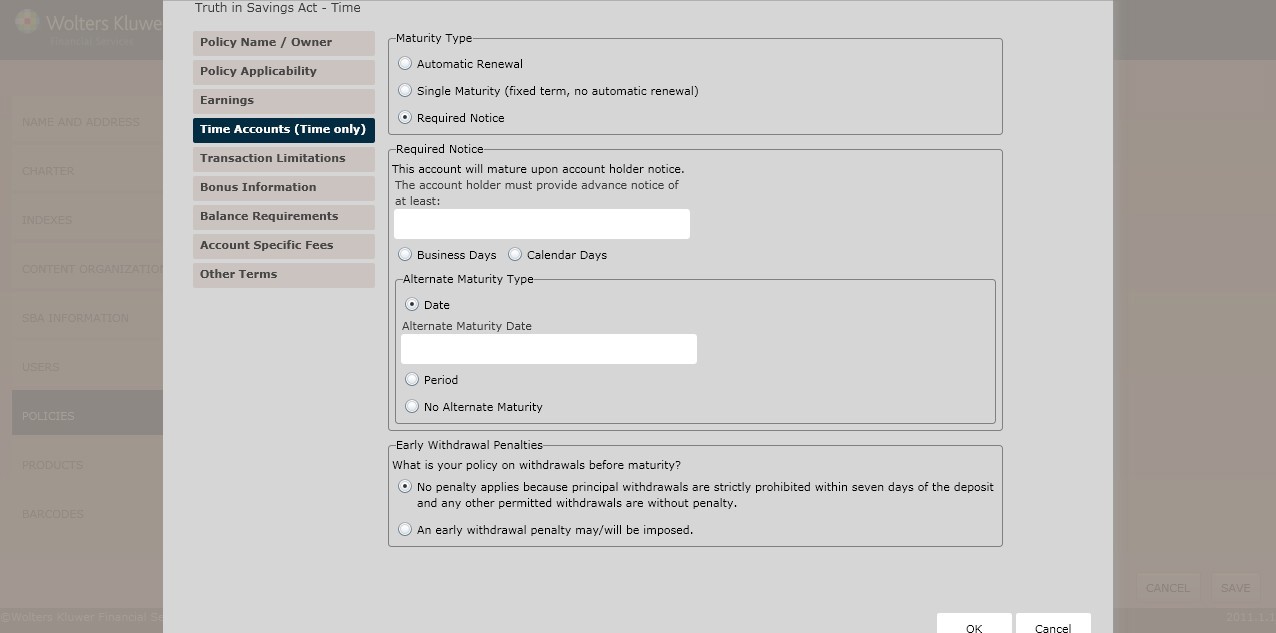
Maturity Type
Select one of the following:
- Automatic Renewal (see Automatic Renewal below)
- Single Maturity (fixed term, no automatic renewal); complete the Term of Account field.
- Required notice (see Required Notice below)
Automatic Renewal
- In the Renewal Term section, select one of the following:
- Same as original term
- Other; enter the renewal term for the account in the corresponding field.
- In the Renewal Rate section, select one of the following:
- Same rate we offer on new accounts with the same term
- Other; enter the details regarding how the rate will be determined at renewal in the corresponding textbox.
- If necessary, click the Grace Period Applies checkbox; enter the Grace Period. Clarify the grace period by selecting one of the following:
- Business Days
- Calendar Days
Automatic Renewal Protection
An account holder may prevent renewal by selecting one of the following:
- Providing the notice prior to maturity or during the grace period
- Withdrawing the funds at maturity or during the grace period
- Other; enter the methods by which the account holder may prevent renewal of this account by completing the corresponding textbox.
If necessary, click the Callable Feature Applies checkbox; see Callable Account Options below for more information.
Callable Account Options
Select one of the following:
- Account can be called by advanced notice to the account holder; select one of the following from the This account can be called section:
- With a 30 Day Notice
- With a 10 Day Notice
- At Any Time
- Other; complete the Enter your policy for calling this account field.
Required Notice
The account holder must give advance notice by performing the following:
- Completing The account holder must provide advance notice of at least: field; select one of the following option buttons:
- Business Days
- Calendar Days
- From the Alternate Maturity Type section, select one of the following types:
- Date
Earnings Upon Final Maturity
Determine how unwithdrawn funds will be handled upon final maturity by selecting one of the following:
- Interest/Dividend Bearing Account
- Non Interest/Dividend Bearing Account
- Paid to Account Holder
- Other
Early Withdrawal Penalties
Determine your policy on withdrawals before maturity by selecting one of the following:
- No penalty applies because principal withdrawals are strictly prohibited within seven days of the deposit and any other permitted withdrawals are without penalty.
- An early withdrawal penalty may/will be imposed.
Transactions Limitations page
This page allows users to configure the following transaction limitations:
- Deposit Frequency Limitations
- Deposit Amount Limitations
- Earnings Withdrawal Limitations
- Principal Withdrawal Limitations
- Withdrawal Limitations
- Savings Account Withdrawal Limitations
- Club Account Withdrawal Limitations
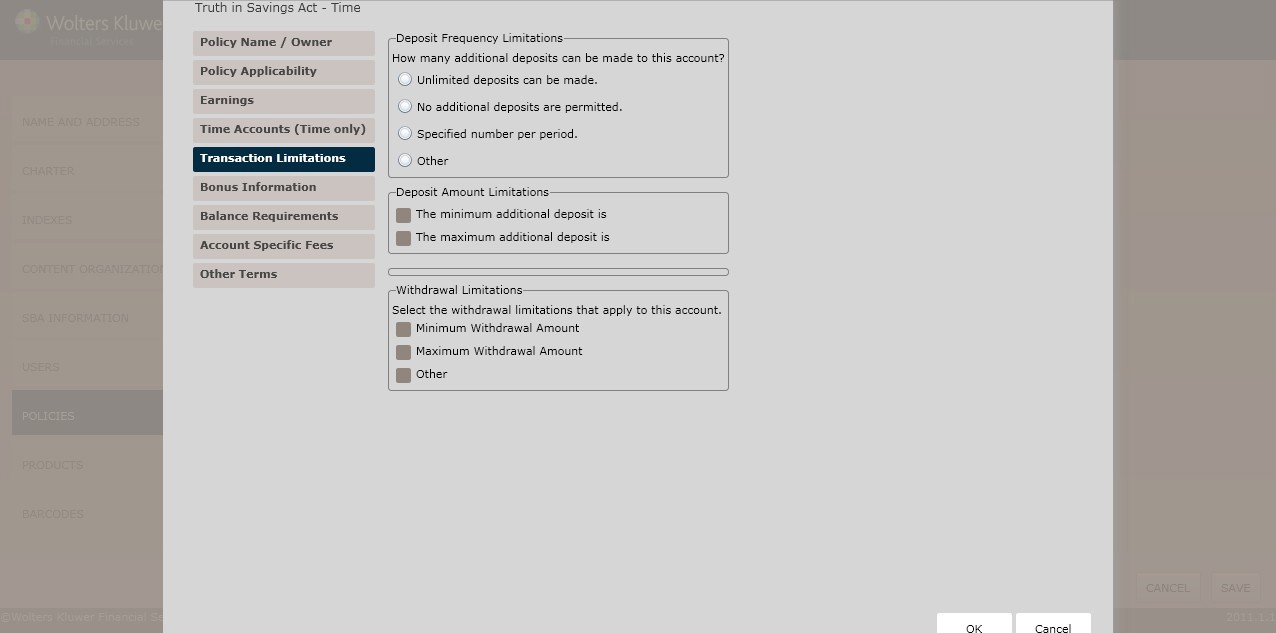
Deposit Frequency Limitations
(*If selecting a Checking or Savings Account) In the Deposit Frequency Limitations section, determine if any additional deposits can be made to the account; select one of the following:
- Unlimited Deposits can be made (*default)
- No additional deposits are permitted
- Specified number per period;perform the following:
- Enter the number in the No more than field.
- Determine the frequency by selecting one of the following: Day, Month, Quarter, Year, Other.
Deposit Amount Limitations
(*If selecting a Checking or Savings Account) In the Deposit Amount Limitations section, determine if minimum and maximum additional deposit limitations exist by selecting either of the following checkboxes:
- The minimum additional deposit; enter the deposit amount in the corresponding text box.
- The maximum additional deposit; enter the deposit amount in the corresponding text box.
Deposit Limitations – Effect on Maturity
(*If selecting a Time Account) Determine how additional deposits to the account will affect the maturity date in the Deposit Limitations – Effect on Maturity section. Select one of the following:
- The maturity date will remain the same.
- A new maturity date will be established for the entire account balance. The account will mature at the end of a period equal to the original terms.
- The maturity date for the existing principal will remain the same after additional deposits. The additional funds will not mature until either the next following maturity date (for automatically renewable accounts) or a period equal to the original term (for accounts that do not automatically renew).
- Other.
-
Note: If selecting Other, enter your own policy definition for how the maturity will be determined.
Savings Account Withdrawal Limitations
(*If selecting a Savings Account)Determine the Savings Account Withdrawal Limitations; according to Regulation D requirements, users must limit certain transactions in order to qualify as a savings account. Click the Include Reg. D Transaction Limitations with this account checkbox.
- Enter your policy for withdrawal limitations for Reg. D in the corresponding field.
Principal Withdrawal Limitations
(*If selecting a Time Account) Determine your policy on withdrawing principal for the account in the
Principal Withdrawal Limitations section. Select one of the following from the dropdown box:
- Principal may not be withdrawn during the term
- Principal may be withdrawn during the term only if we agree,subject to penalty
- Unlimited withdrawals may be made during the term, subject to penalty.
- Other
Earnings Withdrawal
(*If selecting a Time Account)Determine your policy on withdrawing earnings for this account in the
Earnings Withdrawal Section. Select one of the following:
- Earnings may not be withdrawn during the term
- Earnings may be withdrawn without penalty; perform the following:
- In the What type of earning can be withdrawn from this account during the term section, select one of the following:
- Accrued Earning
- Credited Earning; determine when Earnings can be withdrawn by selecting one of the following: Only on crediting date, Any time after crediting, Other; Enter your policy for earnings withdrawal limitations in the corresponding field.
- In the What type of earning can be withdrawn from this account during the term section, select one of the following:
- Earnings may be withdrawn, subject to penalty
- Earnings may be withdrawn only if we arrange a periodic payment option; see above for additional details.
- Other
Withdrawal Limitations
(*If selecting a Checking or Savings Account) In the Withdrawal Limitations section, select any of the withdrawal limitations that apply to the account:
- Four cash withdrawals and four balance inquires per month are permitted with additional fee. The account may be accessed for cash withdrawals and balance inquires only through proprietary ATMs or in person at one of our tellers.
- Online point-of-sale purchases, cash withdrawals and cash-back purchases are also available with no additional fee.
- Other
Club Account Withdrawal Limitations
(*If selecting a Savings Account with a Club option) Determine the Club Account Withdrawal Limitations by clicking The account may/will be closed checkbox. Select one of the following:
- The account may be closed
- The account will be closed
- In the If section, select the number of withdrawals that can be made before a certain date. Enter the date in the corresponding field; select one of the following:
- Any
- One
- Two
- Three
- Other; Enter your policy on withdrawals from the club account in the corresponding field.
Bonus Information page
The Bonus Information page allows users to offer bonuses worth more than $10.00in exchange for the following:
- Opening, maintaining, or renewing an account
- Increasing the balance
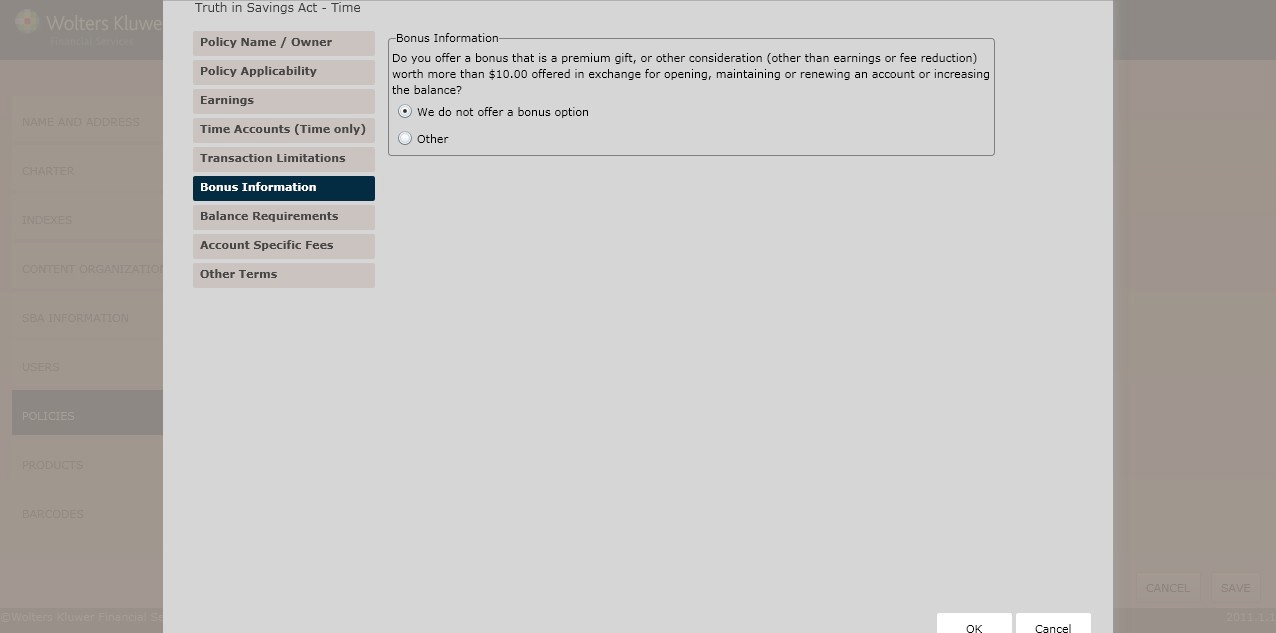
Bonus Information
Select one of the following:
- We do not offer a bonus option (*default)
- (*If selecting a Club/Savings Account) If the account holder makes the following number of consecutive deposits, we will make the next consecutive deposit;enter the Number of Consecutive Deposits in the corresponding field.
- (*If selecting a Club/Savings Account) If deposits are made totaling a prearranged periodic amount within a specified time frame, we will contribute a bonus equal to the periodic amount; complete the following fields:
- Deposits must exceed
- Times the prearranged periodic amount by the following date
- Other
- If selecting one of the following options in the Bonus Information section,advance to the Periodic Deposit Amount section:
- If the account holder makes the following number of consecutive deposits, we will make the next consecutive deposit
- If deposits are made totaling a prearranged periodic amount within a specified timeframe, we will contribute a bonus equal to the periodic amount
Periodic Deposit Amount
In the Periodic Deposit Amount section, select one of the following options that define the periodic deposit amount for this policy:
- We do not want to disclose a specific periodic deposit amount
- The periodic deposit amount falls within a range of values for a specific time period; specify the following:
- Minimum Amount
- Maximum Amount
- Frequency
- The periodic deposit amount is a specific value for a specific time period; specify the Amount in the corresponding field.
- Other; enter the periodic deposit amount for this policy in the corresponding field.
Balance Requirements page
The Balance Requirements page allows users to determine the following requirements for a particular account:
- Balance Requirements
- Minimum Balance
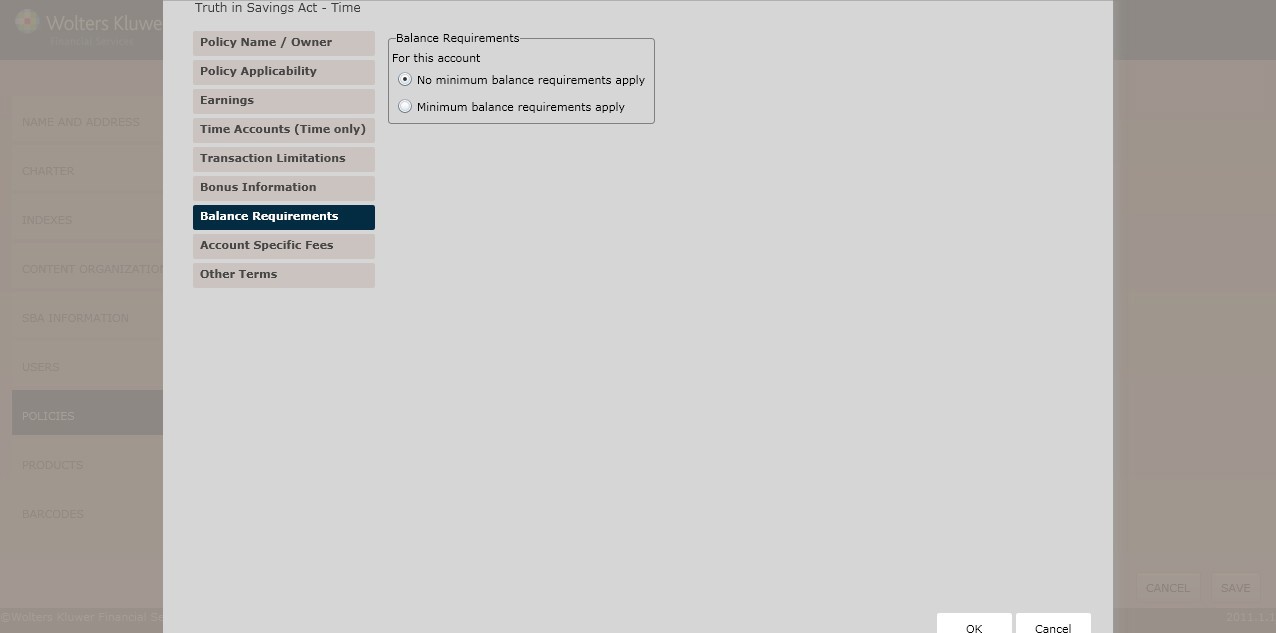
Balance Requirements
Select one of the following to determine the Balance Requirements:
- No minimum balance requirements apply (*default)
- Minimum balance requirements apply
- If selecting the Minimum balance requirements apply checkbox, select either of the following:
- There are minimum balance requirements to open this account; to determine a minimum balance requirement open an account,select one of the following:
Minimum Balance to Open Account
- Minimum Balance Account; enter the amount in the corresponding field.
- Other; enter any other minimum balance or related conditions that apply in the corresponding text box.
- (*If selecting a Checking/Share Draft,Money Market, Savings/Share Savings, Time/Term Share Account, Club, or Basic Banking account and allowing this account to accrue earnings) There are minimum balance requirements below which no earnings will be paid on this account; in the Minimum Balance to Earn Rate section, select one of the following balance computation methods used to earn the disclosed rate:
- Average Daily Balance. Enter the amount in the corresponding field; select one of the following:
- Daily
- Weekly
- Bi-weekly
- Monthly
- Quarterly
- Semi-Annually
- Annually
- Daily Balance; enter the amount in the corresponding field.
- Investable Balance; enter the amount in the corresponding field.
- Computation Method; enter the Name and Method in the corresponding fields.
- Other; enter any other minimum balance requirements necessary to earn the disclosed rate in the corresponding field.
- Average Daily Balance. Enter the amount in the corresponding field; select one of the following:
- (*If selecting a Checking/Share Draft,Money Market, Savings/Share Savings, Time/Term Share Account, Club or Basic Banking account) There are minimum balance requirements to avoid fees; select one of the following:
Minimum Balance to Earn Rate
Select the balance computation method(s) that will be used to earn the disclosed rate.
- Average Daily Balance
- Enter the Amount in the corresponding field (in dollars).
- Daily Balance
- Enter the Daily Balance in the corresponding field (in dollars).
- Computation Method
- Enter the Name and the Amount (in dollars).
- Other
- Complete the Enter any other minimum balance requirements necessary to earn the disclosed rate textbox.
Minimum Balance to Avoid Fees
The fees are assessed are based on something other than a singled balance (Tiered Balance); Enter the minimum balance requirements necessary to avoid this fee in the corresponding field. Enter the Fee Rules in the corresponding field.
- The fees assessed are based on a single balance; perform the following:
- Enter a Fee Name in the corresponding field.
- Select one of the following from the Balance Method dropdown:
- Daily Balance; complete the fields in the Minimum Single Balance to Avoid Fees – Details section.
- Average Daily Balance; complete the fields in the Minimum Average Balance to Avoid Fees – Details section.
- Both/Either; complete the fields in the Both Balance Methods – Details section.
- (*If selecting a Basic Banking account) Complete the fields in the There are minimum balance requirements to maintain the account section.
- Select one of the following from the Fee Applied Every dropdown box:
- Day
- Periodic Cycle
- Week
- Month
- Quarter
- Year
- Statement Cycle
- Other
Account Specific Fees page
The Account Specific Fees page allows users to apply fees to the account; these fees are not itemized elsewhere.
- Click Next to advance to the Bonus Information page.
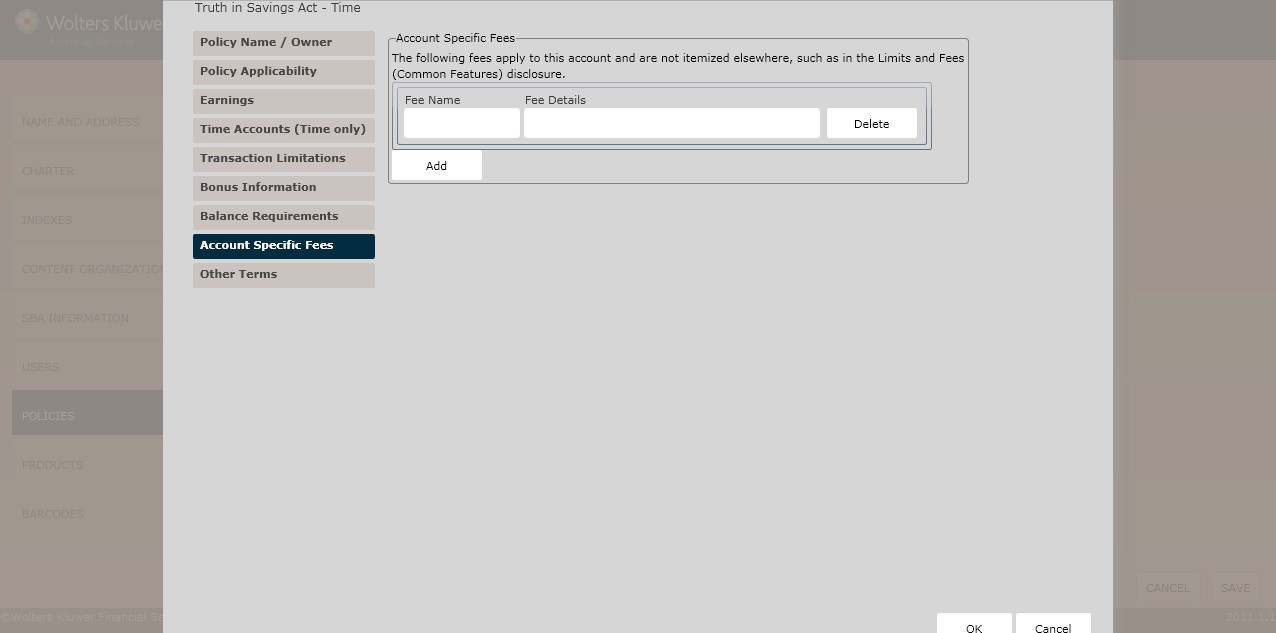
Account Specific Fees
Complete the following information:
- Fee Name
- Fee Details
Other Terms page
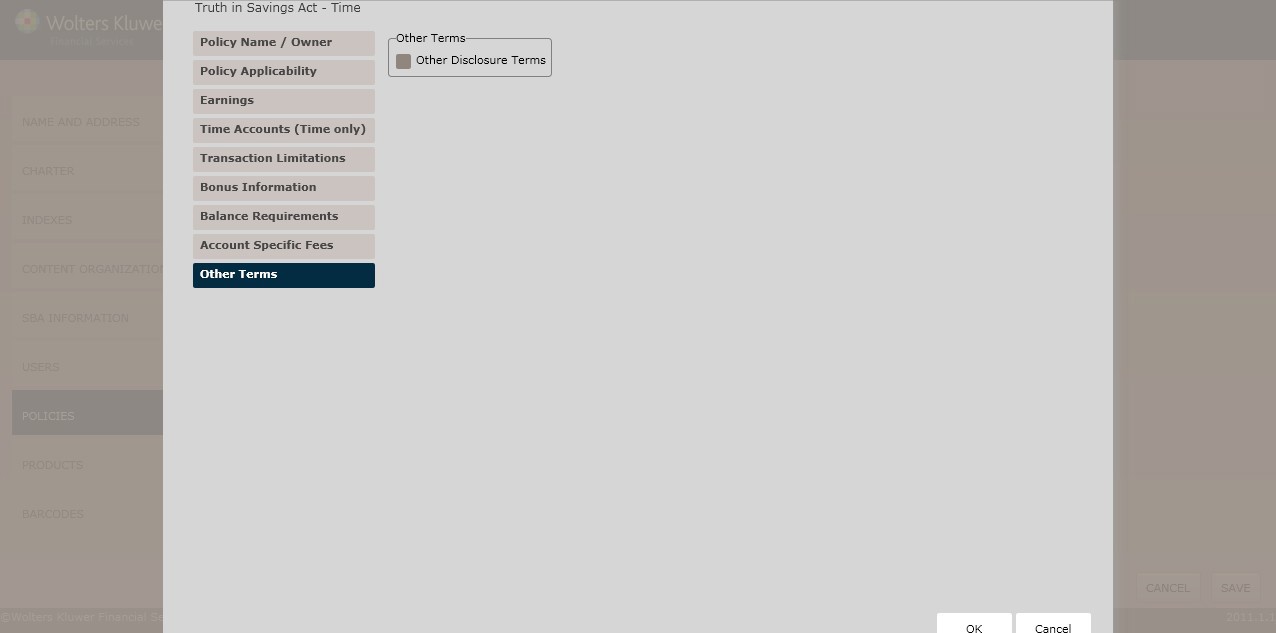
Other Terms
To enter additional disclosure terms, click the Other Disclosure Terms checkbox. Enter any additional disclosure terms to print on the account disclosure in the corresponding field. For information on displaying, editing, copying or deleting policies, see Creating and Managing Policies.
- (*If selecting a Basic Banking Account) In the Periodic Cycle – New York Only section, click The periodic cycle we use is: checkbox. Enter information in the corresponding field.
- Click OK to complete the Account Policy (TISA) creation process. The policy is now available to OPPSA users.