Creating a Policy
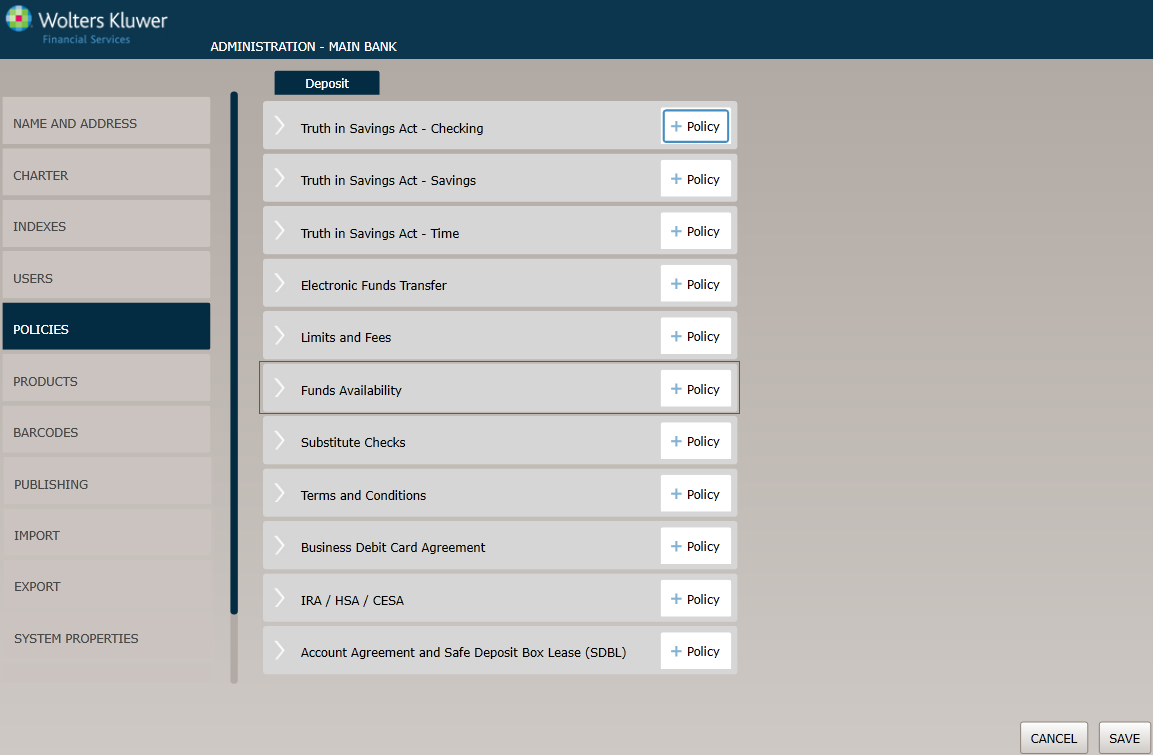
Before You Begin
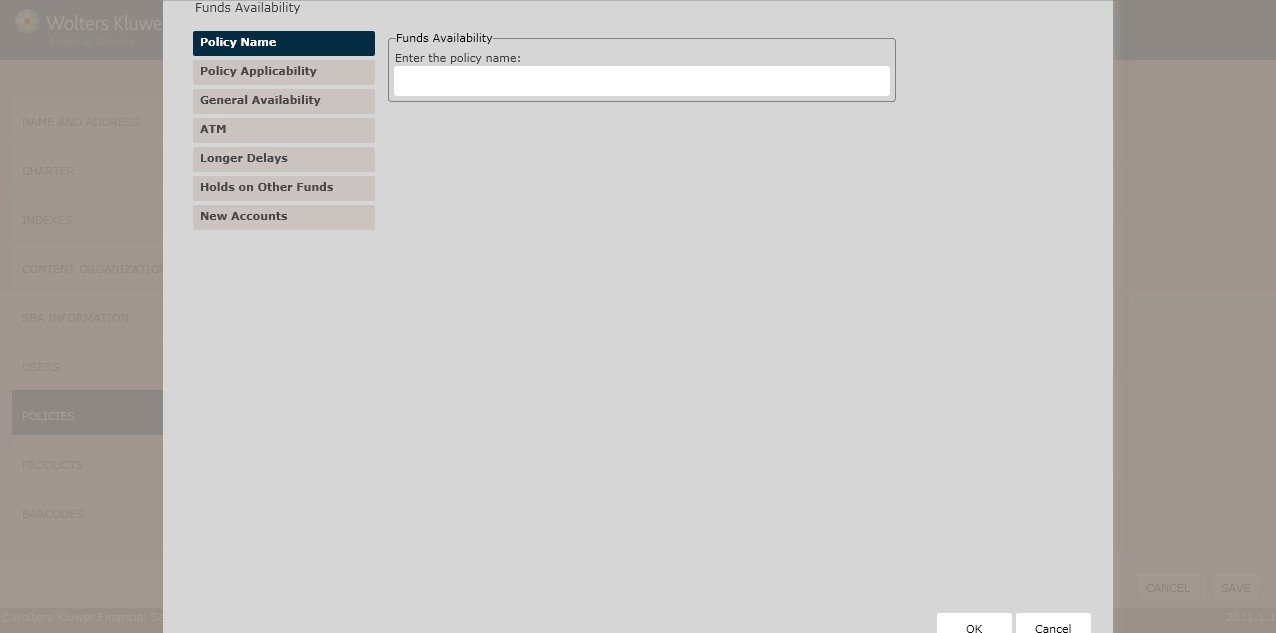
The Policy Name page appears by default. Complete this page and then click the option immediately under Policy Name, in this case Policy Applicability. Continue until you have completed all the necessary screens and fields.
Click the OK button at any time to save the policy information; however, keep in mind that the policy will close and save the information when you click OK. You will have to go to the menu screen and open the policy again to make additional changes.
Policy Name/Owner
Policy Applicability
The Policy Applicability page allows users to perform the following:
- Create a disclosure subtitle
- Determine the policies to which this policy applies
- Specify teller cutoff times
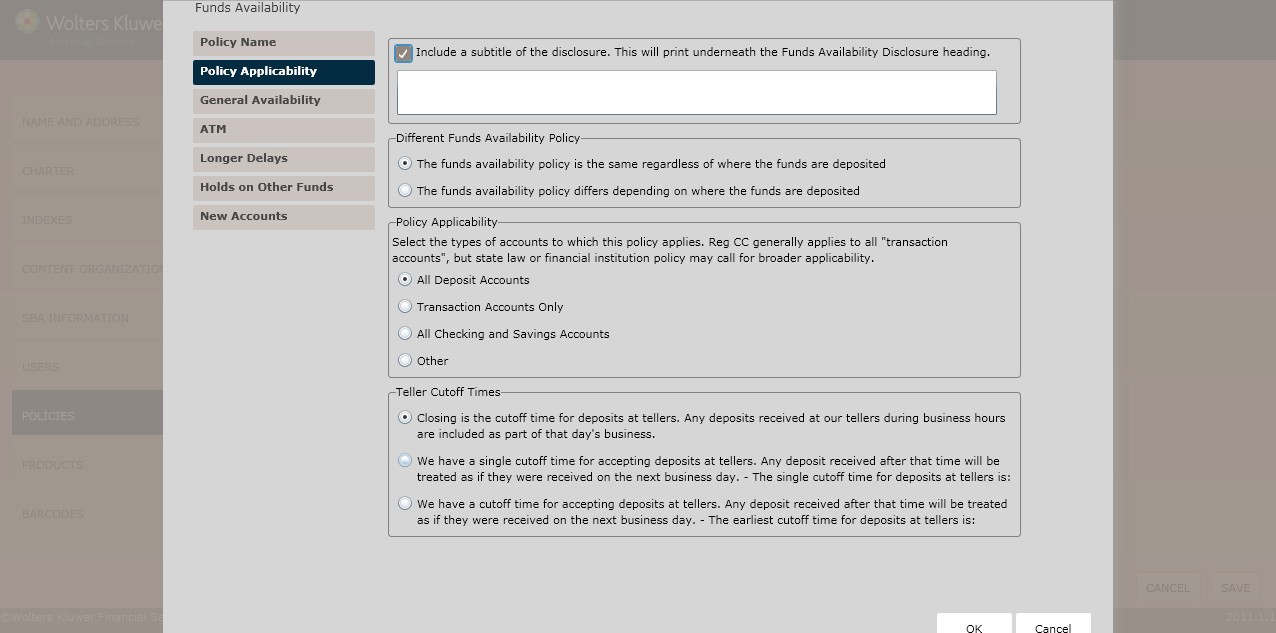
To include a disclosure subtitle,click the Include a subtitle of the disclosure checkbox. Enter the subtitle in the text box below.
Different Funds Availability Policy
Determine the Different Funds Availability Policy selecting one of the following:
- The funds availability policy is the same regardless of where the funds are deposited (*default)
- The funds availability policy differs depending on where the funds are deposited
- Enter the location(s) or check processing region(s) in the corresponding text box below.
- The funds availability policy differs depending on where the funds are deposited
Policy Applicability
- In the Policy Applicability section, select the types of accounts to which this policy applies:
- All Deposits
- Transaction Accounts Only
- All Checking and Savings Accounts
- Other; enter the type(s)of account to which this policy applies in the corresponding text box.
Teller Cutoff Times
- In the Teller Cutoff Times section, select one of the following:
- Closing is the cutoff time for deposits at tellers. Any deposits received at our tellers during business hours are included as part of that day’s business.
- We have a single cutoff time for accepting deposits at tellers. Any deposit received after that item will be treated as if they were received on the next business day.
- We have a cutoff time for accepting deposits at tellers. Any deposit received after that time will be treated as if they were received on the next business day.
General Availability
The General Availability page allows you to perform the following:
- Determine availability of funds for withdrawal
- Define Electronic Direct Deposits
- Determine Reg. CC Availability
- Specify categories of checks
General Availability
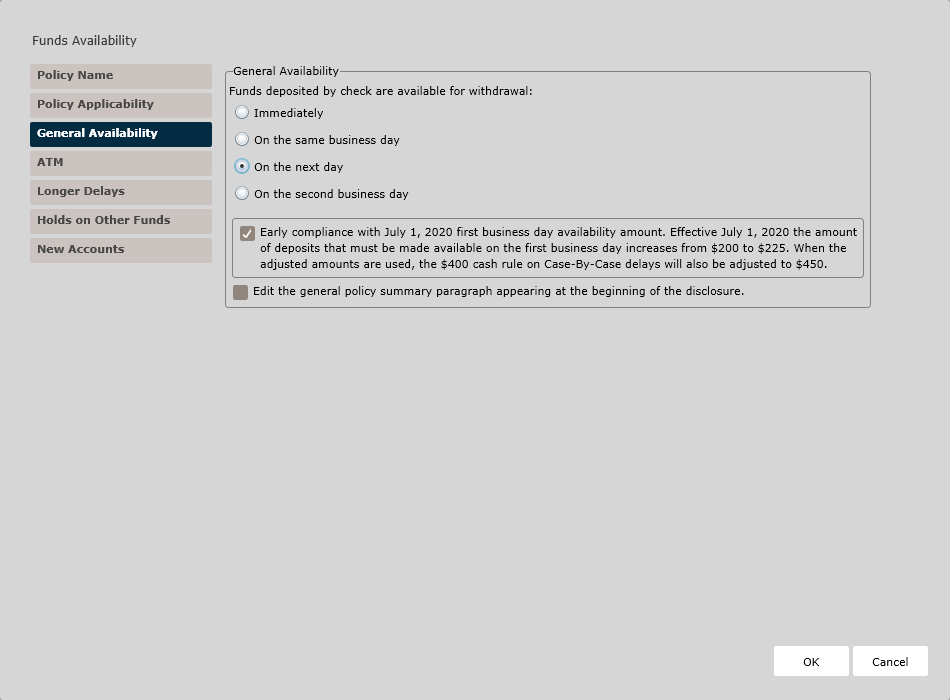
In the General Availability section, determine when funds deposited by check are available for withdrawal; select one of the following:
- Immediately (*default)
- On the same business day
- On the next day
- On the second business day; see the Reg. CC Availability and the Electronic Direct Deposits below.
If necessary, click the Early compliance with July 1, 2020 first business day availability amount. Effective July 1, 2020 the amount of deposits that must be made available on the first business day increases from $200 to $225. When the adjusted amounts are used, the $400 cash rule on Case-By-Case delays will also be adjusted to $450. checkbox. This checkbox controls the value amounts available on the General Availability and Longer Delays policy pages.
If necessary, click the Edit the general policy summary paragraph appearing at the beginning of the disclosure checkbox. Edit the content in the corresponding text box.
Electronic Direct Deposits
- If electronic direct deposits must available sooner than required, or other items
exist that must be available sooner, click the Electronic direct deposits are
available sooner than required (immediately, for example), OR there are
other items besides direct deposits that are made available same day or
immediately checkbox. Select one of the following:
- Direct deposits are available immediately and no other items are available immediately or same day.
- There is a combination of immediate and same day items.
- There are only same day items (i.e. in addition deposits).
Reg CC Availability
- Because Reg. CC requires certain items to be made available next day, you select additional rules,including the following:
- Some items Reg. CC required to be available next day are actually available sooner (see same day items entered above),OR there are additional items available on next day beside those required by Reg. CC.
- To include a second day reference in the heading, click Include a reference to second day in the heading checkbox. Enter a description of items available next day in the text box below.
- There are special requirements for faster availability of state or local government checks and cashier’s, certified, or teller's checks. Select one of the following special deposit types:
- Envelopes
- If necessary, click the Envelopes are ONLY available directly from our tellers checkbox.
- Describe where envelopes are available in the corresponding text field.
- Slips
- If necessary, click the Slips are ONLY available directly from our tellers checkbox. If unchecked, describe where slips are available in the corresponding text field
- If selecting neither option above,enter the appropriate special deposit procedure in the Name field; click the [] are ONLY available directly from our tellers checkbox.
- Envelopes
- Some items Reg. CC required to be available next day are actually available sooner (see same day items entered above),OR there are additional items available on next day beside those required by Reg. CC.
ATM page
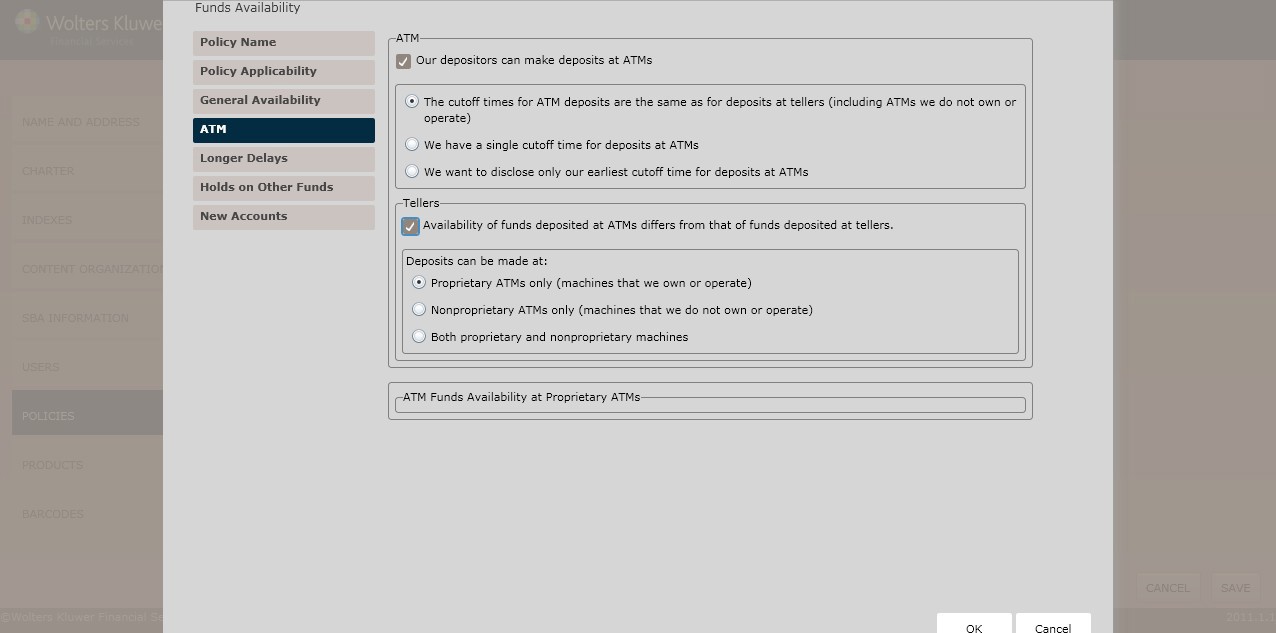
ATM
To determine whether users can make ATM deposits,click the Our depositors can make deposits at ATMs checkbox. Select one of the following:
- The cutoff times for ATM deposits are the same as for deposits at tellers (including ATMs we do not own or operate) (*default)
- We have a single cutoff time for deposits at ATMs
- Determine the cutoff time in the corresponding text box.
- We want to disclose only our earliest cutoff time for deposits at ATMs
- Determine the earliest deposit cutoff time in the corresponding text box.
Tellers
To determine if ATM funds availability differs from that of tellers, click the Availability of funds deposited at ATMs differs from that of funds deposited at tellers checkbox. Select one of the following:
- Proprietary ATMs only (machines that we own or operate)(*default); see the ATM Funds Availability at Proprietary ATMs section below.
- Nonproprietary ATMs only (machines that we do not own or operate); see the ATM Funds Availability at Nonproprietary ATMs section below.
- Both proprietary and nonproprietary machines
- To determine whether the proprietary ATM funds availability differs from that of nonproprietary ATMs, click the Availability of funds deposited at proprietary ATMs differs from that of funds deposited at nonproprietary ATMs checkbox; follow the procedures for both ATM Funds Availability at Proprietary ATMs and ATM Funds Availability at Nonproprietary ATMs below.
ATM Funds Availability at Proprietary ATMs
(*If selecting Proprietary ATMs only above) In the Proprietary ATM Deposits – All States Except Alaska and Hawaii section, determine when deposits at proprietary ATMs will be available by selecting one of the following:
- Immediately
- Other (*default)
- Click Next to advance to the Longer Delays page.
ATM Funds Availability at Nonproprietary ATMs
(*If selecting Nonproprietary ATMs only above) In the Nonproprietary ATM Deposits – All States Except Alaska and Hawaii section, determine when deposits at proprietary ATMs will be available by selecting one of the following:
- Immediately
- Other (*default)
Longer Delays
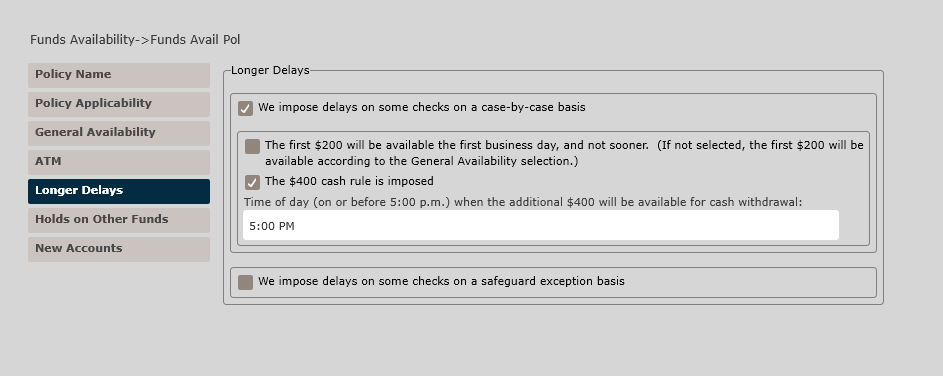
To impose delays on checks, select from the following:
- We impose delays on some checks on a case-by-case basis. Select from the
following options:
- Case-by-Case Delay. Depending on options selected in the General Availability section, you may see additional Case By Case Delay fields here.
- The first $200 will be available the first business day, and not
sooner. If not selected, the first $200 will be available
according to the General Availability selection. Note: If the Early Compliance checkbox was checked on the Policy Applicability section, the dollar amount reflected is $225.
- The $400 cash rule is imposed. Determine when the
first $400 is available for withdrawal by entering time of day when the
additional $400 will be available for cash withdrawal in the text box.
Note: If the Early Compliance checkbox was checked on the Policy Applicability section, the dollar amount reflected is $450.
- We impose delays on some checks on a safeguard exception basis; see Safeguard Exception– All States Except Alaska and Hawaii below.
Safeguard Exception– All States Except Alaska and Hawaii
Select one of the following:
- We impose the standard maximum delay for regular check deposits (i.e. seventh business days)
(*default)
- Other; determine the longest safeguard exception in the corresponding text box.
Holds on Other Funds
The Holds on Other Funds screen allows users to create holds on the following:
- If the account holder cashes a check drawn on another institution
- If the account holder gets cash back on a deposit of checks drawn on another institution
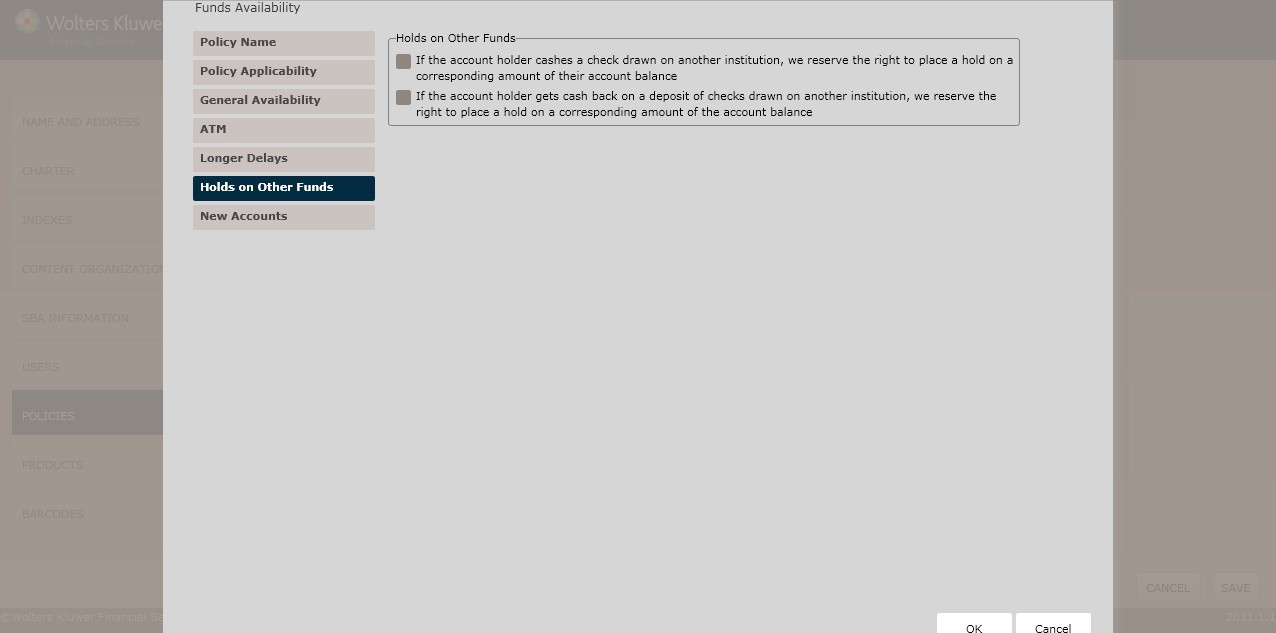
Holds on Other Funds
To place holds on the following, click the checkbox next to the desired rule:
- If the account holder cashes a check drawn on another institution, we reserve the right to place a hold on a corresponding amount of their account balance (default)
- If the account holder gets cash back on a deposit of checks drawn on another institution, we reserve the right to place a hold on a corresponding amount of the account balance
- Click Next to advance to the New Accounts page.
New Accounts
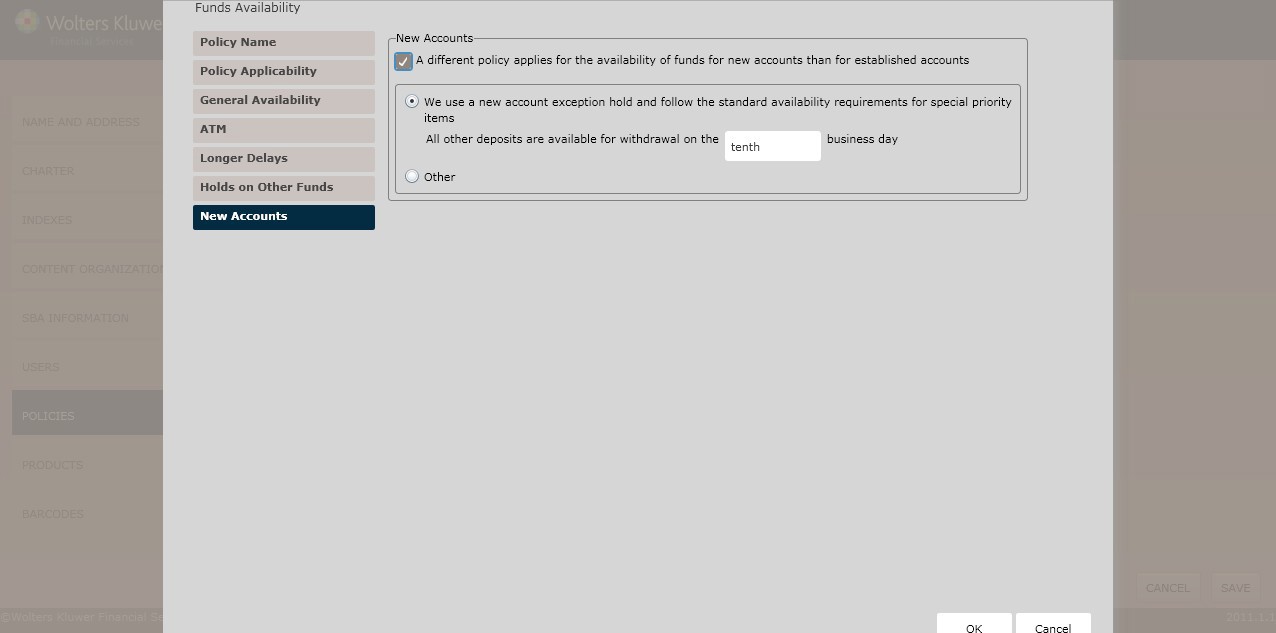
To determine whether funds availability policies differ between new and existing accounts, click the A different policy applies for the availability of funds for new accounts than for established accounts checkbox. Select one of the following:
- We use a new account exception hold and follow the standard availability requirements for new accounts (*default)
- Determine the desired business day in the corresponding text box.
- We use a new account exception hold, however we do not follow the standard availability requirements for new accounts and instead allow funds to be available sooner than required.
- Enter the policy for availability of items for new accounts in the corresponding text box.
- Click OK to complete the policy creation process. The policy is now available to OPPSA users.
How Do I View and Manage the New Policy?
For information on displaying, editing,copying or deleting policies, see Creating and Managing Policies, earlier in this section.