Options
The Options dialog provides the ability to modify various settings within PubAssist.
General
The General settings are displayed by default when first opening Options.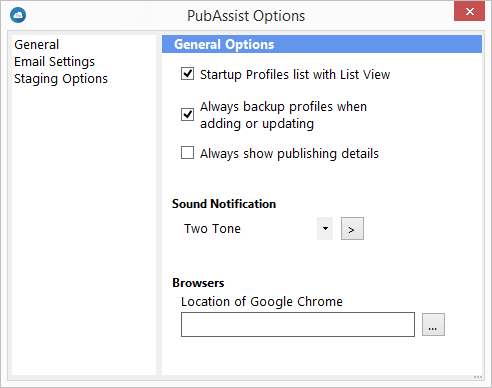
| Feature | Description |
|---|---|
| Startup Profiles List with List View | When selected, the Profiles list on the Main Screen will be displayed by default in List mode. |
| Always backup profiles when adding or updating | When selected, each time a profile is added or updated you will be prompted to backup the PubAssistProfiles.xml file. |
| Always show publishing details | When selected, the details pane of the publishing window will be displayed by default. |
| Sound Notification | Allows you to select which audible tone is played when publishing is completed. |
| Browsers | Allows you to select the location in which Google Chrome is installed. This allows you to select Chrome as a browser in which to view your published content. |
Email Settings
Clicking Email Settings from the left pane displays the Email Settings options.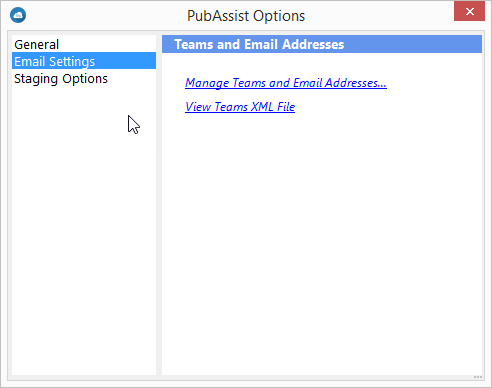
Manage Teams and Email Addresses...: displays the Team Management window.
View Teams XML File: displays the Teams xml file in your default XML file viewing application.
Staging Options
Clicking Staging Options from the left pane displays the options available for the
staging environment.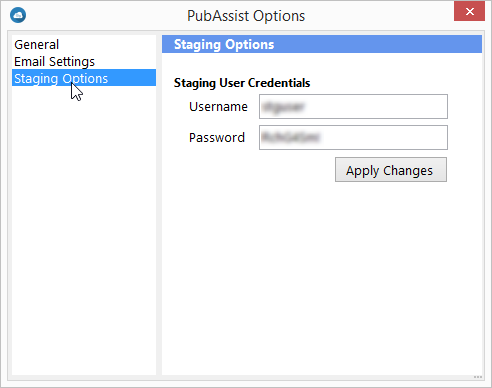
Staging User Credentials: displays and allows you to set the credentials of the staging folder. This information is used within the Email Configuration screen when sending an email to your team. Credentials are automatically populated with the default intial credentials. Should these credentials change, you can set them here by modifying the Username and/or Password and clicking Apply Changes.