| December 2020 |
Note: Discontinuing Support for Internet Explorer 11
(IE11) Internet Explorer 11 will no longer
be a supported browser in Q2 of 2021, most likely
with the April Production release. Our recommended
browser for accessing the application(s) will
continue to be, Google Chrome, and going forward
as of Q2 next year will also be Microsoft Edge
(Chromium based, version 79.0.309 or
newer). Wolters Kluwer does not anticipate
prevalent issues for users accessing the
application(s) via IE11, however, after the April
Production release, we will no longer remediate
reported bugs that are specific to the IE11
browser.
New Functionality
- URLA
- Starting January 1, 2021, the revised Uniform Residential Loan Application can be used
instead of the Fannie Mae 1003 Freddie Mac 65
Universal Residential Loan Application. If your
institution wants to use the revised application
form during the early adoption period, select the
Early adopt URLA option in Administration.
Selecting this option will not impact existing
transactions.
Set a reminder on your calendars
now to update Administration only after January 1,
2021. Testing can occur before this date on
Customer Test. Note:
- Do not select Early Adopt
URLA in Administration prior to 01/01/2021.
- For organizations not using the revised URLA
until the mandatory date, the Early adopt
URLA option should not be selected in
Administration.
On the Application page, select
URLA for the revised Uniform Residential
Loan Application or UCA-RE for the Credit
Application Real Estate for the Select your credit
application option. The selected document will
display on the Document Data and Print
pages. The default selection for Select
you credit application depends on the document
policy. If the Select the Fannie Mae 1003
Freddie Mac 65 Uniform Residential Loan
Application (URLA) is selected for a document
policy, URLA will default as selected. If
Select the Fannie Mae 1003 Freddie Mac 65
Uniform Residential Loan Application (URLA) is
not selected, UCR-RE will default as selected. The
default value can be changed at transaction
time.
- For Help information about using the new URLA,
select Application.
- We will continue making improvements prior to
the 3/1/2020 regulatory date. If you have any
feedback for us, please let us know.
- WK E-Sign
- When Parallel Signing and more than one
recipient are selected, Package Information will
not display because this information is not needed
for parallel signing.
Note: To use Parallel Signing, confirm each
recipient has selected Smart Consent in WK
E-Sign prior to sending a package to that
recipient. To confirm and view the status for
each recipient, complete one of the following:
- Log in to Group Admin under Support. Select
Users and Find. Their profile will
display their status.
- Search for and select a user on the Home page.
Their profile will display their status.
- If you are licensed for WK E-Sign, you can now
display all the generated documents from any
package for the Application or Closing Phase.
Select Display all generated document
packages after selecting the Package in the
Phase drop-down list on the Print page.
-
Lender Documents and Content
Due to technical issues, several licensed lender
documents and content were introduced with our
November 2020 updates. The introduction was
recently discovered and has been corrected to
remove the licensed lender documents and content.
The additional content should not affect the
enforceability of any documents and is essentially
a non-required, over-disclosure.
- Loan Product Advisor and Desktop Underwriter
- The Loan Product Advisor and Desktop
Underwriter have been updated to support the early
adoption period of the revised URLA. If
URLA is selected for Select your credit
application on the Application page,
application information will be sent to the
third-party services in Mismo 3.4 format as
required by Freddie Mac/Fannie Mae
specification.
|
| November 2020 |
Note: Wolters Kluwer offices will be closed on Thanksgiving and
the following day (11/26 and 11/27).
Note: Discontinuing Support for Internet Explorer 11
(IE11) Internet Explorer 11 will no longer
be a supported browser in Q2 of 2021, most likely
with the April Production release. Our recommended
browser for accessing the application(s) will
continue to be, Google Chrome, and going forward
as of Q2 next year will also be Microsoft Edge
(Chromium based, version 79.0.309 or
newer). Wolters Kluwer does not anticipate
prevalent issues for users accessing the
application(s) via IE11, however, after the April
Production release, we will no longer remediate
reported bugs that are specific to the IE11
browser.
New Functionality
- Application
- The Title column has been added to the
Property section. Specify is the default entry in
the column. Select Specify to open a dialog
box and complete the following information: Title
Will Be Held in What Name(s), Use Collateral
Owners, Describe How Title Will Be Held and
Description, and Estate Will be Held in. After
saving the entered information, Specify changes to
View. Select View to make changes. This
information will print to the Fannie Mae 1003
Freddie Mac 65 Universal Residential Loan
Application or Credit Application Real Estate
documents.
- Previously, the Present Housing Expenses
section did not populate when a party was added to
a transaction created from a template. This issue
has been resolved, and the Present Housing
Expenses section will include the data.
- Parties
- In preparation for the Revised URLA effective
in 2021, the Parties page has been updated to
include Country and Unit # in the
Employer Information section for both borrowers
and cosigners. These fields are applicable for
current, additional, and previous employment types
on the new URLA.
- Financial Analysis
- The Property Type field in Real Estate Owned
section was converted to a drop-down list with
additional values to accommodate Desktop
Underwriter and Loan Product Advisor requirements.
If the real estate owned collateral is tied to a
collateral item, a value will be defaulted when
applicable. These values will print to the Fannie
Mae 1003 or the UCA-RE.
- Important Notice: WK E-Sign Parallel Signing
- In a future release, when Parallel
Signing is selected and more than one
recipient is selected, Absolute Expiration
Date and the grid displaying Package Type,
Description, and Default Business…/Abs Exp.
Date… will not display. This information is
not used for parallel signing. Until Absolute
Expiration Date is removed, ignore this
section when sending a package using parallel
signing, and your package will not expire to
paper.
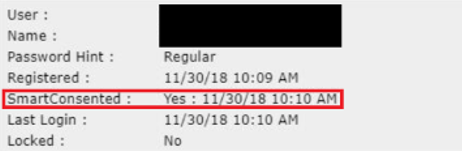
- Verify Smart Consent prior to sending a
Parallel Signing package: To avoid violating
ESign/UETA rules, your financial institution
should monitor each party's consent prior to
sending to the parallel signed package to WK
E-Sign. Prior to sending a package in WK E-Sign,
confirm that each recipient has selected Smart
Consent.
To confirm that each recipient has
used Smart Consent before sending a package to WK
E-Sign:
- An Administration user should log into Group
Administration.
- Under Support, enter an email address under
Find. After finding the user, their profile will
show their consent status. You can also search for
the user on the Home page. After selecting the
user, their consent status will display.
- Administration
- In Administration on the Indexes tab,
information entered in the Source field for a
user-defined index will populate the Adjustable
Rate Mortgage Disclosure Conventional, and
Adjustable Rate Mortgage Program Disclosure when
the user-defined index is selected in
Calculations.
-
Previously, loan originator information was
manually entered on the Document Data page. Now,
the information entered in the Title,
Email, and License ID fields when
setting up a Loan Officer on the Contacts tab in
Administration will automatically populate on
documents including this information.
|
| October 2020 |
What's New
New Functionality
- Application Page
-
In an effort to prepare you for URLA revisions
effective in 2021, we are releasing the
Application page feature now. This page is modeled
after the URLA revisions. We hope this can help
you prepare your staff between now and the
effective date, so the URLA revision is not a
major event for your institution.
The Application page is now available as the
first tab on each transaction and when using OLA,
you will now be directed to Application instead of
Parties when opening your inquiry. The purpose of
this page is to gather the borrower-related
information required to complete an application.
Until the revised URLA is released, this page can
be used to complete the Fannie Mae 1003/Freddie
Mac 65 Universal Residential Loan Application or
Credit Application Real Estate documents.
The Application page contains the following
sections:
- Parties
- Liabilities
- Present Housing Expenses
- Assets, Purchase Credits, Gifts &
Grants
- Loan Details
- Property
- Declarations
The information entered on the Application page
will flow to the correspondent fields on the other
tabs. For example, if you enter the Sales Price of
property on the Application page, the entered
amount will automatically show on the Collateral
Details page. Conversely, if you update the Sales
Price on the Collateral Details page, the
correspondent value will automatically be updated
on the Application page.
Additionally, we have added the functionality
to pull a credit report directly from the
Application screen for your convenience.
For Help information, select Application.
Note: The final URLA release is planned for the
December release and you will be able to turn it
on anytime between 1/1/2021 (Early Adoption) or
3/1/2021 (Mandatory Regulatory Date). The
Application page will continue to be enhanced
prior to the effective date. We are working to
take all the valuable feedback we’ve received from
you at our Monthly Mortgage Insider’s calls and
make sure all application data is collected in one
place where possible.
- Previously, Declarations and Present Housing
Expenses information was gathered in the Fannie
Mae 1003 Freddie Mac 65 Universal Residential Loan
Application or Credit Application Real Estate
documents. As a part of the October 2020 release,
this information will not be collected on
documents. Instead, the information will be
collected on the Application page.
- WK E-Sign
-
New functionality has been added that allows
for a parallel signing experience when there are
multiple parties that need to sign a package. This
new functionality allows each party to sign and
merge their signatures onto a single PDF if they
have e-consented prior to sending the WK E-Sign
package. It is very important that your financial
institution monitors the consenting of each party
prior to sending to WK E-Sign in order to not
violate ESIGN/UETA rules.
To use the new Parallel Signing feature, you
will need your WK E-Sign Administrator to contact
your WK E-Sign Support Specialist at esignsupport@wolterskuwer.com to verify
your institution's WK E-Sign account is set up for
Parallel Signing. Your WK E-Sign configuration
will need to be set to Smart Consent. Within the
transaction, you will see a new option for
Parallel Signing under Fulfillment Options when
using Interactive Signing. When Parallel
Signing this is selected and a package has
more than one signer, their signatures will be
merged onto a single PDF(s) after both/all parties
have signed.
- When Package Level Consent is set up in your
WK E-Sign configuration, you will notice
Additional Authentication Required is now
always selected and locked down for Electronic
Delivery. You no longer need to remember to select
this option. If your institution is set up for
Smart Consent, Additional Authentication
Required will still be optional.
- Modification
- There were circumstances where on a
Modification, when a collateral was set to
“released”, the system was giving a user not
authorized error. This has now been resolved.
- Financial Analysis
- When Account Number was blank for an Asset,
Liability or Source of Funds on the Financial
Analysis page, NULL displayed when using Internet
Explorer or Edge browsers. This issues has been
resolved.
- Fannie Mae/Freddie Mac
- For Fannie Mae loans when the collateral is
Condo and Freddie Mac loans when the collateral is
PUD, the Property is not located in a
project was changed to Property is located
in a project and will display as selected on
the Add Property view. The change enable
successful submissions to Loan Product Advisor and
Desktop Underwriter.
Changes to Interfaces
- This release does not include changes to
interfaces.
|
| September 2020 |
What's New New Functionality
- The first column of the Projected Payments Table
on the Loan Estimate and Closing Disclosure has
been updated to show the P&I payment as a
single value instead of the min/max range. This
applies to non-construction variable loans where
the Initial Hold Term entered 1) does not
constitute a whole number of years and 2) is
greater than 1 year.
Changes to Interfaces
- This release does not include changes to
interfaces.
|
| August 2020 |
What's New New Functionality
- Wolters Kluwer E-Sign functionality has been enhanced in ComplianceOne and the
Interactive Signing feature has been added to WK
E-Sign. If licensed for this interface, you can
send a package through WK E-Sign via the Print
page within the transaction. To review the new
functionality, select Wolters Kluwer E-Sign (WK E-Sign)
for detailed Help information.
- IMPORTANT: If you are configured for
Package Level Consent within WK E-Sign (ie.
Additional Authentication Required is always
checked and locked when sending a package), you
will need to manually check the Additional
Authentication Required checkbox until a future
release. If you have additional questions on your
WK E-Sign consent status, contact Wolters Kluwer
E-Sign Support at 1-800-529-1582, Option 2.
- Wolters Kluwer now supports the Secured
Overnight Finance Rate (SOFR) index that is an
alternative to the LIBOR index. The index will be
available on the Calculations page in the Index
Name list for variable in-house loans. If the
30-day Average SOFR Index is selected, and
a rate is entered when setting up a variable-rate
policy in Administration, the index and rate will
default when the policy is selected at transaction
time.
Changes to Interfaces
- The August release does not include updates to
interfaces; however, if you are licensed for WK
E-Sign, accessing the interface via the menu is
not longer needed. Enhanced functionality for WK
E-Sign is available now on the Print page within
the transaction. WK E-Sign will remain in the
menu, providing time to learn about the new
functionality and train your staff until it is
removed from the menu in a future release.
|
| July 2020 |
What's New New Functionality
- The Fannie Mae 1003 Freddie Mac 65 Universal
Residential Loan Application will no longer print
section X. Information For Government Monitoring
Purposes. Previously, the section was available
for non-HMDA transactions when neither the
Demographic Information Collected
Separately nor the Government Monitoring
Information Collected Separately was selected
within the Document Data.
Note: ComplianceOne allows collection of
disaggregated demographic data separate from the
application on the Demographic Information
Addendum or the Government Monitoring Information
document. The Demographic Information
Addendum is available in Document Data if:
- HMDA Applies is selected on the Loan
Definition page or Government Monitoring
Information For ECOA (Regulation B) is
Requested is selected on the Document Data
page; and
- Demographic Information Collected
Separately is selected on the Document Data
page.
The Government Monitoring Information is
available in Document Data if:
- HMDA Applies is not selected on the
Loan Definition page; and
- Both Government Monitoring Information For
ECOA (Regulation B) is Requested and
Government Monitoring Information Collected
Separately are selected on Document Data
page.
In addition, an issue that began with the
June release was resolved. In the previous
release, the Fannie Mae 1003 Freddie Mac 65
Universal Residential Loan Application was not
selected for non-HMDA transactions when
Demographic Information Collected
Separately was selected in the Document Data.
This document will now display in the document
list when Demographic Information Collected
Separately is selected.
Changes to Interfaces
- The July release does not include updates to
interfaces.
|
| June 2020 |
What's New New Functionality
- As a continuation of our COVID-19 Emergency offering, we have now added COVID-19
Emergency Suspended Payment Forbearance Plan
Extension, which can extend the original
forbearance plan, as well as the COVID-19
Emergency Payment Deferral Agreement which is
to be used when the loan comes out of
forbearance.
Please note that these
forbearance documents should be used for in-house
mortgages ONLY, and they are not designed to be
used for federally- backed mortgage loans. The
Plan is simply the first step in the process where
you are agreeing to forbear a certain number of
payments. The Extension is to be used to extend
the forbearance, if needed, and the Deferral
Agreement will be used to detail the effect on
payments at the end of the forbearance.
We’ve designed these documents to not
require transaction data to complete. You can
complete data entry in these documents in Document
Data. If you recall your first COVID transaction
where you completed a Forbearance Plan, the data
will be reused where applicable on the two new
documents. To use these new documents,
either recall an existing transaction or start a
new transaction, go to the Closing phase, and
select Post Closing package. Under Transaction
Data, the COVID-19 Emergency Suspended Payment
Forbearance Plan Extension and COVID-19 Emergency
Payment Deferral Agreement options will display.
Select the applicable option and complete the
document. Note: For an empty transaction where
you do not want to complete the other pages,
simply complete the document. Then, take one of
the following approaches:
- Have an Administrator, with rights to
override validation warnings, override each
transaction to remove the Incomplete watermark as
validation will look for collateral and
calculations data.
- Create a template for these COVID-19
transactions and enter fake collateral with a
property address state, possibly a fake seller,
and fake calculations. This template will avoid
the need to override validation warnings.
Remember: The COVID-19 Emergency documents
do not use data from the transaction, so the fake
data will not affect this document.
Changes to Existing Functionality
- Previously, when a liability was added and
linked to a Real Estate Owned property on the
Financial Analysis page, the liability did not
save after a user left the page. The issue has
been resolved as a part of this release.
Changes to Interfaces
- The June release does not include updates to
interfaces.
|
| May 2020 |
What's New
- The May release does not include updates to
What's New with Documents.
- The May release does not include updates to
What's New with Documents.
Changes to Existing Functionality
- The May release does not include updates to
existing functionality.
Changes to Interfaces
- The May release does not include updates to
interfaces.
|
| April 2020 |
What's New Changes to Existing
Functionality
- Select What's New with Docs to review document
changes.
- Based on customer request, we have implemented The COVID-19 Emergency Suspended Payment
Forbearance Plan document within ComplianceOne
Assumptions. The forbearance plan should be used
for in-house mortgages ONLY, and is not designed
to be used for federally-related mortgage loans.
The Plan is simply the first step in the process
where you are agreeing to forbear a certain number
of payments. We are in the process of developing a
separate document to be used to extend the
forbearance, if needed, and a separate agreement
that will be used to detail the effect on payments
at the end of the forbearance (i.e. extending the
maturity date and adding the payments to the end
of the loan). These additional documents will be
available at a later date, knowing that within 3
months, you will need to connect with your
customer and make a plan for the end of the
forbearance.
We’ve designed this document to
not require transaction data to complete and you
can completely fill out this document in Document
Data. To use this new document, you are able to
either recall an existing transaction or start a
new transaction, go to the closing phase, and
select Post Closing package. Under Transaction
Data, the COVID-19 Emergency Suspended Payment
Forbearance Plan option will display. Select this
option and complete the document. Note: For an
empty transaction where you do not want to
complete the other pages, simply complete the
document. Then, take one of the following
approaches:
- Have an Administrator, with rights override
validations, override each transaction to remove
the Incomplete watermark as validation will look
for collateral and calculations data.
- Create a template for these COVID-19
transactions and enter fake collateral with a
property state address, possibly a fake seller,
and fake calculations. This template will avoid
the need to override validation warnings.
Remember: The COVID-19 Emergency Suspended
Payment Forbearance Plan does not use data from
the transaction, so the fake data will not affect
this document.
Changes to Interfaces
- This release does not include changes to
existing functionality.
|
| March 2020 |
What's New Select What's New with Docs to review document
changes. Changes to Existing Functionality
- Previously, the revised version of URLA was available for
transactions created with a template that was new or modified as
of 2/1/2020, that used a Document Policy with the following
option checked: Select the Fannie Mae 1003 Freddie Mac 65
Uniform Residential Loan Application (URLA) . The
current version of the URLA should have been selected. The issue
was fixed on 2/13/20. If you created a new template or modified
a template with that document policy option checked during that
date range and used it for a transaction, you can update your
existing transactions and templates so the current version of
URLA will be available on the Document Data page. Please do the
following:
- Refresh the Document Policy for that existing
transaction on the Loan Definition page.
- Reopen the impacted templates.
Changes to Interfaces
- This release does not include updates to interfaces.
|
| February 2020 |
What's New Select What's New with Docs to review document
changes. Changes to Existing Functionality
- As part of the on-going URLA update project, the assets list on
the Financial Analysis page has been rearranged into two
sections: Assets and Purchase Credits. Lot Equity and
Relocation Funds were added as purchase credit types
and will print in the Assets section of Credit Application Real
Estate and Fannie Mae 1003 Freddie Mac 65 Universal Residential
Loan Application documents until the revised URLA is
supported.
- Previously, if the USDA Technology Fee was added to a Fee
Policy, the fees in that Fee Policy were not pulled into the
transaction. Changes were made so fees included in a Fee Policy
will be included in a transaction when the USDA Technology Fee
has been added to a Fee Policy.
Changes to Interfaces
- Secure Document Exchange (SDX) has been renamed to Wolters
Kluwer E-sign. If you are licensed for Secure Document Exchange
(SDX),"Wolters Kluwer E-sign" will display in areas that
previously displayed Secure Document Exchange (SDX).
|
| January 2020 |
What's New Select What's New with Docs to review document
changes. Changes to Existing Functionality
- As a part of the on-going URLA update project, the Monthly Rent
option has been removed from the Physical Address section on the
Parties page. The Monthly Rent amount will now be based on the
amount entered for the Rent liability entered on the Financial
Analysis page and default to the revised URLA when it is
available in a future release.
- Previously, details entered for an asset type on the Financial
Analysis page did not save unless the tab key was used or
another field was selected on the Financial Analysis page after
entering the details. This behavior was changed so the details
entered for the asset will save if you leave the Financial
Analysis page after entering the data.
Changes to Interfaces
- This release does not include updates to interfaces.
|