How do I set up automatic loan number generation in ComplianceOne?
To set up automatic loan number generation in ComplianceOne, select options in ComplianceOne Administration and automatic numbering will be available on the Application and Loan Definition pages when processing a transaction.
Administration Setup
- On the Organizations tab in Administration, select the Enable automatic number
generation option.
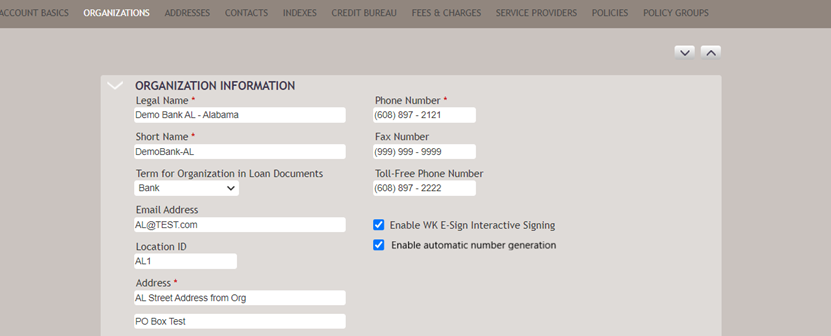
- After selecting the option, go to the Automatic Number Generation section at the
bottom of the Organizations page. Enter the information that will determine
the rules for the numbering.
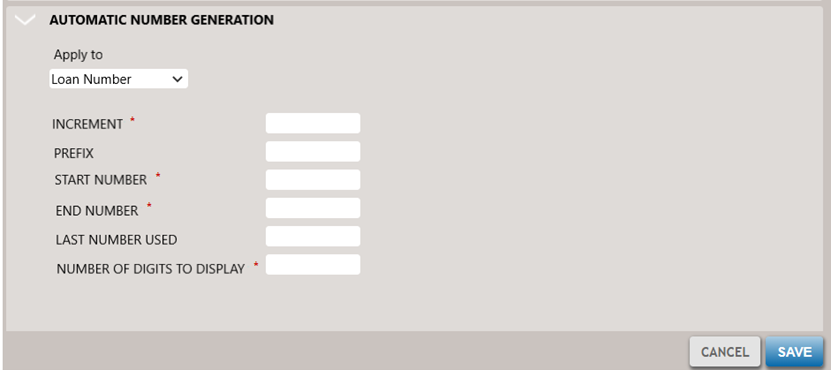 Note:Fields with a red asterisk are required. Verify Loan Number is selected in the Apply to drop-down list.
 - Select Save.
Application/Loan Definition
After automatic loan numbering is set up in Administration, the Application and Loan Definition pages display the Use the system generated Loan Number option. By default, it displays unselected.
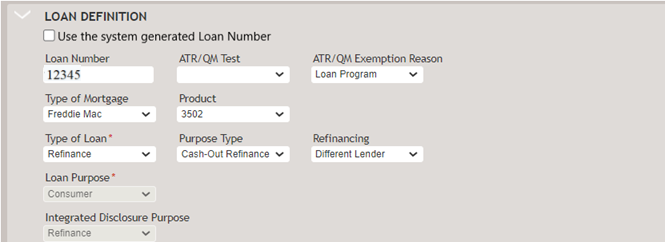
- When Use the system generated Loan Number is selected, and the Loan
Number is blank, a loan number will be generated based on the
Administration settings. The Loan Number cannot be changed.Note:If Use the system generated Loan Number ” is selected, and a number is entered in the Loan Number field, the loan number will not be automatically generated. If this happens, deselect the Use the system generated Loan Number, clear the Loan Number field, and select the Use the system generated Loan Number again.
- When a transaction is copied, the Use the system generated Loan Number option will display unchecked so a new loan number can be generated.
- If a loan number cannot be generated due to configuration settings, internal systems error, etc, a validation message will display indicating the error.