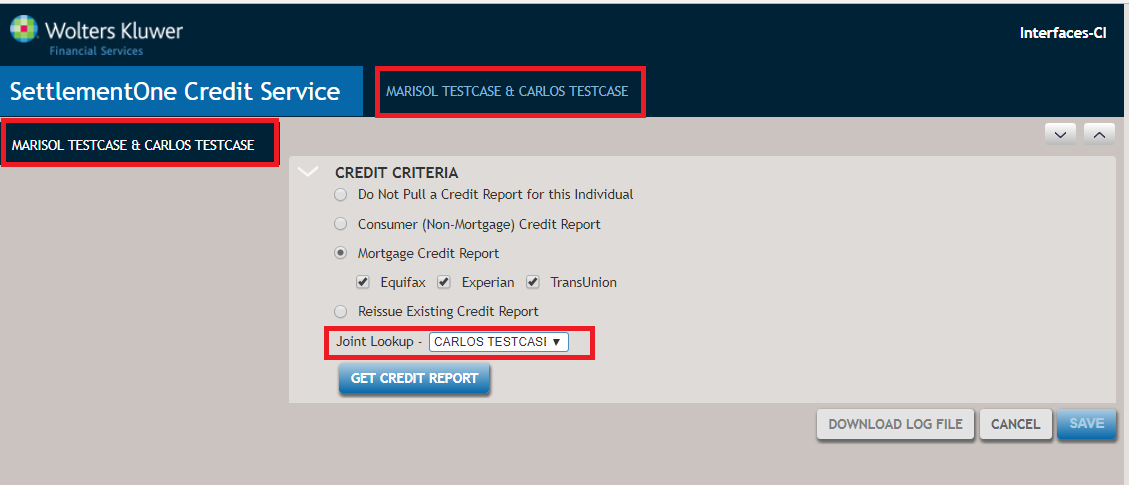
View 4: SettlementOne Credit Service Interface (After selecting Mortgage Credit Report)
View 4 shows the SettlementOne Credit Service Interface page after selecting Mortgage Credit Report (tri-merge), and Joint Lookup with Carlos Testcase as the Secondary Borrower.
- Get Credit Report: Select Get Credit Report to send the service request to the SettlementOne Credit Service. After the service request is completed, a Lender Copy of the Credit Report displays. The report can be viewed, printed, and/or downloaded. Refer to View 5 for more information.
- Save: Select Save to save credit report data to ComplianceOne and return to the Financial Analysis page of ComplianceOne mortgage where the saved credit service data can be viewed.
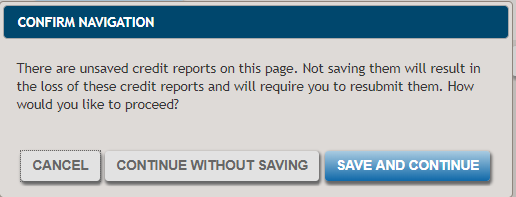
- Cancel: Select Cancel to return to the Financial Analysis page of
ComplianceOne without saving any data on the SettlementOne Credit Service Interface
page. If Get Credit Report and Save were not selected, the following
message displays:
- Download Log File: Select Download Log File download an XML file of
the service request and/or response using browser functions. The XML file is used by
Wolters Kluwer Customer Support – SupportLine when troubleshooting customer
issues.