Package Information
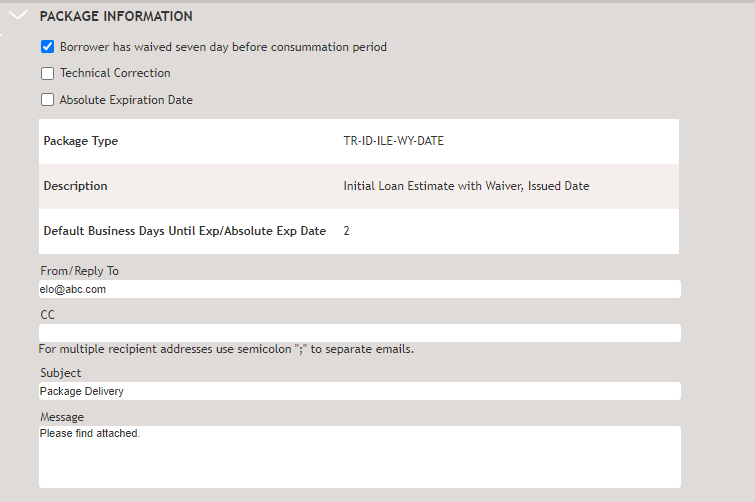
Complete the Package Information section when you are ready to send the package. The information is not saved in ComplianceOne after you leave the page because the data applies specifically to the current selected recipients, the transaction phase, and the autoselected documents.
Select the applicable options. The selected options will determine the package type that is sent and apply the appropriate times. The Package Type grid will display the package type, description, and default times set up in WK E-Sign for package expiration. This information indicates the number of days a customer has to access the package before it expires.
- Absolute Expiration Date: Select this option to override a TRID timer or enter a
specific date if you are not using TRID timers. Select to display a
calendar and enter a specific expiration date. If the option is
selected and a date is not entered, the expiration date will display
outlined in red and indicated as required.
When Parallel Signing is selected and more than one recipient is selected, Absolute Expiration Date will not display. This information is not used for parallel signing.
- Package Type Grid: When Parallel Signing is selected, and more than one recipient is selected, this grid will not display as this data is not relevant to a parallel signing scenario.
- Package Type: The type is based on selections made in the transaction and helps determine disclosures and the package expiration date.
- Description: The description provides details about the package type.
- Default Business Days Until Exp/Absolute Exp Date: The expiration date displays based on selections in the Package Information section and the package type selected in Fulfillment Options. If an absolute expiration date is entered, that date will display here.
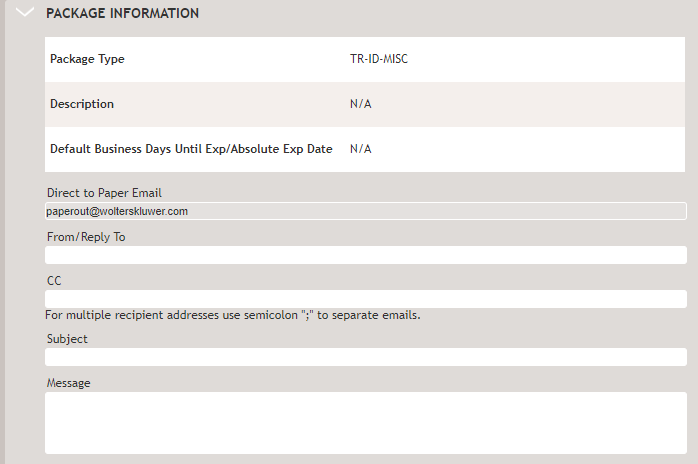
- From/Reply To: In a Direct to Paper scenario, direct to paper email address set up in your configuration defaults here.
- CC: Use to send someone a notification of a sent package. The full package is not sent.
- Subject: Enter a subject.
- Message: Enter a message.
Direct to Paper Package Information
Package Information for Electronic Delivery