How do I set up two credit service providers in Desktop Underwriter?
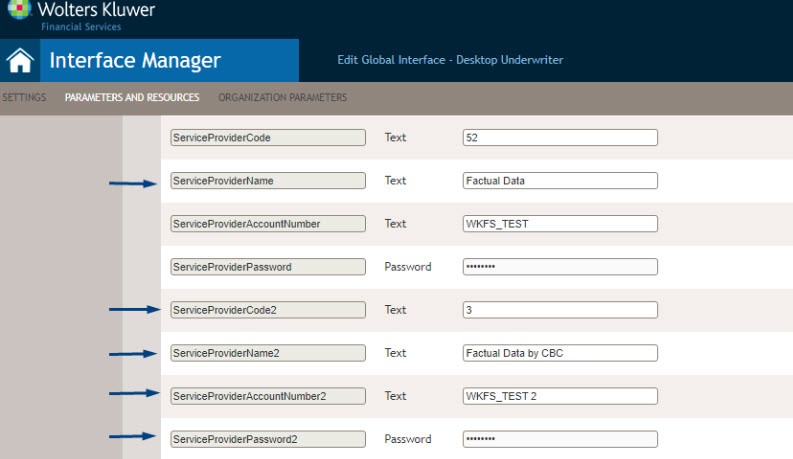
To set up an additional credit service provider for Desktop Underwriter, provide the following parameters in the Account Parameters section of the Desktop Underwriter interface in Interface Manager:
- ServiceProviderCode2
- ServiceProviderName2
- ServiceProviderAccountNumber2
- ServiceProviderPassword2
Also, complete the ServiceProviderName that will display for the first credit service provider.
Next, go to the transaction and open the Desktop Underwriter interface. A new section, "Credit Provider," displays on the interfaces page where you can indicate the credit service provider for the Desktop Underwriter third-party service.
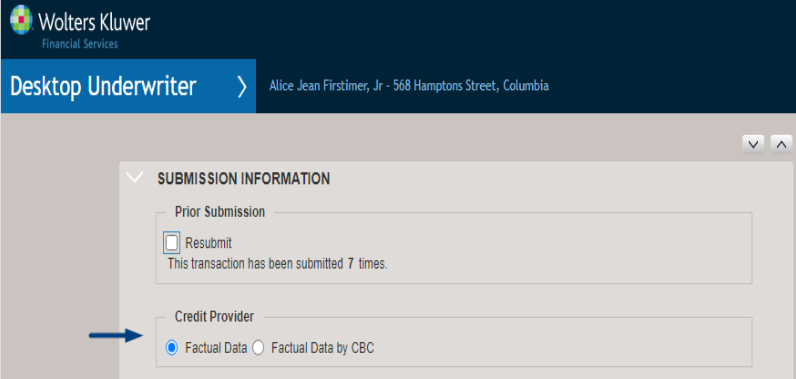
If at some point in time, you do not need to choose between credit service providers for the Desktop Underwriter submission, remove the parameters for the second credit service provider in the Interface Manager. After the removal, the Credit Provider section will no longer display on the Desktop Underwriter interface screen.