Resubmission of Automated Underwriting Service Request
This scenario begins 20 days after Ken Customer, a single adult, received his loan application package from Lenny Lender for a $300,000, 30-year, fixed-rate mortgage. Initial credit and automated underwriting findings produced an eligible status. Subsequently, Ken is seeking to increase the loan amount by $10,000 because of additional charges that were uncovered. Patty, at the request of Lenny, has updated all applicable loan application data and documents, and will resubmit the loan to Desktop Underwriter for an updated automated underwriting assessment from Fannie Mae Desktop Underwriter from within ComplianceOne.
Patty follows this process:
- Patty selects Automated Underwriting on the ComplianceOne services menu.
- Patty reviews and enters additional data on the Desktop Underwriter page.
- Patty selects Submit.
- ComplianceOne resubmits the automated underwriting (plus merged credit) service request to Desktop Underwriter. Feedback Findings and data are returned to the Desktop Underwriter page in ComplianceOne.
- Patty views and/or prints the findings, selects Save, and is returned to the ComplianceOne page she was on before the service was initiated.
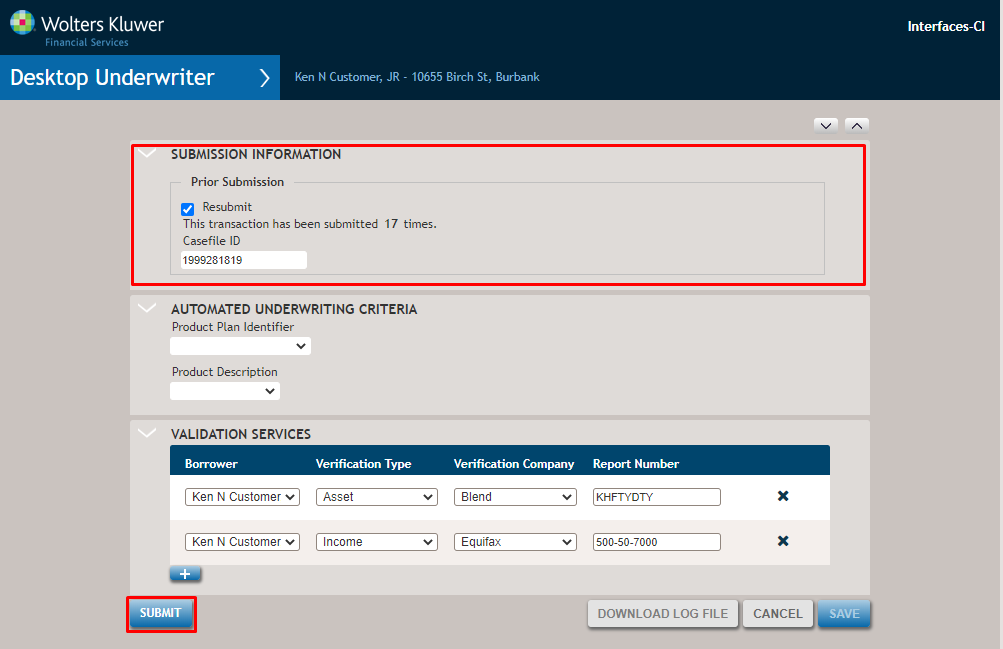
- Submission Information: The Casefile ID saved from the initial service request display.
- Casefile ID: This unique identifier assigned by the underwriting system to the underwriting case for a specific loan application. This field may be blank for the initial loan submission. All subsequent submissions will be prepopulated with the DU assigned Casefile ID number from the initial submission.
- Automated Underwriting Criteria: Previous data does not display. Enter applicable data.
- Validation Services: This section displays the asset, income and employment data previously entered.
- Submit: Select Submitt to send the service request to Desktop Underwriter. After a successful service submission, an Automated Underwriting Findings section displays with findings that can be viewed and printed by the user. See View 5 in the first scenario for more information.