Build: Building a Repository
The build command tells the tool to open the repository. It opens the repository defined in the path to repository parameter. The command line to build a repository is as follows:
ReqAdmin Build [--v] [-ReqFormat] [-SkipUpdate] <Path to repository> <Output path>| Argument | Definition |
|---|---|
| --RepositoryPath | Required. The path to the repository. |
| --OutputPath | Required. The path where the build output will be written. Specify a path different than the repository path. |
| --v | (Default: false) Flag indicating to log verbose messages to the console. This value is false by default. |
| --NoCopyToChildOrgs | (Default: false) Flag indicating whether to copy base content to child orgs as a prebuild step when building repositories with precedence structure. |
| --CopyToChildOrgsPKG | (Default: false) Flag indicating parent PKG doc lists should be copied to child orgs as a prebuild step when building repositories with precedence structure. |
| --NoEmptyPkgs | (Default: false) Flag indicating not to create PKG files if they will not contain any documents. |
| --SourceSchemasInOrganization | (Default: false) Flag indicating whether schemas are copied to each organization. When this flag is set the schema files are located in the Schemas folder under the Org folder, otherwise they are located in the Schemas folder in the root of the --RepositoryPath folder. |
| --SkipUpdate | (Default: false) Flag indicating whether to skip the update
content references process. If the argument is not passed, content references in the
target repository are updated before it is built. The skip update switch is typically used when you have recently performed an update to content references using the update command just prior to building a content repository (using the build command). In this case, you are confident that the content references have been updated and are not out of date. See Update: Updating Content References in Dynamic Documents for details. |
| --NoGenerateSchemaFiles | (Default: false) Flag indicating to not generate document data requirements as schema for each document. This value is false by default. |
| --GenerateXpathDataListFiles | (Default: false) Flag indicating to generate document data requirements as data lists for each document. This value is false by default. |
| --ReqFormat | (Default: false) Flag indicating to build in REQ format not ERL. This value is false by default. |
| --GenerateXpathEnumUsages | (Default: false) Flag indicating to generate document rule xpath enumeration usage reports. This only works if the NoGenerateSchemaFiles is false (the default). This value is false by default. |
| --SkipFileContentsHashing | (Default: false) Flag indicating to skip MD5 file caching manifest creation. This value is false by default. |
| --CreateDeploymentZip | Full path (including the filename) to the deployable zip file which will be
created containing the source *.req documents and the build content of the *.req documents. Note:
|
| --Update | Flag indicating that the built content is intended to update an existing
library. Use in combination with the CreateDeploymentZip argument. Using this flag
inserts a comment into the resulting zip file indicating the version and update
status. 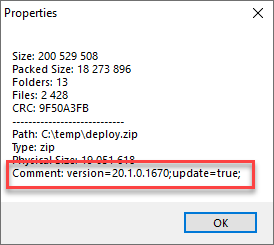 |
| --CreatePromptsReport | Flag indicating whether to create EZ Config Default Data XPaths Prompts |
| --PromptsReportLineOfBusinessIds | EZ Config Default Data Documents line(s) of business to keep. |
| -?, -h, --help | Show help and usage information |
- The build command updates content references from the content in the file system repository that is being built; this differs from behavior in the Requirements Editor where content reference updates are performed through the authoring web service and database.
- If JavaScript files are included with the repository, they will be included with the build automatically.
- All Manifest and JS files are included in the repository after the build output.
- JavaScript unit tests are run when the ContentAdmin build is run.
- Any errors in the unit tests are logged in the bottom of the build output report as warnings.
- Tests are performed on all standard and customized repositories using either the command line or the user interface.
- Command options are case insensitive.
- The build command produces enxl, entt, xPath and xsd files for Default Data REQ files for both root and child orgs.
- Multiple Copies: The build command will generate multiple copies when executing the document if it is indicated within the document's properties. Refer to Document Properties in the Requirements Editor User Guide for instructions on how to request multiple copies.
The output is then placed at the path location entered in the second path parameter: <Output path>. The directory output layout, as required by the load command, is as follows:
<output root>
 - Organization 1 name
 -REQ or ERL files
 - Organization 2 name
 -REQ or ERL files
 - Organizations.xml
 - BuildReport.html
 - BuildReport.xml
 - DocumentRevisionHistory.csv
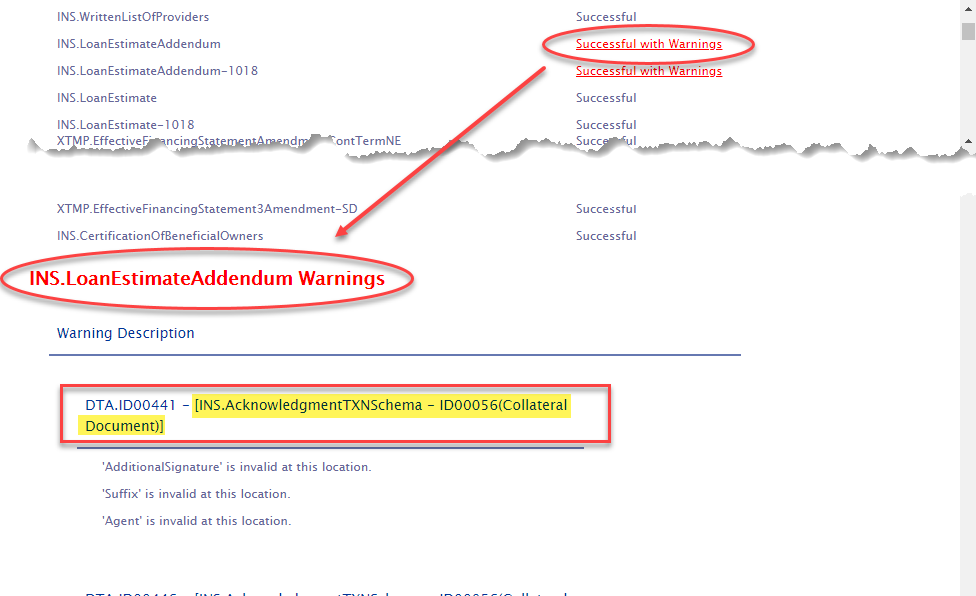
Repository Report
Each time the build command is run, a Repository Report is created containing a list of all REQ files within each LOB.
The report is a CSV file with a file name of: [Org]RepositoryReport.csv. the report can be found in the same location as the Revision History report.
[LOB]Overlay
Overlay file: The build command automatically identifies Default Data REQs. If
found, an overlay xml file is created: [LOB]Overlay.xml This file contains
XPaths (from the OverlayOverride.csv) file with suppression turned off and is used by Doc
Viewer to limit the information displayed. For detailed information, refer to OverlayOverride.
The [LOB]Overlay.xml file Is modeled after the Master Dictionary and is automatically generated based of the Default Data REQs in the repository. Values in this file override the Master Dictionary. The [LOB]Overlay.xml file is saved at the root ORG level and and is applicable with multiple ORGs. This way there is the separation of ORG and their specific LOBs.
OverlayOverride
After authoring a Default Data REQ, the REQ must be viewable within Doc Viewer. However, the information displayed within Doc Viewer must be limited. To assist in limiting this information, a Dictionary Overlay must be created. Dictionary Overlays are designed to suppress specific TXN paths and limit enumerations.
In order to generate the Dictionary Overlays, Requirements Administration automatically detects if there are any Default Data REQs present in the repository. If any files exist, the Dictionary Overlays are generated based on the LOB for the REQs. Once created, Requirements Administration checks for a file called OverlayOverride.csv within the root folder of the Org. This CSV file supplies the builder with information required to override items in the dictionary.
The OverlayOverride.csv is used to update or customize the [LOB]Overlay.xml file. This file, placed at the org root level of the file system needed, is created and managed by the author. This spreadsheet has a specific layout, as indicated in the example above.
Each row within the OverlayOverrides.csv conains the LOB being labeled. During the build process, the Administration Tool attempts to locate the corresponding overlay file and integrates the file for the given xPath that is on the same row. If it finds the path, it takes the values (if any) in the Enumerations, Prompt, Predicate, MustAlreadyExist, and ApplyToAll columns to the location inside of the Overlay file.
| Column | Description |
|---|---|
| Suppress | Allows you to suppress the processing of the associated XPath. This value
is blank by default (do NOT suppress) and accepts the following values
|
| LOB | The name of the LOB spelled out how it is in the REQ, Example:
Commercial Lending |
| xPath | The full TXN path The xPath must exist in order for information to be added. When the OverlayOverride.csv file is opened by Administration tool, it follows this flow of existence. |
| Enumerations | Enumerations will contain [Enumeration] =
[Value]Enumerations are added to the OverlayOverrides.csv file if the file is present during the build. The values in the Enumerations column must be entered manually. |
| Predicate | Value of 1 or 0 (blank) Used to match values so that merges between Default Data and the one in the TXN are handled correctly. Note:
|
| MustAlreadyExist | Value of 1 or 0 (blank) This must exist inside of the [LOB]Overlay.xml file. if it does not exist, it ignores the row and moves to next row. Refer to mustAlreadyExist Examples below. |
| ApplyToAll | Value of 1 or 0 (blank) If true, data entered will apply to all instances. Refer to predicate and applyToAll Examples below. |
| Prompt | Allows you to set the text that is displayed as a tooltip when the user hovers over the item within Doc Viewer. |

predicate and applyToAll Examples
Txn xmlns="http://schemas.bankerssystems.com/2004/ExpereTxn">
    <Notes>
        <Note>
            <FeesAndChargesBaseFees>
                <FeesAndChargesBaseFee>
                    <FeeType1 predicate="true">Fee Type 1 Data</FeeType1>
                    <FeeValue1>FeeValue1</FeeValue1>
                    <Payments>
                        <Payment>
                            <MyPayment applyToAll="true">My Payment Data</MyPayment>
                        </Payment>
                    </Payments>
                </FeesAndChargesBaseFee>
            </FeesAndChargesBaseFees>
        </Note>
    </Notes>
</Txn>
mustAlreadyExist Examples
<Txn xmlns="http://schemas.bankerssystems.com/2004/ExpereTxn">
    <CollateralItems>
        <Collateral>
            <AccessoriesDesc>Collateral 1 Accessories Desc</AccessoriesDesc>
        </Collateral>
    </CollateralItems>
    <StateHousingFinanceAgencies>
        <Agency>
            <NCHFAHomeAdvantageProgramInd>1</NCHFAHomeAdvantageProgramInd>
            <Name>Agency1Name</Name>
            <Address>Agency1Address</Address>
            <City>Agency1City</City>
        </Agency>
    </StateHousingFinanceAgencies>
</Txn><Txn xmlns="http://schemas.bankerssystems.com/2004/ExpereTxn">
<StateHousingFinanceAgencies>
<Agency>
<!-- The mustAlreadyExist at the leaf element level indicates that element must exist in the original transaction -->
<NCHFAHomeAdvantageProgramInd predicate="true"
mustAlreadyExist="true">1</NCHFAHomeAdvantageProgramInd>
<NCHFADownPaymentAssistanceInd predicate="true"
mustAlreadyExist="true">1</NCHFADownPaymentAssistanceInd>
<PreparerName>NCPreparerNameFromDefault</PreparerName>
<PreparerAddressDesc>NCPreparerAddressDescFromDefault</PreparerAddressDesc>
</Agency>
<Agency>
<!-- The mustAlreadyExist at the leaf element level indicates that element must exist in the original transaction -->
<SONYMALowInterestRateProgramInd predicate="true"
mustAlreadyExist="true">1</SONYMALowInterestRateProgramInd>
<SONYMAConstructionIncentiveProgramInd predicate="true"
mustAlreadyExist="true">1</SONYMAConstructionIncentiveProgramInd>
<PreparerName>NYPreparerNameFromDefault</PreparerName>
<PreparerAddressDesc>NYPreparerAddressDescFromDefault</PreparerAddressDesc>
</Agency>
</StateHousingFinanceAgencies>
<CollateralItems>
<!-- The mustAlreadyExist attribute at the collection level indicates there must be at least 1 of that collection in the transaction. If not then ignore all child elements -->
<Collateral mustAlreadyExist="true">
<BoatTitleNoticeInd>1</BoatTitleNoticeInd>
</Collateral>
</CollateralItems>
</Txn>