ComplianceOne Home Page
The ComplianceOne Home page is the first page that displays after you log into ComplianceOne. The Home page shows a list of open transactions associated with an account. From this view, you may have access to the following areas depending on your permissions.
The  menu may include the
following areas:
menu may include the
following areas:
menu may include the
following areas:- Administration requires the following Security Administration permissions to access: Manage Template and Policy Group Administration for ComplianceOne Assumptions and the Manage Administration for ComplianceOne Assumptions.
- HMDA Processing requires one of the following four Security Administration permissions to access: Create Transaction in Application Phase, Create Transaction in Closing Phase, Print/Preview Documents Only in Application Phase, or Print/Preview Documents Only in Closing Phase.
- Party Management requires one of the following four Security Administration permissions to access: Create Transaction in Application Phase, Create Transaction in Closing Phase, Print/Preview Documents Only in Application Phase, or Print/Preview Documents Only in Closing Phase.
- Security Administration requires the Manage Account permission in Security Administration to access.
- Template Maintenance requires the Manage Template and Policy Group Administration for ComplianceOne permission in Security Administration to access.
The header displays the following symbols.
- The
 and
the account name that follows it shows the current account for the transactions
displayed in the grid.
and
the account name that follows it shows the current account for the transactions
displayed in the grid. - Select
 next to your user name to access your User Profile.
 - Select
 to access
Help for ComplianceOne.
to access
Help for ComplianceOne. - Select
 to log
off from your current session.
to log
off from your current session.
By default, all open transactions display on the ComplianceOne Home page. After a
transaction is marked complete, the transaction will no longer appear in the default
list of transactions on this page. You can filter the transaction list to find completed
transactions by selecting 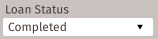 The following filters are also available:
The following filters are also available:- Loan Number
- Party Name/SSN/EIN
- Organization
- User Name
- Loan Phase