Overview
The Wolters Kluwer Freddie Mac Uniform Loan Delivery Dataset (ULDD) Interface enables delivery of a loan between mortgage and the Freddie Mac Loan Selling Advisor application so that a Lender can submit closed loans that adhere to Freddie Mac’s conditions to purchase the loans post consummation.
The interface enables the following activities:
- Ability to collect post-closing mortgage loan information within mortgage required for submission of a closed loan to Freddie Mac.
- Creation and the export of a XML file containing the required loan data for a subsequent import into the Freddie Mac Loan Selling Advisor application.
- Transformation of the source mortgage data (TXN) to the ULDD required data format (MISMO v3.0).
What is a typical mortgage user workflow when using the Freddie Mac Uniform Loan Delivery Dataset (ULDD) Interface?
The following diagram summarizes the user workflow between mortgage, the Wolters Kluwer Freddie Mac ULDD Interface and the Freddie Mac Loan Selling Advisor application.
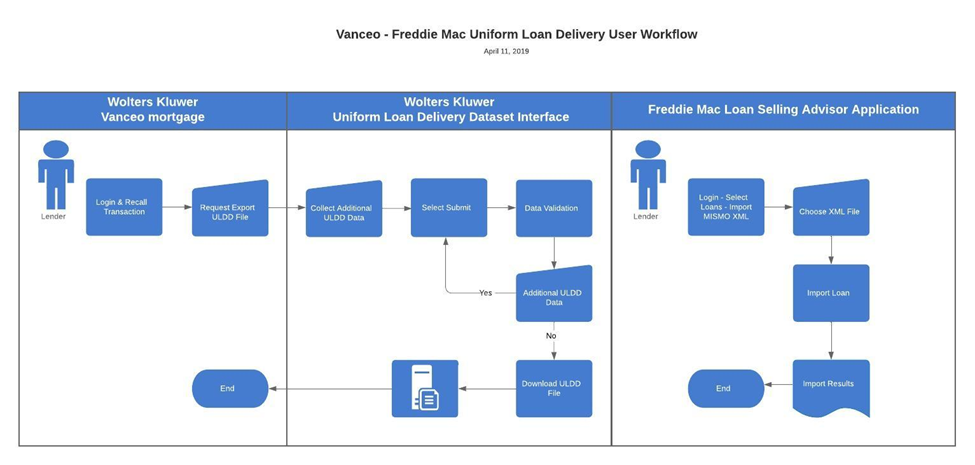
The Freddie Mac Loan Selling Advisor application expects to receive a required set of data from mortgage for a loan to import successfully. The user will generally recall a mortgage loan that recently closed and proceed to export the loan data so that they can import the loan data into the Freddie Mac Loan Selling Advisor application.
The Wolters Kluwer Fannie Mae Uniform Loan Data Delivery (ULDD) Interface, receives the loan export request along with the existing data from mortgage and allows the user to enter additional data such as information used in underwriting the loan and for identifying additional parties fulfilling roles for the loan. Upon selection of Submit, the Interface performs data validation and the user enters any required data until validation is complete. The user then selects Download ULDD File. The Interface merges collected data and creates and places a XML file in the user’s designated file download location. After exporting the loan data, selecting Done returns the user to mortgage from the ULDD Interface.
Subsequently, the user logs into the web-based Freddie Mac Loan Selling Advisor application, selects Loans, selects Import MIMSO XML and the Import Loan page appears. The user will then browse and select the XML file to be imported, respond to additional optional import parameters and select Import Loans to import the loan file. Upon import completion, Loan Seller Advisor presents the user with a Results page that may have additional actions to complete for a successful submission of loan data within the Freddie Mac Loan Selling Advisor application.