Completing in CASH Suite
Open the appropriate spread in CASH Suite or select the link on the Spread Tax Return Integrated Task card in CASH Suite.
After the spread opens, complete the following steps:
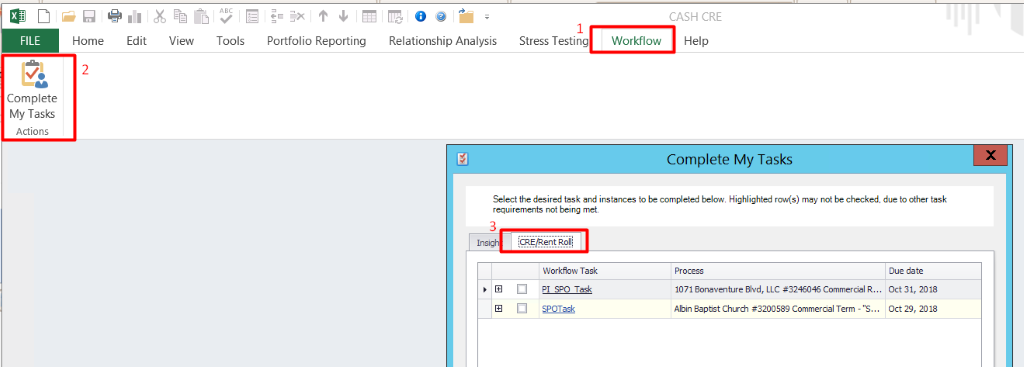
- Select the Workflow tab.
- Select Complete My Tasks to display the tasks specific to current return.
- Select the appropriate tasks.
- Select + to view the items related to current tax return.
- After the tax return is complete, select the appropriate items.
- If requirements for other tasks are met, select these items to mark them complete.
Note:To see all Insight tasks, select Show all. Expand specific tasks and mark some or all items complete for the tasks as needed.
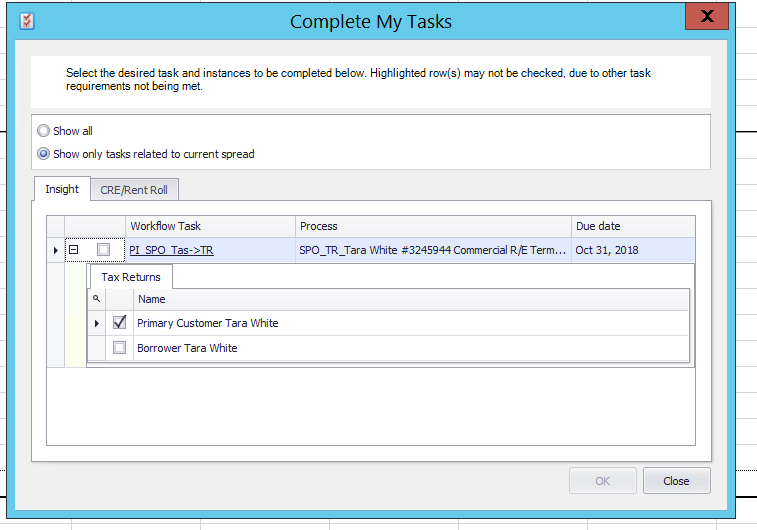
If a spread is manually opened in CASH Insight, selecting Complete My Tasks on the Workflow tab displays a user's tasks for the spread. Selecting Show All displays all tasks in CASH Insight for a user. If the user does not have tasks in CASH Insight, tasks will not display.
Users can complete only the tasks that are assigned to them. Tasks must have all requirements met before completing a task. Hovering on a task name displays missing requirements. Selecting the task name will mark the task and all items for the task complete at the same time.