Configuring Integrated Tasks
To configure an integrated task, follow the process below.
- In the Process Properties pane, select Product, Customer, or Collateral in the Context list.
- Add a task to the template.
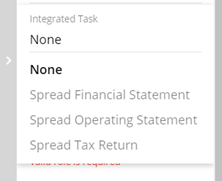
- On the Task Properties pane, select the appropriate option in the Integrated Tasks list.
Each task can have only one integrated task.
 Note:After selecting the integrated task type, select one or more appropriate entities (borrowers, guarantors, grantors etc.) that apply to the task.
 - After completing the template, activate the template so it is available for users to start new processes.