Executing an Integrated Task
After an integrated task is started for a process, the Task Details page displays an Integrated Tasks card that includes one or more items (links) based on related loan entities, such as the number of borrowers or guarantors.
Selecting link opens the appropriate file in CASH Insight or CASH CRE. If loan entities are modified, such as removing or adding a borrower in CASH Suite, the Integrated Tasks card displays updated links in CASH Workflow after refreshing the page. If new entities are added to previously completed integrated tasks, a warning displays.
The example below displays a Spread Financial Statement integrated task that requires spreading for both borrowers and guarantors. The items on the card will be labeled with borrowers and guarantors names.
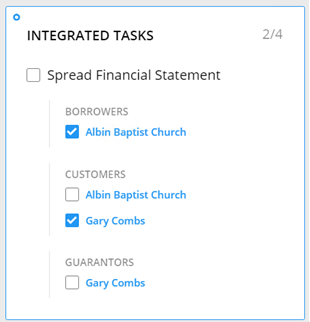
To mark a task complete, all the items on the Integrated Tasks card must be completed and
checked  . All other data,
document, and decision requirements must be met as applicable.
. All other data,
document, and decision requirements must be met as applicable.