Uploading Errors
File Types
The following exception may occur when attempting to upload attachments:
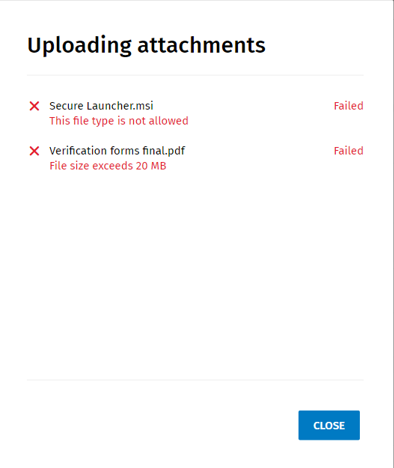
- The file type is not allowed. If a forbidden extension is detected by the system, the file will not upload. The following message displays: “This file type is not allowed.”
- The following list displays file types that are not allowed. This list may
be updated based on periodic security reviews.
- "EXE"
- "PIF"
- "APPLICATION"
- "GADGET"
- "MSI"
- "MSP"
- "COM"
- "SCR"
- "HTA"
- "CPL"
- "MSC"
- "JAR"
- "BAT"
- "CMD"
- "VB"
- "VBS"
- "VBE"
- "JS"
- "JSE"
- "WS"
- "WSF"
- "WSC"
- "WSH"
- "PS1"
- "PS1XML"
- "PS2"
- "PS2XML"
- "PSC1"
- "PSC2"
- "MSH"
- "MSH1"
- "MSH2"
- "MSHXML"
- "MSH1XML"
- "MSH2XML"
- "SCF"
- "LNK"
- "INF"
Files Size
The file size is restricted to a 20 MB limit. Only files up to 20 MB can be uploaded. For files greater than 20 MB, the following message displays: “File size exceeds 20 MB."
Internal Server Error
If an internal service error occurs, the following message will display: “Failed due to server error.” If this issue occurs, try to upload again. If the issue persists, contact Support.