2019 Release One (1) Expere Engine and Tools Changelog
Expere Engine Release: 2019 Release One (1)External release date is June 2019.
- March 26, 2019: 2019042319.1.0.2393-N20190326N
- No new Features for this release
- eOriginal parameters removed from
bsi.propertiesfile - PostProcess API updated to accept an owner password
- DiscreteParty updated for use with foreign addresses
- eSignature behavior enhanced for middle pages within dynamic documents (.REQ documents)
- DocViewer User Guide available
- Fillable Field enumeration enhanced
- SelectAndGenerate and Generate API calls updated for password-protected PDF files
- New parameter added to ListDocuments API > Document data type
- InfoDev: Expere Implementation Guide updates for .NET file system
- InfoDev: Setting up bsi.properties page in Expere Implementation Guide updated
- Ability to embed fonts with a tagged PDF
- Implementation Guide updated with detailed
bsi.propertiesinformation - Email address included in response for SignaturePointSet and FillableFields
- Barcode cover page enhancement for dynamic documents
- Discrete Party ID enhanced
- Enhance eSignatures to populate Description and SignatureText
- Implementation Guide updated - connecting .NET with .HTTPS
- Updated Implementation Guide Installation Outline
- Expere Engine changelog restructured
- Transaction failures due to presence of certain non-ASCII characters
- Page numbering issue with for barcode cover page addressed
- 2D barcode behavior enhanced
- WSEndpoint XML parse issue resolved
- Merge TRID: Closing Disclosure duplication issue resolved
- Ability to apply more than one OPPSA product of the same name
Expere Engine build number is: 2019.1.0.2536.
| Transaction failures due to presence of certain non-ASCII characters |
|---|
|
Issue:
A
defect was identified internally where a request using
any of the non-ASCII characters below would result in a transaction failure when
the documents generated contained fillable fields; the Engine version referenced
above contains the latest change.
|
| Solution: With this fix, transactions containing fillable fields and the above non-ASCII characters no longer fail. |
| Implementation Notes: This defect correction requires an Expere Engine 2019 Release One (1) update. |
Expere Engine build number is: 2019.1.0.2425.
| Page numbering issue for barcode cover page addressed |
|---|
|
Issue: It was determined that the Expere response file did not include
the correct page count when using a barcode cover page. The following elements
within the response file did not include the correct total page count:
As a result, when using the bookmark on the PDF to locate the fillable field, users were taken to the wrong location in the PDF file. In the
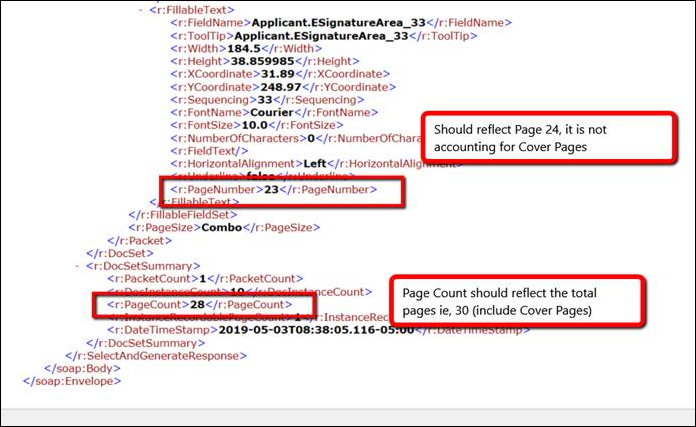 |
| Solution: These have been resolved; the Expere response file now accurately displays the total page count when barcode cover page is used. |
| Implementation Notes: This defect correction requires an Expere Engine 2019 Release One (1) update. |
eOriginal parameters removed from
bsi.properties file |
|---|
|
Summary: Users reported the presence of more detailed parameters in
the bsi.properties files specific to eOriginal. These
parameters are used for the electronic note (eNote) process for mortgage
transactions and should not have been included in the
bsi.properties file as the eNote is currently only
supported in our hosted environment. As a result, we have removed the
eOriginal-specific parameters that were inadvertently added to the
|
| Implementation Notes: This enhancement requires an Expere Engine 2019 Release One (1) update. |
| PostProcess API updated to accept an owner password |
|---|
|
|
Summary: It was reported that after installing Expere Engine 2018
Release Three, users were unable to merge PDF documents when submitting an
external PDF that was password-protected. The PostProcess API allows users to add password protection to those PDF's that are not currently protected, but not to those PDF's that have existing password protection. As a result, we have modified the PostProcess API to allow users to specify an owner and any additional password for each provided PDF in order to merge PDF's that previously-assigned password protection. |
| Implementation Notes: This enhancement requires an Expere Engine update, available in 2019 Release One (1). |
| 2D barcode behavior enhanced |
|---|
|
Issue: It was reported that when using a 2D barcode, the barcode covered
the "Page 1 of <x>" in the footer of a document. In the screenshot below, the
barcode appears over the "Page 1 of <x>." |
| Solution: We have updated the barcode output code so that the 2D barcode appears properly in the footer and does not obscure any portion of the text. |
| Implementation Notes: This defect correction requires an Expere Engine 2019 Release One (1) update. |
| DiscreteParty updated for use with foreign addresses |
|---|
|
Summary: Expere now supports Foreign Addresses. As a result, the
<DiscreteParty> object now accepts
<CountryCode> as a parameter. When using a Foreign
Address, the <CountryCode> is required. |
| Implementation Notes: This enhancement is available in the 2019 Release One (1) of the Expere Engine. |
| eSignature behavior enhanced for middle pages within dynamic documents (.REQ documents) |
|---|
|
|
Summary: An issue was identified with dynamic documents containing
eSignatures authored in the footer: while the first page, last page, and first
middle page contained a correct eSignature, eSignatures did not appear in the
footer of additional middle pages. After analysis occurred, it was determined that an internal process did not identify any eSignature placeholders for pages other than the first, last, and first middle. This internal process was enhanced to identify and enable all eSignature placeholders. |
| Implementation Notes: This enhancement is available in the 2019 Release One (1) of the Expere Engine. |
| DocViewer User Guide available |
|---|
|
| Summary: We have published an updated DocViewer user guide; the guide is independent of any specific product and provides details on how to use base DocViewer functionaity. |
| Implementation Notes: The DocViewer User Guide is available in the 2019 Release One of the Expere Engine. |
| WSEndpoint XML parse issue resolved |
|---|
|
Issue: When attempting to access the
<http://localhost:8080/Common/WSEndpoint> endpoint (where "localhost" is
the machine name and "port" is the port number where the Expere application
server is installed), the following error was logged in the
ExpereServices.log
file:Expected behavior is that an XML parser error should not occur when attempting to hit the endpoint. |
| Solution: This issue has been resolved; accessing this location does not result in an error and subsequent error logging. |
| Implementation Notes: This defect correction requires a 2019 Release One (1) Expere Engine update. |
| Fillable Field enumeration enhanced |
|---|
|
| Summary: We have modified the enumeration logic regarding fillable fields. It was determined that using the same field name in multiple locations within a single PDF could cause issues, such as: the fillable field would not generate properly based on the name. After additional research, we have appended unique sequencing identifiers to each field name when the same field name is used in more than one location in the same document. |
Technical Notes: Note the following example for standard fields:
|
| Implementation Notes: This enhancement is available in the 2019 Release One of the Expere Engine. |
| SelectAndGenerate and Generate API calls updated for password-protected PDF files |
|---|
|
Summary: Previously, the SelectAndGenerate and Generate API calls resulted in errors when password-protected PDF documents were included in the Request. This was due to a newer version of iText which was included in the Expere Engine 2018 Release Three. As a result, we have implemented the following enhancements:
Note: If an incorrect password is provided, the request will fail and will result in a SOAP:Fault indicating that an incorrect password was provided. The error message will include the InstanceDisplayName of the failing external PDF. |
| Implementation Notes: This enhancement is available in the 2019 Release One (1) of the Expere Engine. |
| New parameter added to ListDocuments API > Document data type |
|---|
|
Summary: We have updated the ListDocuments API to include a Package
ID (<PackageID>) element in the response back to the
user. This element was added in order for the Expere EZ Config Packages and
Packets tool to use when processing packages, in addition to the Phase name
(<Phase/>) element. |
Technical Notes: Sample <Document/> element
subset in the
response: |
| Implementation Notes: This enhancement is available in the 2019 Release One (1) of the Expere Engine. |
| Merge TRID: Closing Disclosure duplication issue resolved |
|---|
|
| Issue: An issue was identified when using the TRID Merge function. Instead of merging the Closing Disclosure and Addendum into a single merged PDF, it was duplicating the Closing Disclosure, resulting in the Closing Disclosure appearing twice in the merged PDF. |
| Solution: Now, the Merge TRID feature works as expected; the Closing Disclosure and Addendum are successfully merged into a single PDF. |
| Implementation Notes: This defect correction requires an Expere Engine update. |
| InfoDev: Expere Implementation Guide updates for .NET file system |
|---|
|
| Summary: The Installation Steps topic of the Expere Implementation Guide has been updated with information on how to handle database parameters when using content with a file system in place of the database. |
| Implementation Notes: N/A |
| InfoDev: Setting up bsi.properties page in Expere Implementation Guide updated |
|---|
|
Summary:
|
| Implementation Notes: Documentation change only. There are no implementation instructions for this change. |
| Ability to apply more than one OPPSA product of the same name |
|---|
|
| Issue: An issue was identified when making a request to OPPSA for a multiple account opening scenario. When using the same product for more than one account, the first account successfully merged the product data into the transaction. However, subsequent account(s) (using the same product) would not get OPPSA product data merged into the transaction. |
Solution: Now, when multiple accounts use the same OPPSA product, the
product data is merged into each transaction based on order. Additionally, we have updated the
ApplyPoliciesAndReturnTransactionRequest in the
ExpereIEServices WSDL file to allow 0 to Many for the
OppsaProductName element. Below is a sample request
containing two OppsaProductName elements with the same
values.
|
| Implementation Notes: This defect correction is available in the 2019 Release One (1) of the Expere Engine. |
| Ability to embed fonts with a tagged PDF |
|---|
|
| Summary: As part of Expere's adherence to creating WCAG 2.0 and 2.1 compliant documents, fonts are now embedded in the generated .PDF file when PDF tagging has been enabled. |
Technical Notes: To enable this functionality, use TaggedPDFEmbeddedFonts as your document format option. |
|
Implementation Notes: This enhancement is available in the 2019 Release One (1) of the
Expere Engine. Note: The
Expere Engine Change supporting this function will be included in Expere
Engine 2019 Release Two. |
Implementation Guide updated with detailed
bsi.properties information |
|---|
|
Summary: The Expere Implementation Guide has been updated to include
detailed information for each property within the
bsi.properties file. |
| Implementation Notes: This enhancement is available in the 2019 Release One (1) of the Expere Engine. |
| Email address included in response for SignaturePointSet and FillableFields |
|---|
|
Summary: For Expere users who do not utilize Wolters Kluwer E-Sign to fulfiill their e-signature requirements, Expere now returns the signer email address for the following signer and fillable fields:
|
| Implementation Notes: This enhancement is available in the 2019 Release One (1) of the Expere Engine. |
| Barcode cover page enhancement for dynamic documents |
|---|
|
| Summary: Previously when generating ancillary barcodes with a cover page, Expere would only generate the cover page for any static document or dynamic TRID-only documents if the REQ file was not authored with the barcode element. We have enhanced this functionality. Now when requesting an ancillary barcode with a cover page, any dynamic or static documents that has not been authored with the barcode element will now generate a cover page. |
| Implementation Notes: This enhancement is available in the 2019 Release One (1) of the Expere Engine. |
| Discrete Party ID enhanced |
|---|
|
Summary: Expere has been enhanced to use the Signer
<ID/> data string as the
<DiscretePartyID/> value when the
<DiscretePartyID/> contains a blank or null value in the
transaction .XML request or does not exist in the .REQ file. Additionally, the
<DiscreteParties/DiscreteParty/ID/> element has been
updated to utilize the same ID used by the Signer <ID/> in
the same manner.Note: If the <DiscretePartyID/> and the
Signer <ID/> elements are passed in the request, then
the <DiscretePartyID/> takes precedence. The
<DiscreteParties/DiscreteParty/ID/> also takes
precedence over the Signer <ID/>
element. |
Technical Notes:
Technical Notes:
<DiscretePartyID/> code sample as it appears in the response
file:Signer
DiscreteParties/DisreteParty/ID code sample as it appears in the response file: |
| Implementation Notes: This enhancement is available in the 2019 Release One (1) of the Expere Engine. |
| Enhance eSignatures to populate Description and SignatureText |
|---|
|
|
Summary: Previously, Select and Generate calls did not return a
proper response for the WKES ESignatureAndFieldSupport ancillary
output type in that the SignatureText and Description fields
contained unexpected values. It was expected that the
|
Technical Notes: Here is a sample response with the enhanced
elements: |
| Implementation Notes: This enhancement is available in 2019 Release One (1) of the Expere Engine. |
| Implementation Guide updated - connecting .NET with .HTTPS |
|---|
|
| Summary: A user reported issues using Expere.NET with HTTPS despite enabling .NET for HTTPS and binding the SSL certificate to the Expere website. While immediate temporary assistance was provided, we have also updated the Expere Implementation Guide for our entire self-hosted user base to use OPPSA and the Expere Testing System with .NET. |
| Implementation Notes: This enhancement is available in 2019 Release One of the Expere Engine. |
| Updated Implementation Guide Installation Outline |
|---|
|
| Summary: The Expere Implementation Guide - Installation Outline topic has been updated to include links for the list of installation steps to the associated topics. |
| Implementation Notes: This enhancement is available in the 2018 Release Three (3) of the Expere Engine. No user action is required. |
| Expere Engine changelog restructured |
|---|
|
| Summary: To facilitate accessing the desired information more quickly, the Changelogs and Important Notifications topic of the Expere Engine and Tools Changelog has been restructured. Previous versions are now acessible without having to navigate away from the Changelogs and Important Notifications topic. |
| Implementation Notes: This enhancement is available in the 2019 Release One (1) of the Expere Engine. |