2020 Release One (1) Expere Engine and Tools Changelog
Expere Engine Release: 2020 Release One (1)External release date is May 2020. Expere Engine build number is: 2020.1.0.1503.
- May 11, 2020: 2020051120.1.1.3008-J20190326Y
- EnableEsignatureManifest method behavior enhanced
- Special character values supported
- Updated user documentation shortcut available within Expere Engine release media
- Expere updated to honor of copies in package (PKGD) file
- ADA Implementation Guide updated
- Logo enhancements -
<LogoID/>reference - "&" symbol now allowed in certain elements
- Fillable field/checkbox size modified with dynamic documents
- Additional guidance provided for using mutually exclusive checkboxes and GroupID's
- iText 7 enhancement for use with ancillary options
- Default document margin behavior enhanced for use with barcodes
Ehcache.xmlfile functionality enhanced to use specific values- iText upgraded for use with MergedPDF and TaggedPDFEmbeddedFonts
| EnableEsignatureManifest method behavior enhanced |
|---|
|
Summary: Previously, content was identified as esignable via an
ESignature manifest file stored with the content. In
order to take advantage of esignable documents, the configuration setting of
com.bankerssystems.expere.render.EnableEsignatureManifest
within the bsi.properties file had to be set to “true.”
Content has been updated to indicate eSign in the .REQ file replacing
the |
| Implementation Notes: This enhancement is available in the 2020 Release One (1) of the Expere Engine. |
| OR Together Package rules processed |
|---|
|
|
Summary: A scenario existed where a user wanted to combine packages
of documents and merge them into one package. For example, merging Home
Equity with Mortgage, to make one large package for Residential Lending. For
base content, the Home Equity package(s) and Mortgage package(s) use
different package names and autoselection criteria. Previously, Expere would
only look at the first Package autoselection rule, if it was not met, the
document would not be generated. Expere has been updated to us an “OR”
process where it will look at ALL autoselection rules for the specified
package. For example, a single document could have 3 different autoselection
rules for one package. With this enhancement, Expere now evaluates all
package rules for the given document. Note: Documents will only be generated
once for a given package. For example, if the document meets two
autoselection rules for a specific package, only one instance of the
document will be generated. |
| Implementation Notes: This feature is available in the 2020 Release One (1) of the Expere Engine. |
| Special character values supported | ||||||||||||||||||||||||||||||
|---|---|---|---|---|---|---|---|---|---|---|---|---|---|---|---|---|---|---|---|---|---|---|---|---|---|---|---|---|---|---|
| ||||||||||||||||||||||||||||||
Summary: As part of a dedicated long term effort to support
previously-unsupported Unicode characters when generating static documents, we
now support the following special characters in this release through the Arial
font character map:
| ||||||||||||||||||||||||||||||
| Implementation Notes: This enhancement is available in the Expere Engine 2020 Release One (1). |
| Updated user documentation shortcut available within Expere Engine release media |
|---|
|
| Summary: We have updated the Expere Engine user documentation landing page shortcut in the Expere Engine release media. The new shortcut is named Expere Engine Documentation.url, available in Documentation folder on the release media. |
| Implementation Notes: This enhancement is available in the Expere Engine Release One (1). |
| Expere updated to honor of copies in package document (PKGD) |
|---|
|
| Summary: Expere now honors the number of copies for a given document when authored in an .REQ file. When working with number of copies in EZ Config Packages and Packets, the number of copies specified within EZ Config Packages and Packets will be honored in addition to the number of copies specified in the .REQ file. For example, a document authored with three copies in the .REQ file and two copies in EZ Config Packages and Packets will result in six copies of the document. The document file names are incremented with (1), (2), (3), etc. to identify multiple copies. |
| Implementation Notes: This enhancement is available in the Expere Engine 2020 Release One (1). |
| ADA Implementation Guide updated |
|---|
|
| Summary: We have updated the ADA Implementation Guide to reflect current procedures for setting and using Tagged PDF as a rendering option for ADA-compliant documents. Additionally, we have implemented other enhancements in the document verbiage to be more in line with WCAG requirements. |
| Implementation Notes: This enhancement is available in the Expere Engine 2020 Release One (1). |
| Signature issue resolved in Fannie Mae/Freddie Mac Uniform Residential Loan Application |
|---|
|
Issue: It was reported that when electronically signing the Fannie
Mae/Freddie Mac Uniform Residential Loan Application, the signature was
appearing above the X on the form (see example below). The correct
behavior should consist of the X appearing to the left of the electronic
signature (Borrower's Signature: and Co-Borrower's Signature) and
Date fields.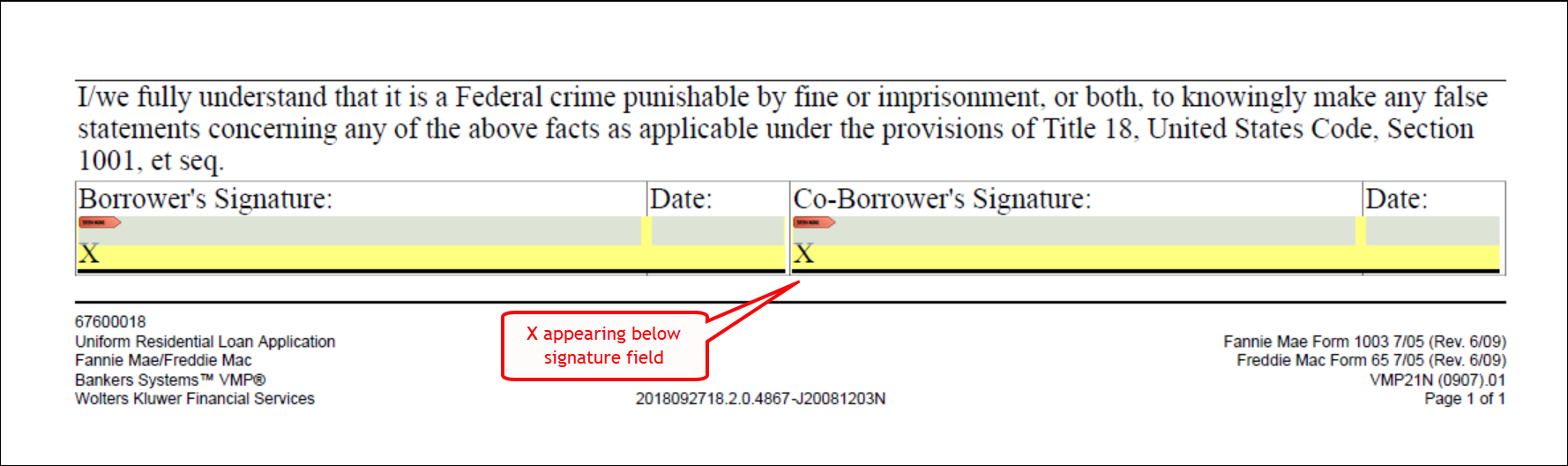 |
| Solution: This issue has been resolved; the X now appears to the left of the electronic signature (Borrower's Signature: and Co-Borrower's Signature) and Date fields in the Fannie Mae/Freddie Mac Uniform Residential Loan Application. |
| Implementation Notes: This defect correction is available in the 2020 Release One (1) of the Expere Engine. |
| Privacy Notice logo issue resolved |
|---|
|
|
Issue: It was determined that a specific authoring element, in the
document file, was not merging appropriately with the logo. We have modified
how the logo is applied to the document so document text is no longer
covered by the logo. Note: The following documents were also impacted by
this change, as they share the same authoring element as the Privacy
Notice:
|
| Solution: We have modified the document so that when applying a logo, the What We Do table starts lower on the document so that the logo does not obscure the table text. |
| Implementation Notes: This defect correction is available in the 2020 Release One (1) of the Expere Engine. |
Logo enhancements - <LogoID/>
reference |
|---|
|
Summary: We have enhanced how we handle logos within the request
file. Previously, when applying a logo to a transaction from EZ Config
Packages and Packets, or using the InLine package, the logo file for the
image was inserted in the request with each document being selected. This
would cause the request file to be exceptionally large and cause performance
delays in generating the document package. The logo is now passed in one
location and will contain a <LogoID/> element that can
be referenced in other places within the transaction, such as an Ancillary
Output Option within a packet or document. We updated the Expere schema with
the following:
|
|
Technical Notes: Sample request file: Inline Package: Ancillary Output Option: |
| Implementation Notes: This enhancement is available in the 2020 Release One (1) of the Expere Engine. |
| "&" symbol now allowed in certain elements |
|---|
|
Summary: A customer reported failed transactions; after internal
analysis, it was determined that the "&" character in the Mailing Address 2
line (<MailingAddressStreetAddr2>Test & Business name
</MailingAddressStreetAddr2>) was causing this particular
transaction to fail. This behavior has been enhanced. We have updated Expere to escape the "&" when it is submitted in a request; Expere now serializes this special character and returns it in the response file successfully. |
| Implementation Notes: This enhancement is available in the 2020 Release One (1) of the Expere Engine. |
| Fillable field/checkbox size modified with dynamic documents |
|---|
|
|
Summary: A customer reported that the size of our fillable checkboxes
were smaller than its non-fillable counterpart for dynamic documents;
subsequently, issues occurred in their scanning process. After internal
assessment, it was determined that Expere was decreasing the size of checkboxes
when making them fillable. As a result, we have enhanced the size of our fillable fields and checkboxes to match those of their non-fillable counterparts. |
| Implementation Notes: This enhancement is available in the 2020 Release One (1) of the Expere Engine. |
| Additional guidance provided for using mutually exclusive checkboxes and GroupID's |
|---|
|
| Summary: We have added supplemental guidance on using mutually exclusive checkboxes and GroupID's, consisting of various scenarios and code sample. Please refer to the link above for more information. |
| Implementation Notes: This enhancement is available in the Expere Engine 2020 Release One (1). |
| OPPSA printing behavior enhanced |
|---|
|
| Issue: A customer reported that when sending an Expere request with multiple accounts, OPPSA data appeared multiple times on the Reg E - Disclosure and Limits and Fees documents when the data should have appeared only once. After internal research, it was determined that an issue existed with the Expere Engine. |
| Solution: The Expere Engine has been updated so that OPPSA data appears only once unless otherwise specified. |
| Implementation Notes: This defect correction requires a 2020 Release One Expere Engine update. . |
| Default document margin behavior enhanced for use with barcodes |
|---|
|
|
Summary: It was reported that when a document (.REQ file) did not contain
predefined margins and utilized a barcode in the tagline, the barcode appeared
over the tagline information. As a result, Expere now uses .5 inch default document margins when they have not been authored in the document and when using either barcodes or logos. Note the following:
|
| Implementation Notes: This enhancement is available in the 2020 Release One (1) of the Expere Engine. |
Ehcache.xml file functionality
enhanced to use specific values |
|---|
|
Summary: We have made the following updates to the Ehcache.xml
functionality:
This enhancement requires users to upgrade to Java 8; for those users still using Java 6, an enhanced version of Expere will be sent to them. Additionally, Expere source compatibility has been updated to use Java 1.8. |
| Implementation Notes: This enhancement is available in the 2020 Release One (1) of the Expere Engine. |
| iText 7 enhancement for use with ancillary options |
|---|
|
Summary: Previously, Expere utilized iText 5.5; however, we made a
determination that we needed to update our technology to optimize our PDF
rendering. As a result, we have upgraded Expere to utilize iText 7 with the
following ancillary options:
|
| Implementation Notes: This enhancement is available in the 2020 Release One (1) of the Expere Engine. |
| iText upgraded for use with MergedPDF and TaggedPDFEmbeddedFonts |
|---|
|
| Summary: Expere has been upgraded to iText 7 when merging PDF's and using TaggedPDFEmbeddedFonts. Previously when merging PDF's with TaggedPDFEmbeddedFonts, the tags were stripped from the merged PDF. |
| Implementation Notes: This enhancement is available in the 2020 Release One (1) of the Expere Engine. |
| Signer Signature Sequence behavior modified - static documents |
|---|
|
Issue: A customer reported the following issues in generated PDF's using
static documents with the sequencing in signature date fields:
The root of the issue is that the Signer Signature Sequence is not being recognized and incremented by the Expere Engine when two signature lines and date fields for the same party exist on the same page. |
| Solution: Modifying the Expere Engine to force the Signer Signature Sequence to increment automatically resolves these issues. |
| Implementation Notes: This defect correction is available in the 2020 Release One (1) of the Expere Engine. |