Changelog Entries - 2019
This help topic encompasses new features, enhancements, and defect corrections covering all aspects of your hosted environment, including Expere Document Services and the Expere Engine.
New Features
- See Features page
Enhancements
- SUPPORT page - ability to now search for Generate API call
- Tool Suite online help links updated
- Tool Suite - Search Accounts functionality enhanced
- AccountNumber now returned with DiscreteParty in response
- ListPackagesResponse updated to include PackageID / DisplayName
- WKES field name updated when "Multiline" attributes used
- SignerID behavior enhanced when used with DiscreteParty
- None
Defect Corrections
December
| Signer Signature Sequence behavior modified - static documents |
|---|
|
Issue: A customer reported the following issues in generated PDF's using
static documents with the sequencing in signature date fields:
The root of the issue is that the Signer Signature Sequence is not being recognized and incremented by the Expere Engine when two signature lines and date fields for the same party exist on the same page. |
| Solution: Modifying the Expere Engine to force the Signer Signature Sequence to increment automatically resolves these issues. |
| Implementation Notes: This defect correction is available in the 2020 Release One (1) of the Expere Engine. |
| SUPPORT page - ability to now search for Generate API call |
|---|
|
Summary: Per an internal enhancement request, we have updated the
API Call dropdown on the SUPPORT page to now include
Generate as a search option.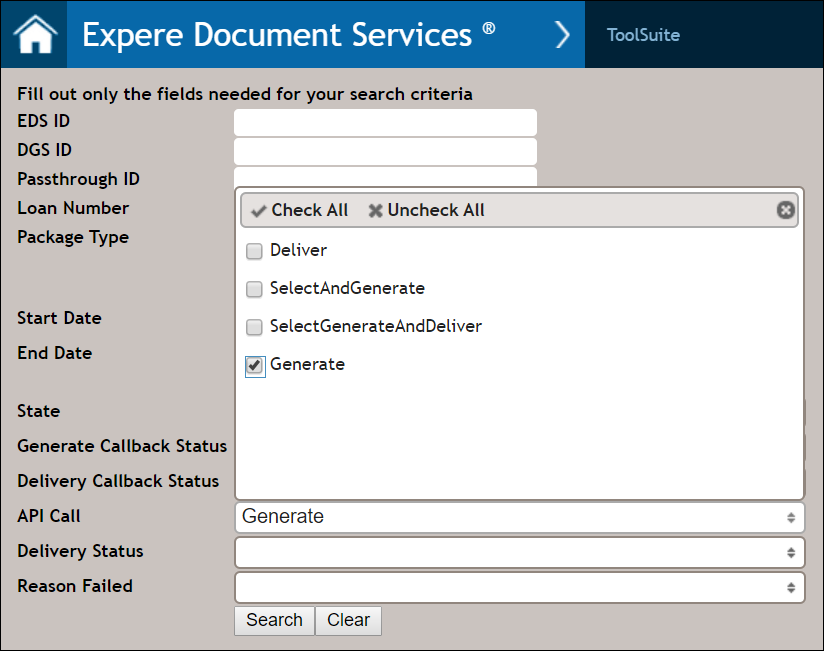 Additionally, Generate now appears as a potential option in the API Call column of the search results table. |
| Implementation Notes: This enhancement is available in the December release of Expere Document Services. |
| Tool Suite online help links updated |
|---|
|
Summary: We have implemented the following online help links in the Tool Suite:
|
| Implementation Notes: This enhancement is available in the . |
| Document format not honored when using Generate |
|---|
|
Issue: It was reported that when attempting to generate a package where certain documents were to be output as RTF documents, all of the documents within the package printed as PDF's instead, The <Format/> element was not being honored when the value was set to "RTF" at a document level when performing a Generate call. The code sample below shows the portion of a request where the |
Solution: This issue has been corrected; individual documents that are specified with a <Format/> value of "RTF" now output as the desired output type. |
| Implementation Notes: This defect correction is available in the . |
| Tool Suite - Search Accounts functionality enhanced |
|---|
|
Summary: We have made the following enhancements to our searching functionality within various SERVICES-related pages:
|
| Implementation Notes: This enhancement is available in the . |
November
Static documents now honor eSignature setting |
|---|
|
Issue: Previously, the Expere response returned <XCoordinate> and <YCoordinate> values when a static document was not marked eSignable. Note: eSignable is a setting within the REQ properties that can be identified at the time of authoring. For example: |
Solution: <XCoordinate> and <YCoordinate> values are no longer returned in the Expere response when a static document is not eSignable. |
| Implementation Notes: This defect correction requires an Expere 2019 Release Two (2) update. |
October
| AccountNumber now returned with DiscreteParty in response |
|---|
|
Summary: The DiscreteParty section within the Expere response file now contains the Account number in the form of a new <AccountNumber> element. This new element only appears when the Account number is specifically authored in the content. This enhancement was requested so documents could be assigned to a corresponding account. |
| Implementation Notes: This enhancement is available in the 2019 Release Two (2) of the Expere Engine. |
| ListPackagesResponse updated to include PackageID / DisplayName |
|---|
|
Summary: Previously, the package identifier was populated as the
value for the <PackageName> in the Expere response.
However, it was determined that users need the package identifier and
package name to contain different values. As a result, we have created a new
<PackageID> element. We have updated the WSDL to
include the following optional elements in the
<ListPackagesResponse> >
<ArrayOfPackageDescription> >
<PackageDescription element:
|
| Implementation Notes: This WSDL change is updated in the October release of Expere Document Services / Hosted Expere; the elements will be included in the response in our November release. |
| WKES field name updated when "Multiline" attributes used |
|---|
|
|
Summary: A need existed to identify a WKES fillable field that contained
multiple lines in the field name. As a result, when content has been authored to include a multline field with WKES fillable fields, the field name now reflects the use of a "Multiline" attribute; for example: WKES_Multiline_email_M_#, where "Multiline" reflects the Field Type. |
| Implementation Notes: This enhancement is available in the Expere 2019 Release Two (2). |
| SignerID behavior enhanced when used with DiscreteParty |
|---|
|
Issue: Users reported that the <SignerID> element
value was being used to populate the <DiscretePartyID>
element. The expected behavior is if the <DiscretePartyID>
element contains a value, the <SignerID> element value
should not override it. We have updated Expere to ignore the
<SignerID> element when a
<DiscretePartyID> value is present. |
| Implementation Notes: This enhancement is available in the Expere Engine 2019 Release Two (2). |
September
| New AncillaryOutputOptions > OutputType of PreserveDocinstances added |
|---|
|
Summary: It was determined that there was no option to preserve
individual document instances (<DocInstance> when
requesting a PdfMerge ancillary option for a packet, as this
functionality did not previously exist. As a result, the resulting Expere
response file did not display the individual
<DocInstance> elements with document information,
only that of the merged PDF document.We have created a new
PreserveDocInstances ancillary option that, when used with
the PdfMerge option, preserves these individual document
instances when specifying a packet. The subsequent Expere response file
now includes |
Technical Notes: A portion of a sample request is included
below: |
| Implementation Notes: This enhancement is available in the September release of Hosted Expere / Expere Document Services. |
| Date field generation behavior enhanced for Wolters Kluwer E-Sign documents |
|---|
|
|
Summary: An issue was identified when generating a static document
with a single party, where Wolters Kluwer E-Sign was requested. When
creating fillable fields for WKES the co-borrower date field was being
rendered, and presented for completion in WKES, when a co-borrower was not
present. This was causing signing issues within WKES, as the field was
requiring to be completed, but was not applicable to any of the parties on
the document. As a result, Expere has been enhanced to no longer generate date fields when the corresponding signature field is not rendered. |
| Implementation Notes: This enhancement is available in the September release of Expere Document Services / Hosted Expere. |
| Web Services Guide updated with sample token/assertion information with Hosted Expere |
|---|
|
| Summary: The Expere Document Services Web Services Guide has been updated to include helpful information on getting a token from Wolters Kluwer Administration and using SOAP headers and assertions. The Using Authentication/Authorization with Expere Document Services section contains examples of sample tokens, assertions, and a sample SelectAndGenerate call with complete security information. |
| Implementation Notes: This enhancement is available in the Expere Document Services Web Services in conjunction with our September application deployment. |
| PacketCustomDataItem now returns data in the response |
|---|
|
Summary:Expere Document Services has been enhanced to include data in
the <PacketCustomDataItem/> element in the
GetGenerateResults response, when it has been authored in the
content. This element has been a part of the response, but has not returned
data until now. This can be used at the institution's discretion to describe
something about the packet. That data can then be used for internal
processes or additional LOS operations. |
Technical Notes: Below is an example of an Expere Document Services
response with <PacketCustomeDataItem/>
authored: |
| Implementation Notes: This enhancement is available in the September deployment of Wolters Kluwer Hosted Expere / Expere Document Services. |
August
| Callbacks failing in Generate call |
|---|
|
|
Issue: A user reported that after the 8/6 customer test deployment,
callbacks were not functioning properly. Prior to this deployment, an
HTTPBasic authorization was passed in that set the Callback Authorization
object value to "null." This was expected behavior as we determine if any
credentials are configured for either the user or account. If none are
found, the Callback Authorization object is set to "null." However the deployment on 8/6, introduced a change that caused this functionality to break. This caused the following error to appear: |
| Solution: We have corrected this issue and users should no longer be receiving the error referenced above. |
| Implementation Notes: This defect correction is available in the August deployment of Expere Document Services / Hosted Expere. No user action is required. |
| Tool Tip behavior enhanced |
|---|
|
| Summary: Previously if a fillable PDF contained tool tip help text that exceeded 255 characters, the transaction would fail. Document Generation Services has been enhanced so that when the tool tip text on a fillable PDF exceeds 255 characters, the text is truncated and the transaction no longer fails. |
| Implementation Notes: This enhancement |
| Expere no longer supporting TLS 1.1 |
|---|
|
| Summary: As of the 2019 Release Two, Wolters Kluwer no longer supports TLS 1.1 for use with the Expere Engine due to outdated security algorithms and cryptosystems. It is required that you enable 1.2. If you do not, callback functionality could be compromised. |
| Implementation Notes: Upgrade to TLS 1.2 or higher, then disable TLS 1.1 for all requests being sent to Expere. This enhancement is deployed in the 2019 Release Two of the Expere Engine. |
| Web services guide updated for callback information and generation/delivery WSDL's |
|---|
|
|
Summary: The Expere Document Services Web Services Guide has been
updated to include accurate information regarding the Wolters Kluwer
callback service. Previously, the EDS production and CT callback URL's referenced in our WSDL Overview section were incorrect and not usable. We have replaced these URL's with links to a new Sample Callback Request and WSDL's help topic which provide a sample callback request and document generation and delivery WSDL's that integrators should use. |
| Implementation Notes: This enhancement is available in the July deployment of Expere Document Services. |
| eOriginal ID now included in Expere response |
|---|
|
Summary: The eOriginal transaction ID
(<eOriginalTransactionID>) and eOriginal profile ID
(<eOriginalDocumentProfileID>) are now available in the
Expere response file. These
values are used in the transaction creation process and are available for users
to reference in the eOriginal Command Center. Note: These new parameters are
optional and will only be returned in the response when working with
eOriginal to receive an eNote in place of a traditional paper Note. You may
disregard this change if you are not using eNotes. |
| Implementation Notes: This enhancement is available in the 2019 Release One (1) of the Expere Engine. |
| Transaction failures due to presence of certain non-ASCII characters |
|---|
|
Issue:
A
defect was identified internally where a request using
any of the non-ASCII characters below would result in a transaction failure when
the documents generated contained fillable fields; the Engine version referenced
above contains the latest change.
|
| Solution: With this fix, transactions containing fillable fields and the above non-ASCII characters no longer fail. |
| Implementation Notes: This defect correction requires an Expere Engine 2019 Release One (1) update. |
June
| Page numbering issue for barcode cover page addressed |
|---|
|
Issue: It was determined that the Expere response file did not include
the correct page count when using a barcode cover page. The following elements
within the response file did not include the correct total page count:
As a result, when using the bookmark on the PDF to locate the fillable field, users were taken to the wrong location in the PDF file. In the
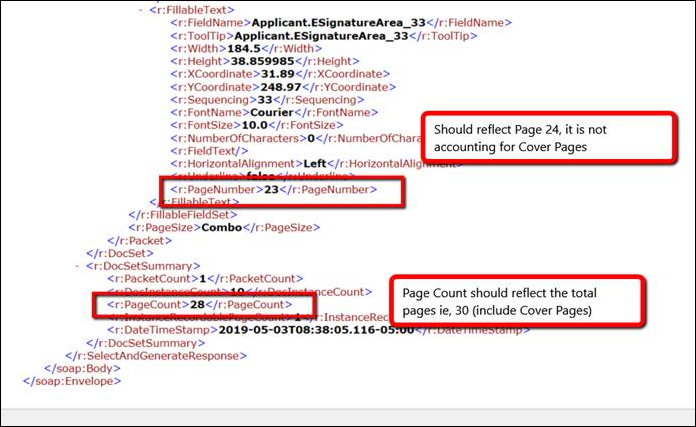 |
| Solution: These have been resolved; the Expere response file now accurately displays the total page count when barcode cover page is used. |
| Implementation Notes: This defect correction requires an Expere Engine 2019 Release One (1) update. |
May
| RTF behavior enhanced |
|---|
|
Summary: We have enhanced the following user-reported issues when
documents were generated to an RTF output:
|
| Implementation Notes: This enhancement is available in the May deployment of Expere Document Services. |
| Date field behavior enhanced |
|---|
|
|
Summary: It was reported that the second instance of a date field was
not signable via Wolters Kluwer ESign, for Static documents. It was found
that the date fields were not enumerating correctly when more than on
signature date was present on the document, due to the signature date not
being given a unique name. This behavior has been enhanced. The
|
| Implementation Notes: This enhancement is available in the May deployment of Expere Document Services. |
| Previously-released TrackXPathChanges flag updated in SecuritySessionService for |
|---|
|
| Summary: In the 2018.4 release of DocViewer, a "TrackXPathChanges" flag was implemented. While it was implemented in the DocViewer WSDL, it was not added to Expere Document Services nor Document Generation Services when it should have been. We have updated the SecuritySessionService API for to implement the "TrackXPathChanges" flag in the WSDL. |
| Implementation Notes: While not considered a change that will break functionality, . |
| Invalid character messaging enhanced |
|---|
|
|
Summary: We previously observed that certain errors being logged
internally were being truncated in our SQL database if they exceeded 255
characters. The errors in question pertained to invalid characters that
appeared in the submitted request. Because our document engine cannot
process the request due to the presence of invalid characters, the submitted
request would reside in an incomplete state. As a result, the user would not
be alerted if the message exceeded 255 characters, and the transaction would
time out after 15 minutes. Now when an invalid character is present in the submitted request, Expere Document Services will present the user with an error message alerting them of this issue. |
| Implementation Notes: This enhancement is available in the May release of Expere Document Services; no user action is required. |
April
| 2D barcode behavior enhanced |
|---|
|
Issue: It was reported that when using a 2D barcode, the barcode covered
the "Page 1 of <x>" in the footer of a document. In the screenshot below, the
barcode appears over the "Page 1 of <x>." |
| Solution: We have updated the barcode output code so that the 2D barcode appears properly in the footer and does not obscure any portion of the text. |
| Implementation Notes: This defect correction requires an Expere Engine 2019 Release One (1) update. |
| System version dependencies documented for Hosted Expere / Expere Document Services |
|---|
|
| Summary: The Expere Document Services Web Services now contains required system-level dependencies an integrating partner should expect to use with Wolters Kluwer Hosted Expere. |
| Implementation Notes: The new System Version Dependencies topic is available in the April publication of the Expere Document Services Web Services Guide. |
| DiscreteParty updated for use with foreign addresses |
|---|
|
Summary: Expere now supports Foreign Addresses. As a result, the
<DiscreteParty> object now accepts
<CountryCode> as a parameter. When using a Foreign
Address, the <CountryCode> is required. |
| Implementation Notes: This enhancement is available in the 2019 Release One (1) of the Expere Engine. |
| eSignature behavior enhanced for middle pages within dynamic documents (.REQ documents) |
|---|
|
|
Summary: An issue was identified with dynamic documents containing
eSignatures authored in the footer: while the first page, last page, and first
middle page contained a correct eSignature, eSignatures did not appear in the
footer of additional middle pages. After analysis occurred, it was determined that an internal process did not identify any eSignature placeholders for pages other than the first, last, and first middle. This internal process was enhanced to identify and enable all eSignature placeholders. |
| Implementation Notes: This enhancement is available in the 2019 Release One (1) of the Expere Engine. |
| DocViewer User Guide available |
|---|
|
| Summary: We have published an updated DocViewer user guide; the guide is independent of any specific product and provides details on how to use base DocViewer functionaity. |
| Implementation Notes: The DocViewer User Guide is available in the 2019 Release One of the Expere Engine. |
| WSDL updated to require recipient information |
|---|
|
Summary: The WSDL has been updated to require recipient information
when the request includes a Delivery call. Required information includes:
If a Delivery request is submitted and missing any of this information, the transaction will fail. |
| Implementation Notes: This enhancement is available in the April release of Expere Document Services. |
| Signature field name and sequencing elements enabled for Expere Document Services response |
|---|
|
Summary: It was noted that the Signature FieldName
and Sequencing elements were not being returned in the EDS
response when requesting SignatrePointSet or eSignatureAndFieldSupport. This
has been updated so the FieldName is returned for all
signature fields, and Sequencing is returned for signature
fields when using WKESign. |
| Technical Notes: For more information on these elements, see SignaturePoint in the Expere Document Services web services guide. |
| Implementation Notes: This enhancement is available in the April release of Expere Document Services. |
| Fillable Field enumeration enhanced |
|---|
|
| Summary: We have modified the enumeration logic regarding fillable fields. It was determined that using the same field name in multiple locations within a single PDF could cause issues, such as: the fillable field would not generate properly based on the name. After additional research, we have appended unique sequencing identifiers to each field name when the same field name is used in more than one location in the same document. |
Technical Notes: Note the following example for standard fields:
|
| Implementation Notes: This enhancement is available in the 2019 Release One of the Expere Engine. |
March
| Ability to embed fonts with a tagged PDF |
|---|
|
| Summary: As part of Expere's adherence to creating WCAG 2.0 and 2.1 compliant documents, fonts are now embedded in the generated .PDF file when PDF tagging has been enabled. |
Technical Notes: To enable this functionality, use TaggedPDFEmbeddedFonts as your document format option. |
|
Implementation Notes: This enhancement is available in the 2019 Release One (1) of the
Expere Engine. Note: The
Expere Engine Change supporting this function will be included in Expere
Engine 2019 Release Two. |
| Ability to apply more than one OPPSA product of the same name |
|---|
|
| Issue: An issue was identified when making a request to OPPSA for a multiple account opening scenario. When using the same product for more than one account, the first account successfully merged the product data into the transaction. However, subsequent account(s) (using the same product) would not get OPPSA product data merged into the transaction. |
Solution: Now, when multiple accounts use the same OPPSA product, the
product data is merged into each transaction based on order. Additionally, we have updated the
ApplyPoliciesAndReturnTransactionRequest in the
ExpereIEServices WSDL file to allow 0 to Many for the
OppsaProductName element. Below is a sample request
containing two OppsaProductName elements with the same
values.
|
| Implementation Notes: This defect correction is available in the 2019 Release One (1) of the Expere Engine. |
February
| ID and Email added to response file for FillableFields |
|---|
|
Summary: Previously in PBI 528780, we had updated the Expere Document Services WSDL to
include the customer ID and SignerEmail for fillable fields. For PBI 528782,
we enhanced the response file to now include the <ID/>,
<SignerEmail/>, and <FieldName/>
when fillable fields are generated on a document. |
| Implementation Notes: This enhancement is available in the February release of Expere Document Services. |
| Web Services Guide: API descriptions update |
|---|
|
| Summary: Several API operation pages have been updated to more accurately describe their descriptions. Included are all API operations under the API Overview topic (Generate, GetDeliveredImages, etc). |
| Implementation Notes: This enhancement is available in the February release of Expere Document Services. |
January
| Barcodes help link updated in Tool Suite |
|---|
|
| Summary: We have updated the barcode pattern help link on the Select Generate Deliver and Select and Generate pages to point to the Barcode overview page in the Implementation Strategies online user guide. |
| Implementation Notes: This enhancement is available in the January release of Expere Document Services |
| WKES Signatures missing sequence number in PDF |
|---|
|
| Issue: It was reported that Wolters Kluwer ESign fillable fields did not allow users to add an electronic signature. It was determined that the field order sequencing number was missing from the Signature and Date fields in the generated .PDF, although the Expere response file returned the correct signature field name with sequencing number. |
| Solution: This issue has been corrected. Now the Signature and Date field names in the .PDF correctly match what it is in the response .XML match. |
| Implementation Notes: This defect correction is available in the December release of Expere Document Services. |