Form to View First
The Select a Phase and Form to View List dropdowns appear at the top of the page when the DocViewer launches.
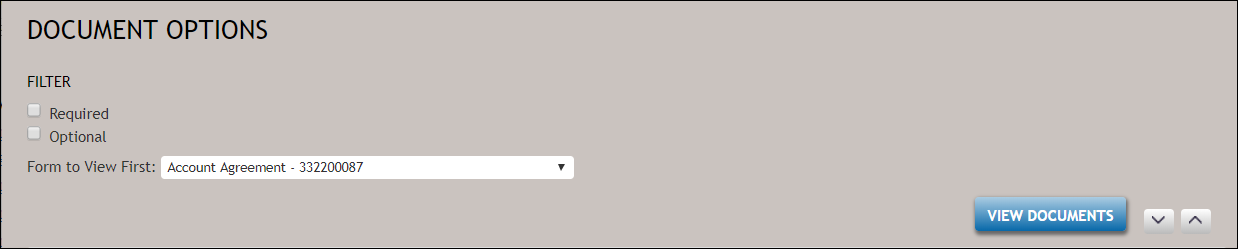
Form to View First dropdown
When the Form to View First drop-down is available, select the document to complete with corresponding data collection. Select the down arrow to display and select a document from the list.
Filtering on optional and/or required documents
If an overlay dictionary with a "RequiredUIField" flag set to "1" and SupportedRequiredFields flag is set to "true" have been passed in with the BeginSession input, Required and Optional checkboxes appear directly above the he Form to View First dropdown. This allows users to filter on documents within a particular package that contain either optional or required data points, or both.
For example, clicking the Required checkbox displays only those documents that contain required data points.
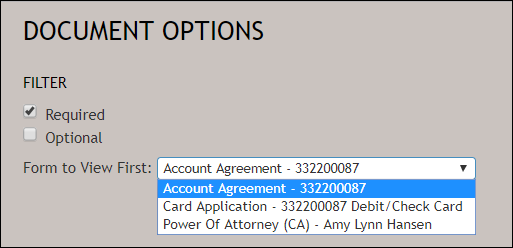
- Users may filter on optional and/or required documents.
- Users are not restricted to one category of document; you may select both the Optional and Required checkboxes; selecting both checkboxes removes those documents that do not contain any open data filed(s) for user entry, categorized as "No Data."
- During the first DocViewer data entry session, documents remain in the state in which they were initially launched. For example: if a document contains required data, the document is listed as required and will not be changed to optional until exiting DocViewer.
- During subsequent DocViewer data entry sessions, documents which were originally labeled as Required or Optional can be updated to a new status if all required data fields or optional data fields have been satisfied.