Using Notary and Witness Fields
This topic explains how to use Notary and Witness fields.
Making Notary lines eSignable and Notary Fields Fillable
Notary line are eSignable and associated notary fields (for example: witness lines/fields, checkboxes, and text fields) should appear as fillable to the user when the following conditions are met:
- The document is eSignable (in the Requirements Editor, Properties >
eSignable is checked OR
<SuppressESignature/>is not present in the .REQ file) and either of the following conditions are met:- An ancillary output of eSignatureAndFillableSupport is used, OR
- The eSignature property (
eSignatureSupport) is set to "true" inbsi.properties.
Note: The presence of a<SuppressESignature/>element within a particular section will result in that signature field NOT being fillable. This element may also be authored to allow the presence, or suppression, of electronic signatures (for example: some states may allow electronic signatures while others may not).
Associating the SignerID when using a Notary or Witness party
When using a Notary or Witness party during the eSigning process, users are
encouraged to possess a corresponding signing party's SignerID as it will make the
process more streamlined. The associated party SignerID can be authored using the
<LinkToSignerIdentifier/> element within the
<Signature/> or <SignatureField/>
elements. Refer to the Requirements Editor User Guide for more information.
Making Witness lines eSignable
SignatureIdentifier element
will contain the value of the "in scoper" signer plus "-witness" when the SignerID
value is not provided. This will generate an esignable witness line when the
following conditions are satisfied: - The document is eSignable (in the Requirements Editor, Properties >
eSignable is checked OR
<SuppressESignature/>is not present in the .REQ file) and either of the following conditions are met:- An ancillary output of eSignatureAndFillableSupport is used, OR
- The eSignature property (
eSignatureSupport) is set to "true" inbsi.properties.
Note: The presence of a<SuppressESignature/>element within a particular section will result in that signature field NOT being fillable. This element may also be authored to allow the presence, or suppression, of electronic signatures (for example: some states may allow electronic signatures while others may not).
Using the LinkToSignerIdentifier element
<LinkToSignerIdentifier/> element is authored as part of the
<Signature/>, <SignatureField/>,
</FillableText>, and <FillableCheckbox/>
containers. This element associates a known party with a notary or witness to
simplifiy the process, especially when multiple notaries are required. 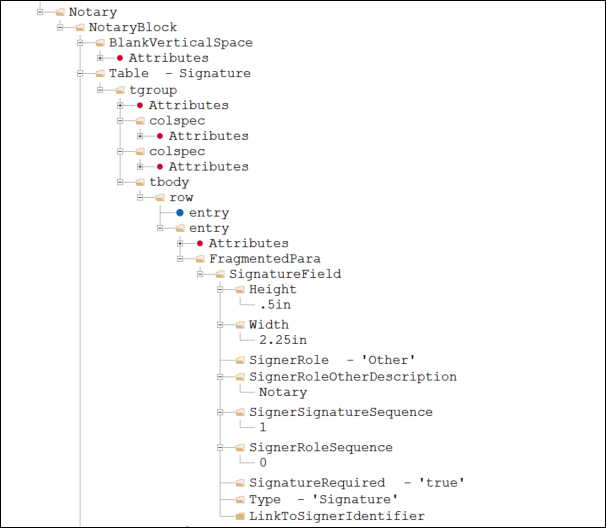
When a party is known, the <LinkToSignerIdentifier/>
element incorporates a DTA that returns an in-scope signing party ID (for example:
the RembrandtID of the borrower, co-signer, owner, etc). As a result in the Expere
response file, this value uses the same value as the in-scope signer ID (another
signing party ID within the response file).
When a party is unspecified, then the
<LinkToSignerIdentifier/> element and value are not present
in the response for a notary or witness.
Notary example with a known signer:
<r:Signer>
	<r:Id>null</r:Id>
	<r:Description>Notary</r:Description>
	<r:SignaturePoints>
		<r:SignaturePoint>
			<r:IncludeDate>false</r:IncludeDate>
			<r:PageNumber>19</r:PageNumber>
			<r:PageOrder>1</r:PageOrder>
			<r:Height>36.0</r:Height>
			<r:Width>198.0</r:Width>
			<r:SignatureText>_</r:SignatureText>
			<r:XCoordinate>93.6</r:XCoordinate>
			<r:YCoordinate>190.44</r:YCoordinate>
			<r:Type>Signature</r:Type>
			<r:FieldName>SIG_Notary_0__true_1</r:FieldName>
			<r:Sequencing>2</r:Sequencing>
			<r:SignatureRequired>true</r:SignatureRequired>
			<r:LinkToSignerIdentifier>b1</r:LinkToSignerIdentifier>
		</r:SignaturePoint>
	</r:SignaturePoints>
</r:Signer>
Witness example with a known signer:
<r:Signer>
	<r:Id>b1-witness</r:Id>
	<r:Description>Witness</r:Description>
	<r:SignaturePoints>
		<r:SignaturePoint>
			<r:IncludeDate>false</r:IncludeDate>
			<r:PageNumber>19</r:PageNumber>
			<r:PageOrder>1</r:PageOrder>
			<r:Height>36.0</r:Height>
			<r:Width>198.0</r:Width>
			<r:SignatureText>_</r:SignatureText>
			<r:XCoordinate>93.6</r:XCoordinate>
			<r:YCoordinate>190.44</r:YCoordinate>
			<r:Type>Signature</r:Type>
			<r:FieldName>SIG_Witness_0_b1-witness_true_1</r:FieldName>
			<r:Sequencing>2</r:Sequencing>
			<r:SignatureRequired>true</r:SignatureRequired>
			<r:LinkToSignerIdentifier>b1</r:LinkToSignerIdentifier>
		</r:SignaturePoint>
	</r:SignaturePoints>
</r:Signer>
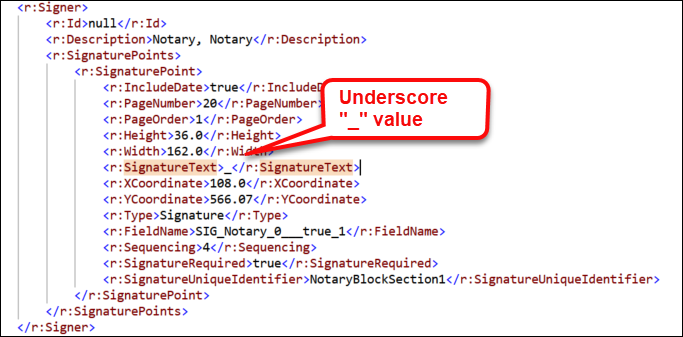
When Signer Name is unknown
When the Signer name contains a known value, the <SignatureText>
element in the Expere response file will contain corresponding value. However,
certain scenarios exist where the signing party is unknown, typically with a notary
or witness. if the Signer name is not known, Expere will set the value for
<SignatureText> to an underscore ('_').