Encryption
Encryption defines the PDF file
encryption information and document rights management options. A watermark is a
recognizable image or text pattern that appears superimposed on a generated PDF output.
In the DocServicesAPI (self-hosted Document Generation System users),
DocumentServicesAPI (Hosted Expere users), and
ExpereAPI (self-hosted Expere users), watermarks are implemented as
a post-processing event submitted on a request in the AncillaryOutputOptions
object and defined through a single object, SetEncryption, containing three
object to define the encryption strength, passwords, and
permissions to associate with the encrypted document.
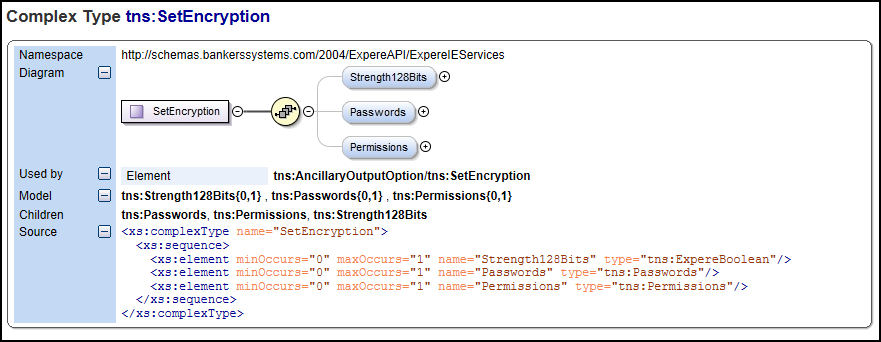
- Strength128Bits: A boolean defining if the document is marked for encryption as 128-bit encrypted. A TRUE value indicates the document is marked for 128-bit encryption; a FALSE value indicates it is marked for 40-bit encryption.
- Passwords: Object containing the user and owner to submit on a request.
- Permissions: Object defining rights to associated with the user/owner submitted on the request.
Using Encryption with your request
This section explains how to use the Encryption element and child elements when making a request.
Passwords:
Userpassword: if provided in thePermissionselement, theuserpassword is used to open a document or when any of the permissions below are set to "false." If nouserpassword is set, users may open the PDF without a password but would be prompted to perform other actions (printing, edting) if anownerpassword is provided.Ownerpassword: if provided in thePermissionselement, theownerpassword is used to grant access to any of the permissions below.
Permissions:
- AllowPrinting: if set to "true," this option allows users to print a copy of the document.
- AllowModifyContents: if set to "true," this option allows users to edit the document if the corresponding viewer has edit capabilities (e.g. Adobe Acrobat Professional).
- AllowCopy: if set to "true," this option allows users to copy text from the output document.
- AllowModifyAnnotations: if set to "true," this option allows users to modify annotations on the output document.
- AllowScreenReaders: this option is not used.
- AllowFillIn: if set to "true," this option enables form field fill-in features on the output document.
- AllowAssembly: if set to "true," this option allows the output document to be assembled.
- AllowDegradedPrinting: if set to "true," this option allows users to print a low-resolution copy of the document.
Additional information - using Encryption with PDF and RTF outputs
If your document package contains a combination of PDF and RTF document outputs, the Encryption ancillary output can applied to PDF documents. The transaction will generate all documents, but Encryption passwords and permissions will apply to PDF documents.