Augment Transaction functionality
Overview
The Augment Transaction file provides the ability to set XPath value(s) based
on the transaction xml. For example: the value of
/Txn/Notes/Note/NoteCommercialsStandardType can be set based on
other XPaths in the transaction XML. By setting
/Txn/Notes/Note/NoteCommercialsStandardType using the
Augment Transaction file and functionality, the logic that dictates the
NoteCommercialStandardType can be authored once in the
Augment Transaction file. Then
/Txn/Notes/Note/NoteCommercialsStandardType’s value can be
referenced in PTRs verses repeating the logic defined in the Augment
Transaction file in the numerous PTRs throughout the content. To indicate
that an Augment Transaction file should be applied to a transaction request,
the transaction must contain /Txn/AugmentTransactionInd = true
element and value
/Txn/Notes/Note/NoteCommercialsStandardType = '1' in the
transaction, and the Augment Transaction resolves to '2', the resulting transaction
value will remain '1'.Guidelines
Within the Augment Transaction file, a DTA is authored within the Requirements
Editor > Outline Editor on the desired element (for example, a Para
element). The DTA capture the specific XPath and the Product Technical Rule (PTR).
The PTR is authored to in a manner that will result in the XPath having its value
set.
Note other considerations:
- When authoring the Augment Transaction file, users must specify the line of business through the File Properties dialog box.
- The XPaths being specified in the Augment Transaction file is limited to
a single collection level (for example:
/Txn/Notes/Note/NoteCommercialStandardType); placing another collection level underNoteis currently prohibited. - Currently, Expere only supports one Augment Transaction file per line of business.
ELSE value of
"0" in order to avoid failures. 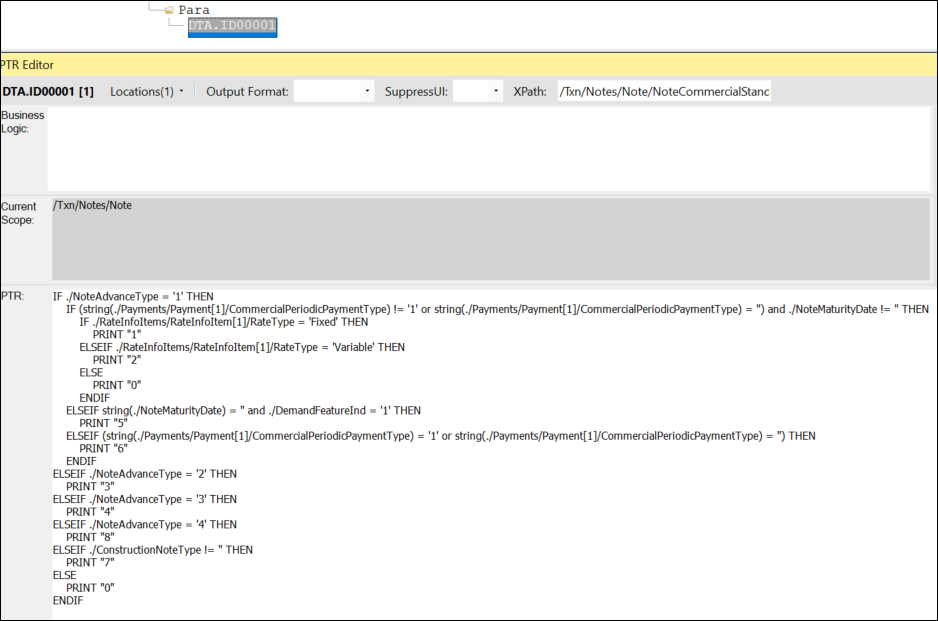
/Txn/AugmentTransactionId =
                    true
to the transaction XML, verify the content has the Augment
Transaction file and the content was built with version 23.3 or
newer.Using the Augment Transaction file with an EZ Config package
/Txn/AugmentTransactionId = true in the transaction XML;
Expere then applies the Augment Transaction file to the transaction XML if
the following conditions are present:- The Content Alias points to a library that has the Augment Transaction file for the Line of Business of the specified Package.
- The content was built with version 23.3 or newer.