New Features
- None
Defect Corrections
- None
Management Tool: Alias enhanced
- Reference: PBI 421566
- Compliance Impacts: this defect correction is not a compliance or regulatory issue.
- Documentation: No Document impact.
Previously, it was noted that when using special characters in the alias name, the Document Generation Services Management Tool could not validate any of the characters after the special characters. As a result, the following validation warning appeared: "The original value already exists for account #####." Based on this behavior, it was determined to prohibit the use of special characters in the alias name.
We have enhanced this behavior; if attempting to use special characters when creating an alias, the following warning message now appears: "Special characters are not allowed." The Add button is also disabled. With this enhancement, users can only use 0-9 and A-Z alphanumeric characters.
Management Tool: undeployed orphaned aliases enhanced
- Reference: PBI 384385
- Compliance Impacts: This enhancement is not a compliance or regulatory issue.
- Documentation: No document impact.
In a previous release we had introduced enhancements to the Management Tool to formally remove accounts and aliases associated to a library when the library is being un-deployed (see previous Change Logs for PBI's 404166 & 382509). Prior to those changes, when un-deploying a library, aliases associated to those libraries (that were un-deployed) would become an ‘orphan’ in the database and would still show in the Account list. With this release we performed a ‘clean up’ to remove all orphaned aliases, for un-deployed libraries, from the database and the Account list.
- Expere Engine 2016.2.0
Upgrade documentation created
- Reference: PBI 417736
- Compliance Impacts: This enhancement is not a compliance or regulatory issue.
- Documentation: Upgrade Process Overview
We have added upgrade documentation for those users who have previously installed Document Generation Services and all components. For more information, see Upgrade Process Overview.
API request and response examples added
- Reference: PBI 413008
- Compliance Impacts: This enhancement is not a compliance or regulatory issue.
- Documentation: Appendix: Request and Response Samples
We have enhanced the Document Generation Services (Document Services) API documentation to include detailed request and response examples for each operation. For more information, see Appendix: Request and Response Samples.
Aliases on Cloned Accounts in Management Tool
- Reference: PBI 414688
- Compliance Impacts: This defect correction is not a compliance or regulatory issue.
- Documentation: No document impact.
This release includes a defect correction to the DGS Management Tool so that when cloning an account in Admin, the aliases pertaining to that account now clone successfully.
Transform updated to set "BusQueue" Config appSetting
- Reference: PBI 418473
- Compliance Impacts: This enhancement is not a compliance or regulatory issue.
- Documentation: No document impact.
We have implemented an enhancement to the Document Generation Services installer in the Octopus Deploy transform through the "BusQueue" configuration appSetting. This configuration enhancement impacts the DocGenServiceHost, DocGenServices, Management, and ManagementServices configuration files.
Users can now edit the "BusQueue" configuration appSetting to set the desired RabbitMQ host server name for the following configuration files:
- DocGenServiceHost
- DocGenServices
- Management
- ManagementServices
DocGenServiceHost, DocGenServices, and ManagementServices
<add key="BusQueue" value="rabbitmq://<your Server name goes here>"/>
Management
<add key="RabbitmqHost" value="rabbitmq:// <your Server name goes here>"/>
New Relic enhancements for Document Generation Services
- Reference: PBI 416251 / 416500
- Compliance Impacts: This enhancement is not a regulatory or compliance issue.
- Documentation: No document impact.
We have implemented the following New Relic enhancements for Document Generation Services:
- We have added account number and requested API call sent to New Relic.
- We have modified the performance time to appear as a number for reporting; previously the performance time appeared as a string of data in New Relic.
These enhancements are part of a larger endeavor to establish standard metrics pertaining to our Residential Lending and Home Equity users. These metrics aid in capacity planning and issue monitoring as we migrate DocPrep users to Expere Document Services.
New Relic enhancements for Document Generation Services
- Reference: PBI 416251 / 416500
- Compliance Impacts: This enhancement is not a regulatory or compliance issue.
- Documentation: No document impact.
We have implemented the following New Relic enhancements for Document Generation Services:
- We have added account number and requested API call sent to New Relic.
- We have modified the performance time to appear as a number for reporting; previously the performance time appeared as a string of data in New Relic.
These enhancements are part of a larger endeavor to establish standard metrics pertaining to our Residential Lending and Home Equity users. These metrics aid in capacity planning and issue monitoring as we migrate DocPrep users to Expere Document Services.
Sequence fields functionality incorporated with MergePDF
- Type: Enhancement
- Reference: PBI 411604
- Compliance Impacts: This enhancement is not a compliance or regulatory issue.
- Documentation: SignaturePoint, FillableCheckbox, FillableText
We have introduced a new <Sequencing/> element to the following field types in the Expere response file:
- Signature (SignaturePoint element)
- Date
- Initials
- FillableText
- FillableCheckboxes
This <Sequencing/> element is implemented for the Secure Document Exchange (SDX) product for those users who sign across documents. It also makes each field unique so Document Generation Services can merge PDF documents that use signature, date, initial, and fillable text fields.
If the "MergePDF=true" in the response file, the Signature, Date, Initials, FillableCheckboxes and FillableText field types elements will contain sequencing in the <FieldName/> element using an incremental numbering system with an underscore.
Sequencing logic and format example:
<r:SignaturePointSet> <r:Signer> <r:Id>Homer</r:Id> <- Signer ID <r:Description>Borrower, Borrower</r:Description> <r:SignaturePoints> <r:Type>Initials</r:Type> <r:Sequencing>1</r:Sequencing> <r:FieldName>INI_Borrower_null_homer_false_1_SigField_1</r:FieldName> </r:SignaturePoint> <r:SignaturePoint> <r:IncludeDate>true</r:IncludeDate> <r:PageNumber>1</r:PageNumber> <r:SignatureText>Homer Simpson</r:SignatureText> <r:Type>Signature</r:Type> <r:Sequencing>2</r:Sequencing> <r:FieldName>SIG_Borrower_null_homer_false_1_SigField_2</r:FieldName> </r:SignaturePoint> <r:FillableFieldSet> <r:FillableText> <r:FieldName>FillableField_3</r:FieldName> <r:ToolTip>fill in here</r:ToolTip> <r:PageNumber>1</r:PageNumber> <r:Width>420.0</r:Width> <r:Height>72.0</r:Height> <r:XCoordinate>56.0</r:XCoordinate> <r:YCoordinate>100.0</r:YCoordinate> <r:Sequencing>3</r:Sequencing> </r:FillableText> <FillableCheckBox> <r:FieldName>FillableCheckBox_4</r:FieldName> <r:ToolTip>check here</r:ToolTip> <r:PageNumber>1</r:PageNumber> <r:Checked>false</r:Checked> <r:XCoordinate>22.0</r:XCoordinate> <r:YCoordinate>140.0</r:YCoordinate> <r:Sequencing>4</r:Sequencing> </FillableCheckBox> </r:FillableFieldSet>
Management Tool: Leading and trailing spaces removed from original value when adding alias
- Reference: PBI 363758
- Compliance Impact: This enhancement is not a compliance or regulatory issue.
- Documentation: No document impact.
Previously, when leading and trailing spaces were included in the Original Value upon adding an alias users would receive an error when using the alias at transaction time.
The Management Tool has been updated to remove any leading and trailing spaces from the Original Value when creating an alias, so users no longer receive errors at transaction time.
Security Updates
- Reference: PBI 371011
- Compliance Impacts: This change is not a compliance or regulatory issue.
- Documentation: No document impact.
This release includes updates to security.
- Expere Engine 2016.x.0
Management Tool: library undeploy functionality enhanced
- Reference: PBI 382509
- Compliance Impact: This enhancement is not a compliance or regulatory issue.
- Documentation: Undeploying a Library
Previously in PBI 404166, we added a confirmation page that verifies the removal of associated accounts and aliases when undeploying a libary. In this PBI, undeploying a library now removes the aliases and account permissions upon clicking OK on the confirmation page.
For more information, see Undeploying a Library.
XML NPI data scrubbing functionality
- Reference: PBI 262975 / 404190
- Compliance Impact: This new feature is not a compliance or regulatory issue.
- Documentation: SUPPORT - Downloading transaction data
The Document Generation Services Tool Suite now contains a feature that allows internal users to download any customer transaction file with the non-public information (NPI) data scrubbed (removed) from it. To take advantage of this new feature users may go to the Request Details page in the Tool Suite and select the Download Transaction button.
The resulting exported transaction file will reside in TXN format that can be resubmitted through the Select, Select and Generate, and Generate actions.
For more information, see the SUPPORT - Downloading transaction data help topic.
Tool Suite now displays OPPSA organizations and products
- Reference: PBI 404908
- Compliance Impact: This enhancement is not a compliance or regulatory issue.
- Documentation: Select and Generate, Generate
Document Generation Services Tool Suite users can now access all available and licensed OPPSA organization and product information through the Select and Generate and Generate actions.
SignerEmail element and email address associated with FieldName element added to Expere response file
- Reference: PBI 410080 / 410688
- Compliance Impacts: This new feature is not a compliance or regulatory issue.
- Documentation: Signer
We have added a new <SignerEmail/> element to the <Signer/> element.
This element appears in the Expere response file when including the "eSignatureWKES" flag in the initial request. Sample code below:
<r:SignaturePointSet> <r:Signer> <r:Id>homer</r:Id> <r:SignerEmail>Joe.Doe@wolterskluwer.com</r:SignerEmail> <r:Description>Borrower, Borrower</r:Description> <r:SignaturePoints> <r:SignaturePoint> <r:IncludeDate>true</r:IncludeDate> <r:PageNumber>1</r:PageNumber> <r:PageOrder>1</r:PageOrder> <r:Height>72.0</r:Height> <r:Width>540.0</r:Width> <r:SignatureText>Homer Simpson</r:SignatureText> <r:XCoordinate>36.0</r:XCoordinate> <r:YCoordinate>396.0</r:YCoordinate> <r:Type>Initials</r:Type> <r:FieldName>INI_Borrower_null_homer_false_1_SigField_joe.doe@wolterskluwer.com</r:FieldName> </r:SignaturePoint> </r:SignaturePoints> </r:Signer> </r:SignaturePointSet>
Management Tool: library build queuing enhanced
- Reference: PBI 364273
- Compliance Impacts: This enhancement is not a compliance or regulatory issue.
- Documentation: No document impact.
Previously, when attempting to queue a build with an existing library prefix, the build process executed but failed. This caused the existing library to become inoperable.
The library build queue process has been enhanced; as a result, when deploying a library with an existing prefix, users now receive the following message:
- XXXXXX Library and Version Number already exists. Please choose another version number or name.
The existing library will continue to operate as expected.
Library undeploy screen added
- Reference: PBI 404166
- Compliance Impacts: This enhancement is not a compliance or regulatory issue.
- Documentation: Management Tool: Undeploying a Library
When undeploying a library, users are now presented with a confirmation page containing a list of associated accounts and aliases.
We have now initiated that change in PBI 382509.
For more information, see Management Tool: Undeploying a Library.
Database update schema no longer generating twice per transaction
- Reference: PBI 410253
- Compliance Impacts: This defect correction is not a compliance or regulatory issue.
- Documentation: No document impact.
The database update schema no longer generates twice per transaction.
Secure Document Exchange users initials can now render with Acroform fields
- Reference: PBI 408277
- Compliance Impacts: This new feature is not a compliance or regulatory issue.
- Documentation: Using eSignature and Acroform fields, Select And Generate, Generate
Wolters Kluwer Electronic Signature (WKES) users can now initial documents with a fillable text field (Acroform) using a new element called </eSignatureWKES>, as a child of the </ESignatureAndFieldSupport> element in the </AncillaryOutputOption>. If setting this element to "true," the initials render as a fillable text field on the document(s). By default, this element is set to "false" and renders as an eSignature field. In a future release, WKES users will be able to capture initials one time per signer and populate those initials to all the respective signer fields.
<r:AncillaryOutputOption> <r:OutputType>ESignatureAndFieldSupport</r:OutputType> <r:ESignatureAndFieldSupport> <r:eSignatureTooltip/> <r:eSignatureInitialsTooltip/> <r:eSignatureCoordinatesOnly>false</r:eSignatureCoordinatesOnly> <r:eSignatureDateSupport>true</r:eSignatureDateSupport> <r:NonSignatureFieldCoordinatesOnly>true</r:NonSignatureFieldCoordinatesOnly> <r:eSignatureWKES>false</r:eSignatureWKES> </r:ESignatureAndFieldSupport> </r:AncillaryOutputOption>
Integrators: API updates to include OPPSA parameters
- Reference: PBI 404745
- Compliance Impacts: This enhancement is not a compliance or regulatory issue.
- Documentation: Select And Generate, Generate
This enhancement allows Document Generation Services to return OPPSA organization and production information to OPPSA users.
We have added OPPSA Organization and OPPSA Product parameters to the following API's:
- SelectAndGenerate
- Generate
Column width of InstanceDisplayName and InstanceFileName elements increased
- Reference: PBI 408491
- Compliance Impacts: This enhancement is not a compliance or regulatory issue.
- Documentation: No document impact.
Previously, users reported SQL exceptions when persisting the Result to the database, due to <InstanceDisplayName/> and <InstanceFileName/> element values exceeding 254 characters. Our database only supports a maximum length of 255 characters.
We have increased the maximum length of the <InstanceDisplayName/> and <InstanceFileName/> elements in the ResultDocument table.
Document Generation Services updated to use latest version of MassTransit
- Reference: PBI 405013
- Compliance Impacts: This enhancement is not a compliance or regulatory issue.
- Documentation: Prerequisites
We have enhanced Document Generation Services to use MassTransit 3.3.5. This upgrade resolves internal issues that occurred with DocGenSvcHost. With this change, the target .NET verson of Document Generation Services was updated to .NET 4.6.2.
For more information, see http://masstransit-project.com/.
Document Generation Services updated to use latest version of RabbitMQ server
- Reference: PBI 404663
- Compliance Impacts: This enhancement is not a compliance or regulatory issue.
- Documentation: Installing RabbitMQ
An issue existed in an older version of RabbitMQ which prevented viewing what is in the various Queues through the Management Console. RabbitMQ has been updated from version 3.6.3 to 3.6.5 within Document Generation Services to resolve this issue. There is no impact to the user.
DocInstances now returned individually for merged PDF
- Reference: PBI 405890
- Compliance Impacts: This enhancement is not a compliance or regulatory issue.
- Documentation: No document impact.
Previously, Document Generation Services only returned one DocInstance when merging PDF documents. As a result, only one set of elements was returned, rather than multiple sets of elements determined by the number of DocInstances.
Document Generation Services now returns separate DocInstances when the merged PDF is set to "true" in the response file.
For more information, see the following:
PacketFileName and PacketName attributes added to Packet element in response file
- Reference: PBI 405759
- Compliance Impact: This enhancement is not a compliance or regulatory issue.
- Documentation: Packet Data Type
The <Packet/> now contains the following attributes:
- <PacketName/>
- <PacketFileName/>
These attributes are included in the <Packet/> element so users can create packets of documents.
Connectionstring updated in Document Generation Services web.config file
- Reference: 402682
- Compliance Impact: This enhancement is not a compliance or regulatory issue.
- Documentation: No document impact.
When previously installing the Document Generation Services .msi file to the Mortgage Continuous Integration 814 environment, users reported issues accessing the DGS Tool Suite. It was determined that connectionString="Server=localhost..." when it should have been populated with a valid server value.
This issue has been addressed: <connectionString="…" now contains a valid server value.
<connectionStrings>
 <add name="DocGenSvcs" connectionString="Data Source=labw6408hvm815.wkmnlab.net;Initial
Catalog=docgen;Integrated Security=true;" providerName="System.Data.SqlClient"/>
 <add name="SecurityTokenDbContext" connectionString="Data
Source=labw6408hvm815.wkmnlab.net;Initial Catalog=AppSecurityTokenCache;Integrated Security=True;" providerName="System.Data.SqlClient"/>
 </connectionStrings>
DiscretePartyID elements added to GetGenerateResponse
- Reference: PBI 405761
- Compliance Impact: This enhancement is not a compliance or regulatory issue.
- Documentation: DocInstance, DiscretePartyIDs
The <DiscretePartyID/> element is now available in the Document Generation Services WSDL in the DocInstance complex type. It is a sibling to the <InstanceDisplayName/> element and a child element of <DocInstance/>.
<DiscretePartyIDs> -
 <DiscretePartyID>x</DiscretePartyID>
 <DiscretePartyID>x</DiscretePartyID>
</DiscretePartyIDs>
- Expere Engine 2016.3.0
There were no customer-facing changes for this release.
Health Check page now pings Expere
- Reference: PBI 400691
- Compliance Impact: This enhancement is not a compliance or regulatory issue.
- Documentation: No document impact.
The Document Generation Services Health Check page now pings the Expere Engine to confirm that is operational.
When operational, an .REQ file is authored and generated with a "Passed" label. If Expere cannot generate a document, the Health Check page is updated to indicate a "Failed" status.
Health Check page now pings Expere
- Reference: PBI 400691
- Compliance Impact: This enhancement is not a compliance or regulatory issue.
- Documentation: No document impact.
The Document Generation Services Health Check page now pings the Expere Engine to confirm that is operational.
When operational, an .REQ file is authored and generated with a "Passed" label. If Expere cannot generate a document, the Health Check page is updated to indicate a "Failed" status.
Tool Suite: session timeout behavior modified
- Reference: PBI 363969
- Compliance Impact: This enhancement is not a compliance or regulatory issue.
- Documentation: No document impact.
Previously, users were logged out of the Document Generation Services Tool Suite after 25 minutes, regardless of their activity. The expected behavior is that the Tool Suite only times out after 25 minutes of user inactivity.
The Tool Suite has been enhanced to only time out after 25 minutes of user inactivity.
Management Tool: session timeout behavior modified
- Reference: PBI 362539
- Compliance Impact: This enhancement is not a compliance or regulatory issue.
- Documentation: No document impact.
Previously, users were logged out of the Document Generation Services Management Tool after 25 minutes, regardless of their activity. The expected behavior is that the Management Tool only times out after 25 minutes of user inactivity.
The Management Tool has been enhanced to only time out after 25 minutes of user inactivity.
Tool Suite: Get Generate Results Transaction ID enhanced
- Reference: PBI 400829
- Compliance Impacts: This defect correction is not a compliance or regulatory issue.
- Documentation: No document impact.
Previously, entering a Transaction ID from the Generate Results page would generate the corresponding .ZIP file with .PDF's; however, the Transaction ID field was editable. The expected behavior is that the Transaction ID field should disabled after generating the associated .ZIP file.
The Transaction ID is now disabled after entering an ID and generating the .ZIP file containing the appropriate .PDF files.
See Generate Results for more information on using this feature.
Management Tool: session timeout behavior modified
- Reference: PBI 362539
- Compliance Impact: This enhancement is not a compliance or regulatory issue.
- Documentation: No document impact.
Previously, users were logged out of the Document Generation Services Management Tool after 25 minutes, regardless of their activity. The expected behavior is that the Management Tool only times out after 25 minutes of user inactivity.
The Management Tool has been enhanced to only time out after 25 minutes of user inactivity.
Tool Suite: Get Generate Results Transaction ID enhanced
- Reference: PBI 400829
- Compliance Impacts: This defect correction is not a compliance or regulatory issue.
- Documentation: No document impact.
Previously, entering a Transaction ID from the Generate Results page would generate the corresponding .ZIP file with .PDF's; however, the Transaction ID field was editable. The expected behavior is that the Transaction ID field should disabled after generating the associated .ZIP file.
The Transaction ID is now disabled after entering an ID and generating the .ZIP file containing the appropriate .PDF files.
See Generate Results for more information on using this feature.
Document Generation Services installation now supports JBoss
- Reference: PBI 382929
- Compliance Impacts: This enhancement is not a compliance or regulatory issue.
- Documentation: Document Generation Services Installation Overview
The Document Generation Services installation process now includes JBoss. No user action is required.
Logging: ID generation enhancement
- Reference: PBI 397833
- Compliance Impacts: This enhancement is not a compliance or regulatory issue.
- Documentation: No document impact.
Previously, we had refactored the Document Generation Services and Expere Document Services log files; during this process, we discovered that Document Generation Services logs logged [00000000-0000-0000-0000-000000000000] as the DGS ID at certain instances. This value was typically followed by a proper field value for the DGS ID after two more logged lines of the same '00' values.
For example, a log entry consisted of the following:
-
AUTH 9 2016-07-21 14:10:05,874
DocGenServices.Managers.DocGen.AuthorizingDocGenManager -
[00000000-0000-0000-0000-000000000000] [admin1] [20090]
Permission to use the webservice granted for user admin1.
It was determined that the DGS ID was not generated when the initial request was made. The expected behavior is the DGS ID should be generated as soon as the Document Generation Services request is initiated.
Document Generation Services has been enhanced to generated a DGS ID as soon as the Document Generation Services request is initiated; this now results in a proper DGS ID field value in the log file.
Logging: [Null] value removed
- Reference: PBI 397827
- Compliance Impacts: This enhancement is not a compliance or regulatory issue.
- Documentation: No document impact.
It was reported that [null] values appeared in the Document Generation Service log files, for example: [(null)] [(null)] [(null)].
The anticipated behavior should have consisted of the following:
- [DGS ID] [USER ID] [EDS ID], for example: [9b3675e7-e66a-4695-9963-a64a00e984e3] [admin1] [20090]
The Document Generation Service log files have been updated to remove all instances of [null] and replaced them with appropriate [DGS ID], [USER ID], or [EDS ID], value.
Document Generation Services installation now supports JBoss
- Reference: PBI 382929
- Compliance Impacts: This enhancement is not a compliance or regulatory issue.
- Documentation: Document Generation Services Installation Overview
The Document Generation Services installation process now includes JBoss. No user action is required.
Logging: ID generation enhancement
- Reference: PBI 397833
- Compliance Impacts: This enhancement is not a compliance or regulatory issue.
- Documentation: No document impact.
Previously, we had refactored the Document Generation Services and Expere Document Services log files; during this process, we discovered that Document Generation Services logs logged [00000000-0000-0000-0000-000000000000] as the DGS ID at certain instances. This value was typically followed by a proper field value for the DGS ID after two more logged lines of the same '00' values.
For example, a log entry consisted of the following:
-
AUTH 9 2016-07-21 14:10:05,874
DocGenServices.Managers.DocGen.AuthorizingDocGenManager -
[00000000-0000-0000-0000-000000000000] [admin1] [20090]
Permission to use the webservice granted for user admin1.
It was determined that the DGS ID was not generated when the initial request was made. The expected behavior is the DGS ID should be generated as soon as the Document Generation Services request is initiated.
Document Generation Services has been enhanced to generated a DGS ID as soon as the Document Generation Services request is initiated; this now results in a proper DGS ID field value in the log file.
Logging: [Null] value removed
- Reference: PBI 397827
- Compliance Impacts: This enhancement is not a compliance or regulatory issue.
- Documentation: No document impact.
It was reported that [null] values appeared in the Document Generation Service log files, for example: [(null)] [(null)] [(null)].
The anticipated behavior should have consisted of the following:
- [DGS ID] [USER ID] [EDS ID], for example: [9b3675e7-e66a-4695-9963-a64a00e984e3] [admin1] [20090]
The Document Generation Service log files have been updated to remove all instances of [null] and replaced them with appropriate [DGS ID], [USER ID], or [EDS ID], value.
eSignature and field support behavior enhanced
- Type: Enhancement
- Reference: PBI 392598
- Compliance Impacts: This enhancement is not a compliance or regulatory issue.
- Documentation: Using eSignature and Acroform fieldSelect And Generate, Generate
We have created a new eSignatureAndFieldSupport element to support returning XY coordinates for all fillable fields.
Management Tool: latest ReqAdmin added / schema generation disabled
- Reference: PBI 396742
- Compliance Impacts: This enhancement is not a compliance or regulatory issue.
- Documentation: No document impact.
The following enhancements have been implemented for the Management Tool:
- The latest ReqAdmin.dll file is now included;
- Schema files (types INS, XTMP, and PKG) are no longer generated in the cache during library deployment
Document Generation Services Health Check: STS verification added
- Reference: PBI 394476
- Compliance Impacts: This enhancement is not a compliance or regulatory issue.
- Documentation: No document impact.
The Document Generation Services health check page now verifies STS to ensure it is operating correctly. If any issue occurs, the health check fails and subsequently alerts the ASM group.
Users can access the health check page here.
Memory leak with Document Generation Services build 6190 resolved
- Reference: PBI 396402
- Compliance Impacts: This defect correction is not a compliance or regulatory issue.
- Documentation: No document impact.
We discovered a memory leak with build 6190 when load testing in Staging and Integration. The DocGenSvcHost consumed all available memory, thus causing Document Generation Services to crash. It was determined that multiple references to the NHibernate container classes were opening, but not closing, sessions.
This memory leak has been resolved; Document Generation Services does not crash when executing load testing, and CPU and memory retention occurs as expected.
Document Generation Services logging enhanced for improved consistency
- Reference: PBI 386860
- Compliance Impacts: This enhancement is not a compliance or regulatory issue.
- Documentation: No document impact.
The Document Generation Services log files have been updated for consistency with Document Generation Services and allows for better parsing by our logging solutions.
The following enhancements have been implemented:
- RequestID has been eliminated and is now referred to as DGS ID.
- The DGS ID, User ID, and External ID fields are contained with brackets (for example: "[ ]"). For more information about External ID: see Generate.
Management Tool updated with latest ReqAdmin
- Reference: PBI 383825
- Compliance Impacts: This enhancement is not a compliance or regulatory issue.
- Documentation: No document impact.
The Document Generation Services Management Tool now utilizes the latest version of the Expere Content Administration tool. This version now ensures content is deployed with content stylesheet changes required for a recent Saxon and Java 8 update.
SignaturePointSet and eSignatureAndFieldSupport element changes
- Reference: PBI 388966
- Compliance Impacts: This new feature is not a compliance or regulatory issue.
- Documentation: No document impact.
In an effort to support returning XY coordinates for all fillable fields we have begun the development work. The first step in supporting this feature is creating a new element (eSignatureAndFieldSupport).
Management Tool updated with latest ReqAdmin
- Reference: PBI 383825
- Compliance Impacts: This enhancement is not a compliance or regulatory issue.
- Documentation: No document impact.
The Document Generation Services Management Tool now utilizes the latest version of the Expere Content Administration tool. This version now ensures content is deployed with content stylesheet changes required for a recent Saxon and Java 8 update.
SignaturePointSet and eSignatureAndFieldSupport element changes
- Reference: PBI 388966
- Compliance Impacts: This new feature is not a compliance or regulatory issue.
- Documentation: No document impact.
In an effort to support returning XY coordinates for all fillable fields we have begun the development work. The first step in supporting this feature is creating a new element (eSignatureAndFieldSupport).
- Expere Engine version 16.2.03624; see the Expere Engine and Tools Change Log for detailed information on the 2016.2 release.
- Content Admin Tool version 15.3.3.8154.
PackageDocs now included in Response
- Reference: PBI 390368
- Compliance Impact: This enhancement is not a compliance or regulatory issue.
- Documentation: No document impact.
After submitting a transaction in Document Generation Services, users will now receive a response file containing the Package Documents, which contain <DocCustomData/> elements in the packages.
The new elements exist as children and grandchildren of the <r:DocDescriptor/> element. The <r:DocCustomDataItem/> elements contain the following DataItemName attribute values:
- /Txn/IntegratedDisclosuresLoanEstimateCashToCloseStoredValueAmount
- /Txn/IntegratedDisclosuresLoanEstimateClosingCostsFinancedStoredValueAmount
- /Txn/IntegratedDisclosuresLoanEstimateTotalClosingCostsStoredValueAmount
Logging Enhancement: FATAL level added
- Reference: PBI 389600
- Compliance Impacts: This enhancement is not a compliance or regulatory issue.
- Documentation: No document impact.
Updated Document Generation Services installation instructions
- Reference: PBI 384236
- Compliance Impacts: This enhancement is not a compliance or regulatory issue.
- Documentation: Document Generation Services Installation Overview
We have updated the Document Generation Service installation instructions. You can access the installation instructions here: Document Generation Services Installation Overview
Document Generation Services upgraded to use AutoMapper 4.2.1
- Reference: PBI 382397
- Compliance Impacts: This enhancement is not a compliance or regulatory issue.
- Documentation: No document impact.
The previous version of AutoMapper was not thread-safe and caused problems when multiple threads ran.
AutoMapper 4.2.1 has been optimized to repair thread-related issues, when multiple requests are process simultaneously. Document Generation Services has been updated to use AutoMapper 4.2.1.
For more information, see http://automapper.org/.
Management Tool: Manage Account enhancement
- Reference: PBI 382268
- Compliance Impacts: This enhancement is not a compliance or regulatory issue.
- Documentation: Manage Accounts
Users can now create and maintain the ContentID for a specific account in the Management Tool. For more information, see Manage Accounts.
Masstransit consumer enhanced to prevent NHiberate from crashing
- Reference: PBI 379997
- Compliance Impacts: This enhancement is not a compliance or regulatory issue.
- Documentation: No document impact.
Previously, Masstransit enhanced its consumer functionality to use tasks and asynchronous messaging. As a result, the consumer shared session resources.
An interim solution was implemented that prevented NHibernate from crashing with other shared tasks. We have now enhanced the NHibernate session object that prohibits session sharing.
First Page functionality available
- Reference: PBI 370563; original PBI 364255
- Compliance Impact: This enhancement is not a compliance or regulatory issue.
- Documentation: Select And Generate; Generate
In a previous release, we had released First Page Barcode functionality, albeit in limited functionality.
First Page Barcode is now fully functional in Document Generation Services for SelectAndGenerate and Generate methods.
Configuration files enhanced
- Reference: PBI 377920
- Compliance Impact: This enhancement is not a compliance or regulatory issue.
- Documentation: No document impact.
- Removed the commented out attributes;
- Old Raven references (LibraryDb in Mgmt) have been removed;
- Removed Unused ws2007FederationHttpBinding Binding elements (ie DefaultWSTrust)
eSignature and AcroForm fields added
- Type: Enhancement
- Reference: PBI 379704, 379926
- Compliance Impact: This enhancement is not a compliance or regulatory issue.
- Documentation: Select And Generate, Generate
Users can now pass eSignature and Acroform values in the AncillaryOutput of a SelectAndGenerate or Generate request. For detailed information on enabling or disabling eSignature or Acroforms, see Select And Generate, and Generate.
Management Tool updated to access Account ID's by product
- Reference: PBI 379925
- Compliance Impacts: This new feature is not a compliance or regulatory issue.
- Documentation: Manage Accounts
The Management Tool has been updated with a new Manage Accounts tab. This new area allows users to view/search accounts based on licensed product. This is the first step for a future enhancement to automate content deploys. Users can search by Account Name, or Customer Number. For more information, see Manage Accounts.
New API for Administration Tool
- Reference: PBI 378380
- Compliance Impacts: This new feature is not a compliance or regulatory issue.
- Documentation: No document impact.
The GetActiveAccountsByProduct API has been created to associate the Content ID with the Account ID in the Administration tool; this allows the Management Tool to call the Administration API by line of business. Administration then returns values for the following fields:
- AccountID
- Account Name
- Customer Name (if available)
The effective date for all products within the scope of this document for this release is April 14, 2016 for the CT environment and April 21, 2016 for the Production environment.
The latest version of Document Generation Services uses the Expere Engine version 2015.4. See the Expere Engine and Tools Change Log for detailed information on the 2015.4 release.
RabbitMQ upgrade / Installation enhancements
- Reference: PBI 375846/ 375847
- Compliance Impacts: This enhancement is not a compliance or regulatory issue.
- Documentation: Configuring RabbitMQ for Document Generation Services
The following installation enhancements have been implemented:
- The Document Generation Services installation has been enhanced with the RabbitMQ 3.6.1 upgrade; for more information, see Configuring RabbitMQ for Document Generation Services.Note: Users are not required to upgrade to RabbitMQ 3.6.1.
- Management Services was upgraded to use RabbitMQ 3.6.1.
- Queuing has been changed to RabbitMQ from MSMQ with this upgrade.
- Coding was completed to update the masstransit Dlls to version 3.2.4.
ListDocuments API Added
- Reference: PBI 373191
- Compliance Impacts: This new feature is not a compliance or regulatory issue.
- Documentation: List Documents.
The Expere ListDocuments API is now available through DGS.
The ListDocuments option calls a base or custom package of documents defined by the customer. The list of documents in the base or custom package is displayed for the end user to select and use for a given transaction. For detailed information on using this feature in the Document Generation Services Tool Suite, see List Documents.
Build Definitions migrated to Visual Studio 2015
- Reference: PBI 375822
- Compliance Impacts: This enhancement is not a compliance or regulatory issue.
- Documentation: No document impact.
The following build definitions have been migration to Visual Studio 2015:
- Dev-DGS_CI_LongTerm
- Dev-DGS_CI
- MainBuild
- MainBuild-NoAutomaticDeploy
- Prep_DGS_Install_Package - DGS CI
Document Generation Services updated to latest versions of Erlang, RabbitMQ Server/.NET client
- Reference: PBI 371716
- Compliance Impacts: This enhancement is not a compliance or regulatory issue.
- Documentation: No document impact.
Document Generation Service has been updated to include the newest versions of Erlang and RabbitMQ Server/RabbitMQ .NET Client to utilize the latest enhancements.
Document Generation Services now utilizes the following latest versions:
- Erlang 18.3
- RabbitMQ Server/.NET Client 3.6.1
No user action is required.
For more information, see the following:
- Using Erlang, see Documentation.
- Using the RabbitMQ Server, see Server Documentation.
- Using the RabbitMQ .NET Client, see Client Documentation.
Document Generation Services target framework updated to version 4.5
- Reference: PBI 366734
- Compliance Impacts: This enhancement is not a compliance or regulatory issue.
- Documentation: No document impact.
The Document Generation Services target framework has been updated from version 4.0 to 4.5. This affects the following dependencies in NuGet:
- Castle
- MassTransit
- RabbitMQ
This upgrade to Document Generation Services will not impact end-users.
Health Check Page enhanced
- Reference: PBI 367443
- Compliance Impacts: This defect is not a compliance or regulatory issue.
- Documentation: No document impact.
Previously, the Document Generation Services Health Check page called the ListAllOrganizations API which unnecessarily returned the organization list. Additionally, the call never returned any errors due to the way the API was coded.
This issue was resolved; the Document Generation Services Health Check page now does not call the ListAllOrganizations API.
Performance optimized
- Reference: PBI 371135
- Compliance Impacts: This enhancement is not a compliance or regulatory issue.
- Documentation: No document impact.
Performance has been enhanced to improve request processing and minimize any deadlock errors.
SUPPORT Page enhanced to allow product-based request searching
- Reference: PBI 367008
- Compliance Impacts: This enhancement is not a compliance or regulatory issue.
- Documentation: SUPPORT Page
The SUPPORT Page in the Tool Suite has been enhanced to allow users to search for a request based on any product and account that uses Document Generation Services.
The Tool Suite now displays a product dropdown list at the top of the page. For detailed information, see SUPPORT Page.
Document Generation Services reverted to Network Service
- Reference: PBI 368854
- Compliance Impacts: This enhancement is not a compliance or regulatory issue.
- Documentation: Creating and installing Document Generation Services, Installing the Management Service, Using Log Files
Previously, the Document Generation Services installation process was updated from Network Service to Machine Identity. Due to some configuration issues, the installation process has been reverted from Machine Identity back to Network Identity.
The following sections in the Installation Overview have been reverted to their previous iteration:
- Changed: Creating and installing Document Generation Services
- Changed: Installing the Management Service
- Changed: Using Log Files
- Removed: Setting Private Key Access Rights for Machine Identity
SQL Scripts enhanced
- Reference: PBI 366793
- Compliance Impacts: This enhancement is not a compliance or regulatory issue.
- Documentation: No document impact.
SQL scripts used with the Document Generation Services tables have been enhanced to remove any records older than seven (7) days. The scripts now remove the records on a nightly basis.
Generate Recycle Event Log Entry
- Reference: PBI 350321
- Compliance Impacts: This enhancement is not a compliance or regulatory issue.
- Documentation: No document impact.
The following enhancements have been implemented for the ExpereAppPool and DocGenServicesAppPool after installing the latest version of Document Generation Services:
- The recycle time is now 1:00 AM
- The 29 hour (1740 second setting) has been removed.
Support Tool: First page only barcode option now available
- Reference: PBI 364255
- Compliance Impacts: This new feature is not a compliance or regulatory issue.
- Documentation: Select And Generate and Generate.
Summary: Users can now apply a barcode to the first or only page of a document. For detailed information on using this feature within the Document Generation Services Tool Suite, see the Select And Generate and Generate webhelp sections within the SERVICE Page.
SUPPORT Page: request status updated for successful transactions
- Reference: PBI 356359
- Compliance Impacts: This enhancement is not a compliance or regulatory issue.
- Documentation: No document impact.
For Select Synchronous API calls, the status did not update after the Render_Processing status. A Job_Complete status should appear after a successful transaction on the SUPPORT Page.
The SUPPORT page now displays a Job_complete status after completing a successful transaction using a Select Synchronous API call.
Management Tool: library alias issue resolved
- Reference: PBI 362530
- Compliance Impacts: This defect is not a compliance or regulatory issue.
- Documentation: No document impact.
Previously, when adding a new alias to an existing library that began with expere://, the following message appeared:
- original value already exists for account <x>.
This issue has been addressed; users can now add a new alias to an existing library.
Management Tool: version number issue resolved
- Reference: PBI 361068
- Compliance Impacts: This defect is not a compliance or regulatory issue.
- Documentation: No document impact.
Previously, the version number and copyright appeared on the middle of the page when scrolling through the library list.
This issue has been resolved; the copyright and version number now appear on the footer of all pages in the Management Tool. We also updated the stylesheet used with the Management Tool.
Library copying function enhanced
- Reference: PBI 359951
- Compliance Impacts: This enhancement is not a compliance or regulatory issue.
- Documentation: Copying Libraries
Previously the Copy Library function only copied the permissions and aliases if the library name was unique. Additionally, the Copy Library function would add new aliases to an account when the account only had permission to the library but did not have an existing alias pointing to the library.
The Copy Library function has been enhanced so that permissions and aliases are copied for a duplicate library name and aliases are no longer created when an account only had permissions to the existing (old) library.
See Copying Libraries for detailed information on this functionality.
Callback exception addressed
- Reference: PBI 345531
- Compliance Impacts: This defect is not a compliance or regulatory impact.
- Documentation: No document impact.
Previously, extraneous error messages were being logged within Document Generation Services due to database calls closing incorrectly.
This issue has been resolved; the database calls have been corrected to now close properly. This in turn eliminates extraneous error reporting within Document Generation Services.
Document Viewer issue addressed
- Reference: PBI 360593
- Compliance Impacts: This defect is not a compliance or regulatory issue.
- Documentation: No document impact.
An error message, stating “ Unauthorized to use library,” appeared on the Document Data page when attempting to access mortgage base content.
This issue has been resolved; mortgage users with permissions to base content can now access the Document Data page without error.
LanguageException for xpath error resolved
- Reference: PBI 354763
- Compliance Impacts: This defect is not a compliance or regulatory issue.
- Documentation: No document impact.
Previously, a LanguageException occurred for a xpath that contained date string format non-numerical characters; the xpath in question should have contained numerical characters.
This issue has been addressed; the error message has been enhanced in the Document Generation Services log file to provide more accurate information.
Select API retry issue resolved
- Reference: PBI 362408
- Compliance Impacts: This defect is not a compliance or regulatory issue.
- Documentation: No document
Previously, the Select API performed a retry five (5) times with every call, even when no errors had occurred in the call. The unnecessary retries may have resulted in performance delays.
This issue has been resolved; the Select API now only performs a retry when an error occurs during the API call, with a maximum retry limit of 5.
Additionally, Document Generation Service callbacks have been updated to only retry a maximum of 8 times; previously we allowed up to 15 retries.
Logging enhancements implemented
- Reference: PBI 327540
- Compliance Impacts: This enhancement is not a compliance or regulatory issue.
- Documentation: No document impact.
The following logging enhancements have been implemented in the Document Generation Services log file:
- External Key; this value originates from the calling application, such as Expere Document Services, DocPrep, or Mortgage.
- Request ID; this value could consist of the the Expere Document Services ID (EDS ID) or DocPrep Book Number.
- Username
Memory increased in web.config
- Reference: PBI 351509
- Compliance Impacts: This enhancement is not a compliance or regulatory issue.
- Documentation: No document impact.
The amount of memory dedicated to the Expere Engine has been increased to prevent out of memory errors. The following values in Web.config have been modified:
- <java.option value="-Xms512m" /> to <java.option value="-Xms2048m" />
- <java.option value="-Xmx4096m" /> to <java.option value="-Xmx8192m" />
The file is located at: $/DocGenServices/Dev/src/DocGenServices/ExpereNetZip/ModifiedFiles/Web.Config.
No user is action is required.
Document Generation Services and Expere version appears in Tool Suite and Management Tool
- Reference: PBI 353377
- Compliance Impacts: This enhancement is not a compliance or regulatory issue.
- Documentation: No document impact.
The Document Generation Services and Expere version numbers now appear on all footers in the Tool Suite and Management Tool.
Document Generation Services installation process updated
- Reference: PBI 358046
- Compliance Impacts: This enhancement is not a compliance or regulatory issue.
- Documentation: Running the CreateSecurityTokenCacheDBDGS.sql script
The installation process now requires the user to run a CreateSecurityTokenCacheDBDGS.sql script with SQL Management Tools before using Document Generation Services. For more information, see Running the CreateSecurityTokenCacheDBDGS.sql script.
SUPPORT page enhanced: View button behavior
- Reference: PBI 356683
- Compliance Impacts: This enhancement is not a compliance or regulatory issue.
- Documentation: No document impact.
A SUPPORT page enhancement has been implemented when using the Tool Suite in Internet Explorer.
Previously, entering the Account ID and clicking Enter resulted in the Tool Suite immediately loading the transactions for that account. However, the transaction list did not appear for the specified account. Conversely, entering the Account ID and clicking View resulted in the Tool Suite displaying the transaction list for that account.
Now, either clicking View or Enter loads the transaction list for the specified account.
Documents supplied for assembly
- Reference: PBI 354766
- Compliance Impacts: This defect is not a compliance or regulatory issue.
- Documentation: No document impact.
Previously, it was reported that an error occurred when generating documents. Typically, a package used for a specific phase would be sent to Document Generation Services for a phase that did not support the package, for example: package for loan rejection phase sent for application phase. As a result, Document Generation Services would not assembly the documents for the specified package.
Typically, a request for a specific package would be sent to Document Generation Services; however, the transaction data did not support the package. For example: a request for the adverse action package when the transaction data did not include any data that would cause the documents in the adverse action package to assembled.
Performance logging enhancement
- Reference: PBI 356363
- Compliance Impacts: This enhancement is not a compliance or regulatory issue.
- Documentation: No document impact.
The performance logging process has been enhanced to more accurately and concisely display the DocGenServiceHost log information. This process includes the host log tool parsing the log file for performance numbers.
The following enhancements have been implemented in the Document Generation Services performance logs:
- The host log tool can now parse the peformance log.
- Queue time has been enhanced to only include queue time.
- Expere calls only include the Expere transaction by type.
- More accurate performance numbers are easily parsed.
Alias validation improved
- Reference: PBI 356527
- Compliance Impacts: This enhancement is not a compliance or regulatory issue.
- Documentation: Importing New Aliases
- Searching for duplicate values
- Identifying invalid regular expressions
- Identifying invalid characters
Additionally, users can now add over 400 aliases to a single account.
For more information, see Importing New Aliases.
Base Content deployed for EDS and DGS accounts
- Reference: PBI 350397
- Compliance Impacts: This enhancement is not a compliance or regulatory issue.
- Documentation: Management Tool: Copying Libraries
The process of granting permission to a new base TRID library is now automated. The Document Generation Services Management Tool has been enhanced to automatically grant account permissions for library copied from a base library.
Certficate process updated
- Reference: PBI 357332
- Compliance Impacts: This enhancement is not a compliance or regulatory issue.
- Documentation: SelectAndGenerate Request, Callback, CallbackAuthentication.
Document Generation Services now utilizes a certificate when calling the callback service. The callback object now includes an authentication object, which consists of a username, password, and client certificate name.
Integrators should consult SelectAndGenerate Request, Callback, and CallbackAuthentication for detailed information on using certificates.
Tool Suite enhanced for improved page loading
- Reference: PBI 351606
- Compliance Impacts: This defect is not a compliance or regulatory issue.
- Documentation: No document impact.
The Document Generation Services Tool Suite has been enhanced to reduce transaction loading time.
Mortgage2 library deploy issue resolved
- Reference: PBI 353048
- Compliance Impacts: This defect is not a compliance or regulatory issue.
- Documentation: No document impact.
Previously, the Document Generation Services Management Tool could not complete a Mortgage2 library deployment. It was discovered that a recent installer change was preventing the deployment from completing.
This issue has been resolved; the Document Generation Services Management Tool now successfully deploys Mortgage2 libraries.
Health Check page enhanced
- Reference: PBI 350739
- Compliance Impacts: This defect is not a compliance or regulatory issue.
- Documentation: No document impact.
It was reported that users were seeing the health check results for servers other than the targeted server.
This issue has been resolved; health check page results always display for the targeted server.
Tool Suite enhanced for improved account access and search functionality
- Reference: PBI 351582 / 352874
- Compliance Impacts: This enhancment is not a compliance or regulatory issue.
- Documentation: SUPPORT Page, Select and Generate, Generate, Select, Select-Synchronous.
The following enhancments have been implemented on the SUPPORT, Select and Generate, and Generate, Select, and Select-Synchronous pages of the Document Generation Services Tool Suite:
- SUPPORT page: entering the account number displays the transactions for that account.
- Select and Generate, Generate, Select, and Select-Synchronous pages: entering the account number runs the API call for the specified account.
- Entering the account name or customer number displays the accounts in the account list based on the search terms entered.
- Selecting a transaction opens the Request Details in another internet browser tab.
- Entering a Request ID returns the specific transaction that matches the request ID for the identified account.
- Entering a date or date/time returns all transactions for a specified date range for the identified account.
- The account list is expanded; users can now scroll through the account list.
The SUPPORT, Select and Generate, Generate, Select, and Select-Synchronous pages contains detailed information on using this functionality.
Deadlock errors resolved
- Reference: PBI 349912
- Compliance Impacts: This defect is not a compliance or regulatory issue.
- Documentation: No document impact.
Previously, Document Generation Services had experienced on average, five deadlock errors per day. An effort was undertaken to determine and correct the root cause of these deadlock errors.
To correct these deadlock errors, development verfied that database contained indexes where appropriate and made more efficient queries.
Osprey common libraries updated
- Reference: PBI 345551
- Compliance Impacts: This enhancement is not a compliance or regulatory issue.
- Documentation: No document impact.
All Osprey common libraries have been updated to the latest version.
Import CSV file validation enhanced
- Reference: PBI 348652
- Compliance Impacts: This enhancement is not a compliance or regulatory issue.
- Documentation: Management Tool User Guide
The following enhancements have been implemented when using the Import CSV validation:
- Leading/trailing spaces have been removed.
- expere:// is lower case.
- The destination value is now validated to verify $1 is present.
- If the numeric value is any value other than 1, the value is changed to 1.
- If the $ is not present, an error appears. The user must return to the previous screen and correct the error before reattempting the CSV import process.
For detailed information on using a .CSV file, see Importing New Aliases.
CSV process enhanced to avoid timeouts
- Reference: PBI 348129
- Compliance Impacts: This enhancment is not a compliance or regulatory impact.
- Documentation: No document impact.
The CSV process has been enhanced to avoid timeouts when validated against a large database. Previously, this validation process timed out if it exceeded the default response time.
NHibernate Issues Resolved
- Reference: PBI 343004
- Compliance Impacts: This defect is not a compliance or regulatory issue
- Documentation: No document impact.
Previously, intermittent requests would reside in an indefinite "Incomplete" state. An issue was identified with NHibernate where DGS was not able retrieve the request from the database.
This issue has been resolved; submitted requests no longer reside in an indefinite "Incomplete" state.
Aliases removed from ComplianceOne mortgage accounts with base content
- Reference: PBI 347551
- Compliance Impacts: This enhancement is not a compliance or regulatory issue.
- Documentation: No document impact.
In PBI 339603, a new API was implemented that creates an alias and adds permissions to a library when creating a ComplianceOne mortgage account. One of the enhancements specific to this PBI is that accounts with access to base content do not have an alias and rely on the owner account; note that accounts using custom content have an alias.
In PBI 347356, a new Management Services API was implemented that determines whether custom content from a source account should be applied to a new account when using the Copy Aliases function in the Document Generation Services Management Tool.
A script has been created to remove ComplianceOne mortgage aliases from the CT and Production environments for those accounts that contain base content.
Management Services API available for cloning/copying aliases
- Reference: PBI 347356
- Compliance Impacts: This new feature is not a compliance or regulatory issue.
- Documentation: Management Services: Manage Libraries API.
A new Management Services checkAliasesinAccount API is now available that determines whether custom content from a source account should be applied to a new account when using the Copy Aliases function in the Document Generation Services Management Tool.
For detailed information, see checkAliasesinAccount.
Import CSV process issue resolved
- Reference: PBI 344652
- Compliance Impacts: This defect is not a compliance or regulatory issue.
- Documentation: No document impact.
It was reported that after updating version numbers for aliases in a .CSV file, the applicable accounts pointed to the wrong content set.
This issue has been resolved; code changes were made to resolve data discrepancies that existed in the database.
Index added to PacketId
- Reference: PBI 345265
- Compliance Impacts: This enhancement is not a compliance or regulatory issue.
- Documentation: No document impact.
An index has been added to the PacketId in the ResultDocumentArchive and ResultDocument tables that will improve processing time.
Management Tool: overwrite now available in Copy Aliases functionality
- Reference: PBI 345709
- Compliance Impacts: This enhancement is not a compliance or regulatory issue.
- Documentation: Copying aliases and account information.
The Copy Aliases functionality was introduced in a recent sprint iteration; when originally implemented, users could not overwrite duplicate account aliases between source and new accounts. An enhancement has been introduced to allow users to overwrite duplicate account aliases; when overwriting, Document Generation Services replaces the aliases with the new account with those of the source account.
For detailed information on using the Copy Aliases functionality, see Copying aliases and account information.
Aliases now needed only for custom content
- Reference: PBI 339603
- Compliance Impacts: This enhancement is a compliance or regulatory issue.
- Documentation: No document impact.
Document Generation Services now automatically allows access to base content; users are now no longer required to create an alias for base content in the Management Tool.
An alias is now required only if a library is pointing to custom content. When pointing to base content, the library will incorporate "Mortgage" into the alias.
ManageLibraries API added to Document Generation Services
- Reference: PBI 339602
- Compliance Impacts: This new feature is not a compliance or regulatory issue.
- Documentation:
A new API called ManageLibraries has been added to create a new alias and add account permissions to a library when cloning accounts. This allows users to create an alias in the Management Tool without contacting customer support.
- CloneAccount: copies an existing account's alias for a new account. Permissions for the new account is added to any library to which the sibling account has access
- DeployLibrary: deploys the library containing the cloned account information
See the Document Generation Services API Reference Guide for more information.
Health Check Services added
- Reference: PBI 338078
- Compliance Impacts: This new feature is not a compliance or regulatory issue.
- Documentation: No document impact.
A new Document Generation Services health check page is now available that verifies all components and databases that use Document Generation Services are functioning properly; these consist of background operations and requests and responses.
The health check consolidates the response into a list of responses on the page. If any failures occur, users are notified through Keynote.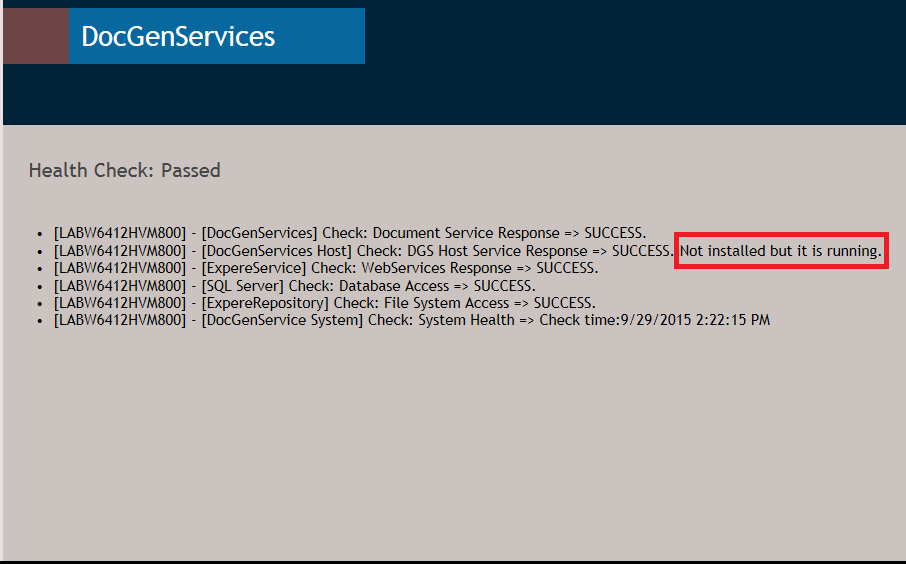
Click the appropriate URL to access your product's health check page.
A sample URL would be: https://localhost/DocGenServices/HealthCheck.aspx.
Load balancing now supported without sticky sessions
- Reference: PBI 340410
- Compliance Impacts: This enhancement is not a compliance or regulatory issue.
- Documentation: No document impact.
Document Generation Services now load balances without sticky sessions.A user session is no longer bound to a specific instance. The Tool Suite and Management tool function normally without sticky sessions enabled on the load balancer.
- A DGSSecurityTokenStore table/database has been created to store the unique session code.
- A script has been created to build the table
- Code has been created to implement the security token cache to enable/disable sticky sessions.
Ability to copy aliases between accounts
- Reference: PBI 341139
- Compliance Impacts: This enhancement is not a compliance or regulatory issue.
- Documentation: Copying aliases and account information.
Customer support specialists can now copy aliases from one account to another account.
See Copying aliases and account information for detailed information.
Callback reattempt enhanced
- Reference: PBI 346387
- Compliance Impacts: This enhancement is not a compliance or regulatory issue.
- Documentation: No document impact.
The callback functionality has been enhanced in Document Generation Services to automatically reattempt upon a failed callback to the calling application.
Document Generation Services now reattempts a callback in the following intervals:
- One (1) second
- Two (2) seconds
- Four (4) seconds
- Eight (8) seconds
- Sixteen (16) seconds
Logging enhanced
- Reference: PBI 346546
- Compliance Impacts: This enhancement is not a compliance or regulatory issue.
- Documentation: No document impact.
Logging enhancements have been implemented for Document Generation Services to include the duration for a request to complete and wait times. This will provide Wolters Kluwer with more information to analyze environments
Workaround created for properties.xsl issue
- Reference: PBI 344134
- Compliance Impacts: This defect is not a compliance or regulatory issue.
- Documentation: No document impact.
- WKFS_StyleGuide.xsl
- FontScaling.xsl
- table.xsl
A temporary solution has been implemented to use a unique name for these files.
Utilize the UpdatePropertiesStylesheet utility to change the .xsl files to have their own unique identifier. See "How and when to run the UpdatePropertiesStylesheetUtility.docx" for detailed information.
After running the UpdatePropertiesStylesheet utility on the Document Generation Services Management Tool, the following files and their references within the files are updated accordingly:
| Original .xls file | Example of updated .xsl file name |
|---|---|
| WKFS_StyleGuide.xsl | WKFS_StyleGuide635780724639423381.xsl |
| Properties.xsl | properties635780724639423381.xsl |
| FontScaling.xsl | fontScaling635780724639423381.xsl |
| table.xsl | table635780724639423381.xsl |
- If deploying content from sprint 27 or before, you must run the utility on the content after it has been deployed to the Document Generation Services environment before using the content.
- Submit a SN ticket to ASM and include the "How and when to run the UpdatePropertiesStylesheetUtility.docx" document and the zip file stating you need the UpdatePropertiesStylesheet utility ran for a specific environment.
- If you need to deploy more than one library, deploy all libraries before submitting one ASM ticket.
- Running the utility will cover all libraries that have been deployed to that environment.
- After deploying content, do not use/ping/test the library for any reason until after ASM runs the utility; we will be at risk for this error to occur again.
- You can run this utility any time after the library has been deployed.
- There are no dependencies on aliases or permissions being completed prior to running the utility.
Users can access these files at https://connect.wolterskluwer.com/sites/dept-pmoportal/BankingInvestmentProducts/expereie/Lists/General%20Discussion/Subject.aspx.
Management Tool: Ability to update version number for aliases
- Reference: PBI 310532
- Compliance Impacts: This new feature is not a compliance or regulatory issue.
- Documentation: Updating the Version Number for an Alias Group.
Users can now simultaneously update the version number of the destination value (library path) for an alias (orig value) for a group of accounts.
See Updating the Version Number for an Alias Group for detailed information.
Management Tool: Ability to create multiple aliases
- Reference: PBI 318532
- Compliance Impacts: This new feature is not a compliance or regulatory issue.
- Documentation: Importing New Aliases.
Users can now create multiple aliases for multiple accounts through a new Import New Aliases option on the Manage Aliases page in the Document Generation Services Management Tool. The Import New Aliases option utilizes uses a .CSV file with user-defined Account ID, Orig Value, and Destination Value/New Value values to create the alias.
See Importing New Aliases for detailed information.
Document Generation Services Updated to Support SQL
- Reference: PBI 293836
- Compliance Impacts: This enhancement is not a compliance or regulatory issue.
- Documentation: No document impact.
The application for Document Generation Services has been updated to support SQL. All supporting components have been updated. With this upgrade, transactions will not be migrated from the old database to the new database. You will not be able to receive responses using the previous Request/Transaction ID after the upgrade has occurred.
