| Element/Attribute | Usage |
|---|---|
| Tagline | The Tagline element is optional; however, it is present on all base documents. The default behavior is to exclude the tagline from screen readers when the Tagline element is used without the ReadElement attribute. |
| ReadElement | The attribute is optional. When the ReadElement attribute is used on the Tagline element, and defined with a value of Yes, the tagline is included for reading. If the ReadElement attribute is present on the Tagline element, and defined with a value of No, the tagline is excluded from screen reading. |
The tagline element on a document is not read by screen readers. To include the tagline element as a readable tag you must set the ReadElement attribute on the tagline. The tagline element does not include the ReadElement unless specifically added during authoring.
The ReadElement attribute is available within the Tagline element. Right-click the Tagline element and select Add Attribute > ReadElement. 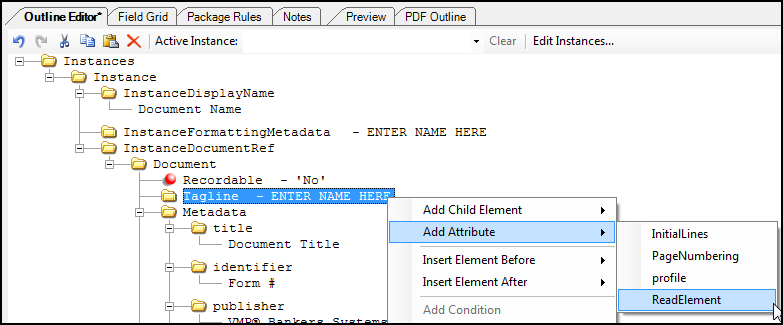
In the ReadElement attribute you can select the attribute value as Yes or No. The default value is Yes (ReadElement = Yes). To modify the attribute value, select the attribute and double-click (in this case, the available values are Yes/No). 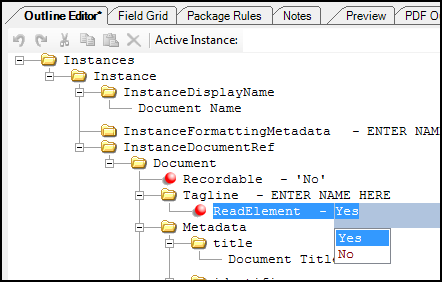
When producing a Tagged PDF (see Creating a Tagged PDF), tags are not created in the structure tree for tagline information if the ReadElement value is No (or not present in the REQ file). If the ReadElement value is Yes, tags generate for all of the pages tagline information and all are placed at the top of structure tree.