Implementing accessibility features for dynamic documents generated as samples (Assembly > Execute Document) or previews (Preview feature) for testing requires defining the Dynamic Document Rendering Option as Apache - FOP and selecting the Tagged PDF check box in the Requirements Editor.
As you create a new document, or modify an existing document, with the intent of enabling accessibility features, begin by setting (or changing) the rendering options in the Requirements Editor Tools > Options menu. All documents and previews generated with these options selected will produce a tagged PDF output.
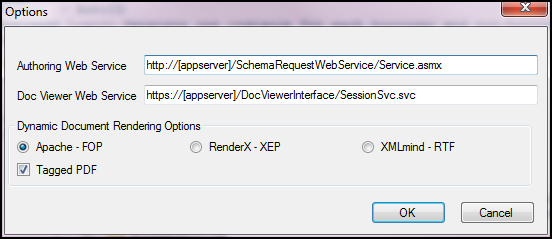
The tagged PDF option is dependent on the Apache™ FOP (Formatting Objects Processor) to render the output in a manner that supports ADA Standards for Accessible Design. As such, accessibility features are dependent upon the features provided by Apache FOP to create tagged PDF output.
Generating a tagged PDF output may not result in visible changes to the PDF; it does, however, embed tags produced by Apache FOP rendering methods that can be used by screen readers and other assistive technologies. That is, while the PDF may not appear any different, the embedded tags are used to define, or trigger, how a document is read out loud by screen readers.