| Attribute | Usage |
|---|---|
| AlternateText | The attribute is optional. It must be defined to enable screen reading of an image alternate text. If the attribute is not present, no alternate text is associated with the image. |
When an image contains words that are important to understanding the content, the text alternative should include those words. This will allow the alternative to accurately represent the image. Alternate descriptions are human-readable text that can be vocalized by text-to-speech technology for the benefit of users with vision disabilities.
To provide a description for an image that is read by a screen reader you can use alternate text associated with the image reference. The alternate text is implemented as an attribute and written as text (a string) that is then read when the user passes over the associated image.
The AlternateText attribute is available within the any of the three image elements; InlineGraphic, ExternalGraphic, and ImageReference. Right-click an image element and select Add Attribute > AlternateText.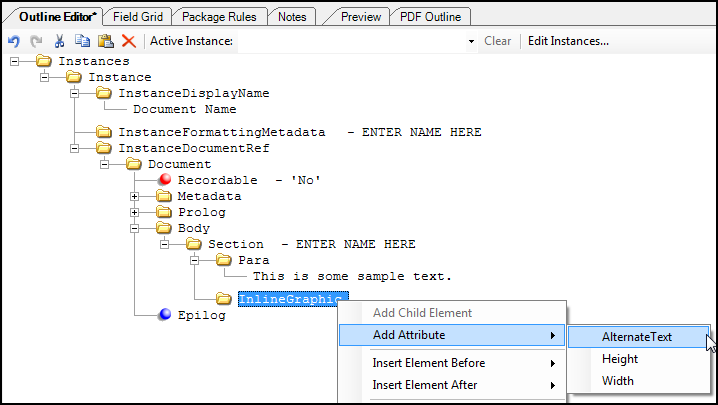
When producing a Tagged PDF (see Creating a Tagged PDF), text alternatives for images are required for accessibility and will fail accessibility checker rules if not present. The tag for images will populate with the /Alt entry and this alternate text is read out loud by the screen reader.
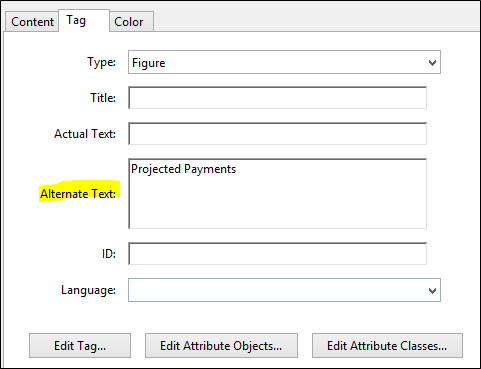
Alternate Text
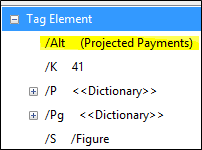
/Alt Tag Element