| Attribute | Usage |
|---|---|
| rowspan | The attribute is optional. It is defined with an integer value indicating the number of rows an entry element needs to span. |
For tables with a row > entry element, a rowspan attribute is used when a given cell of the table needs to span multiple rows. The user indicates the number of rows to span by entering the rowspan value (integer).
Right click the entry element and select Add Attribute > rowspan from the shortcut menu.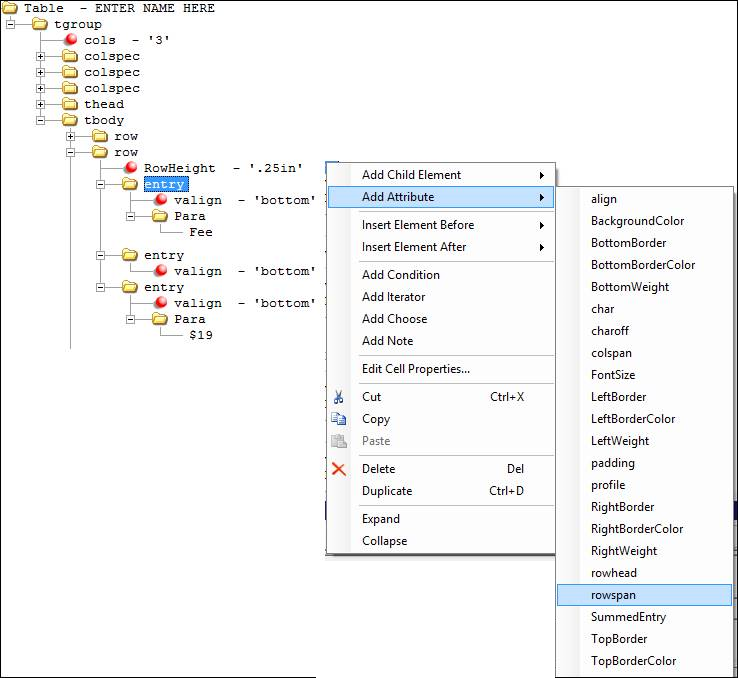
In the rowspan attribute, enter an integer value to indicate the number of rows to span. There is no default value.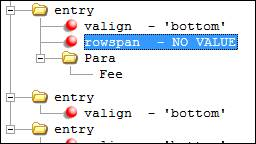
If the Tagged PDF option is selected (see Creating a Tagged PDF), the tag for a cell is marked with the /RowSpan attribute to indicate to span the desired number of rows. In the example below, the tag for the cell with contents "East" would include the attribute /RowSpan 2 to signify that this value relates to multiple rows. The tag for a cell marked with the /RowSpan attribute only appears once in the tag tree (it is not repeated for the spanning rows).
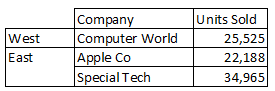
Sales by Region Example