Print a Transaction
When a transaction is printed, Transaction Summary information prints and includes tasks information, task comments, and transaction comments.
To print a transaction
- On the Transaction Summary page, select
 and Print
Summary.
and Print
Summary.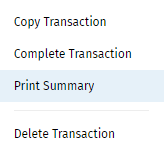
- After the page is opened in a new browser tab, print using the web browser print function.
Note:
All relevant information for the selected transaction will print including:
- Transaction Summary information
- All tasks information
- All comments information
- Regardless of the comment option selected on the Transaction Summary page, all comments will be printed.