Previewing Attachments
Before downloading, single or multiple PDFs can be previewed.
To preview a single PDF
- On the Attachments grid, select the multiple attachments to
preview.
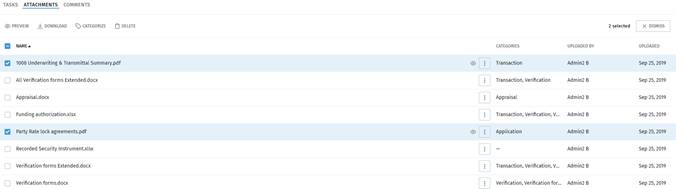
- On the Attachments grid, select
 next to an attachment with a PDF
extension.
next to an attachment with a PDF
extension.
- View the PDF attachment in the separate browser tab that opens.
- Close the Preview tab to return to Vanceo.
To preview multiple files
- On the Attachments grid, select the multiple attachments to preview.
- Select
 at the top of the Attachments
grid.
at the top of the Attachments
grid. - Preview the attachments in a separate browser tab that displays the PDFs as a
single PDF file.Note: The multiple PDFs display as a single PDF with bookmarks for easy navigation between the different attachments.
- Close the Preview tab to return to Vanceo.