| December 2018 |
What's New Take Advantage of a Complimentary
Quick Start to What’s New? Get up and running
quickly with our overview of the ComplianceOne mortgage changes so you
know what to expect in our next release. Attend a complimentary
“What’s New” webinar, hosted by our experienced software trainers. For
available dates, times, and to register, sign-in on our Support website, and
navigate to your ComplianceOne mortgage product page.Note: Beginning
in January 2019, What's New Instructor-let Webinars will be replaced
with on-demand, recorded tutorials that will be available 24/7. We
will continue to provides links each month to the recorded tutorial in
this section in What's New Help.Click to review What's New with the
Documents Click to review the Document
List New Functionality
- The Bureau of Consumer Financial Protection issued an
interpretive and procedure rule on August 31, 2018 to
implement and clarify the Economic Growth, Regulatory
Relief, and Consumer Protection Act which amends HMDA and
creates a partial exemption applicable to transactions
with an Action Taken Date on or after 1/1/2018.
Organizations that are partially exempt have the option of
reporting exempt data.
On the Loan Definition page,
Partially Exempt per S. 2155 has been added
to the HMDA section and is available when 2018
HMDA Applies is selected. When setting up your
Loan Definition Policy in Administration, you can
indicate if Partially Exempt per S. 2155
defaults selected or not, and if you want to
Allow User to Edit Field in Transaction.
- On existing transactions where a Loan Definition
policy is used, Partially Exempt per S.
2155 defaults unselected and is editable until
the Loan Definition policy is updated in
Administration and Loan Definition Policy
is refreshed on the Loan Definition page.
- On existing transactions where a Loan
Definition policy is not used, Partially Exempt
per S. 2155 defaults unselected.
If you are licensed for the HMDA Wiz interface,
any existing transaction with an Action Taken
Date on or after 1/1/2018 will need to be
updated if you are a partially exempt lender. Those
existing transactions can be updated using the Grid
view on the Edit page within HMDA Wiz. If you
are not licensed for the HMDA Wiz interface, you
will have to open each transaction and select
Partially Exempt per S. 2155 on the Loan
Definition page and then recreate your pipe
delimited file(s). The following questions
have been added to the HMDA Reporting section in
How do I identify a transaction as partially exempt per Senate Bill 2155 for HMDA Reporting?, If I select Partially Exempt per S. 2155 on the
Loan Definition page, how will that impact my
transaction?, and My organization is regulated by the FDIC or OCC;
how do I continue to report the Reasons for Denial
on my partially exempt
transactions?
Updates to Existing Functionality What's New for Interfaces New
Functionality
- We have reordered the information on the HMDA Preview LAR
report to provide a more consistent experience across our
products and to allow for easier review of the
information. For those users who use ComplianceOne Lending
and/or ARTA Lending, the order of the information in the
reports will be in the same for all products. For those
users that are licensed for the HMDA Wiz interface, the
order of the information in the report will follow the
order of data on the Edit page within HMDA Wiz.
-
If you are a licensed HMDA user and try to use
Geocoding, Rate Spread and Insert/Update services
with the wrong credentials, a validation message
displays directing you to verify your credentials in
Interface Manager. To validate your credentials,
visit the HMDA Wiz website, test your credentials,
and make changes if needed in Interface Manager.
- If there is an Appraisal Identifier entered on the
Collateral Details page, it will be transferred to the
Property Information section of the Loan Product Advisor
underwriting system. The Appraisal Identifier field is
available within ComplianceOne Mortgage / Assumptions if
type of Mortgage is Fannie Mae, Freddie Mac, or FHA.
- If the user selects the specific appraisal Form Number used
to report the property valuation that can be entered on
the Uniform Underwriting and Transmittal document, the
Form Number will be sent to Loan Product Advisor. This is
required if there is an Appraisal Identifier available in
the transaction.
If there is a Valuation Method
being selected on the Collateral Details page, this
information will transfer to Loan Product Advisor.
This is a required information to be reported to the
third-party underwriting system if the property
valuation has been done on the property and there is
an Appraisal Identifier available. The following
question has been added to the Automated Underwriting
section in Help: What property valuation information should be submitted to Loan Product Advisor?
- Product Description has been added to the Loan
Product Advisor interface view. This is the lender's
unique identifier of a mortgage product or program
associated with the loan, allowing the lender to
distinguish between different loan offerings.
- If there is a property seller in the transaction who is an
individual or sole proprietor, the seller's
First-/Middle/Last-/Suffix Names will be now transferred
to Loan Product Advisor.
Updates to Existing Functionality
- What's New for Interfaces
- New Functionality
-
- ComplianceOne® Insiders
- Note: The Insiders meetings have changed from
two times per month to one time per month. We will
adjust as the need arises.
Here's your chance to
be on the “inside” of the ComplianceOne mortgage
development discussions. Be heard in this monthly
group (3rd Thursday each month), during a one-hour
roundtable discussion to gather your input and
feedback on functionality that is being updated or
added to ComplianceOne mortgage. We look
forward to engaging with you! Register
Here using the password:
Mtg2018
|
| November 2018 |
- What's New
- Take Advantage of a Complimentary Quick Start to
What’s New?
- Get up and running quickly with our overview of the
ComplianceOne mortgage changes so you know what to
expect in our new release. Attend a complimentary
“What’s New” webinar, hosted by our experienced
software trainers. Select What's New in November to
access the training webinar.Note: What's New
webinars are no longer available at http://training.wolterskluwerfs.com/. You
can now access the webinars from links in What's New
Help or by selecting Support
Website and logging in. Navigate to the
ComplianceOne mortgage product page, select View
All Product Training and select
ComplianceOne Mortgage What's New webinars.
- Click to review What's New with the
Documents
- Click to review the Document
List
- New Functionality
- An individual contact type of Loan
Processor is now collected in Administration
on the Contacts page and a default Loan
Processor is collected on the Organizations
page. Within a transaction and a template, Loan
Processor has been added to the General
Information section on the Loan Definition page.
After your administrator enters the loan processor
contact(s), the information entered in
Administration for the Loan Processor
selected on the Loan Definition page will print in
the Contact Name, Contact Title, Contact Phone
Number, and ext. fields on the Uniform
Underwriting and Transmittal Summary for new and
existing transactions.
- On the Loan Definition page, an option must be
selected for the Construction Note Type to
create a construction loan and calculate
accurately. If an option is not selected and
Construction is selected for the Integrated
Disclosure Purpose, the following message
displays on the Loan Definition page: "Select an
option under Construction Note Type to create a
construction loan" and the following message
displays on the Print page as a warning:
"Construction Note Type should be set up for
transactions with Integrated Disclosure Purpose
equal to Construction."
For existing
transactions where the Integrated Disclosure
Purpose Type of Construction was chosen and
the Rate Type is variable, the
Product field, where variable rate program
is described, is showing the incorrect value for
the initial rate hold term on the documents listed
below:
- Adjustable Rate Mortgage Program
- Lock Agreement-MN
- Lock in Agreement-MT
- Loan Estimate
- Closing Disclosure
- Rate Lock Agreement
- Fannie Mae 1003 Freddie Mac 65 Uniform
Residential Loan Application
- Fannie Mae 1003 Freddie Mac 65 URLA Uniform
Residential Loan Application‐CA
- Fannie Mae 1003 Freddie Mac 65 URLA Uniform
Residential Loan Application‐DC
- Fannie Mae 1003 Freddie Mac 65 URLA Uniform
Residential Loan Application‐OH
- Mortgage Loan Commitment
You will want to visit the Loan Definition
page to select the appropriate Construction
Note Type, calculate, and recreate documents
if necessary.
- The credit bureaus' address, phone number,
internet address, and credit score range numbers
will now populate the Risk Based Pricing Notice,
Risk Based Pricing Notice - Credit Score, and
Notice of Action Taken after completing a credit
pull in ComplianceOne Lending and transferring the
loan to ComplianceOne mortgage. A re-issue of the
credit report or a credit bureau refresh in
Financial Analysis will no longer need to be
completed.
- Updates to Existing Functionality
- Previously, if the Combine Assets/Liabilities
option for co-applicants on the Parties Page was
cleared and a user navigated away from the page
and returned, the option displayed selected. This
issue was resolved and the option will remain
cleared.
- Purchase, non-construction transactions with
the Application Received Date on or after
10/1/2018 and where the Loan Amount is
equal to Sales Price should be recalculated
to show the accurate amount of Down Payment/Funds
from Borrower and Funds for Borrower on the Loan
Estimate and Closing Disclosure documents. To
publish the correct value in the Application Phase
of the transaction, select Calculate on the
Calculation Details page. As of 10/1/18, this
value was calculated incorrectly by removing the
Closing Costs Financed (if present) before
comparing the Total Existing Debt Being
Satisfied and the Loan Amount.
- In the Loan Terms section on the Loan Estimate
and Closing Disclosure, an issue has been resolved
where 'Yes' was printing for Can this amount
increase after closing? for the Interest Rate row.
This occurred when the Application Received
Date was on or after 10/1/2018, Construction
Only was selected for Construction Note
Type on the Loan Definition page, Variable was
selected for Rate Type on the Calculations
page, and after calculating the Rate Type
was changed to Fixed. For existing transactions,
review, calculate, and recreate the Closing
Disclosure if necessary.
-
- What's New for Interfaces
- New Functionality
- The Location ID entered in Administration for
your organization will now be sent to the Loan
File Setup section in the Loan Product Advisor
underwriting service.
- The explanations selected for any Yes answer
to a declaration on lines a through i on the
Uniform Residential Loan Application Continuation
Page or Credit Application Real Estate Supplement
are now transferred to Desktop Underwriter
(DU).
- Updates to Existing Functionality
- Previously, the dependent ages entered on the
Uniform Residential Loan Application document
(section III) were not transferred to Desktop
Underwriter. This has been resolved and if
dependent ages are entered, they will be
transferred to Desktop Underwriter.
- Loan demographic data including ethnicity,
race, sex, and basis of collection for the data
will populate mortgage when performing an import
from Mortgagebot.
- ComplianceOne® Insiders
- Note: The Insiders meetings have changed from
two times per month to one time per month. We will
adjust as the need arises.
Here's your chance to
be on the “inside” of the ComplianceOne mortgage
development discussions. Be heard in this monthly
group (3rd Thursday each month), during a one-hour
roundtable discussion to gather your input and
feedback on functionality that is being updated or
added to ComplianceOne mortgage.
- These are complimentary, open to all
ComplianceOne mortgage users, and require
pre-registration.
- The agenda for each session will be posted one
week prior on the registration website allowing
you to plan which roundtable you can impact the
most!
We look forward to engaging with you!
Register
here using the password:
Mtg2018
|
| October 2018 |
- What's New
-
This release marks the launch of the Vanceo™
Mortgage. Congratulations! If you are reading
this, you and your financial institution have made
a great decision, and will now be able to leverage
Vanceo™ Mortgage to drive internal controls and
efficiencies in your daily financial processes.
For more information, refer to the Vanceo page in Help.
- Take Advantage of a Complimentary Quick Start to
What’s New?
- Get up and running quickly with our overview of the
ComplianceOne mortgage changes so you know what to
expect in our new release. Attend a complimentary
“What’s New” webinar, hosted by our experienced
software trainers. Select What's New in October to
access the training webinar.Note: What's New
webinars are no longer available at http://training.wolterskluwerfs.com/. You
can now access the webinars from links in What's New
Help or by selecting Support
Website and logging in. Navigate to the
ComplianceOne mortgage product page, select View
All Product Training and select
ComplianceOne Mortgage What's New webinars.
- Click to review What's New with the
Documents
- Click to review the Document
List
- New Functionality
- On the Loan Definition page in the HMDA
section, Business or Commercial Purpose is
used to report the loan as a business or
commercial purpose to HMDA and displays unselected
by default. The Business or Commercial
Purpose selection is strictly for HMDA
reporting purposes, and the transaction will be
treated as a consumer purpose loan for all other
purposes.
- On the Calculations page in the Monthly
Housing Expenses section, All Other Monthly
Payments is now automatically calculated. The
calculated amount is a sum of all liabilities
entered on the Financial Analysis page except for
Mortgage, Leasehold Payment, Ground Rent and Other
Housing Expense. The calculated amount can be
changed if needed. The All Other Monthly
Payments value is used by the Uniform
Underwriting and Transmittal Summary
document.
- On the Calculations page in the
Origination/Disposition section, 4 = Collateral
will now default selected for Reasons for
Denial when 'Location or condition of
collateral (use only in Massachusetts)' is
selected for Reason Type in the Action
Reason section of Document Data for the Notice Of
Action Taken document. You will need to manually
select 4 = Collateral for Reasons for Denial
on any existing transaction that has 'Location
or condition of collateral (use only in
Massachusetts)' selected for Reason Type.
- An issue has been resolved where if more than
one instance of Assessment or County Property Tax
had been entered for Proration Type on the
Closing Disclosure page and both instances were
assigned to the same Integrated Disclosure
Subsection, then only the first instance
printed to the Closing Disclosure. For example, on
the Closing Disclosure page, you enter
Proration Item of Assessment and
Integrated Disclosure Subsection of
Adjustments for Items Unpaid by Seller and an
amount of $200. You also enter another
Proration Item of Assessment and
Integrated Disclosure Subsection of
Adjustments for Items Unpaid by Seller and an
amount of $100. In this scenario, the second
Assessment for $100 would not print to the Closing
Disclosure. This issue has been resolved for
transactions with an Application Received Date
on or after 10/1/2018, so review, calculate
and recreate documents if necessary. For
transactions with an Application Received
Date prior to 10/1/2018 (in which the closing
occurs after 10/1/2018), you will need to continue
to aggregate the amounts and enter one proration
on the Closing Disclosure page.
- Updates to Existing Functionality
This
release does not include updates to existing
functionality.
- What's New for Interfaces
- New Functionality
- Previously, when lenders used a credit service
outside of ComplianceOne, a validation error
displayed for Credit Identifier that
prevented submissions to the GSE Automated
Underwriting Service (i.e. Fannie Mae DU or
Freddie Mac LP). The validation error was removed
and submissions to the GSE Automated Underwriting
Service will now be successful.
- Manual Geo Codes entered on the Collateral
page and Manual Rate Spreads entered on the
Calculations page now import and override
automated Geo Codes and automated Rate Spreads in
HMDA Wiz and CRA Wiz.
- Updates to Existing Functionality
This
release does not include updates to existing
functionality.
- ComplianceOne® Insiders
- Note: The Insiders meetings have changed from two
times per month to one time per month. We will
adjust as the need arises.
Here's your chance to
be on the “inside” of the ComplianceOne mortgage
development discussions. Be heard in this monthly
group (3rd Thursday each month), during a one-hour
roundtable discussion to gather your input and
feedback on functionality that is being updated or
added to ComplianceOne mortgage.
- These are complimentary, open to all
ComplianceOne mortgage users, and require
pre-registration.
- The agenda for each session will be posted one
week prior on the registration website allowing
you to plan which roundtable you can impact the
most!
We look forward to engaging with you!
Register
here using the password:
Mtg2018
|
| September 2018 |
- What's New for ComplianceOne® mortgage
- Take Advantage of a Complimentary Quick Start to
What’s New?
-
Get up and running quickly with our overview of
the ComplianceOne mortgage changes so you know
what to expect in our next release. Attend a
complimentary “What’s New” webinar, hosted by our
experienced software trainers. Select What's New in
September to access the training
webinar.
- Click to review What's New with the
Documents
- Click to review the Document
List
- New Functionality
- Several improvements were made to the
following areas:
- Headers
- Template Maintenance
- Party Management
- HMDA Processing
Although the changes are small, they
impact several areas. All the current
functionality is still available but the look and
feel of the main landing page header has been
updated to provide easier viewing and navigation.
The information below provides details about the
changes. Transaction Header The
transaction header has been updated.
- The home icon has been replaced with
 that brings you back to a
main page. that brings you back to a
main page.
- Selecting your name brings you to your User
Profile.
- Selecting Help opens up Help
information.
- Selecting Logout ends your
session.
Manage To access
Administration, HMDA Processing, Interface
Manager, Party Management, Security
Administration, or Template Maintenance management
functions that were previously in the
ComplianceOne menu, select Manage in the
header and an option. The selected function will
open in a new browser tab. The lending browser tab
will remain open so you can easily return and
continue work after you finish with the newly
opened tab. To close a management function such as
Administration, close the browser tab.
Old 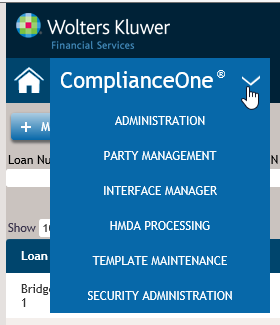
New 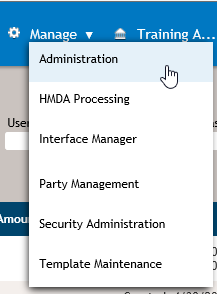
HMDA Processing, Party Management and
Template Maintenance Headers The look
and feel of the HMDA Processing, Party Management,
and Template Maintenance headers were updated to
match the new transaction header. However, HMDA
Processing, Party Management, or Template
Maintenance display instead of ComplianceOne.
- When a transaction is recalled from HMDA
Processing, the transaction header shows you came
from HDMA Processing. Selecting the brings you back to the HMDA
Processing landing page.
- When a party is recalled from Party
Management, the transaction header shows you came
from Parties. Selecting brings you back to the
Parties landing page.
- When a template is recalled from Templates,
the transaction header shows you came from
Templates. Selecting brings you back to the
Templates landing page.
Accessing
Accounts Account was moved from
inside a page to the header. To access a different
account if you are licensed for more than one
account, select the account in the header.
Old 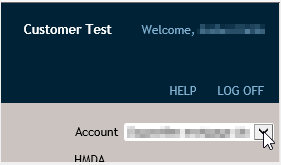
New 
- In the May release, we added validation
messaging to the Loan Definition and Print pages
alerting you that transactions with an Application
Received Date of 10/1/2018 or later were not yet
supported. Since then, we have been making changes
each release to implement the TILA RESPA
Integrated Disclosures (TRID) amendments. We have
completed all of the changes and the validation
messaging has been removed from the Loan
Definition and Print pages. A summary of the
changes and when they were released is included
below:
- May Release: What’s New with
Documents
- June Release: Calculating Cash to Close
Table-Adjustments and Other Credits
- June Release: Calculating Cash to Close
Table – Seller Credits; June release
- June Release: Help only changes
- Closing Disclosure page; Gift Funds
- Calculations and Closing Disclosure page;
Seller Credits
- July Release: Escrow Account table
- Escrowed Property Costs over Year
- Estimated total amount over year 1 for your
escrowed property costs
- Escrow Payment
- July and September Release:
Improvements Value
- August Release: Inspection and Handling
Fees
- August Release: Calculating Cash to
Close Table-Closing Costs Financed
- August Release: Calculating Cash to
Close Table-Down payment/Funds from Borrower and
Funds for Borrower
- September Release: Loan Terms-Principal
and Interest row (See below)
- September Release: Adjustable Payment
(AP) Table (See below)
- September Release: Closing Costs
Expiration (See below)
- The TRID amendments, applicable to
transactions with an Application Received
Date on or after 10/1/2018, allow a creditor,
issuing a revised Loan Estimate after the consumer
has indicated an intent to proceed within the time
specified by the creditor, to leave the date and
time the estimate closing costs are to expire
blank. On the Calculations page in the application
phase, we have removed the required symbol from
the Date, Time, and Time Zone
within the Closing Costs Expiration section. When
the Closing Costs Expiration Date,
Time, and Time Zone are blank and the
Application Received Date is on or after
10/1/2018, the language on page one of the Loan
Estimate is as follows: '...closing costs expire
on.'
In addition, we have also hidden the
Closing Costs Expiration section of the
Calculations page within template maintenance due
to a customer request.
- The TRID amendments, applicable to
transactions with an Application Received
Date on or after 10/1/2018, allow a user to
include the estimated value of improvements to be
made on a property when disclosing an Appraised
Value or an Estimated Value for a construction
loan without a seller. On the Collateral Details
page in the Application phase, the user can enter
the amount in Improvements Value. The
entered value will be added to the
Estimated/Appraisal Value on the Loan Estimate and
Closing Disclosure.
- For transactions with an Application
Received Date on or after 10/1/2018 that have
multiple property taxes or homeowner’s insurance,
some of which are escrowed, 'Some' will print in
the 'In Escrow' section on the Closing Disclosure.
Changes were made so this transaction type can be
submitted to Uniform Closing Dataset (UCD) without
error.
- The TRID amendments, applicable to
transactions with an Application Received
Date on or after 10/1/2018, added comment
7(iv) to Appendix D of Regulation Z. Specifically
the disclosure requirements for the ‘Can this
amount increase after closing’ of the Principal
and Interest row within the Loan Terms section and
the Adjustable Payment (AP) table have been
updated. Both of these sections on the Loan
Estimate and Closing Disclosure have been updated
for transactions where Construction Note Type
is Construction Only or Construction and
Permanent Note.
The following question has been
added to the Calculations section in Help: How are the interest-only, payment amounts
typically calculated for multiple advance,
construction loans? The following
questions have been added to the Document Data
section in Help: Within the Loan Terms section, how is the ‘Can this amount increase after closing’ column of Principal and Interest row completed on the Loan Estimate and Closing Disclosure for construction transactions with an Application Received Date on or after 10/1/2018? How are the ‘First Change/Amount’, ‘Subsequent Changes’, and ‘Maximum Payment’ rows of the Adjustable Payment (AP) Table completed on the Loan Estimate and Closing Disclosure for construction transactions with an Application Received Date on or after 10/1/2018?
- For transactions where Construction Note
Type is Construction Only or Construction and
Permanent Note, we have addressed an issue related
to the calculation of Closing Cost Financed
and have made some improvements in relation to the
data entry of construction costs and the initial
advance amount.
- When the Application Received Date is
on or after 10/1/2018, Improvements Value
has been relabeled as Construction Costs
within Collateral Details. The amount entered is
the cost to complete the construction or
improvements to the property. The following
questions have been added to the Collateral
section in Help:
- When Application Received Date is on or
after 10/1/2018 and Seller Information is
Unknown is selected, Use Seller Disclosures
on Non-Seller Transaction is selected, or a
seller has been added in Collateral Details, the
Closing Costs Financed (Paid from your Loan
Amount) on the Closing Disclosure is determined by
subtracting the Sales Price, liabilities on
the Financial Analysis page where Payoff is
selected, and Construction Costs from the
Loan Amount. Previously in construction
transactions where a seller had been added, the
Construction Costs were not being
considered in this calculation.
- The Initial Advance Amount is now
collected on the Calculations page in the closing
phase. Previously, the Initial Advance
Amount was entered on the Consumer Note. When
an amount is entered for Initial Advance
Amount, the product will automatically create
an Amount Paid to Third Party disbursement on the
Disbursements page and will also automatically
create an Adjustment on the Closing Disclosure
page.
For existing transactions, the Initial
Advance Amount previously entered in Document
Data will be retained and will appear on the
Calculations page. Because the product will
automatically create a disbursement and an
adjustment with this release, you will want to
visit the Disbursements page and Closing
Disclosure page, if applicable, to remove the
manually entered disbursement and adjustment if
you had created them prior to this release.
The following question have been added to
the Disbursements section in Help: The following question has been added to
the Closing Disclosure section in Help:
- The amount of undisbursed loan proceeds
available for construction, also known as
Construction Holdback, is determined by the
product based on the Construction Costs and
Initial Advance Amount. The product
subtracts the Initial Advance Amount on the
Calculations page from the sum of Construction
Costs for each collateral, if more than one
piece of collateral exists. The amount remaining
is the Construction Holdback resulting in an
automatically created Amount Paid to Third Party
disbursement on the Disbursements page and
automatically created Adjustment on the Closing
Disclosure page.
For existing transactions where
you have previously entered a disbursement and/or
an adjustment for the Construction Holdback, you
will want to visit the Disbursements page and/or
Closing Disclosure page to remove it since the
product will have automatically created a
disbursement and adjustment with this
release. The following question has been
added to the Disbursements section in Help:
-
The following question has been added to the
Closing Disclosure section in Help:
-
On construction only loans, the initial
interest rate is correctly being rounded to three
decimal places. Prior to this release, the
interest rate was rounded to the nearest two
decimal places. For existing transactions, review,
calculate, and recreate the documents to see the
rounding update.
- Updates to Existing Functionality
This
release does not include updates to existing
functionality.
- What's New for Interfaces
- New Functionality
This release does no
include new functionality.
- Updates to Existing Functionality
This
release does not include updates to existing
functionality.
- ComplianceOne® Insiders
- Note: The Insiders meetings have changed from two
times per month to one time per month. We will
adjust as the need arises.
Here's your chance to
be on the “inside” of the ComplianceOne mortgage
development discussions. Be heard in this monthly
group (3rd Thursday each month), during a one-hour
roundtable discussion to gather your input and
feedback on functionality that is being updated or
added to ComplianceOne mortgage.
- These are complimentary, open to all
ComplianceOne mortgage users, and require
pre-registration.
- The agenda for each session will be posted one
week prior on the registration website allowing
you to plan which roundtable you can impact the
most!
We look forward to engaging with you!
Register
here using the password:
Mtg2018
|
| August 2018 |
- What's New for ComplianceOne® mortgage
- Take Advantage of a Complimentary Quick Start to
What’s New?
-
Get up and running quickly with our overview of
the ComplianceOne mortgage changes so you know
what to expect in our next release. Attend a
complimentary “What’s New” webinar, hosted by our
experienced software trainers. Select What's New in
August to access the training webinar.
- Click to review What's New with the
Documents
- Click to review the Document
List
- New Functionality
- On the Collateral Details page,
Construction Method is now available for
all transactions that are not HMDA reportable. For
users licensed for Uniform Loan Delivery Dataset
(ULDD), the selection made for Construction
Method will export to the ULDD interface.
- For transactions with an Application
Received Date on or after 10/1/2018,
Closing Costs Financed (Paid from your Loan
Amount) for the seller version of Cash To Close
table is calculated by subtracting the total
amount of payments to third parties not otherwise
disclosed in the Loan Costs and Other Costs from
the Loan Amount. TRID amendments effective on
10/1/2018 have provided clarifications on what
third parties payments should be taken into
consideration in Closing Costs Financed
calculation and include the following:
- The sale price of property for purchase
transactions.
- The estimated value of improvements to be made
on property for construction transactions.
- The payoffs of secured or unsecured debt.
- For transactions with an Application
Received Date on or after 10/1/2018, the
calculation logic of Down Payment/Funds from
Borrower and Funds for Borrower has
changed. If the transaction is non-construction
purchase, we will subtract the Loan Amount from
the total amount of all existing debt being
satisfied in the transaction. If the transaction
is construction purchase, non-purchase, or if the
Loan Amount exceeds the Sale Price, we will
subtract the Loan Amount (excluding Closing Costs
Financed (Paid from your Loan Amount)) from the
total amount of all existing debt being satisfied
in the transaction. Examples of existing debt
being satisfied include: Sale Price of Property,
Adjustments, and any other charges that may be
disclosed on Line K.04 of Closing Disclosure.
If
the amount calculated is greater than zero, then
this amount will be disclosed as Down
Payment/Funds from Borrower in the Cash To Close
table. If the amount is less than zero, then this
amount will be disclosed as Funds for Borrower.
On the Calculations page, we have added the
Inspection and Handling Fees table within the
Post-Closing Fees section that is available when
Construction Note Type is Construction Only
or Construction and Permanent Note and the
Application Received Date is on or after
10/1/2018. The TRID amendments require inspection
and handling fees collected after closing to be
disclosed on the Loan Estimate Addendum and
Closing Disclosure-Addendum. Although, the
Application Received Date is not visible
within template maintenance, the Inspection and
Handling Fees section is available when
Construction Note Type is Construction Only
or Construction and Permanent Note to allow you to
set up your templates prior to the 10/1/2018
effective date. Inspection and Handling
fees are finance charges and should be included in
the calculations for the In 5 Years total and
Total of Payments figures on the Loan Estimate and
Closing Disclosure. As a result, the Total
for the Inspection and Handling fees will impact
the following figures:
- APR within Calculation Results and in the APR
in the Loan Calculations table on the Loan
Estimate and Closing Disclosure
- In 5 Years total in the Loan Calculations
table on the Loan Estimate
- Total of Payments within the
Calculation Results and in Total of Payments total
in the Loan Calculations table on Closing
Disclosure
- APR Fees within Calculation Results
- Total Charges Affecting the APR within
Calculation Results
- Finance Charge within Calculation
Results
- Amount Financed within Calculation
Results
Lastly, Inspection and Handling Fees are
also included in the federal points and fees test
required under 1026.32 and will be included in
that testing when using the Wiz Sentinel
interface. The following questions have been
added to the Fees section in Help:When disclosing inspection and handling
fees that are paid after closing, does each
individual fee need to be disclosed or is the
total of all inspection and handling fees required
to be disclosed? Do inspection and handling
fees that are collected after closing affect any
of the Loan Calculation values on the Loan
Estimate and Closing Disclosure?
- Updates to Existing Functionality
- On the Collateral Details page, the selection
made for the Manufactured Home Land Property
Interest, will now match the selection for the
Manufactured Home Land Property Interest on the
HMDA Preview LAR report or the pipe delimited text
file. Previously, '5 not applicable' defaulted to
the HMDA Preview LAR report or the pipe delimited
text file.
- 8888 is used for the Credit Score on the HMDA
Preview Report and in the HMDA submission request
for the applicant or co-applicant when the
following conditions apply:
- Credit Score Used in Interface is not
selected on the Financial Analysis page for any
credit bureau response for the applicant or
co-applicant.
- On the Calculations page, the Underwriting
Action Taken is one of the following:
- 1 - Originated
- 2 - Application Approved but not Accepted
- 3 - Application Denied
- 7 - Preapproval Request Denied
- 8 - Preapproval Request Approved but not
Accepted,
- What's New for Interfaces
-
New Features
New Credit Provider
Wolters Kluwer has partnered with SettlementOne
to offer mutual customers access to
SettlementOne’s services. After configuration, the
SettlementOne Credit Service allows users to
submit minimal information about an applicant to
SettlementOne Credit Service to receive a
comprehensive credit report. Users are able to
select from single, dual, or tri-merge credit
reports, along with establishing joint credit
pulls for multiple borrowers. After the user has
finished pulling credit, all transaction and
credit report critical data is returned to
ComplianceOne mortgage.
Customers who are interested in the new credit
service provided by SettlementOne should contact
their Wolters Kluwer sales representative.
Updates to Existing Functionality
-
This release does not include updates to existing
interface functionality.
- ComplianceOne® Insiders
-
Here's your chance to be on the “inside” of the
ComplianceOne mortgage development discussions. Be
heard in this twice a month group (2nd and 3rd
Thursdays each month), during a one-hour
roundtable discussion to gather your input and
feedback on functionality that is being updated or
added to ComplianceOne mortgage.
- These are complimentary, open to all
ComplianceOne mortgage users, and require
pre-registration.
- The agenda for each session will be posted one
week prior on the registration website allowing
you to plan which roundtable you can impact the
most!
We look forward to engaging with you!
Register
here using the password: Mtg2018
|
| July 2018 |
- What's New for ComplianceOne® mortgage
- Take Advantage of a Complimentary Quick Start to
What’s New?
-
Get up and running quickly with our overview of
the ComplianceOne mortgage changes so you know
what to expect in our next release. Attend a
complimentary “What’s New” webinar, hosted by our
experienced software trainers. For available
dates, times, and to register or sign in, select
this link: http://training.wolterskluwerfs.com/.
- Click to review What's New with the
Documents
- Click to review the Document
List
- New Functionality
- With this release you will likely have already
realized we adopted the latest Wolters Kluwer
brand standards for the login and logout pages. In
addition, we’ve redesigned and improved the
usability of our Help. You can now search across
all help topics/pages, print help pages, and
provide feedback inside the help tool. The
familiar pages from the previous version of Help
are now laid out in a tile format on the main page
for easy navigation. Selecting the Wolters Kluwer
logo will bring you back to the main landing page
of Help.
- Select the Question button next to the Search
box for tips on searching.
- Select the Helpful? button on the right to
provide a quick comment about Help
information.
- Select the Feedback button to provide detailed
comments about Help and access Support
information.
- Select the Print button to print the current
page.
- For transactions with an Application
Received Date on or after 10/1/2018, the
Escrowed Property Costs over Year 1 amount within
the Escrow Account section on the Closing
Disclosure can be based on the payments made into
the escrow account during the first year starting
from the First Payment Date when
Calculate escrowed property costs over year 1
using the first payment date is selected for
the applicable Calculations Policy within
Administration. The following question has been
added to the Document Data>Document Specific
section in Help: Within the Escrow Account section on the Closing Disclosure, how is the Escrowed Property Costs over Year 1 determined?
- For transactions with an Application
Received Date on or after 10/1/2018, the
'Escrowed Property Costs over Year 1' amount and
'Escrow Payment' amount in the Escrow Account
table on page 4 will now include mortgage
insurance (PMI, Mortgage Insurance or USDA
Mortgage Insurance) when entered on the
Calculations page.
- On the Closing Disclosure for transactions
with an Application Received Date on or
after 10/1/2018, the description of ‘See attached
page for additional information’ will print in the
Escrow Account table for ‘Estimated total amount
over year 1 for your escrowed property costs’
and/or ‘Estimated total amount over year 1 for
your non-escrowed property costs’ fields when
there is not enough space. In addition, the
detailed description prints on the Closing
Disclosure in the Addendum within the Loan
Disclosures section. Lastly, the description will
include a reference to 'mortgage insurance' when
PMI, Mortgage Insurance, or USDA Mortgage
Insurance is entered on the Calculations
page.
- The TRID amendments that are applicable to
transactions with an Application Received
Date of 10/1/2018 or after have updated the
commentary to §1026.38(j)(2)(vi) to provide
clarification on the disclosure of gift funds on
the Closing Disclosure. No changes were made to
the product. The following question has been added
to the Closing Disclosure section in Help:When are Gift Funds required to be disclosed in the Other Credits section of the Summaries of Transactions section of the Closing Disclosure?
- The TRID amendments that are applicable to
transactions with an Application Received
Date of 10/1/2018 or after have updated the
commentary to §1026.37(h)(1)(vi) to provide
clarification on the disclosure of specific seller
credits on the Loan Estimate. No changes were made
to the product. The following question has been
updated on the Calculations>Loan Estimate and
Closing Disclosure section in Help: How are Seller Credits disclosed on the Loan
Estimate?
- On the Calculations page, changes were made to
improve usability. A new section for Post-Closing
Fees has been added and includes the following:
- Returned Payment Fee that was
previously on the Loan Definition page.
- Late Charges that were previously
included in the Fees section on the Calculations
page.
- On the Document Data page for construction
loans, the Collateral is the Construction
Property check box was removed. Collateral
is the Construction Property was renamed to
Construction Property and relocated on the
Collateral Details page.
-
On the Collateral Details page if
Construction Property is selected,
Improvements Value displays to comply with
TRID amendments effective 10.1.2018 (Comment
37(a)(7)-1). If Improvements Value is
selected, the estimated value of improvements to
be made on the property can be entered for a
construction loan without a seller. In the next
release, the estimated value of improvements will
added and print to the Estimated/Appraisal Value
disclosed on the Loan Estimate and Closing
Disclosure for a construction loan without a
seller.
- Updates to Existing Functionality
- On the Collateral Details page, a ‘Sorry, this
page is currently unavailable’ message displayed
after selecting a party to edit. This issue has
been corrected and any party on the Collateral
Details page can be viewed and edited if a user is
not a read-only user.
- On the Calculations page/Underwriting
Information section/Origination/Disposition, the
Override Reasons for Denial was changed to
Edit Reasons for Denial. If you select
Edit Reasons for Denial, the reasons
selected on the Notice of Action Taken document
will remain defaulted to Origination/Disposition
and can be edited.
- What's New for Interfaces
-
New Features
This release does not include new interface
features.
Updates to Existing Functionality
-
This release does not include update to existing
interface functionality.
- ComplianceOne® Insiders
-
Note: The session for Thursday, July 19 has been
cancelled. We look forward to our next discussion
with you on Thursday, August 9.
Here's your chance to be on the “inside” of the
ComplianceOne mortgage development discussions. Be
heard in this twice a month group (2nd and 3rd
Thursdays each month), during a one-hour
roundtable discussion to gather your input and
feedback on functionality that is being updated or
added to ComplianceOne mortgage.
- These are complimentary, open to all
ComplianceOne mortgage users, and require
pre-registration.
- The agenda for each session will be posted one
week prior on the registration website allowing
you to plan which roundtable you can impact the
most!
We look forward to engaging with you!
Register
Here using the password: Mtg2018.
|
| June 2018 |
- What's New for ComplianceOne® mortgage
- Take Advantage of a Complimentary Quick Start to
What’s New?
-
Get up and running quickly with our overview of
the ComplianceOne mortgage changes so you know
what to expect in our next release. Attend a
complimentary “What’s New” webinar, hosted by our
experienced software trainers. For available
dates, times, and to register, sign-in on our
Support
website, and navigate to your ComplianceOne
mortgage product page.
- Click to review What's New with the
Documents
- Click to review the Document
List
- New Functionality
- Updates to Existing Functionality
- We have removed the option of Principal
Reduction from the Closing Adjustment Item list on
the Closing Disclosure page since it was
inadvertently added in the March release. The
first option in the list, Borough Property Tax,
will default selected for any existing
transactions where you had previously selected
Principal Reduction. It is recommended that you
review the Closing Disclosure page and recreate
documents if necessary.
- What's New for Interfaces
-
New Features
This release does not include new interface
features.
Updates to Existing Functionality
-
This release does not include update to existing
interface functionality.
- ComplianceOne® Insiders
-
Here's your chance to be on the “inside” of the
ComplianceOne mortgage development discussions. Be
heard in this twice a month group (2nd and 3rd
Thursdays each month), during a one-hour
roundtable discussion to gather your input and
feedback on functionality that is being updated or
added to ComplianceOne mortgage.
- These are complimentary, open to all
ComplianceOne mortgage users, and require
pre-registration.
- The agenda for each session will be posted one
week prior on the registration website allowing
you to plan which roundtable you can impact the
most!
We look forward to engaging with you!
Register
here using the password: Mtg2018.
|
| May 2018 |
- What's New for ComplianceOne® mortgage
- Take Advantage of a Complimentary Quick Start to
What’s New?
-
Get up and running quickly with our overview of
the ComplianceOne mortgage changes so you know
what to expect in our next release. Attend a
complimentary “What’s New” webinar, hosted by our
experienced software trainers. For available dates
and times, and to register, sign-in on our Support
website, and navigate to your ComplianceOne
mortgage product page.
- Click to review What's New with the
Documents
- Click to review the Document
List
- New Functionality
- On the Parties Details page, changes were made
to improve usability. Data collection items were
added to the Parties Details page and removed from
the Financial Analysis page as described below.
- The Employment Information section was renamed
to Employment and Income and redesigned.
- Overtime, Bonus, and
Commission were added to the new Employment
and Income page.
- Amount was added and includes the total
of Base Income, Overtime,
Bonus, and Commission included for
an employment.
- Overtime, Bonus, and
Commission were removed from the Financial
Analysis page where this information was collected
previously.
- The Other Income section was added so users
can add other income information directly on the
Parties Details page. In this section,
Dividends/Interest, Net Rental Income, Alimony,
Child Support, Maintenance, Social Security,
Subject Property Positive Cash Flow, Support
Pension, and Other can be selected in the Select
Income Source drop-down list and an amount can be
entered.
- If Other is selected, a custom description and
an amount can be entered.
- Other income sources can be added by selecting
Add and entering a name and amount.
- Support Pension and Social Security are new
income types that have been added to the Select
Income Source drop-down list.
- On the Loan Definition and Print pages,
changes were made to accommodate the final rule
amending the federal mortgage disclosure
requirements under the Truth in Lending Act
(Regulation Z), otherwise known as TRID, that took
effect on October 10, 2017 with a mandatory
compliance date for applications taken on or after
October 1, 2018. We are in the process of updating
the product pages, calculations, and documents to
comply with the new rules. As a result, validation
warnings have been added to Application
Received Date on the Loan Definition page and
the Print page when the Application Received
Date is 10/1/2018 or later, and the system
date is prior to 10/1/2018. This will allow you to
review the new functionality as we make changes in
the upcoming releases which will be communicated
here and in the What's New with the Documents.
(Link to be inserted). After we have completed all
the changes, the validation warnings will be
removed from the Loan Definition page and Print
page.
- On the Calculations page in the Ratios
section, changes were made to improve
usability.
- Include all parties income was added.
This option replaces Additional Parties
Income that was removed from the Financial
Analysis page. If selected, the total income from
all borrowers and cosigners will be included in
the Home to Income (HTI) and Debt to Income (DTI)
calculations.
- Exclude the borrower income and report ‘not
applicable’ for HMDA was added and will
display when 2018 HMDA Rule Applies is
selected on the Loan Definition page. HMDA
reportable income will be excluded and Not
Applicable will be reported to HMDA when
Exclude the borrower income and report ‘not
applicable’ for HMDA is selected. Exclude
the borrower income and report ‘not applicable’
for HMDA was removed from the Financial
Analysis page where it appeared previously.
- On the HMDA page, the name of the reviewer and
the date of the review will display after
Reviewed is selected by a user. A user must
be assigned the HMDA Reviewer permission in
Security Administration before they can select
Reviewed.
- Updates to Existing Functionality
- What's New for Interfaces
-
New Features
Updates to Existing Functionality
- ComplianceOne® Insiders
-
Here's your chance to be on the “inside” of the
ComplianceOne mortgage development discussions. Be
heard in this twice a month group (2nd and 3rd
Thursdays each month), during a one-hour
roundtable discussion to gather your input and
feedback on functionality that is being updated or
added to ComplianceOne mortgage.
- These are complimentary, open to all
ComplianceOne mortgage users, and require
pre-registration.
- The agenda for each session will be posted one
week prior on the registration website allowing
you to plan which roundtable you can impact the
most!
We look forward to engaging with you!
Register
here using the password: Mtg2018.
|
| April 2018 |
- What's New for ComplianceOne® mortgage
- Take Advantage of a Complimentary Quick Start to
What’s New?
-
Get up and running quickly with our overview of
the ComplianceOne mortgage changes so you know
what to expect in our next release. Attend a
complimentary “What’s New” webinar, hosted by our
experienced software trainers. For available dates
and times, and to register, sign-in on our Support
website, and navigate to your ComplianceOne
mortgage product page.
- Click to review What's New with the
Documents
- Click to review the Document
List
- New Functionality
- On the Financial Analysis page, liabilities
that have been closed or paid will now be excluded
from the liabilities that are pulled from a credit
bureau when Exclude zero balance liabilities
that are Paid or Closed is selected in Account
Basics in Administration.
- On the Employer Information page, a Calculate
button has been added to calculate the Years
Employed and Months Employed. The
values for the current employer are based on the
From start date and the system date. The
To end date will not display for a current
employer. The values for the previous employer are
based on the From start date and the
To end date.
- On the Parties Details page, Verification
of Employment and Verbal Verification of
Employment have been added for individual and
sole proprietors who are borrowers and cosigners.
Selecting Verification of Employment will
add the Request for the Verification of Employment
(FNMA 1005) to the document list. Selecting
Verbal Verification of Employment will add
the Verbal Verification of Employment to the
document list and display Employee Badge ID
for entering an ID. Previously, Verification
Requested and Verbal Verification of
Employment Requested were available on the
Document Data page to generate the Request for
Verification of Employment and Verbal Verification
of Employment documents. Previously, Employee
Badge ID was collected in Document Data for
the Request for Verification of Employment.
- The HMDA Reviewer permission has been added to
the mortgage Loan Originator role in Security
Administration. The new permission will default
unchecked. This permission allows a user to select
the Reviewed check box on the HMDA page.
Review your mortgage Loan Originator and custom
roles to activate the permission for your users if
applicable.
- Updates to Existing Functionality
- The Introductory Rate Period (In Months) now
prints in the Loan Information section on the
Preview LAR Record where nothing was printing
previously. When Rate Type is Variable, the
Initial Rate Hold Term from the
Calculations page will print. When Rate
Type is Fixed, NA will print along with Not
applicable in the description.
- Previously, when entering a non-numeric value
for the Year, Length, or
Width on the Collateral page for Mobile
Home (Personal Property/Residence) collateral and
exporting to an interface, an error displayed.
Now, the Year, Length, or
Width will be sent as blank. If numeric
digits are entered, the values will be sent.
- An issue has been resolved where the Cash to
Close amount in the Calculating Cash to Close
table and Summaries of Transaction table, when
applicable, was not summed correctly when the
transaction included a Generalized Lender Credit
and Refund exceeded tolerance amount was
selected on the Calculations page. We have also
addressed an issue where the Specific Lender
Credits amount displayed on the Calculations
page in the closing phase was not including any
fees that were added at closing where Paid
By was Lender. For existing transactions,
review, calculate, and recreate documents if
necessary.
- What's New for Interfaces
-
New Features
This release does not include new features.
Updates to Existing Functionality
-
This release does not include updates to existing
functionality.
- ComplianceOne® Insiders
-
Here's your chance to be on the “inside” of the
ComplianceOne mortgage development discussions. Be
heard in this twice a month group (2nd and 3rd
Thursdays each month), during a one-hour
roundtable discussion to gather your input and
feedback on functionality that is being updated or
added to ComplianceOne mortgage.
- These are complimentary, open to all
ComplianceOne mortgage users, and require
pre-registration.
- The agenda for each session will be posted one
week prior on the registration website allowing
you to plan which roundtable you can impact the
most!
We look forward to engaging with you!
Register
here using the password: Mtg2018.
|
| March 2018 |
- What's New for ComplianceOne® mortgage
- Take Advantage of a Complimentary Quick Start to
What’s New?
-
Get up and running quickly with our overview of
the ComplianceOne mortgage changes so you know
what to expect in our next release. Attend a
complimentary “What’s New” webinar, hosted by our
experienced software trainers. For available dates
and times, and to register, sign-in on our Support
website, and navigate to your ComplianceOne
mortgage product page.
- Click to review What's New with the
Documents
- Click to review the Document
List
- New Functionality
- We have added functionality to display
Specific Lender Credits (currently supported)
along with the collection and disclosure of
Generalized Lender Credits. In the application
phase within the Calculating Cash to Close section
on the Calculations page, Specific Lender
Credits, Generalized Lender Credits,
and Lender Credits are available.
- The product rounds all fees Paid By
Lender and sums them. The total is displayed as
Specific Lender Credits.
- Generalized Lender Credits can be
entered.
- The product sums and rounds Specific Lender
Credits and Generalized Lender Credits.
The total is displayed as Lender Credits
which prints on the Loan Estimate.
In the closing phase on the Calculations
page, we have added a Lender Credits section.
Within that section, Specific Lender
Credits, Generalized Lender Credits,
and Lender Credits are available.
- The product sums all fees Paid By
Lender and displays that total as Specific
Lender Credits.
- If Generalized Lender Credits were
entered in the application phase, that amount will
default to the closing phase; otherwise, an amount
can be entered at closing.
- The product sums Specific Lender
Credits and Generalized Lender Credits
and displays that total as Lender Credits.
The lender credits amount is the same figure shown
as Closing Amount within the Lender Credits that
Cannot Decrease section of the Comparison of Loan
Estimate and Closing Disclosure Fees table.
- For existing transactions, the amount
previously calculated for Specific Lender
Credits will be present in the Lender
Credits field and continue to print to
documents accurately. Once the transaction is
recalculated, the field for Specific Lender
Credits and Lender Credits will be
updated.
For additional information on lender
credits, refer to the following questions in the
Calculations>Loan Estimate/Closing Disclosure
section of Help:
- Updates to Existing Functionality
- Previously, for cosigners on the Demographics
page, when an option was selected under Ethnicity
and I do not wish to provide this
information was not selected, when
subsequently visiting the Demographics page,
Ethnicity I do not wish to provide this
information was selected. This has been
corrected. For existing transactions with
cosigners, it is recommended you review the
Demographics page, select the appropriate choice
for Ethnicity I do not wish to provide this
information, and recreate documents if
necessary.
- Some improvements were made to the way credit
score data displays in the Credit Report section
on the Financial Analysis page. The section now
displays in a format that is more consistent with
the other sections on the Financial Analysis page.
In addition, the following changes were made:
- Score Not Available has been relabeled
to N/A and hover text has been added.
- A Risk Based Pricing Notice is required for
this transaction has been relabeled to
Credit Score Used for Risk Based
Pricing.
- Hover text has been added to Credit Score
Used for Risk Based Pricing, Credit Score Used in
Interface, and Use on Notice of Action
Taken to assist users with these options.
- Refresh Bureau has been moved to the
Credit Bureau Name column as an icon. For
more information, refer to the following question
in Help: How do I update a transaction with the latest
information for the Credit Bureaus defined within
Administration?
The behavior of this section and how the
information impacts documents remains unchanged
with this release.
- When 2018 HMDA Rule Applies is selected
on the Loan Definition page, Type of
Purchaser is now defaulted to 0 = Not
applicable when the Action Taken is either
1 = Loan originated or 6 = Purchased loan, but can
be changed as appropriate. Previously, 8 =
Affiliate institution was incorrectly defaulting.
The ability to default Type of Purchaser
from Administration is not currently supported but
if you use templates, this option is available for
you to set a default in Template Maintenance when
2018 HMDA Rule Applies is selected.
- For transactions using a calculations policy
with Disclose the final payment separately for
installment loans selected, the maximum
payment amount in the $10,000 example paragraph of
the Adjustable Rate Mortgage Program or Adjustable
Rate Mortgage Disclosure Conventional documents
has been corrected. Previously, in some
situations, the maximum payment amount disclosed
was based on the separate final payment instead of
the regular periodic payment. For existing
transactions, review, calculate and recreate
documents if necessary.
- User Defined Fees can now be added at
transaction time without entering a User Fee
Name. 'User Defined' will be populated as the
User Fee Name in these cases. Previously,
an error message indicating ‘Object reference not
set to an instance of an object’ displayed when a
User Defined fee was added at transaction time
without a User Fee Name defined.
- Previously, when a borrower paid fee with zero
variance was added in the application phase and
the amount was decreased and the fee was changed
to lender paid in the closing phase, the Print
page displayed the following warning: 'The total
of Lender Paid Fees exceed 0% tolerance.'
On
the Calculations page, Paid By has been added to
the Loan Estimate values in the closing phase and
red text in the Status column will now indicate
when values have been changed from the application
phase.
- When a policy group with a Property Cost
Policy is updated in Administration, the Escrow
Account Type on the Calculations page will now
be updated to reflect the change in both
transactions and templates. Previously, the value
did not change for the Escrow Account
Type.
- On the Service Provider Information page in
Fees, formatting has been added to Phone
Number and Postal Code in the
transaction.
- When a transaction has only one document
policy option or the first document policy is
defaulted to a new transaction, and the Closing
Cost Expiration Date/Time/Time Zone is completed,
the Closing Cost Expiration Date will now
calculate the Closing Cost Expiration Date
on the Calculations Page. Previously, this value
did not calculate until the user refreshed a
document policy on the Loan Definition page.
- The In 5 years amount on the Loan Estimate and
the Total of Payments amount on the Closing
Disclosure have been updated to include fees where
Add To Amount Requested is selected for Collect
As. Previously, these totals only included fees
where Collect As was Cash or Subtract From
Proceeds. For existing transactions, review,
calculate, and recreate documents if
necessary.
- The Adjustable Rate Mortgage Disclosure
Conventional has been updated to disclose the
first payment that will change as a result of the
initial rate hold expiring within the How Your
Payment Can Change section for Fannie Mae and
Freddie Mac transactions. The sum of the
Initial Rate Hold Term plus one is used to
determine the first payment that can change after
the initial rate hold term. For example, if
Initial Rate Hold Term is 36, the
disclosure will include: Your first payment will
be effective with the 37th monthly payment of your
loan. For existing transactions review, calculate,
and recreate documents if necessary.
- On the HMDA Processing page, you can filter by
Organization, Action Taken Date From, Action Taken
Date To, Submitted, and Loan Number. Reviewed has
been added as a filtering option. You can use the
Reviewed option to view transactions that have
been marked as Reviewed.
- On purchase money transactions, the sum of the
Sales Price entered for each real estate
collateral and mobile home collateral is now
correctly included in the total amount that prints
in M. Due to Seller at Closing (Section M) on the
Closing Disclosure document. Previously, the total
amount did not include the Sales Price
entered for the mobile home collateral.
- The following message will now display when
incorrect user credentials are entered when
transferring a transaction from ComplianceOne
lending or ARTA Lending. Previously, a (500)
Internal Server Error message displayed.
"Login
was unsuccessful. Please correct the errors and
try again. Potential errors could be the
following: Incorrect login information. Password
has expired. User ID is locked. System date and
time are out of sync. If problems persist, please
contact your system administrator. Description:
Inner Exception: ComplianceOne mortgage
transfer."
- All licensed interfaces will now be displayed
in the menu without limitation. Previously, the
number of interfaces that would display was
limited to 20.
- What's New for Interfaces
-
New Features
This release does not include new interface
features.
Updates to Existing Functionality
-
- The Name and Version of the Credit Scoring
Model now prints to the HMDA LAR Preview Report
with the data for the Credit Report designated as
Credit Score Used in Interface on the
Financial Analysis page. Previously, blank was
printing.
- The Credit Score now prints to the HMDA LAR
Preview Report with the data for the Credit Report
designated as Credit Score Used in
Interface on the Financial Analysis page.
Previously, blank was printing.
- The races of the borrower or co-borrower now
display on the CRA Wiz 2017 preview page and in
the .csv file in sequential order when the races
are selected. Previously, they did not display
sequentially.
- Chat with ComplianceOne® mortgage Team
-
Thank you for all the feedback that you have
provided through our Chat with ComplianceOne
mortgage sessions. Your feedback is very
beneficial to our continued approach with
ComplianceOne mortgage. We appreciate any time
that you have shared with us in the past, and look
forward to having you share your feedback in the
future. At this time, we are working at delivering
HMDA to you, so we will be taking a short break
from these events. We will return in early 2018.
Watch for more information to come.
|
| February 2018 |
- What's New for ComplianceOne® mortgage
- Take Advantage of a Complimentary Quick Start to
What’s New?
-
Get up and running quickly with our overview of
the ComplianceOne mortgage changes so you know
what to expect in our next release. Attend a
complimentary “What’s New” webinar, hosted by our
experienced software trainers. For available dates
and times, and to register, sign-in on our Support
website, and navigate to your ComplianceOne
mortgage product page.
- Click to review What's New with the
Documents
- Click to review the Document
List
- New Functionality
This release does not
include new functionality.
- Updates to Existing Functionality
- When 2018 HMDA Rule Applies is selected
on the Loan Definition page, the following updates
have been made to the Preview Report when
Preview LAR Record is selected:
- When Action Taken in the Underwriting
Information Section of the Calculations page is
any of the following; 1 = Loan originated, 2 =
Application approved but not accepted, 4 =
Application withdrawn by applicant, 5 = File
closed for incompleteness, 6 = Purchased loan, or
8 = Preapproval request approved but not accepted,
then 10 = Not Applicable now prints to the Denial
Reason on the Preview Report. Previously, nothing
was printing for the Denial Reason.
- When Action Taken in the Underwriting
Information Section of the Calculations page is 1
= Loan Originated or 6 = Loan Purchased and one of
the following scenarios below applies, 3 = Not
Applicable now prints to the Preview Report:
- Occupancy Status is blank,
Borrower’s Principal Dwelling is not
selected, and Owner’s Principal Dwelling is
not selected for the Reported Real Estate
collateral.
- Occupancy Status is not the Primary
Residence for the Reported Real Estate
collateral.
- On Loan Definition, Construction Note
Type is Construction and Construction
Type is Initial.
- When Action Taken in the Underwriting
Information Section of the Calculations page is 1
= Loan Originated or 6 = Loan Purchased,
Occupancy Status is Primary Residence,
Construction Type is not Initial, and
Reg Z Section 32 Applies is selected on the
Document Data page, 1 = High-cost mortgage prints
to the HOEPA Status on the Preview Report. When
Reg Z Section 32 Applies is not selected in
this scenario, 2 = Not a high-cost mortgage prints
to the HOEPA Status on the Preview Report.
- When Action Taken in the Underwriting
Information Section of the Calculations page is
not 1 = Loan Originated or 6 = Loan Purchased, 3 =
Not Applicable now prints to the HOEPA Status on
the Preview Report.
Previously, in all of the above cases, 1 =
High-cost mortgage or 2 = Not a High-cost mortgage
were printing, depending on the Reg Z Section
32 Applies selection on the Document Data
page.
- Previously, when the rate spread could not be
calculated due to the HMDA Wiz service technical
issues, the HMDA Preview page was not accessible
in ComplianceOne mortgage. This has been resolved.
- Previously, Revocable Trust was
available on the Document Data page within the
Owner section when the collateral owner was a
Trust (not including Illinois Land Trusts) and
Type of Mortgage was Fannie Mae or FHA.
Revocable Trust was also available within
document data entry for the Authorization document
when any Owner, Borrower, Cosigner, and Guarantor
was a Trust (not including Illinois Land Trusts).
Revocable trusts or inter vivos trusts are the
only trust types currently supported in
ComplianceOne mortgage. As a result, we have
removed Revocable Trust from document data
and will set it behind the scenes for any Owner,
Borrower, Cosigner, and Guarantor that is a trust
on existing and new transactions.
- Previously, when the user added only seller
paid fees, the totals of these fees were not
disclosed in the Closing Costs Subtotal (D+I)
under the J section and Closing Costs Paid at
Closing (J) under the N section of the Closing
Disclosure. This has been resolved.
- When making multiple updates to the Loan
Estimate Issued Date on Loan Definition, the
Closing Costs Expiration Date and
Time will now calculate automatically.
Previously, the calculation would not be performed
on multiple changes of the Loan Estimate Issued
Date.
- You can now include the Attorney Preference
Notice document for transactions that involve real
estate collateral located in the state of Arkansas
and Georgia by selecting Select the Attorney
Preference Notice document for transactions
involving real estate collateral in Arkansas and
Georgia in your Document Policy that is
applied at transaction time.
Review your
document policies in Administration to determine
if changes are needed. For existing transactions,
the Attorney Preference Notice will still be
included in your document list if you had
previously selected Include the Attorney
Preference Notice on the Document Data page.
If you refresh a previously selected Document
Policy or select a new Document Policy
on the Loan Definition page, the choice made in
your Document Policy will be applied when
you create documents.
- For transactions (regardless of whether the
transaction is created with or without a Template)
where a Policy Group is applied that contains a
Fee Policy, you can now successfully import a
Fannie Mae 3.2 file. Previously, when attempting
to import a Fannie Mac 3.2 file in a transaction
containing a Policy Group with a Fee Policy, users
were experiencing a ‘Warning Invalid Import file’
message.
- The sorting functionality has been updated on
the mortgage and template maintenance home pages.
The ability to sort on Template, Loan Number,
Name, Phase, and Loan Amount has been removed.
Sorting has been added to the created/modified
column to allow for ascending/descending sorting
based on the modified date.
- What's New for Interfaces
-
New Features
This release does not include new interface
features.
Updates to Existing Functionality
An issue has been resolved where Lender
Credits is blank on the HMDA LAR Record
Preview. The data point was not transferred to
HMDA Wiz or the data point was not exported to the
Pipe Delimited Text File for 2018 HMDA reportable
transactions.
- Chat with ComplianceOne® mortgage Team
-
Thank you for all the input you have provided
through our ComplianceOne mortgage feedback
sessions. Your comments and suggestions are very
beneficial to our continued approach with
ComplianceOne mortgage. We appreciate any time
that you have shared with us in the past, and look
forward to having you share your feedback in the
future. We are taking a short break from these
events. Watch for more information to come in the
April, 2018 release.
|
| January 2018 |
- What's New for ComplianceOne® mortgage
- Take Advantage of a Complimentary Quick Start to
What’s New?
-
Get up and running quickly with our overview of
the ComplianceOne mortgage changes so you know
what to expect in our next release. Attend a
complimentary “What’s New” webinar, hosted by our
experienced software trainers. For available dates
and times, and to register, simply sign-in on our
Support
website, and navigate to your ComplianceOne
mortgage product page.
- Click to review What's New with the
Documents
- Click to review the Document
List
- New Functionality
HMDA Processing is
available in the drop-down list next to
ComplianceOne, and allows you to view all your
HMDA transactions with an Action Taken Date
in 2018 in one area. For more information, refer
to the following questions in the HMDA Reporting
section in Help:
- Updates to Existing Functionality
- Security Administration can be accessed from
within ComplianceOne mortgage by hovering over the
arrow found at the top of the page by the words,
'ComplianceOne.' Users must have the Basic
Access for Security Administration permission
assigned in Security Administration to be able to
access Security Administration. Users that had the
Manage Account, Manage Account Users,
and/or Clone Account permission previously
had access to Security Administration and will
automatically be assigned the Basic Access for
Security Administration permission and
consequently, have access to Security
Administration.
- To assist organizations with the separation of
duties among users, several permissions were added
in Security Administration:
- Edit Loan Decision which allows you to
indicate which users can edit Loan Decision
within the menu. With the addition of this
permission, Loan Decision is now hidden in the
menu within a template.
- Copy Transaction which allows you to
indicate which users can copy transactions.
- Delete Transaction which allows you to
indicate which users can delete transactions.
- Existing users with the Create Transaction in
Application Phase for ComplianceOne mortgage and
the Create Transaction in Closing Phase for
ComplianceOne mortgage permission will
automatically be assigned the new permissions.
- To assist organizations with the separation of
duties among users, an account setting called
Loan Decision Must Be Approved to Change
Phases has been added to Account Basics in
Administration. When selected, the phase drop-down
within the menu can only be changed when Approved
is selected for Loan Decision. By default,
this setting is turned off and an administrator
for mortgage will need to turn it on. The account
setting has no impact on the phase drop-down when
in template maintenance.
- A new Inactive Session message will be
presented informing you that ‘You have been
inactive for an extended period of time. Select
CONTINUE to avoid a session timeout. This
message allows you to indicate whether you wish to
be logged off or continue the session without
requiring re-authentication. In either case, any
changes made to pages that do not contain a ‘Save’
option are saved prior to timing out. For more
information, refer to the following questions in
the Getting Started section in Help.
- In the Fees section on the Loan Definition
page, the 'If there is Life Insurance Collateral'
text and the two options beneath it have been
removed since Minimum Finance Charges and
Prepayment Penalties are not supported:
- Prepaying the unpaid balance is allowed
with no additional charge
- Prepaying the unpaid balance may have a
minimum charge associated to it
These options were previously available
when Iowa was selected for the Jurisdiction on the
Organization page in Administration, the
corresponding Organization was selected on
the Loan Definition page, and the Uniform Consumer
Credit Code was selected for the Loan Act
on the Loan Definition page. In addition, 'No'
will print for Minimum Interest Applies on the
Loan Information Report due to the removal of the
two options on the Loan Definition page. Existing
transactions will be updated when recalled, so it
is recommended that you review and recreate
documents if necessary.
- A Reviewed check box has been added to
the HMDA page when 2018 HMDA Rule Applies
is selected on the Loan Definition page and
Action Taken Date on the Calculations page
is on or after January 1, 2018. The
Reviewed check box does not affect
transaction documents, and is provided as a visual
display indicating how many transactions may need
reviewing for those individuals working in HMDA
Processing. You may check Reviewed as a
method of communicating status of the transaction
to other members of the organization.
- When 2018 HMDA Rule Applies is selected
on the Loan Definition page, the following updates
have been made to the Preview Report when
Preview LAR Record is selected:
- When Origination Charges on the Closing
Disclosure are blank (i.e. There were not any fees
assigned to section A), 0 now prints to the
Preview Report. Previously, NA was printing in
this case.
- When Total Loan Costs on the Closing
Disclosure are blank, (i.e. There were not any
fees assigned to section A, B or C), 0 now prints
to the Preview Report. Previously NA was printing
in this case.
- When Exclude Property Value for HMDA is
selected in the Reported Collateral section on the
Collateral page, NA now prints to the Preview
Report. Previously, the value entered in
Collateral Details for the Reported Collateral was
printing.
- When 8 = Other credit scoring model is
selected for HMDA Credit Scoring Model on
the Financial Analysis page, the description
entered now prints to the Preview Report.
Previously, the description was not printing.
- When Exclude their age and report ‘not
applicable’ for HMDA is selected on the
Demographics page for either the Applicant or
Co-Applicant, 8888 now prints to the Preview
Report. Previously, NA was printing.
- Within Document Data on the Uniform
Underwriting and Transmittal Summary document,
Desktop Underwriter Case Identifier and Loan
Product Advisor Automated Underwriting System Key
Identifier have been removed and Case
Identifier has been added to the Underwriting
section on the Calculations page. For existing
transactions where Desktop Underwriter Case
Identifier and Loan Product Advisor Automated
Underwriting System Key Identifier were previously
entered, the value will be retained and will
appear on Calculations page.
- We have added Fannie Mae UCD Resubmit
in the Underwriting Information section on the
Calculations page. If you received a Casefile ID
from Fannie Mae for a loan that was not
underwritten in Desktop Underwriter, the Casefile
ID should be entered for Case Identifier
and Fannie Mae Resubmit should be
selected before creating the UCD file and
resubmitting it to Fannie Mae. For more
information, refer to the following question in
the Uniform Closing Dataset (UCD) section of Help:
When should Fannie Mae UCD Resubmit be
selected?.
- The Underwriting Information section on the
Calculations page is now available for FHA
transactions when the account is licensed for UCD.
The Underwriting MethodSystem, and
Case Identifier are included in the UCD
file when Create UCD File is selected on
the print page.
- Previously for transactions with a
Repayment Method of Single Payment, the ‘In
5 Years total’ amount on the Loan Estimate
included only Loan Costs that affected APR, and
the ‘Total of Payments’ amount on the Closing
Disclosure did not include any Loan Costs. These
issues have been resolved. For existing
transactions, review, calculate, and recreate
documents if necessary.
- What's New for Interfaces
-
New Features
This release does not include new interface
features.
Updates to Existing Functionality
This release does not include updates to existing
interface functionality.
- Chat with ComplianceOne® mortgage Team
-
Thank you for all the feedback that you have
provided through our Chat with ComplianceOne
mortgage sessions. Your feedback is very
beneficial to our continued approach with
ComplianceOne mortgage. We appreciate any time
that you have shared with us in the past, and look
forward to having you share your feedback in the
future. At this time, we are working at delivering
HMDA to you, so we will be taking a short break
from these events. We will return in early 2018.
Watch for more information to come.
|