IP Filtering
Overview
Wolters Kluwer SaaS products allow access from any location so you can access our products from various events and allow employees to work from home. If you prefer to limit access for Wolters Kluwer products to specific location(s), the IP (Internet Protocol) Address Whitelist feature gives you this control.
About IP Addresses
- An Internet Protocol (IP) address identifies a computer or location. There are “Public” IP
addresses and “Private” IP addresses.
- Public IP Addresses: Each location that accesses the Internet has a unique 'Public' IP address. The public IP address identifies where an Internet request is coming from and where the response is returned. The address is a series of numbers separated by periods. Example: 172.217.9.174 is a valid public IP address.
- Private IP Addresses: Each computer has a unique 'Private' IP address. The Private IP address is used by the computer to communicate to other devices and resources within your network. Private IP addresses are not used for accessing resources via the Internet. The address is a series of numbers separated by periods. Example: 192.168.1.1 is a valid Private IP address.
- The IP Filtering feature in Security Administration uses the public IP address, which may
be different than an individual computer’s private IP address.
- To determine your public IP address, open your Internet browser and enter “What is my IP address?” in a search browser (e.g. Google.com). Your public IP address will display.
- If your network is using Dynamic Host Configuration Protocol (DHCP), notify your Network Administrator so they can prepare for changes and update IP Filtering accordingly.
CIDR Ranges
To save time when entering a block of consecutive IP addresses, STS supports CIDR notation. CIDR formats are outside of the scope of this documentation, so please consult your network administrator on how to use CIDR formats.
IP Filtering and Wolters Kluwer SaaS Products
When IP Filtering is not enabled, a user can access Wolters Kluwer software from any location. To limit a user's access to specific locations, IP Filtering must be enabled and a whitelist of IP addresses must be set up that allow a user to access software from the setup locations.
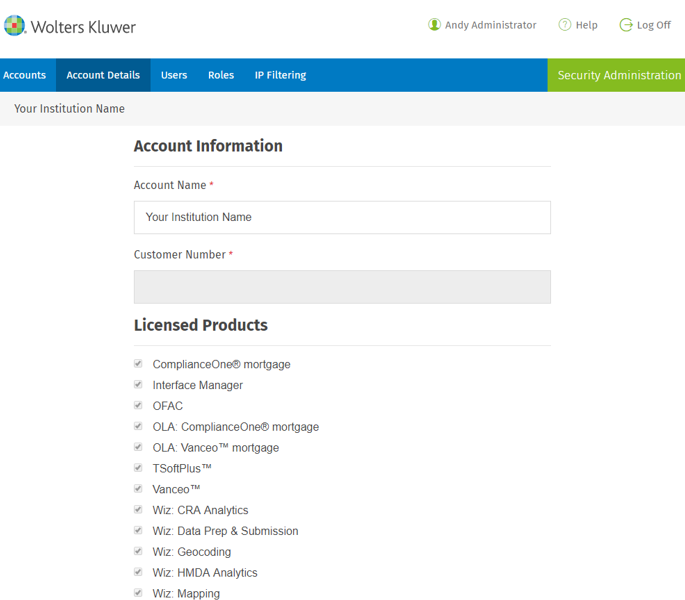
When IP Filtering is enabled, it applies to all licensed products on the Account Details page as shown in the example below. Your data will be specific to your organization.