Options Window
The Options window provides access to various preference settings, giving you control
over certain features. The Tools window is accessible by selecting .
Note: Options are saved automatically in the appliation
settings each time you perform an action.
General
The General tab currently has only one customizable feature.
- Show profile details on startup: when selected, the Profile Details Window is automatically displayed when starting PubAssist FTP.
Backups
- Always backup profiles when adding/updating: when selected, this performs a backup of the profiles xml file every time a profile has been created or updated.
- Always backup profiles automatically: when selected, performs a backup of the profiles xml file in the location you provide in the text box immediately below.
- Show backup prompt at startup: when selected, this displays a prompt to backup your profiles xml file after every 10 startups.
Emails
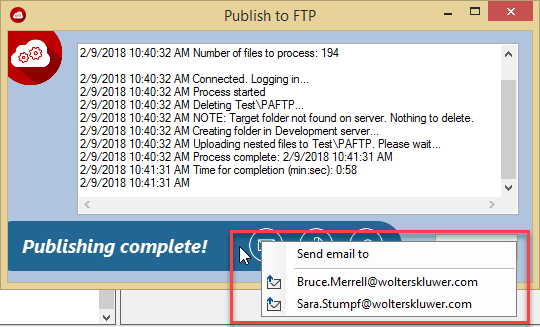
This tab allows you to enter email addresses of team members that may request an email sent to them pertaining to a successful publish.
An email address can be assigned by typing the recipient email address in the text
box and then clicking Add. The email address is added to the emails list. Any
email addresses in this list are displayed in the context menu when the Email button
is clicked on the completion message.
You can delete an email from the list by selecting it from the email list and clicking Delete Sel.