Applying SmartSign Plus to Expere documents
Utilizing eSignatureAndFieldSupport with SmartSign Plus
Expere will apply SmartSign Plus field name naming conventions when the following conditions are met:
- An eSignatureAndFieldSupport ancillary output option must be passed, for
example:
<AncillaryOutputOption> <OutputType>ESignatureAndFieldSupport</OutputType> </AncillaryOutputOption> - In the transaction, the
<EOriginalSSPlusFieldSupport> ="1"element and value must be passed.
EOriginalSSPlusFieldSupport use cases
The
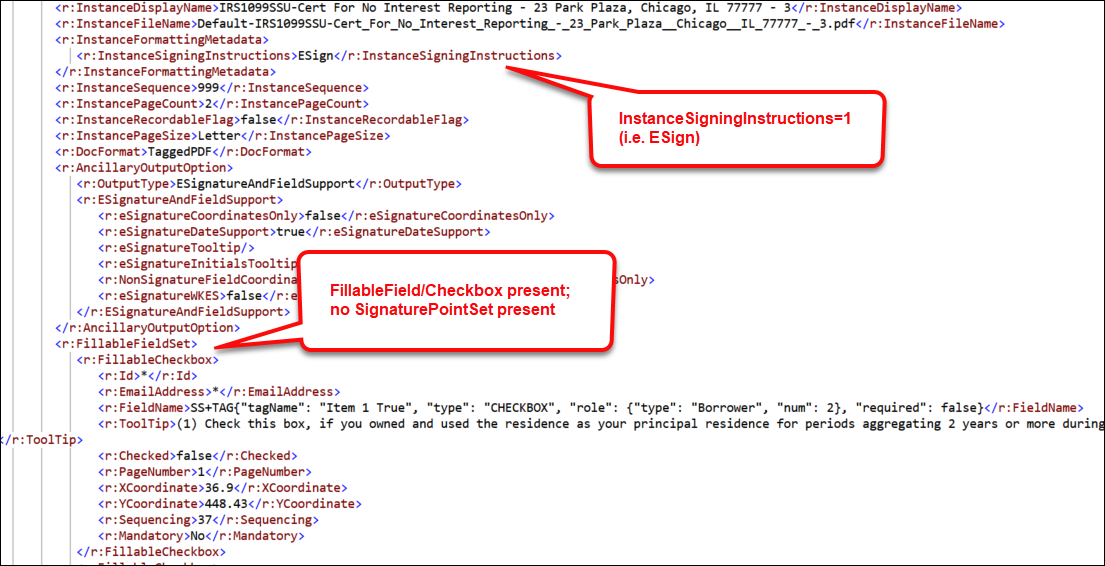
<InstanceSigningInstructions/> value will appear as "ESign"
in the Expere response when the following conditions are met: >Txn/EOriginalSSPlusFieldSupport = 1(true) in the request file- a document contains fillable fields or checkboxes (as indicated in a
FillableFieldSet>FillableCheckboxcontainer within the Expere response file below) but does not have an eSignature field (<SignaturePointSet/>)
Request file

Response file