About Advanced Installation Options
Depending on the version, Requirements Editor includes several optional tools and utilities providing additional features and integration with other applications. These are available in the Advanced Installation option.
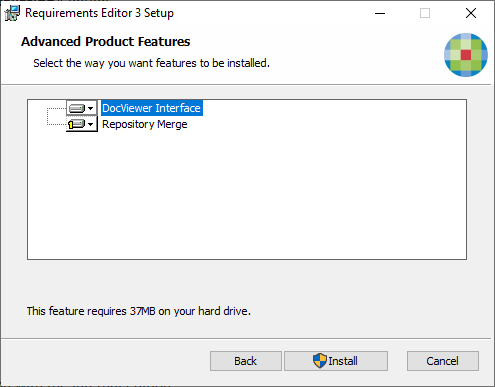
During advanced installation, you will have the option of installing the
following tools and services.
Note:
The following features are only available for installation with the
Internal edition:
- Document Editor and Attributes Tab
- E-Forms Rendition Plug-In (not shown in example)
- Repository Merge
- DocViewer Interface: The DocViewer Interface application
provides for integration of documents authoring in Requirements Editor with the
DocViewer application.Note:Installation of DocViewer requires set up in Requirements Editor after you have installed the application.
- E-Forms Rendition Plug-In: The rendition plug-in is selected by default when installing the internal installation package. You may disable this feature in the advanced options during installation. This option is not available in the customer facing FOP installation package.
- Repository Merge: This feature allows you to merge an existing repository with a new version.
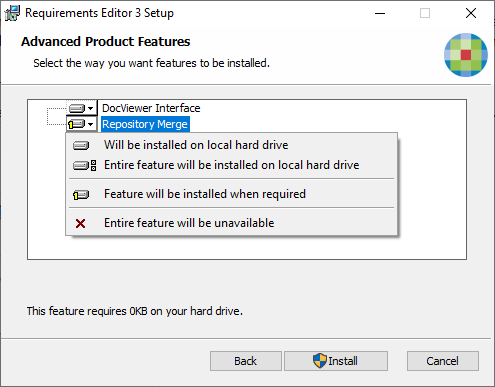
When installing these product features, you have the option to include or
exclude the feature from the installation.
| Options | Description |
|---|---|
| Will be installed on local hard drive | Select this option to install the feature. |
| Entire feature will be installed on local hard drive | Select this option to install the feature and any dependant features. |
| Feature will be installed when required | Select this option to bypass installation of the feature. Installation files are retained locally and this feature will be installed when you attempt to initially access it within the installed application. |
| Entire feature will be unavailable | Select this option to exclude the feature from the installation. |