Sessions - POST
Overview
This is the service call retrieves the associated account ID when starting a session.
Method
| Method | URL | Description |
|---|---|---|
| POST | /api/Sessions | The POST method submits the id and transaction data as part of the call to begin the DocViewer session. |
Parameters
| Name | Type | Constraints | Description |
|---|---|---|---|
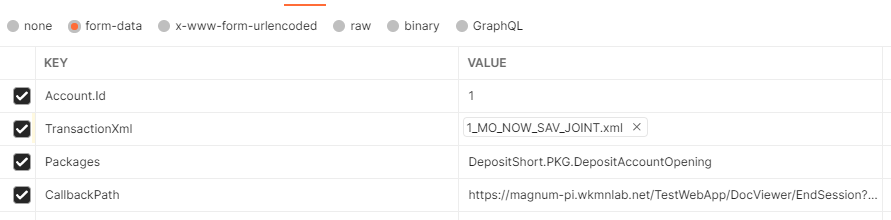
| accountId | integer | required | An element indicating the Administration account to associate the request. |
| TransactionXml | string | required | Transaction file to use with the new DocViewer session |
| CallbackPath | string | The request path within the application's base path where the user-agent will be returned | |
| Packages | array | ||
| Documents | |||
| OverlayDictionary.OverlayDictionaryName | string | Get/set the name of the overlay dictionary to be used | |
| OverlayDictionary.PrecedenceLevel | string | Get/set the precedence level (e.g.- ORG.MyOrg) the dictionary can be found at in the repository | |
| OverlayDictionary.MergeOverlaysToParent | boolean | ||
| supplementalREQFiles | array | ||
| docOrder | array | ||
| Options.IsSummaryTrayVisibile | boolean | Get/set the visibility of the data collect pane on the left side of the doc view screen | |
| Options.IsPackageMenuVisible | boolean | Get/set the visibility of the package dropdown menu. | |
| Options.IsDocumentDrawerVisible | boolean | Get/set the visibility of the document drawer at the top of the doc view screen | |
| Options.IsDocumentCompletionEnabled | boolean | Get/set indicator to activate document completion features | |
| Options.IsCreateDocumentVisible | boolean | Get/set the visibility of the create document button | |
| Options.IsCreatePDFVisible | boolean | Get/set the visibility of the create PDF checkbox | |
| Options.IsDocOptionsHeaderVisible | boolean | Get/set the visibility of the "Doc Options" header. HTML DocViewer only | |
| Options.IsDocDisplayHeaderVisible | boolean | Get/set the visibility of the Doc Display header. HTML DocViewer only | |
| Options.IsBackButtonDisabled | boolean | Get/set the visibility of the back button | |
| Options.Extension | string | The data extension, if any, to apply. Value of "SBA" will apply the SBA Data Collect Extension | |
| Options.SelectedPackage.Id | string | Expere Id of the package | |
| Options.SelectedPackage.Name | string | Readable name of the package | |
| Options.AdditionalXPaths | array | Any additional xpaths for which to prompt on the Doc Options screen. This option is only used when a list of documents is used for autoselection. If a list of xpaths is provided, the Doc Options screen will display (instead of going straight to the documents) with the specified xpaths available for data entry. Please note that the xpaths will not show up if they are still marked as suppressed in the working dictionary (or overlay dictionary). | |
| Options.IsReadOnly | string | Get/set indicator to display DocViewer in a read-only state | |
| Options.SelectedScreen | integer | ||
| Options.SelectedDocId | string | The desired Document to initially navigate to. Passed in the form 'PKGD.MyDocument | |
| Options.SelectedDocInstanceNumber | integer | The instance number of the SelectedDoc to initially navigate to. Will default to 1. | |
| Options.SelectedDocScrollLocation | integer | The desired y-axis scroll location within the SelectedDoc to initially navigate to. Will default to 0. | |
| Options.HideSessionTimeoutErrors | boolean | Flag to tell DocViewer to not display a session timeout error. If this is passed, it is assumed that the calling application will be keeping track of its own timeout and/or acting upon the 'timeout' javascript message DocViewer will pass when it has timed out | |
| Options.TrackXPathChanges | boolean | Flag to tell DocViewer whether or not to track xpath changes in the transaction and return them in the EndSession/GetSession calls | |
| Options.SupportRequiredData | boolean | Flag to tell DocViewer whether or not to you want Docviewer to indicate required fields | |
| Options.MergeTransactionWithEmpty | boolean | Flag to tell DocViewer merge the input txn with the empty transaction in the REQ | |
| Options.TrackXPathChangesWithIndexAttribute | boolean | Flag to tell DocViewer whether or not to track xpath changes in the transaction and return them in the EndSession/GetSession calls |
Sample Request
{
  "account": {
    "id": 1
  },
  "TransactionXml": txndata
  },
  "packages": [
    {
      "id": "expere://1.DepositShort.1.ORG.WoltersKluwerFinancialServices.Root/PKG.DepositAccountOpening"
    }
  ]
}
See example screenshot from Swagger:
Sample Response
{
    "error": null,
    "errorId": null,
    "sessionId": "e6d44e78-68c8-48b5-90cb-9732d418e7cd",
    "redirectUrl": "https://magnum-pi.wkmnlab.net/DocViewerInterfaceHtml/",
    "swt": "<BinarySecurityToken ValueType=\"http://schemas.xmlsoap.org/ws/2009/11/swt-token-profile-1.0\" EncodingType=\"http://docs.oasis-open.org/wss/2004/01/oasis-200401-wss-soap-message-security-1.0#Base64Binary\" xmlns=\"http://docs.oasis-open.org/wss/2004/01/oasis-200401-wss-wssecurity-secext-1.0.xsd\">U2Vzc2lvbklkPWU2ZDQ0ZTc4LTY4YzgtNDhiNS05MGNiLTk3MzJkNDE4ZTdjZCU3YzEwNjI1MTIwMjYmaHR0cCUzYSUyZiUyZnNjaGVtYXMueG1sc29hcC5vcmclMmZ3cyUyZjIwMDUlMmYwNSUyZmlkZW50aXR5JTJmY2xhaW1zJTJmbmFtZT1hZG1pbjEmSXNzdWVyPWRvY3ZpZXdlci53b2x0ZXJza2x1d2VyZnMuY29tJkF1ZGllbmNlPSZFeHBpcmVzT249MTYyNTgzOTU2MSZITUFDU0hBMjU2PXlvaFRXTURsYmolMmYwMUtWeGJpJTJmMWhCelN4eGlUNnV4c2lHJTJmek82UzNtYk0lM2Q=</BinarySecurityToken>"
}