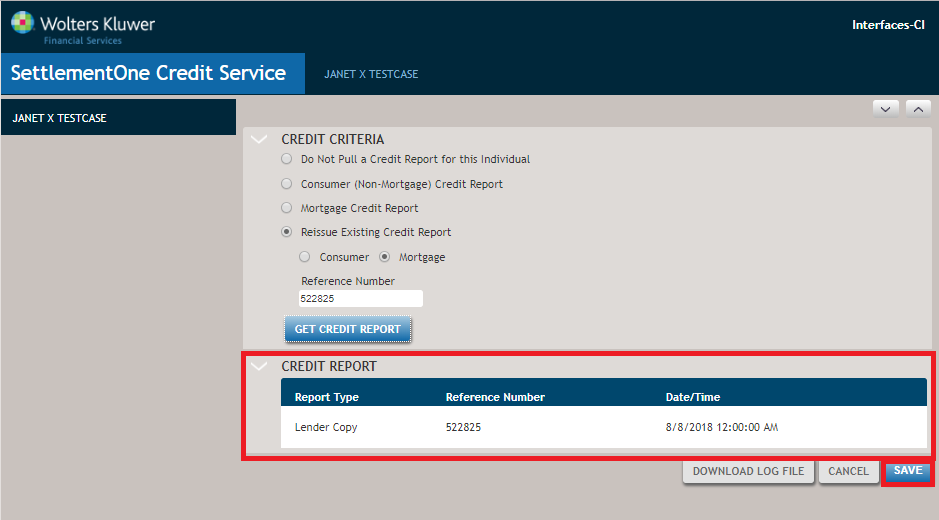
View 2: SettlementOne Credit Service Interface with Credit Report Response
View 2 shows the SettlementOne Credit Service Interface page after a successful response from SettlementOne Credit Services.
- Selecting Lender Copy displays the credit report in a PDF format. The report can be viewed, printed, or saved depending on the functions enabled in Adobe Acrobat Reader.
- The SettlementOne Credit Service Interface requires the user to request a reissue of the credit report from SettlementOne Credit Services and does not automatically request the reissue service. This approach is required as the financial institution will incur a billing event with SettlementOne on a reissue.
- The Save button saves applicable credit report data in the transaction in ComplianceOne and returns the user to the Financial Analysis page of ComplianceOne where they can subsequently view the saved credit service data.
- Saving the reissued credit report data on the Financial Analysis page of
ComplianceOne mortgage does the following:
- Replaces any previously saved Credit Report data including liabilities and previous manual changes or deletions made by a user with the reissued data.
- Keeps any manually added Credit Report rows of data or manually added rows of Liabilities because these rows are not part of the SettlementOne Credit Services data.