After creating a Merge session (see New Merge Session) or opening an existing session, The Merge Session window is displayed, providing access to Merge session details and Diffs for Shared Content and Content Items.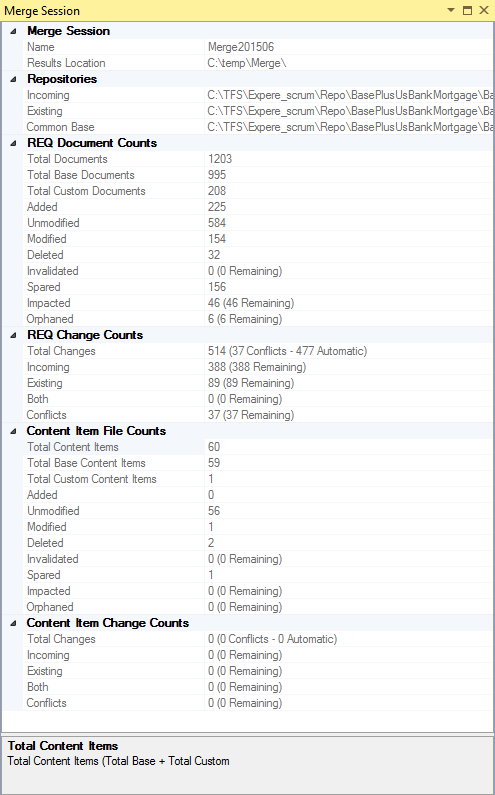
The Merge Session window provides a detailed summary of your session, as well as provides detailed information regarding the number of documents remaining to be reconciled. This includes the following expandable sections within the tab:
- Merge Session - displays the Name of the session and the location in which the results were saved
- Repositories - displays the locations of the Incoming, Existing and Common Base repositories
- REQ Document Counts - displays the total number of each type of REQ (Total Documents, Added, Modified, Deleted, etc)
- REQ Change Counts - displays the total number of changes within the REQs compared to the Base documents
- Content Item File Counts - displays the number of specific Content Items (Total Cintent Items, Added, Unmodified, etc)
- Content Item Change Counts - displays the number and types of Content Items changed
Note: Clicking a heading in the Merge Session window displays brief help for that section in the bottom pane of the window.
The Merge Session window is the parent controlling window for the session. If the it is closed, any open session windows will remain open, but will display not information.
Note: If the Merge Session window is closed during a session, it will not automatically be displayed when the session is opened again (File > Open Merge Session). Requirements Editor retains window configuration when it is closed.
Items Remaining: Numerous reported documents within the Merge Session window contain an indication of how many documents must require attention. Under the REQ Document Counts in the above example, notice there are 46 documents remaining to be addressed. As you address each document, this number updates so that you can easily see how many more must be addressed.
