This section explains how to view details for a specific library.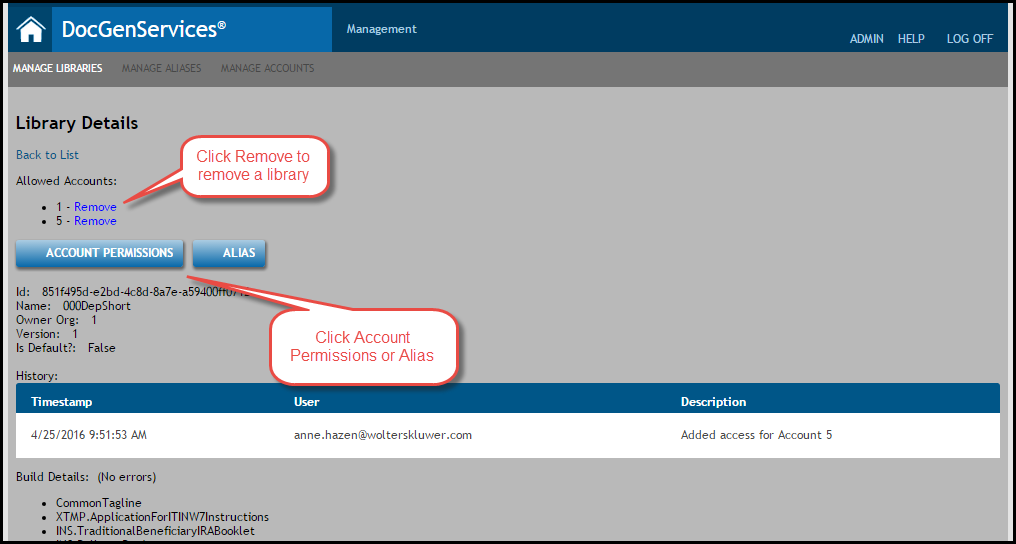
- From the Manage Libraries tab, click a link to a specific library.
- The following options appear:
- Undeploy; see Undeploying a Library for more information.
- Details
Click Details to display the Library Details page for that particular library. - This page allows you to perform any of the following:
- Click Remove to remove the library from the Allowed Organization. See Removing a Library from an Allowed Account for more information.
- Add Account Permissions; see Adding Account Permissions for more information.
- Add an Alias; see Assigning Aliases for more information.
- View the following for the specific library:
- View an auto-generated Id.
- View the Name of the library.
- View the parent organization (Owner Org:).
- View the library Version.
- Determine if the library is the Default version. See Deploying New Libraries for more information.
- View the Build Details; this displays all of the documents within the library.
- Click the Back to List button to return to the Manage Libraries page.
