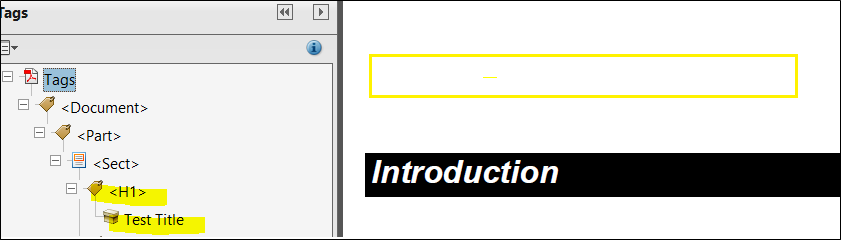
There may be situations where a document does not require a Prolog/DocTitle/Title element to visually appear on the PDF (i.e. Letter or Form Documents); however, the 1st degree heading tag <H1> is needed to produce a hierarchical logical structure when producing a Tagged PDF.
For these scenarios, the Invisible attribute can be used to suppress printing the /Title element value on the PDF (reserves no whitespace), but still generates a heading <H1> tag so it can be used by assistive technologies to navigate the hierarchy structure.
| Attribute | Usage |
|---|---|
| Invisible | The attribute is optional. Possible values are Yes or No with the default being Yes. When Invisible=Yes on the /Title element, the value of the Title element is suppressed from printing on the PDF but the corresponding 1st degree heading H1 tag is generated in the tag tree structure. |
Right-click a /Title element and in the shortcut menu, select Add Attribute. The Invisible attribute is one of the available options.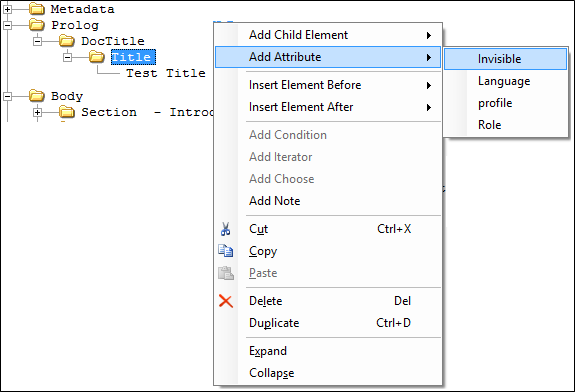
In the Invisible attribute you can select the attribute value as Yes or No. The default value is Yes (Invisible = Yes). To modify the attribute value, select the attribute and double-click (in this case, the available values are Yes/No).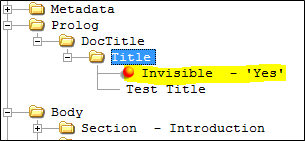
Example of a Tagged PDF with a Prolog/DocTitle/Title element and Invisible attribute set to Yes. The 1st degree heading tag is created <H1> using the /Title value but it is suppressed from printing on the physical PDF.