Expere Document Services Workflow Outline - Select And Generate with Callback
This outline walks you through all of the steps that occur with a Select and Generate API call when using an external callback.
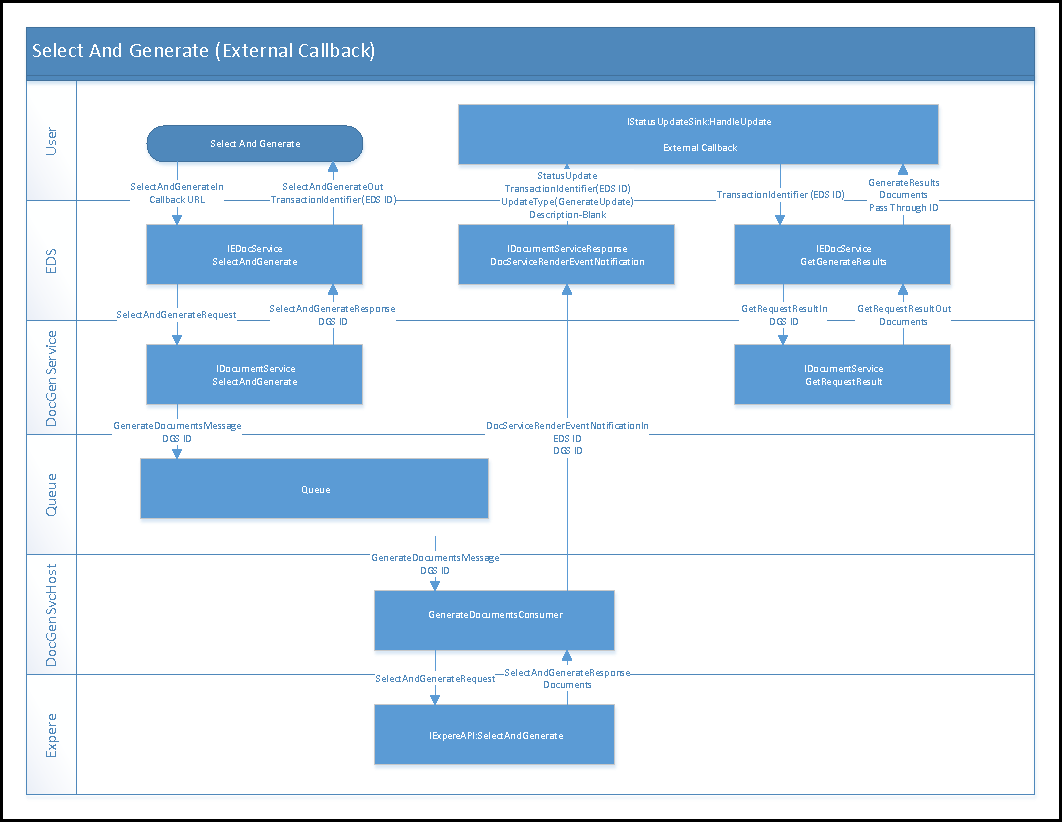
- User submits a transaction XML to Expere Document Services through a SelectAndGenerate API call (SelectAndGenerateIn).
- The request is then passed to Document Generation Services which places the transaction ID on the queue.
- The DocGenSvcsHost (GenerateDocumentsConsumer) pulls the ID off the queue, retrieves the transaction associated with the ID, and sends this information to Expere. .
- Expere performs the select and generate action (e.g. SelectAndGenerate), then sends a SelectAndGenerateResponse and the generated Base64 encrypted documents back to the DocGenSvcHost.
- The DocGenSvcHost sends the EDS ID and DGS ID back to Expere Document Services.
- In Expere Document Services, the TransactionIdentifier, UpdateType, Status Update, and Description are returned to the user via callback to let them know the package/documents are ready for retrieval.
- The user, via calling application, submits the TransactionIdentifier to Expere Document Services through a GetGenerateResults call.
- From Expere Document Services, a GetRequestResultsIn call with DGS ID is directed to Document Generation Services.
- Document Generation Services process the request and returns the documents via GetRequestResultOut to Expere Document Services.